

Bracket pool spreadsheet that scores itself
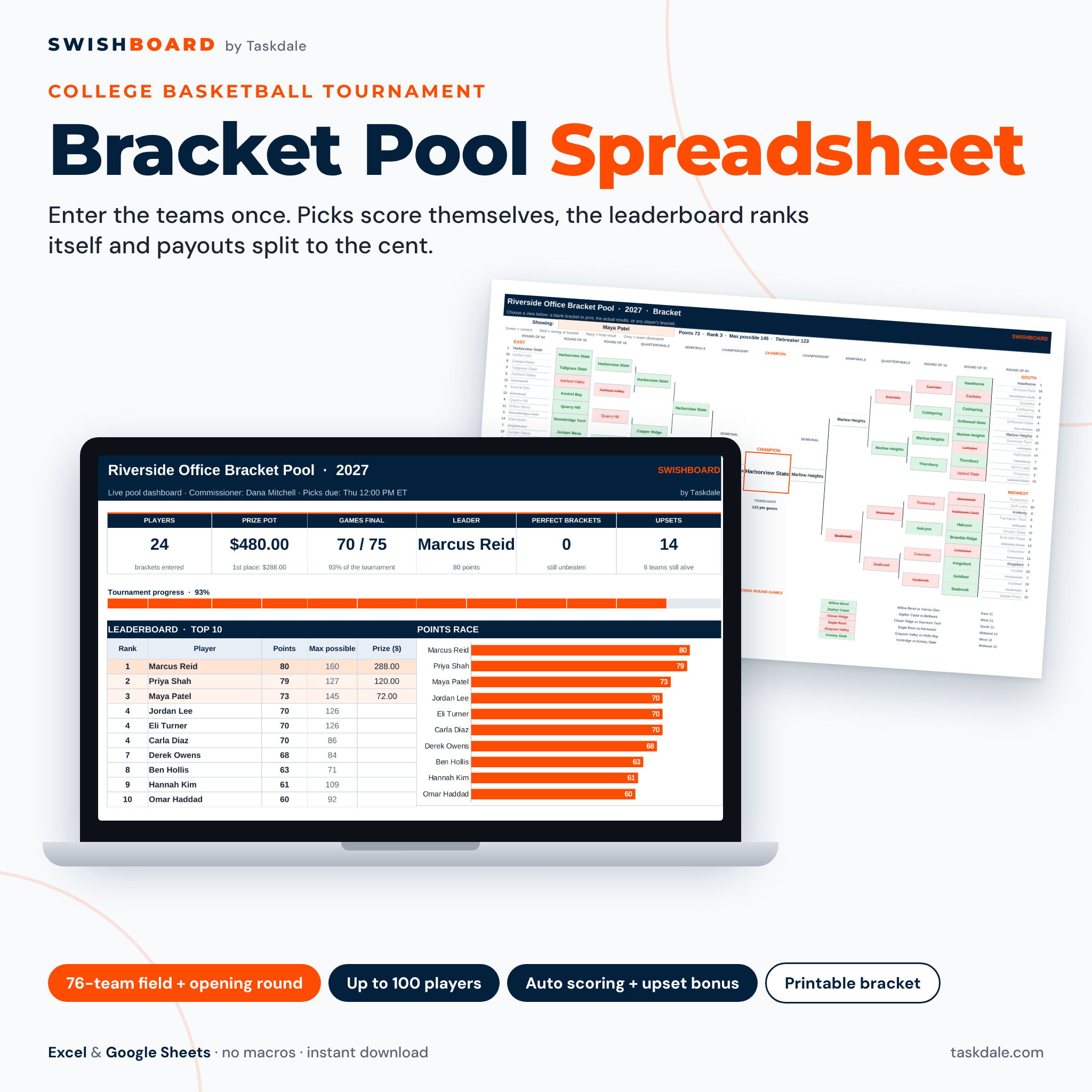
Swishboard is a bracket pool spreadsheet for anyone running an office, family or friends pool for the college basketball tournament. You type the field once, collect each player’s picks with drop-downs, and enter winners or scores as the games finish. Scoring, the live leaderboard, max possible points, prize money and a printable bracket all update on their own. No sign-ups, no ads and no one else’s rules.
It is ready for the 2027 format: the tournament field grows from 68 to 76 teams, with 12 opening-round games played before the Round of 64. Swishboard has 12 opening-round rows, and it still works for a 68-team or 64-team bracket by leaving rows empty.
Who it is for
- Office pool organizers who are tired of paper brackets, calculators and arguments about the standings.
- Families and friend groups who want a fun pool with or without an entry fee.
- Clubs, teachers and fundraisers that need fair scoring, a tiebreaker and clear money tracking.
- Bracket fans who want custom scoring and upset bonuses that free bracket sites don’t offer.
Main benefits
- Hours saved: picks are scored the moment you enter a result, so there is nothing to add up.
- No impossible brackets: later-round drop-downs only offer the teams that player already advanced.
- No typos or mismatches: picks are checked by bracket slot, so capital letters and stray spaces never break scoring.
- Money done right: the prize pot, every paid place and tie splits are calculated for you and always add up.
- Everyone stays interested: max possible points and a “can still win” column show who is still alive.
Features of this office pool bracket tracker
Teams, players and picks
- One teams grid: four editable region names and 16 seeds each, plus up to 12 opening-round games.
- Field check that counts teams, flags duplicate names and confirms the field is complete.
- Players sheet for up to 100 brackets with contact details, amount paid and automatic Paid / Partial / Unpaid status.
- Picks sheet with one column per player, a tiebreaker guess and a bracket check that flags blank or invalid picks.
- Green, red and yellow cell colors for correct, busted and invalid picks.
Scoring options
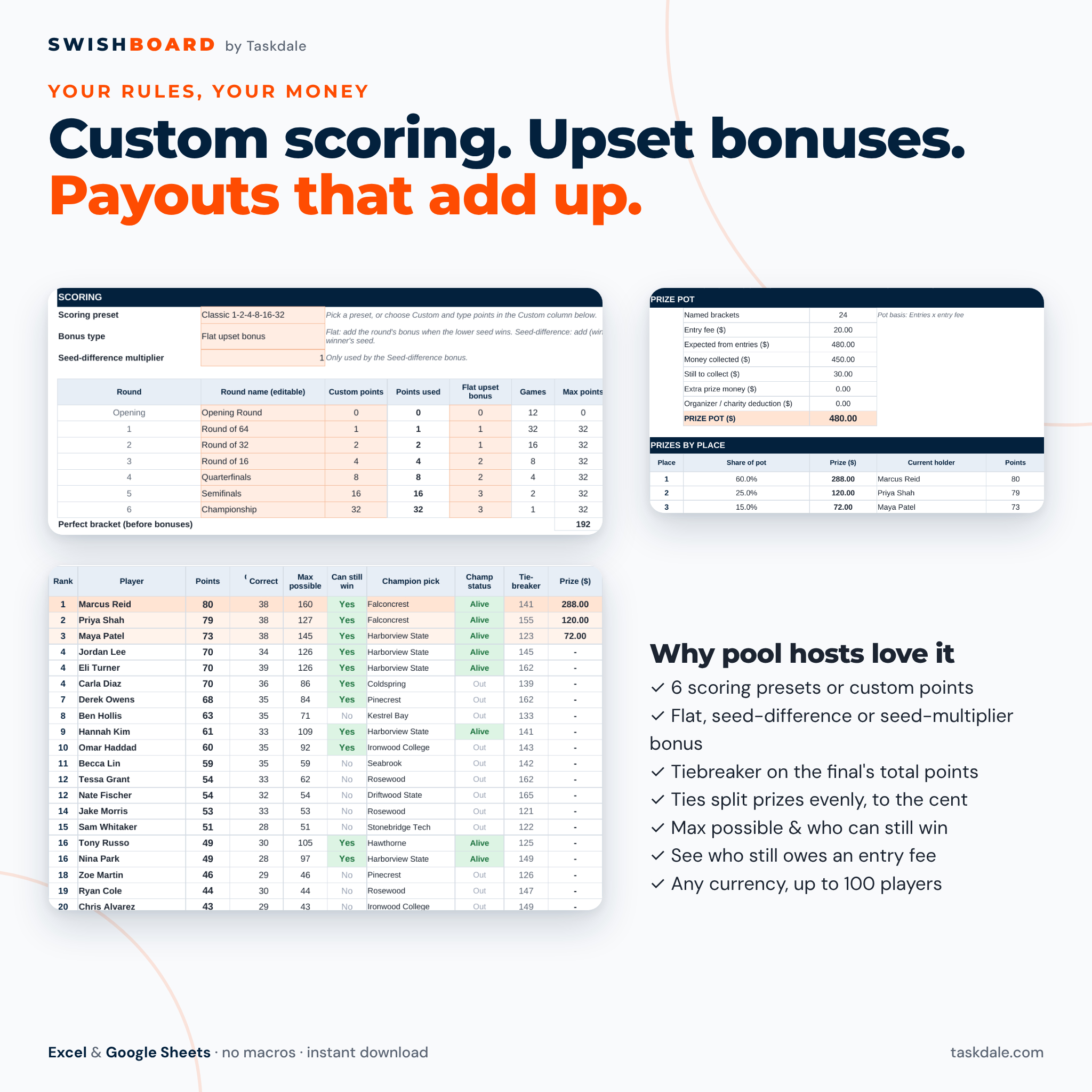
- Six presets: Classic 1-2-4-8-16-32, Big points 10-20-40-80-160-320, Steady climb, Fibonacci, Even, or fully custom points (decimals allowed).
- Upset bonus your way: none, a flat bonus per round, a seed-difference bonus with your own multiplier, or a seed multiplier.
- Optional points for the opening round, and round names you can rename.
- Tiebreaker on the total points scored in the championship game.
Live results
- Results sheet: choose each winner from a drop-down, or simply type both scores and the winner fills in.
- Upsets are flagged, and every game shows the points a correct pick earned and the share of the pool that got it right.
- Dashboard with KPI tiles, a progress bar, a top-10 points chart, champion picks (alive or out), bracket busters and round-by-round stats.
- Leaderboard with rank, points per round, correct picks, max possible, can still win, champion status and projected prize.
Payouts and printing
- Prize pot from entries x entry fee or money actually collected, plus extra prize money and an optional charity or organizer deduction.
- Up to 10 paid places; ties share the prizes for the places they cover, rounded to the cent.
- One-page printable bracket: blank for paper entries, the actual results, or any player’s bracket marked in green and red.
- One currency setting for every money value ($ by default).
What is included
- Swishboard Bracket Pool Manager (.xlsx) with 10 working tabs: Start Here, Dashboard, Settings, Teams, Players, Picks, Results, Leaderboard, Bracket and Payouts, plus two visible calculation tabs you can audit.
- A 16-page user guide (Word .docx) with setup steps, every feature, scoring examples, troubleshooting and FAQ.
How it works
- Settings: name the pool, set the entry fee, currency, scoring preset, bonus type and prize split.
- Teams: type the regions, seeds and opening-round games once.
- Players: add each player and record what they paid.
- Picks: fill each player’s column with the drop-downs and add their tiebreaker.
- Results: pick winners or type scores as games end. Share the Leaderboard, Dashboard or Bracket as a PDF.
File format and software requirements
One Excel workbook (.xlsx) and one Word guide (.docx). Works in Microsoft Excel 2016 or newer on Windows and Mac, Excel for the web, Google Sheets (free with a Google account) and LibreOffice. It uses standard formulas only: no macros, scripts or add-ons. Excel is not needed if you use Google Sheets.
Customization
Rename the pool, regions and rounds, set any points and bonuses, choose 1 to 10 paid places and any currency symbol. Formula cells are locked without a password so they can’t be overwritten by accident; you can unprotect a sheet to restyle it.
Digital download
This is a digital product. You get instant access to the files after checkout; nothing is shipped. The template is undated, so you can reuse a clean copy every season.
Use cases
- A 40-person office pool with a $10 entry fee, 60/25/15 prizes and a 10% charity donation.
- A family pool where kids fill in a printed blank bracket and a parent types the picks in.
- A friends’ pool with seed-multiplier scoring, so long-shot picks pay big.
- A classroom or club pool with no money, just the leaderboard and dashboard on a screen.
FAQ
Does it work with Google Sheets?
Yes. Upload the .xlsx to Google Drive and open it with Google Sheets. Drop-downs, formulas, colors and charts all work.
Is it ready for the 76-team tournament?
Yes. It has 12 opening-round games and a 64-slot main bracket, which covers the 76-team field starting in 2027. Leave rows empty for 68 or 64 teams.
How many players can join?
Up to 100 brackets per file. Players can enter more than one bracket by using a separate row for each.
Does it update scores automatically?
You enter each winner or score yourself; everything else updates instantly. That keeps the file private and working offline.
What happens if two players tie?
The closest guess of the championship game’s total points wins the tie. If players are still tied they share the rank and split the prizes evenly.
Can I print brackets?
Yes. The Bracket tab prints a one-page bracket: blank, actual results or any player’s picks.
Is this an official tournament bracket?
No. Swishboard is an independent template for tracking your own pool and works for any college basketball tournament bracket, including the men’s and women’s NCAA tournaments. Not affiliated with or endorsed by the NCAA. It contains no team names or logos.
License: personal use only (or use within your own business for business templates). You may not resell, share, or redistribute the files. Check your workplace rules and local laws before running a pool with entry fees.
Reviews
There are no reviews yet.