Best Paycheck Budget Spreadsheet: 3 Planners Compared
The best paycheck budget spreadsheet assigns every bill to the paycheck that will pay it, then shows what is safe to spend until the next payday. All three planners on this page do that. Choose Payday Compass if you use Excel, Plum Paycheck Planner for a 12-month bill tracker, or Ledgerlark for annual dashboards.
Budgeting by paycheck can feel fiddly at first, particularly if your bills fall on awkward dates. We'll keep it simple here: what to look for, how the three options differ, and how to set one up so it keeps working after the first month.
 Paycheck Budget Spreadsheet for Excel & Google Sheets | Ledgerlark Biweekly & Monthly Budget Planner with Bill Tracker, Debt Payoff, Savings Goals & Calendar
Key facts at a glance
- A paycheck budget spreadsheet plans your money one payday at a time rather than one calendar month at a time.
- Ledgerlark and Payday Compass each have 15 tabs, and Plum Paycheck Planner has 16.
- Plum Paycheck Planner and Ledgerlark support Excel and Google Sheets, while Payday Compass is built for Excel.
- Every option here includes debt payoff, savings goals and net worth tracking, and each ships with a user guide.
- You enter your recurring bills once, and the spreadsheet places them across the year for you.
Table of Contents Toggle
- What is a paycheck budget spreadsheet?
- What should you look for in the best paycheck budget spreadsheet?
- How do the three paycheck budget spreadsheets compare?
- Which paycheck budget spreadsheet suits which person?
- How do you set up a paycheck budget spreadsheet?
- What mistakes should you avoid?
- What affects the price of a paycheck budget spreadsheet?
- Which paycheck budget spreadsheet should you choose?
- Common questions
What is a paycheck budget spreadsheet?
A paycheck budget spreadsheet is a template that divides your bills, debts and savings between your paydays, so each paycheck has a clear job. A standard monthly budget lists everything against one month's income. A paycheck version asks a more practical question: what must this particular payment cover before the next one arrives?
This matters most when your pay and your bills don't line up. Suppose you're paid every two weeks and your rent leaves on the 1st, your car insurance on the 18th and your phone on the 27th. A monthly budget says you can afford all three. A paycheck budget shows that one payday has to carry the rent and the other has to carry the rest, and it shows how much is left over after each.
The 3 products below all work this way. They differ in the software they run on, the number of tabs, and how much they show you beyond the paycheck view.
What should you look for in the best paycheck budget spreadsheet?
The best paycheck budget spreadsheet is one that fits your pay schedule, spreadsheet app and household, and that you will open every payday. Six factors decide that.
Support for your pay schedule
Check that the template handles weekly, biweekly, semi-monthly or monthly pay, or a custom pattern if your income is irregular. Plum Paycheck Planner lists weekly, biweekly, semi-monthly, monthly and custom paydays. Ledgerlark covers weekly, biweekly, twice-monthly and monthly, and Payday Compass says it works with any pay schedule.
Bills entered once
A good template asks for each recurring bill a single time, then fills the year automatically. This saves hours and removes the main cause of abandoned budgets, which is retyping the same rent figure twelve times. All three products work this way.
The app you actually use
Excel and Google Sheets are not interchangeable. Payday Compass is an Excel template. Ledgerlark and Plum Paycheck Planner are both described for Excel and Google Sheets, so they suit you if you switch between a laptop and a phone or share a file online. If you're unsure, pick the app you already open daily.
A bill calendar and a daily view
A bill calendar is a dated view of what leaves your account and when. Payday Compass includes a bill calendar with a daily balance and flags overdue bills. Ledgerlark has a smart calendar and a safe-to-spend figure per day. Plum Paycheck Planner has a bill calendar plus a 12-month bill tracker.
Debt and savings tabs
Debt payoff is the plan for clearing balances in a chosen order. Savings goals track money you're setting aside for something specific. Each product here includes both, and Plum Paycheck Planner names the debt snowball method, which clears the smallest balance first.
A household split and a guide
If you share costs with a partner or housemate, look for a split tab. Ledgerlark has a household split, while Payday Compass and Plum Paycheck Planner have a couples split. For setup help, each includes a filled sample file or guide: Ledgerlark and Payday Compass include a sample file, and Ledgerlark adds an illustrated guide. Payday Compass includes a 15-page guide and Plum Paycheck Planner a printable Word guide.
How do the three paycheck budget spreadsheets compare?
The three spreadsheets share the same core idea, so the differences come down to software, tabs and extras. This table sets out what each product's description confirms.
| Product | Works in | Tabs | Standout feature | Household feature | Guide |
|---|---|---|---|---|---|
| Paycheck Budget Spreadsheet for Excel & Google Sheets | Ledgerlark Biweekly & Monthly Budget Planner with Bill Tracker, Debt Payoff, Savings Goals & Calendar | Excel and Google Sheets | 15 | Safe-to-spend per day, annual dashboard, 50/30/20 tab | Household split | Illustrated user guide and filled sample file |
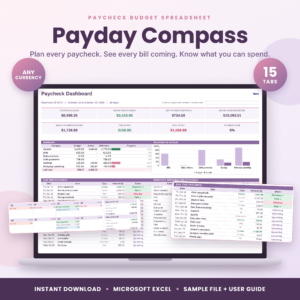 Payday Compass Paycheck Budget Spreadsheet | Biweekly Budget Planner for Excel, Bill Calendar, Debt Payoff & Savings Tracker | Excel | 15 | Bill calendar with daily balance, overdue bill flags | Couples split | 15-page user guide and filled sample file |
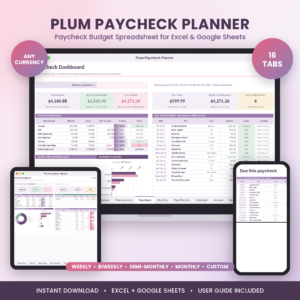 Plum Paycheck Planner | Paycheck Budget Spreadsheet for Excel & Google Sheets | Biweekly Budget, Bill Calendar, Bill Tracker, Debt Snowball & Savings Tracker | Excel and Google Sheets | 16 | 12-month bill tracker, custom paydays | Couples split | Printable Word user guide |
Which paycheck budget spreadsheet suits which person?
Each spreadsheet suits a different habit, so match the product to how you already handle money.
Ledgerlark suits people who want the wider picture. It has monthly and annual dashboards, a 50/30/20 tab and an accounts tab alongside the paycheck view. The 50/30/20 approach, popularised by Elizabeth Warren and Amelia Warren Tyagi, splits income into needs, wants and savings. It's a sensible check on whether your plan is balanced. You also get any start month, so you can begin mid-year.
Payday Compass suits Excel users who worry about missed bills. It schedules the year, shows what's due before your next payday and flags anything overdue. The daily balance on its bill calendar is useful if your account runs tight in the days before payment.
Plum Paycheck Planner suits people with unusual pay patterns or a wish to see every bill across the year. Its custom paydays help if your income doesn't follow a neat cycle. The 12-month bill tracker gives a quick answer to whether a bill has been paid.
If you share finances, all three have a split tab, so that need won't decide it.
How do you set up a paycheck budget spreadsheet?
You set up a paycheck budget spreadsheet in about six steps, and the first session usually takes a single sitting. Open the filled sample file first so you can see how a finished version looks.
- Choose your pay schedule and start date, then enter your take-home pay for each paycheck.
- List every recurring bill with its amount and due date. Include annual costs such as insurance or subscriptions.
- Add debts with their balances and minimum payments.
- Set one or two savings goals, even small ones.
- Check the paycheck view to see which bills fall on each payday, and move spending around if one paycheck looks overloaded.
- Review the spreadsheet on each payday for five minutes, updating actual amounts and the balance in your account.
Keep a small buffer in your current account. It makes the safe-to-spend figure far more forgiving when a bill arrives early.
What mistakes should you avoid with a paycheck budget spreadsheet?
The most common mistake is entering gross pay instead of take-home pay, which makes every figure look healthier than it is. Use the amount that lands in your account.
Other pitfalls are worth knowing:
- Forgetting annual and irregular bills. A yearly car tax or insurance renewal can flatten a single paycheck if it isn't planned.
- Never updating actual spending. A spreadsheet that shows only your intentions soon drifts from reality.
- Treating every paycheck as equal. In a month with three paydays, the extra one is not spare money by default. Decide on its purpose in advance.
- Choosing the wrong app. Check that you can open the file comfortably before you commit. Payday Compass is for Excel.
- Overbuilding. Fifteen tabs is plenty. Start with the paycheck and bill views, and add the rest only when you need them.
What affects the price of a paycheck budget spreadsheet?
The price of a paycheck budget spreadsheet is mainly set by the number of tabs, the software it supports and the support material included. Live prices appear on each product card, so we won't quote them here.
A template that works in both Excel and Google Sheets costs more to build and test than one for a single app. More tabs, such as annual dashboards, net worth and debt payoff, add to the work behind it. A sample file and a written guide add value as well, since they cut your setup time.
Because these are one-off digital files, you can compare on features rather than running costs. Ask which tabs you will use, not which has the longest list.
Which paycheck budget spreadsheet should you choose?
Choose by software first, then by the single feature you'd miss most. Use this rule:
- Pick Payday Compass if you use Excel and want overdue bill warnings and a daily balance.
- Pick Plum Paycheck Planner if you have custom paydays or want a 12-month bill tracker in Excel or Google Sheets.
- Pick Ledgerlark if you want annual dashboards, a 50/30/20 view and a safe-to-spend figure per day.
Whichever you choose, open the sample file and enter your next three paychecks. If the result feels clear, you've found the right one.
Common questions
Is a paycheck budget better than a monthly budget?
A paycheck budget is better when your bills and income dates don't match. It shows which payday covers which bill, so you avoid shortfalls a monthly total can hide. If you're paid once a month on a fixed date, a monthly view works just as well.
Can I use these spreadsheets with a weekly or irregular income?
Yes, within limits. Plum Paycheck Planner lists weekly, biweekly, semi-monthly, monthly and custom paydays, and Ledgerlark covers weekly and twice-monthly pay. Payday Compass says it works with any pay schedule. For very uneven income, enter a cautious figure for each payday.
Do I need Excel, or will Google Sheets do?
It depends on the product. Payday Compass is an Excel template. Ledgerlark and Plum Paycheck Planner are described for both Excel and Google Sheets, so either app works. Check this before choosing, because layouts can behave differently between programmes.
Will the spreadsheet work in my currency?
Yes. Ledgerlark and Plum Paycheck Planner state they work in any currency, and Payday Compass does too. Enter your amounts in your own currency and the dashboards will follow, so there is no need to convert anything.
How long should I keep the spreadsheet updated each payday?
About five minutes is enough once your bills are entered. Record what you actually spent, check the balance in your account against the spreadsheet, and look at what is due before your next payday. A short, regular check works better than a long monthly one.