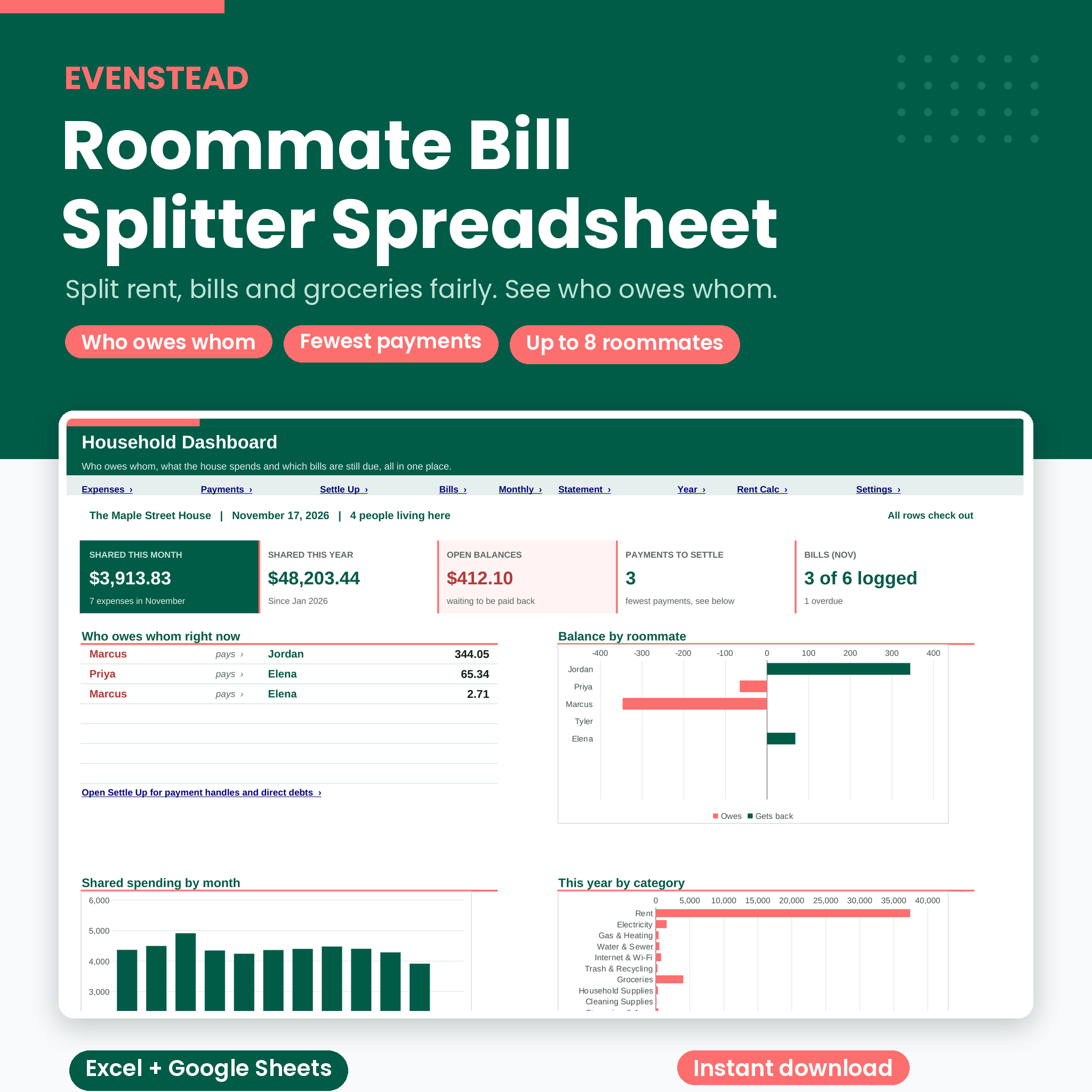


A roommate bill splitter spreadsheet that ends the “who paid for what?” chat
Evenstead is a roommate bill splitter spreadsheet for shared apartments and houses. Every time someone pays for something the house shares, they add one row: the date, the amount, who paid. The spreadsheet works out everyone’s share, keeps a running balance for each roommate, and shows the fewest payments that make everyone square.
Rent, power, internet, a Costco run, the plumber, the pizza on Friday. All of it lives in one file you own. No app to download, no account, no monthly fee.
Who it’s for
- Roommates and housemates sharing a place (2 to 8 people)
- The lease holder who pays the landlord and collects from everyone else
- College students in shared housing
- Friends or couples who split some costs but not all
- Houses where people move in and out during the year
Why roommates like it
- No more mental math. Shares calculate the moment you type the amount.
- Fair, even when people come and go. Move-in and move-out dates mean a new roommate never pays for last month’s power bill.
- Fewer payments. Five roommates with messy balances usually settle in three or four transfers, not ten.
- Never a penny off. Every share is rounded so the shares add up exactly to the amount. All balances add up to zero, and the file checks it for you.
- Clear for everyone. Monthly reports and per-person statements are easy to screenshot for the group chat.
Features of this shared expense tracker
Six ways to split any expense
- Everyone equal: split between everyone living there on that date
- Selected equal: mark who joins with an x
- Custom shares: 2, 1, 1 gives one person a bigger share
- Exact amounts: type each person’s amount
- Rent calculator: split by each room’s fair rent
- By income: split in proportion to monthly pay
Refunds and returns work too. Type a negative amount and it comes off everyone’s share.
Settle Up: who owes whom
See every roommate’s balance (paid for the house, their share, payments sent and received) and a short list of who pays whom, with the recipient’s payment handle. Prefer to pay people back one to one? A direct debts grid shows exactly what each person owes each other person.
Household Dashboard
This month’s and this year’s shared spending, open balances, payments needed to settle, bills logged this month, who owes whom, a balance chart, spending by month, spending by category and the bills still due.
Recurring bills tracker
Set up rent, utilities, internet, streaming and insurance once, with due day, frequency, who usually pays and the split rule. On the Expenses tab, pick the bill and the rest fills in. Status shows Logged, Due in 3 days, Due today or Overdue, and how this month’s bill compares with the typical amount.
Fair Rent Calculator
Not every room is equal. Split rent by room size, a private bathroom, an extra feature like a balcony, and parking. A shared-space portion is split evenly. The rooms always add up to the full rent.
Reports and statements
- Monthly Report: pick any month to see who paid, each person’s share, payments, and shares by category
- Roommate Statement: one person’s full account with opening and closing balance. Perfect for move-out day
- Year Summary: 12 months of totals, a stacked chart by person, and a category-by-month table
What’s included
- Evenstead Roommate Bill Splitter workbook (.xlsx) with 11 tabs: Start Here, Dashboard, Expenses, Payments, Settle Up, Bills, Monthly Report, Roommate Statement, Year Summary, Rent Calculator, Settings
- Room for 8 roommates, 1,500 expenses, 400 payments, 30 recurring bills, 16 categories and 8 payment methods
- Step-by-step user guide (.docx) with screenshots, troubleshooting and FAQ
How it works
- Set up once. Add your roommates, move-in dates, payment handles and currency. Add your recurring bills.
- Log as you go. Date, amount, who paid. Ten seconds per expense.
- Settle up. Open Settle Up, follow the payment list, then log each payment. Balances drop to zero.
File formats and software
- Microsoft Excel (.xlsx). No macros, add-ons or scripts.
- Google Sheets: upload the file to Google Drive and open it with Google Sheets. Save it as a Google Sheet to share it with your roommates.
- Formula cells are locked to prevent accidents, with no password. Input cells are open, with dropdowns for names, categories, bills and split methods.
Customize it
Pick any currency symbol ($, €, £, R and more) and every money label follows it. Rename categories and payment methods. Set when your tracking year starts. Change the rent calculator premiums to whatever your house agrees on. Colors and fonts are not locked, so you can restyle anything.
Real situations it handles
- One person pays the full rent and three people pay them back each month
- A roommate moves out in May and someone new moves in June 1
- Only three of four people share the groceries this week
- One person brought two guests to the cookout and pays a bigger share
- The couch gets split by income, then part of it is refunded
- The primary suite has its own bathroom and parking, so it pays more rent
Digital download
This is a digital product. You get instant access to the files after checkout. Nothing is shipped.
FAQ
How do I split bills with roommates fairly?
Split shared utilities evenly between the people living there, split rent by room size and features, and only split personal items between the people who use them. Evenstead does each of these with a dropdown.
Can all my roommates use it?
Yes. Save it as a Google Sheet and share it, so everyone can log their own expenses.
What happens when someone moves out?
Add their move-out date. They stop sharing “Everyone equal” costs after that date, and their Roommate Statement shows exactly what they owe or are owed.
How many roommates does it support?
Up to 8 people, past and present.
Does it work with Venmo, Zelle or Cash App?
It does not connect to payment apps. You add each person’s handle on Settings and it shows on the Settle Up list, then you log the payment once it is sent.
Can I use it outside the US?
Yes. Type your own currency symbol on Settings.
Is there a subscription?
No. You buy it once and the file is yours.
Personal use license: for you and your own household. Please do not resell, share or redistribute the files.

Reviews
There are no reviews yet.