A free wedding budget spreadsheet is most useful when it answers the question every couple asks at some point: if we invite fewer people, how much do we actually save? This guide explains how venue pricing really works (per-head rates, catering minimums, table hire, service charges and tax), shows you how to build a guest count you can trust, and gives you a free Excel and Google Sheets file to do the math.
Free Wedding Budget Spreadsheet: Guest Count + Venue Cost Calculator
A 100-guest list with Confirmed, Expected and All invited counts, plus a one-venue calculator that compares two headcounts line by line (catering minimum, table hire, service and tax). Excel and Google Sheets.
Want everything unlocked?
The free file is a sample. The full version has every page, tab and feature, plus the user guide.
See the full versionThe download is free. You enter your email address to get the file, and free downloads are limited to 3 per day.
What is inside the free wedding budget spreadsheet
The free file, Vowtally Lite, has three tabs:
- Guest Count: a 100-guest list with meal band (adult or child), invitation status and RSVP status, plus three automatic counts: Confirmed, Expected and All invited.
- Venue Calculator: one venue’s terms and two headcounts side by side, with every bill line from menu spend to added tax and a clear Saving, Increase or No change result.
- Get the Full Version: what the complete Vowtally wedding budget spreadsheet adds.
It opens in Excel 2016 or later and in Google Sheets, has no macros and lets you change the currency symbol in one cell.
Why a smaller guest list does not always cut the bill
Most venue quotes combine several kinds of charges. Some move with every guest, some move only in steps, and some never move at all. Before you trim the list, sort each charge into one of these groups:
| Charge | How it behaves |
|---|---|
| Per-person meals | Moves with every adult or child, unless a catering minimum applies |
| Catering minimum | A floor: below it you pay the minimum anyway, so fewer meals only raise the top-up |
| Table hire | Moves in whole tables once you go past the tables included |
| Room hire and mandatory extras | Fixed, whatever the attendance |
| Service charge and tax | A percentage of whichever lines the venue applies them to |
A worked example
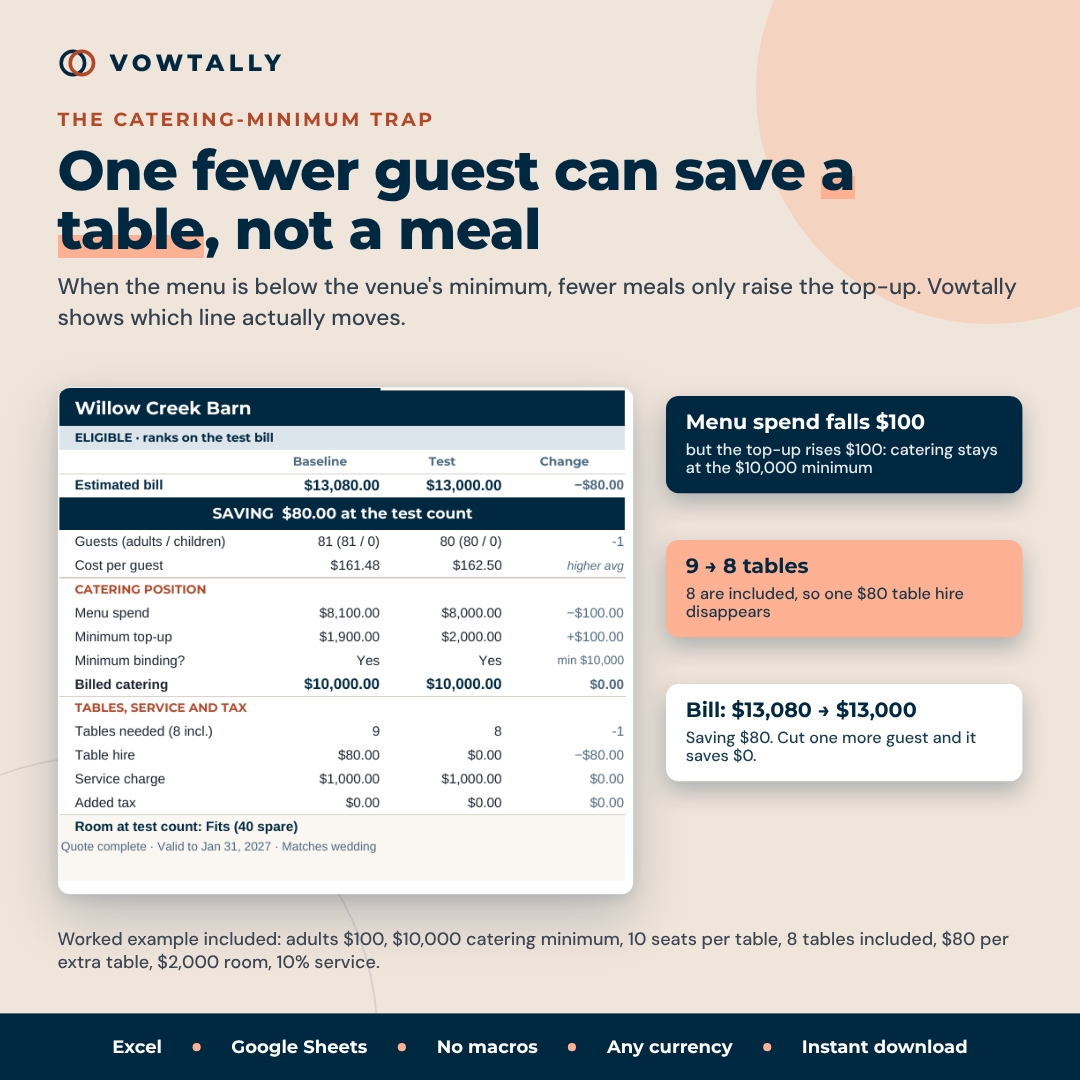
Say a barn charges $100 per adult with a $10,000 catering minimum. Ten guests fit at a table, eight tables are included and each extra table costs $80. Room hire is $2,000 and there is a 10% service charge on catering only.
- At 81 adults, menu spend is $8,100, so you pay a $1,900 top-up to reach $10,000. You need 9 tables, so one extra table costs $80. Service is $1,000. Total: $13,080.
- At 80 adults, menu spend is $8,000 and the top-up rises to $2,000, so catering is still $10,000. Now 8 tables are enough, so table hire falls to $0. Total: $13,000.
- At 79 adults, catering is still $10,000 and you still need 8 tables. Total: $13,000. No saving at all.
So removing one guest saved the price of a table, not a meal, and removing another saved nothing. The free calculator reproduces these numbers exactly, and the full Vowtally workbook finds the next real saving for you automatically.
How to build a guest count you can budget on
Guest numbers change for months. Use three separate counts instead of one number that keeps moving:
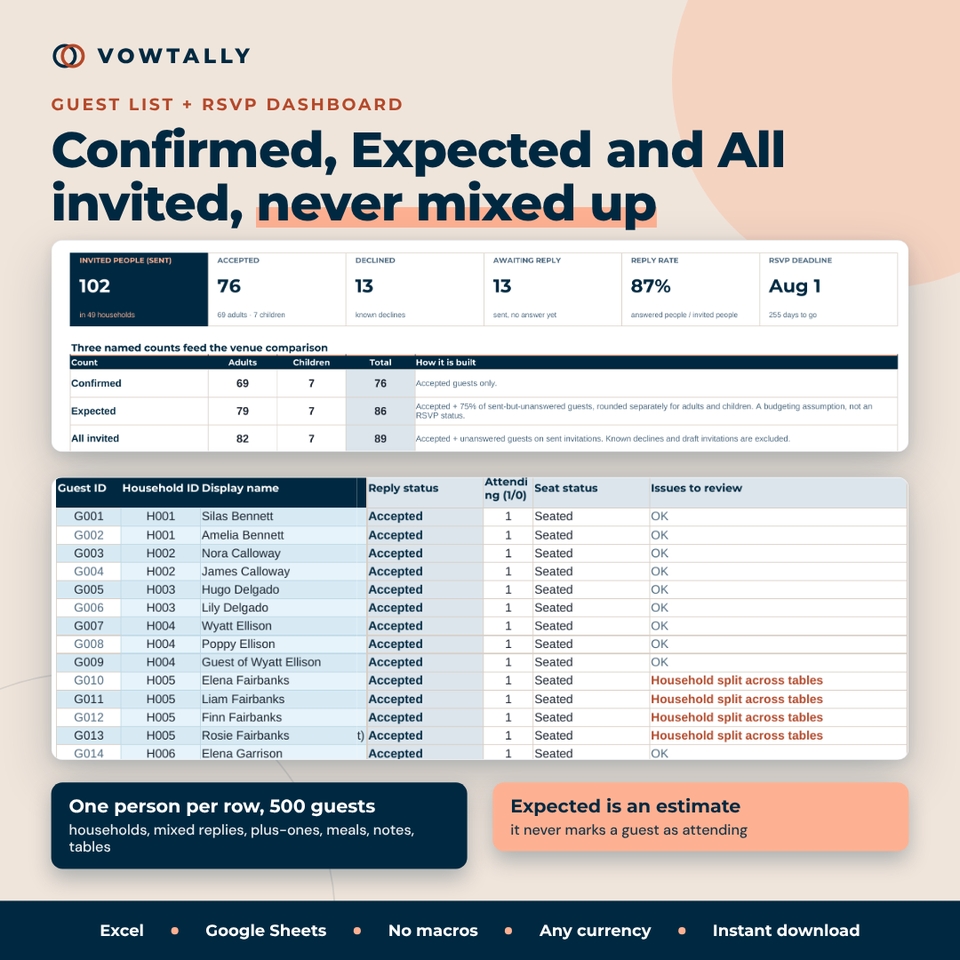
- Confirmed: guests who have accepted. Use this for seating and final numbers.
- Expected: accepted guests plus a percentage of invitations that have not been answered yet. Many couples use 70% to 85%; pick a figure you are comfortable with and round adults and children separately.
- All invited: accepted plus unanswered on invitations that have actually been sent. This is your worst case for capacity and cost.
Keep draft invitations out of all three. A guest you have not invited yet has not failed to reply. And remember that Expected is a budgeting assumption: it should never mark anyone as attending.
Questions to ask every venue before you compare quotes
- What is the catering minimum for our exact date and day of the week?
- Does room hire count toward the minimum, or is it separate?
- How many guests fit per table, and how many tables are included?
- What does each additional table cost?
- Which lines does the service charge apply to: food only, or room and rentals too?
- Which lines are taxed, and is tax charged on the service charge?
- Which extras are mandatory (security, cake cutting, cleaning), and what do they cost?
- When is the deposit due, when does the final headcount become binding, and when does the quote expire?
Write the answers down as numbers. Enter 0 when the venue confirms there is no charge and leave a cell blank when you do not know yet, so unknowns never look like savings. The Vowtally Venue Quotes sheet keeps incomplete or expired quotes out of the ranking for exactly this reason.
How to use the free spreadsheet step by step
- Open the Venue Calculator and replace the example terms with your venue’s quote.
- Set both counts to Manual and type your baseline (for example, your current list) and your test count (the smaller list you are considering).
- Read the result line: Saving, Increase or No change. Then look at the lines that moved: catering, table hire, service or tax.
- Add guests on the Guest Count tab as replies arrive, and switch either count to Confirmed, Expected or All invited.
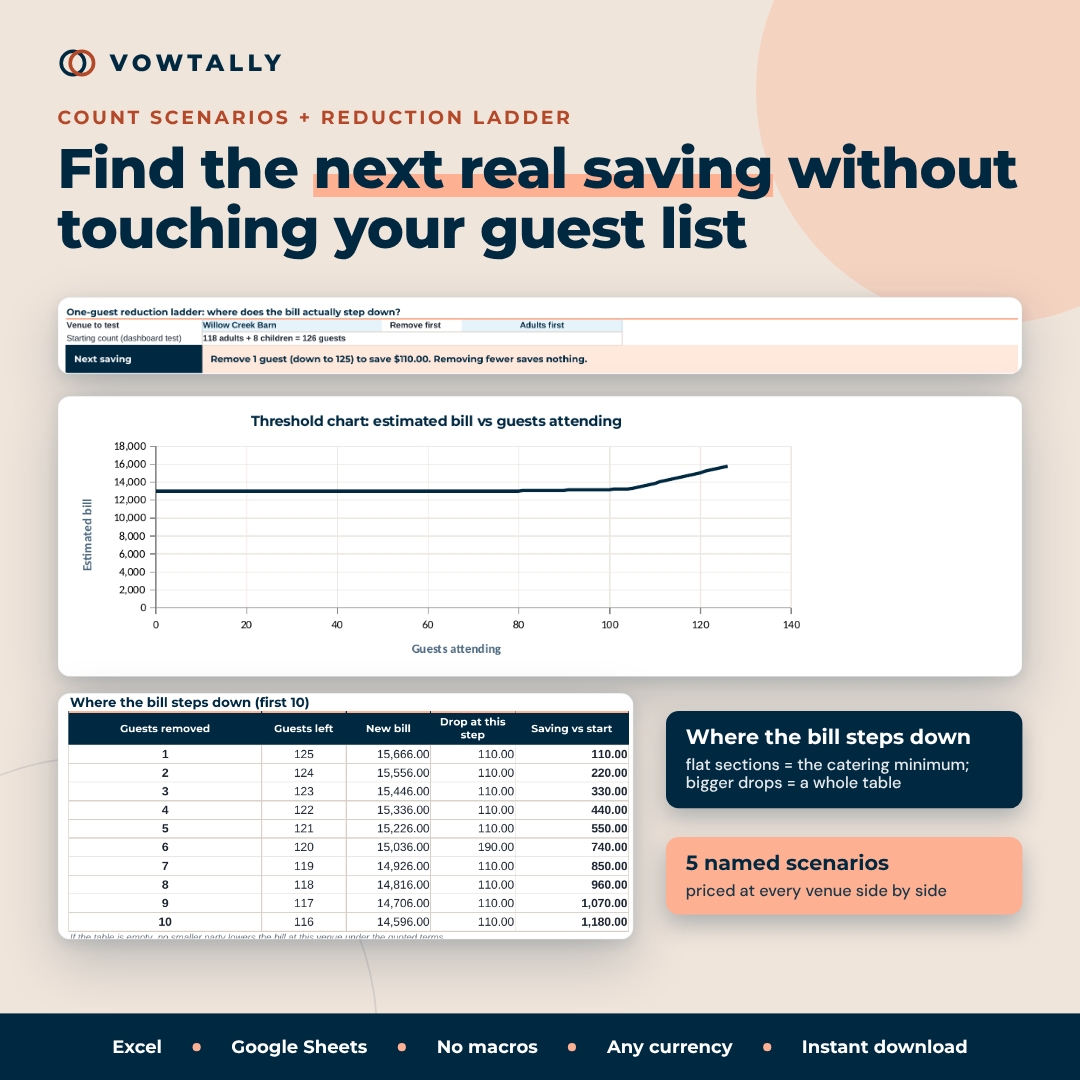
- Try a few test counts to see where the bill steps down. If one guest saves a table, the next ten may save nothing.
Budget tips that keep the numbers honest
- Keep a contingency reserve. Hold back 5% to 10% of your total for surprises, and record any surprise cost as its own line.
- One cost source per line. Each expense should use a manual estimate, a chosen supplier quote or a signed amount, never a mix.
- Do not count a deposit as a saving. A $1,000 deposit on a $10,000 contract lowers what you owe to $9,000; the wedding still costs $10,000.
- Compare suppliers on the same scope. A full-day photographer and a six-hour package are not the same price, so compare the all-in figure beside what is excluded.
- Price what you do not know as unknown. A blank line is Uncosted, not zero.
When you need more than the free file
The free calculator handles one venue and 100 guests. If you are comparing several venues, seating guests or tracking deposits, the complete Vowtally wedding budget spreadsheet links everything together.
Upgrade to the full Vowtally workbook
- Six venue cards at two headcounts, ranked, with excluded quotes and their reasons
- Five named scenarios, the one-guest reduction ladder and a threshold chart
- 500-guest list with households, meals, notes, RSVP dashboard and a 100-table seating plan
- Vendor quotes, a 100-line budget with contingency, and a 300-row payment tracker
- Wedding Dashboard, 36 review checks, a decision page and six print-ready handovers
- Blank workbook, completed worked example and an illustrated user guide
$29.99 · Excel and Google Sheets · instant download
Frequently asked questions
Is this wedding budget spreadsheet really free?
Yes. Enter your email to download the Lite file. There is no subscription.
Does it work in Google Sheets?
Yes. Upload the .xlsx to Google Drive and open it with Google Sheets. It also works in Excel 2016 and later.
Can I use it before we send invitations?
Yes. Use the Manual counts to test any adult and child mix.
Does it give financial or tax advice?
No. It is a planning tool that follows the terms you enter. Always confirm totals, service charges and tax with each venue in writing.
Ready to try it? Download the free file below, or go straight to the full Vowtally wedding budget and guest count dashboard.