A free home affordability calculator spreadsheet is the quickest way to answer two questions before you fall in love with a house: how much cash will you need at closing, and what will the home really cost each month? This guide walks through both, using the same terms as the Loan Estimate your lender gives you, and the free Nestmath Lite calculator does the math for one home and one loan.
Free Home Affordability Calculator Spreadsheet: Cash to Close + Mortgage Payment
A one-home calculator for Excel and Google Sheets that works out your monthly housing payment and estimated cash still due at closing from your Loan Estimate figures.
Want everything unlocked?
The free file is a sample. The full version has every page, tab and feature, plus the user guide.
See the full versionThe download is free. You enter your email address to get the file, and free downloads are limited to 3 per day.
What “affordable” really means when you buy a home
Most online calculators give you one number: a monthly payment. That number usually leaves out the costs that catch buyers by surprise, such as the cash due at closing, homeowners association dues, mortgage insurance and money for repairs. A useful affordability check looks at three things separately:
- Cash: your down payment plus closing costs, minus the deposit you already paid and any credits, and what is left of your savings after you move.
- Monthly cost: principal and interest, property tax, insurance, mortgage insurance, HOA dues and an upkeep allowance.
- Timing: how long you expect to keep the loan, because that decides whether paying extra upfront for a lower rate makes sense.
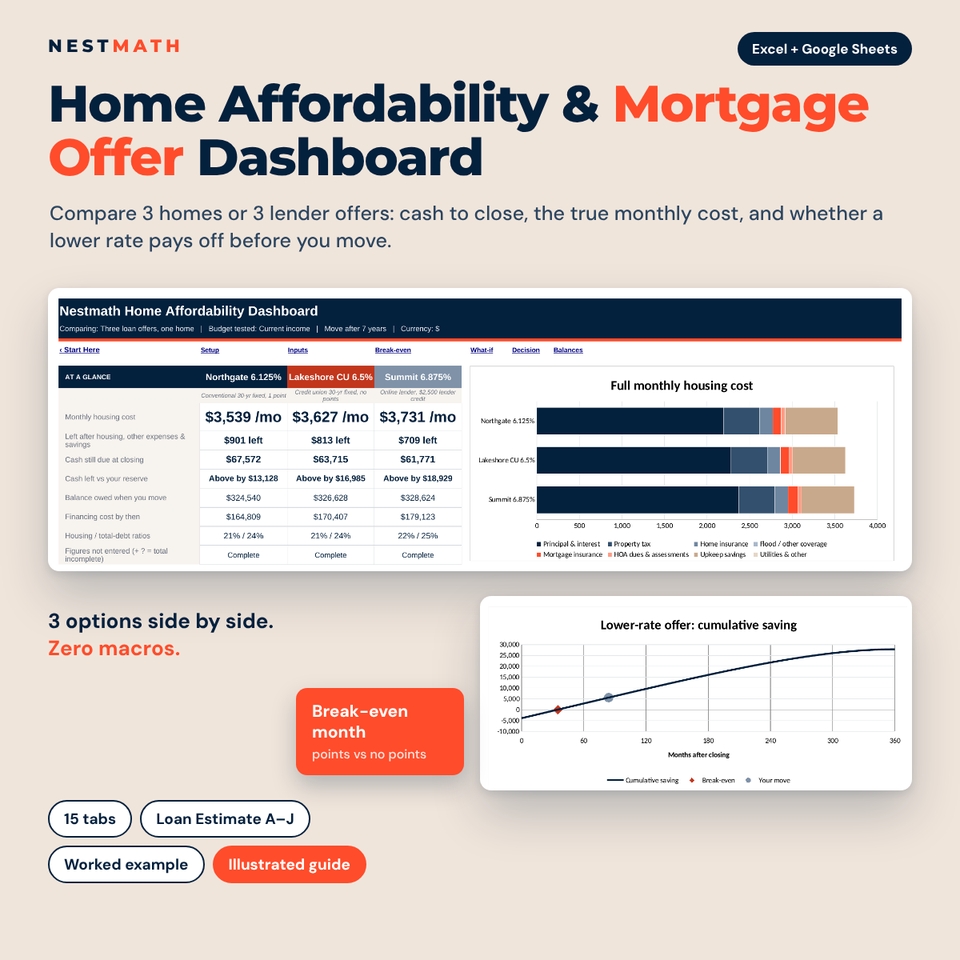
The free calculator covers the first two for one home. The full Nestmath Home Affordability & Mortgage Offer Dashboard covers all three for up to three homes or three lender offers at once.
Step 1: Work out your cash to close
Your lender’s Loan Estimate lists closing costs in lettered sections on page 2. Knowing what each one means makes it much easier to compare offers:
| Section | What it covers |
|---|---|
| A. Origination charges | Discount points (the price of a lower rate) and the lender’s own fees |
| B. Services you cannot shop for | Appraisal, credit report, flood determination and similar |
| C. Services you can shop for | Title and settlement services, survey, pest inspection |
| E. Taxes and other government fees | Recording fees and transfer taxes |
| F. Prepaids | Your first year of homeowners insurance, interest from closing to month-end, sometimes property tax |
| G. Initial escrow payment | A few months of tax and insurance deposited into your escrow account |
| H. Other | Owner’s title insurance, HOA transfer fees and other items |
| J. Total closing costs | D (A+B+C) plus I (E+F+G+H), minus lender credits |
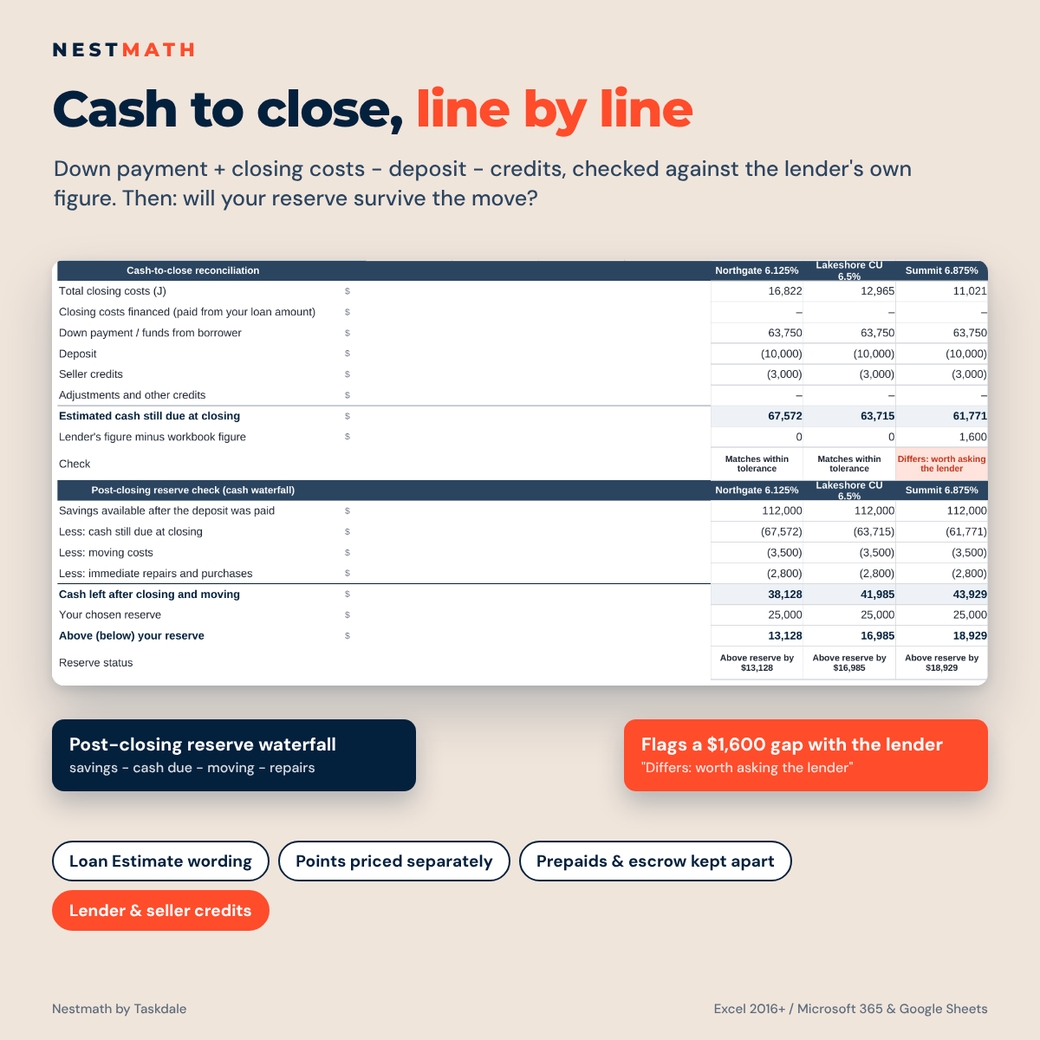
Then the “Calculating Cash to Close” table adds your down payment and subtracts your earnest-money deposit, seller credits and other adjustments. The free spreadsheet does exactly this. Enter the price, down payment, rate, points, lender fees, a total for the other sections, the prepaid days and months, credits and your deposit, and it shows your estimated cash still due at closing.
Prepaids and escrow are not lender fees: they are your own insurance, interest and property tax paid in advance. They still count toward the cash you need, which is why many buyers underestimate closing by thousands of dollars. The full mortgage offer comparison workbook itemizes every prepaid and escrow line and then runs a reserve check: savings available, minus cash due, moving costs and urgent repairs, compared with the emergency cushion you want to keep.
Step 2: Add up the full monthly cost
Lenders often quote “PITI”: principal, interest, taxes and insurance. For a realistic budget, add:
- Mortgage insurance if your down payment is under 20% on a conventional loan, or on most FHA loans
- HOA or condo dues, plus any special assessment
- Flood or other required coverage in some areas
- Upkeep: routine maintenance and savings for big replacements such as a roof or water heater
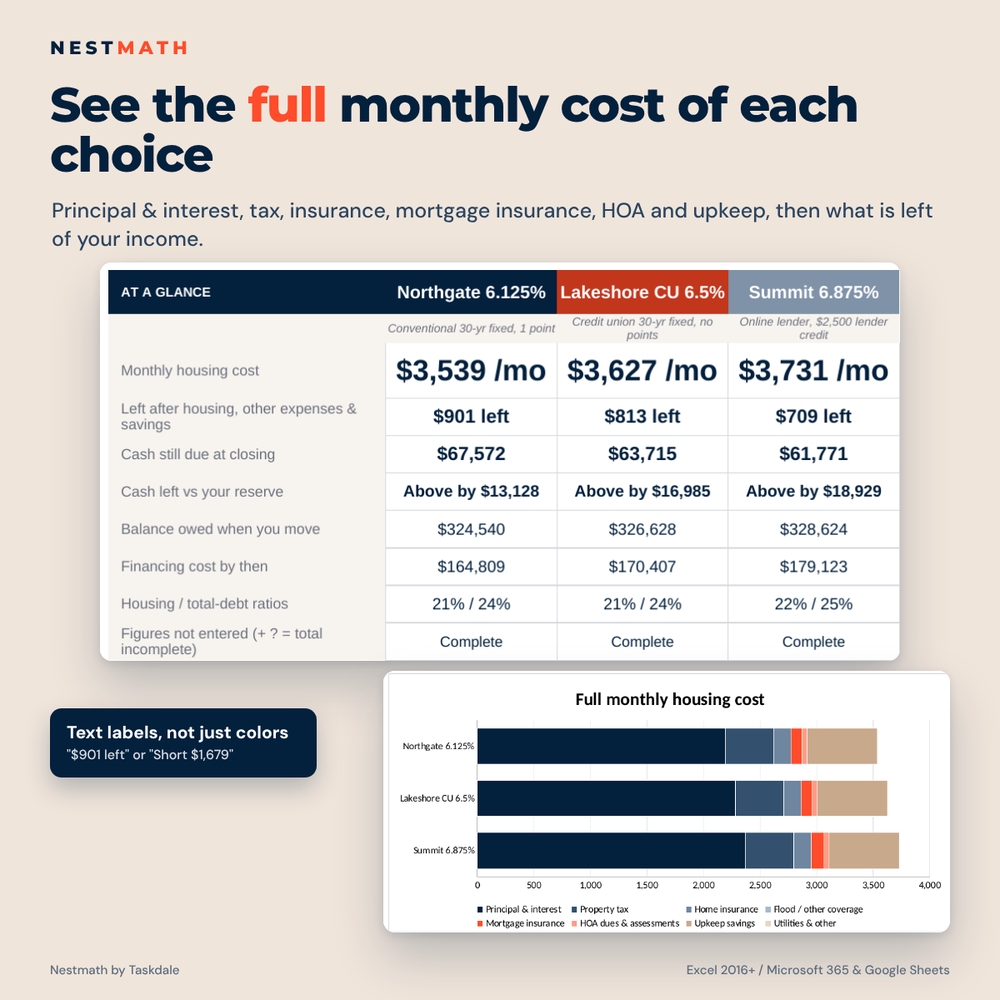
The free calculator gives you the monthly payment including tax, insurance, mortgage insurance and HOA dues. The full workbook adds flood cover, utilities, a 12-line replacement planner and your whole household budget, then shows what is left of your take-home pay after housing, other expenses and your savings target, for both your current income and your expected retirement income.
Step 3: Decide whether paying points is worth it
Discount points lower your rate in exchange for cash at closing. One point usually costs 1% of the loan amount. Whether that pays off depends on how long you keep the loan, so a simple payment comparison is not enough.
Here is a worked example with fictional numbers. A $361,250 loan for 30 years:
- Offer 1: 6.125% with 1 point, net upfront loan charges $8,908
- Offer 2: 6.5% with no points, net upfront loan charges $4,995
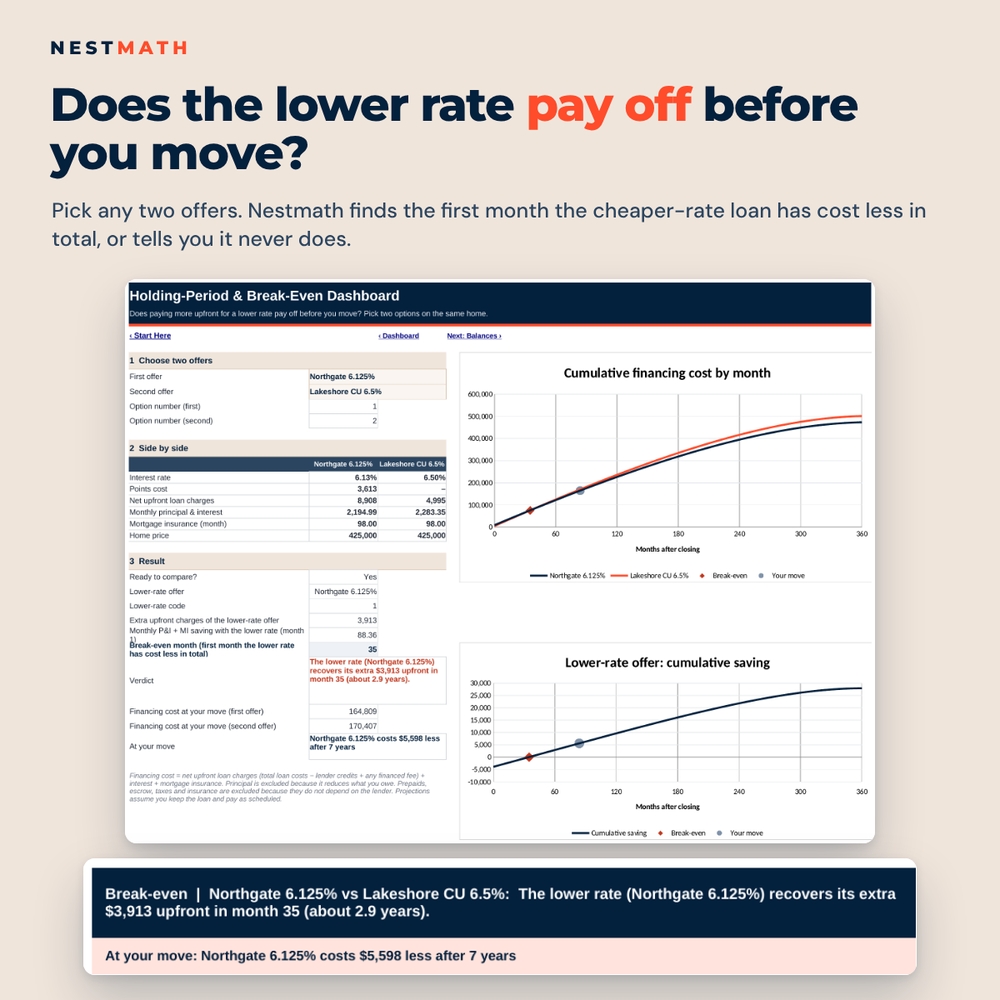
Offer 1 costs $3,913 more upfront and its principal and interest payment is $88.36 lower each month. Dividing $3,913 by $88 suggests about 44 months. But the payment difference understates the saving, because more of each payment goes to principal on the lower rate. Comparing total financing costs (upfront loan charges plus interest plus mortgage insurance) month by month, Offer 1 catches up in month 35, just under three years. If you expect to move or refinance in two years, the no-points offer is cheaper; if you expect to stay seven years, the points offer saves about $5,600 by then.
That month-by-month comparison is what the Nestmath break-even dashboard does for any two offers, including when the lower rate never catches up within your timeline.
How to use the free calculator
- Download the file and open it in Excel or upload it to Google Sheets.
- Set your currency symbol at the top (it uses $ by default).
- Enter the home price and either a down payment amount or a percentage.
- Copy the rate, points, lender fees and other closing costs from your Loan Estimate.
- Enter property tax, insurance, mortgage insurance and HOA dues (0 if none).
- Read your estimated monthly payment and cash still due at closing.
Any blank figure shows “Not entered” instead of a misleading zero, so you can see what is still missing.
Common mistakes to avoid
- Comparing APRs only. The APR spreads costs over the full loan term, but most people move or refinance sooner.
- Forgetting escrow deposits. Several months of tax and insurance are collected at closing on top of fees.
- Spending your whole savings. Keep a reserve for moving costs and the first repairs.
- Assuming mortgage insurance ends soon. Ask your lender exactly when and how it can be removed on your loan type.
- Treating a rough quote as final. Track which figures are estimates and which come from written quotes or a Loan Estimate.
Compare three homes or three lenders with the full Nestmath workbook
- Three options side by side with shared assumptions and highlighted differences
- Full Loan Estimate cost sheet (sections A to J), cash-to-close check and reserve waterfall
- Points break-even month, holding-period charts and balance at your move year
- Household budget for current and retirement income, plus a target-price finder
- Upkeep planner, quote register with rate-lock countdown, what-if panel and printable decision page
- Worked example and illustrated user guide; Excel and Google Sheets
$34.99, instant download.
Frequently asked questions
Is the home affordability calculator really free?
Yes. Enter your email to download it. It covers one home and one loan.
Does it work in Google Sheets?
Yes. Upload the .xlsx file to Google Drive and open it with Google Sheets.
What is the difference between the free and full versions?
The free file is a single-home calculator. The full version compares three homes or offers and adds the dashboard, break-even analysis, reserve check, budget tests, balances, what-if panel and decision summary.
Is this financial advice?
No. It is a planning and education tool. Confirm every figure with your lender, insurer and closing agent. The Consumer Financial Protection Bureau explains each Loan Estimate line at consumerfinance.gov.
Download your free home affordability calculator
When you are ready to compare real offers, the Nestmath Home Affordability & Mortgage Offer Dashboard turns three Loan Estimates into one clear decision.