Looking for a free bookkeeping spreadsheet that does more than add up income and expenses? This free download combines a simple invoice tracker with a 13-week cash flow forecast, so you can see not only what you billed but when the money will actually land in the bank, and whether that leaves enough to cover what goes out.
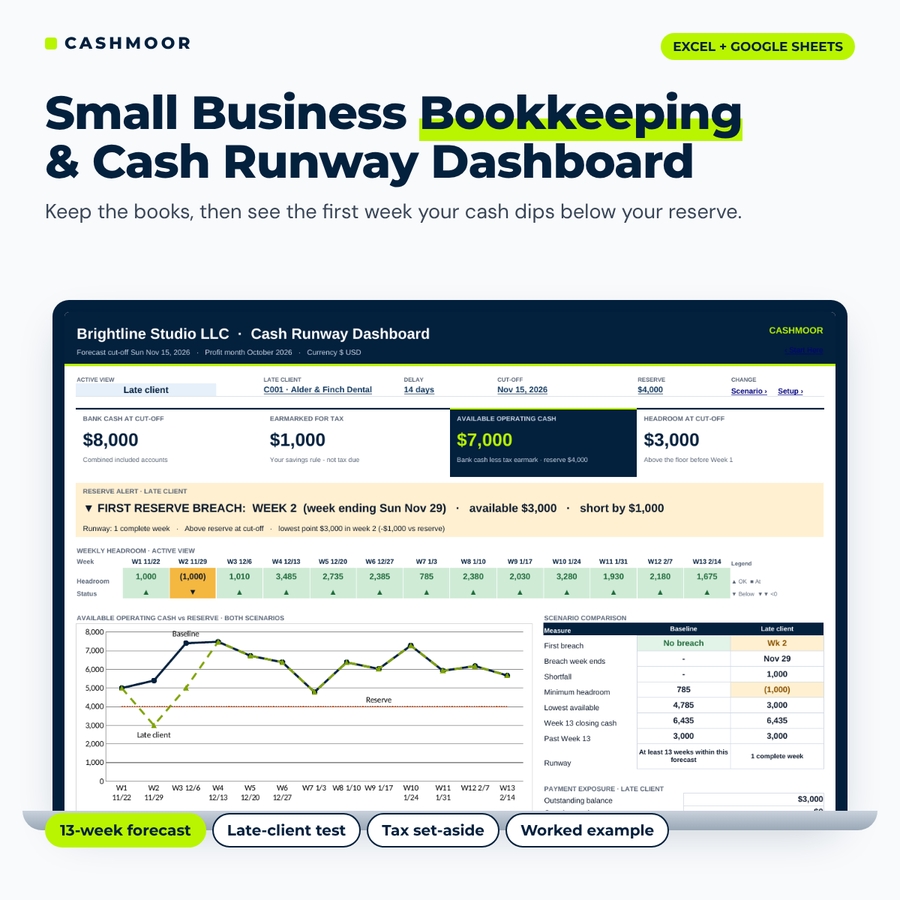
Free Bookkeeping Spreadsheet: Invoice Tracker + 13-Week Cash Flow Forecast (Excel & Google Sheets)
A 3-tab spreadsheet: track up to 50 invoices with balances, status and due weeks, then see a simple 13-week cash forecast with your reserve and the first week cash dips below it.
Want everything unlocked?
The free file is a sample. The full version has every page, tab and feature, plus the user guide.
See the full versionThe download is free. You enter your email address to get the file, and free downloads are limited to 3 per day.
Why bookkeeping and cash flow belong in the same spreadsheet
Most small business owners keep two separate pictures of their money. The bookkeeping picture says how much you billed and spent this month. The bank picture says how much is in the account today. Problems happen in the gap between them: you can have a profitable month on paper and still be unable to pay a contractor on Friday because two clients have not paid yet.
A good bookkeeping spreadsheet links the two. Every invoice you record has a due date and an unpaid balance. Every bill has a due date and an unpaid balance. Put those balances into weekly buckets and you have a cash flow forecast built from your real books instead of from guesses. That is exactly what the free file does on a small scale, and what the full Cashmoor bookkeeping and cash runway workbook does in depth.
What is in the free bookkeeping spreadsheet
- Invoice tracker (50 invoices): invoice ID, client, issue date, amount, terms, amount received so far and an optional expected payment date. It calculates the due date, balance, status (unpaid, part-paid, overdue, paid), days overdue and the forecast week.
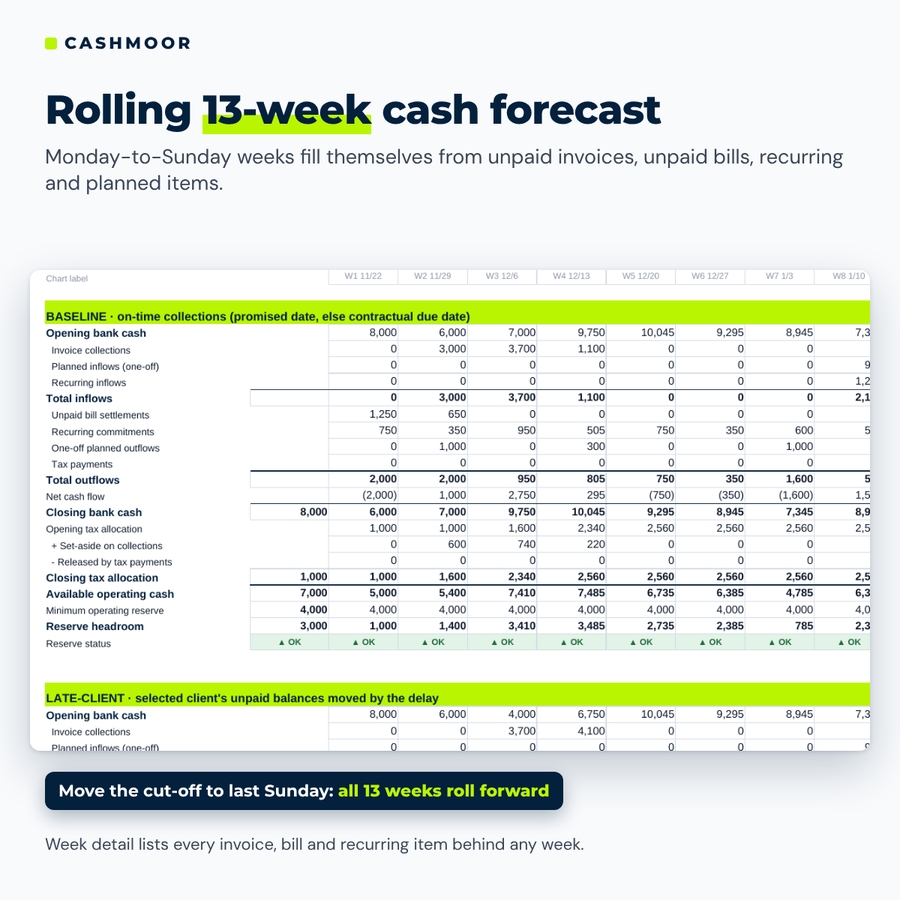
- Simple 13-week cash forecast: enter last Sunday’s date, your bank cash and a minimum reserve. Invoice balances drop into the week they are due. You type expected payments out (bills, payroll or contractors, owner draws and tax) and the sheet shows closing cash, headroom against your reserve, a status for each week and the first week below the reserve.
- Chart: closing cash against your reserve line for the next 13 weeks.
- Your currency: change the currency symbol once and every header follows.
It works in Excel 2016 or later, Microsoft 365 and Google Sheets, with no macros.
How to set up a small business bookkeeping spreadsheet in 15 minutes
1. Pick a cut-off date
Choose the last Sunday for which your records are complete. Everything up to that date is history; everything after it is forecast. Week 1 then runs Monday to Sunday right after the cut-off. Using a fixed weekday matters because it makes each weekly update comparable with the last one.
2. Start from your real bank balance
Enter the combined balance of your business bank accounts at the cut-off. Do not include credit card limits or an overdraft facility: available credit is not cash, and counting it hides exactly the problem you are trying to see.
3. Set a minimum reserve
Your reserve is the cash floor you do not want to go below. Many owners start with one month of fixed costs such as rent, software, insurance and regular contractor payments. The forecast then compares each week’s closing cash with that floor, not with zero.
4. List every unpaid invoice
For each open invoice, enter the amount and anything already received. A $4,000 invoice with a $1,000 deposit leaves $3,000 to collect, and only the $3,000 belongs in the forecast. If a client has promised a specific date, enter it as the expected payment date. If an invoice is already overdue, the free file assumes it is paid in Week 1, so check those carefully before relying on them.
5. Enter the payments going out
Type the bills you know about into the week they are due, plus payroll or contractor payments, owner draws and any tax payment you plan to make. Rough numbers are fine to start; the point is to see the shape of the next three months.
Reading the forecast: the first week below your reserve
The most useful number in a cash flow forecast is not the total at the end. It is the first week your cash falls below your reserve, because that is the deadline for doing something: chasing a payment, moving a bill, delaying an owner draw or arranging funding. The free file shows that week plus the lowest closing cash in the 13 weeks.
Two habits make the number trustworthy:
- Update weekly. Each Monday, move the cut-off to the Sunday just gone, update the bank balance and mark what was paid. All 13 weeks roll forward.
- Remember weekly closing balances hide timing. A comfortable Sunday balance does not prove you can make a Tuesday payment if the client pays on Thursday. Look at the dates inside a tight week.
The question most cash forecasts skip: what if one client pays late?
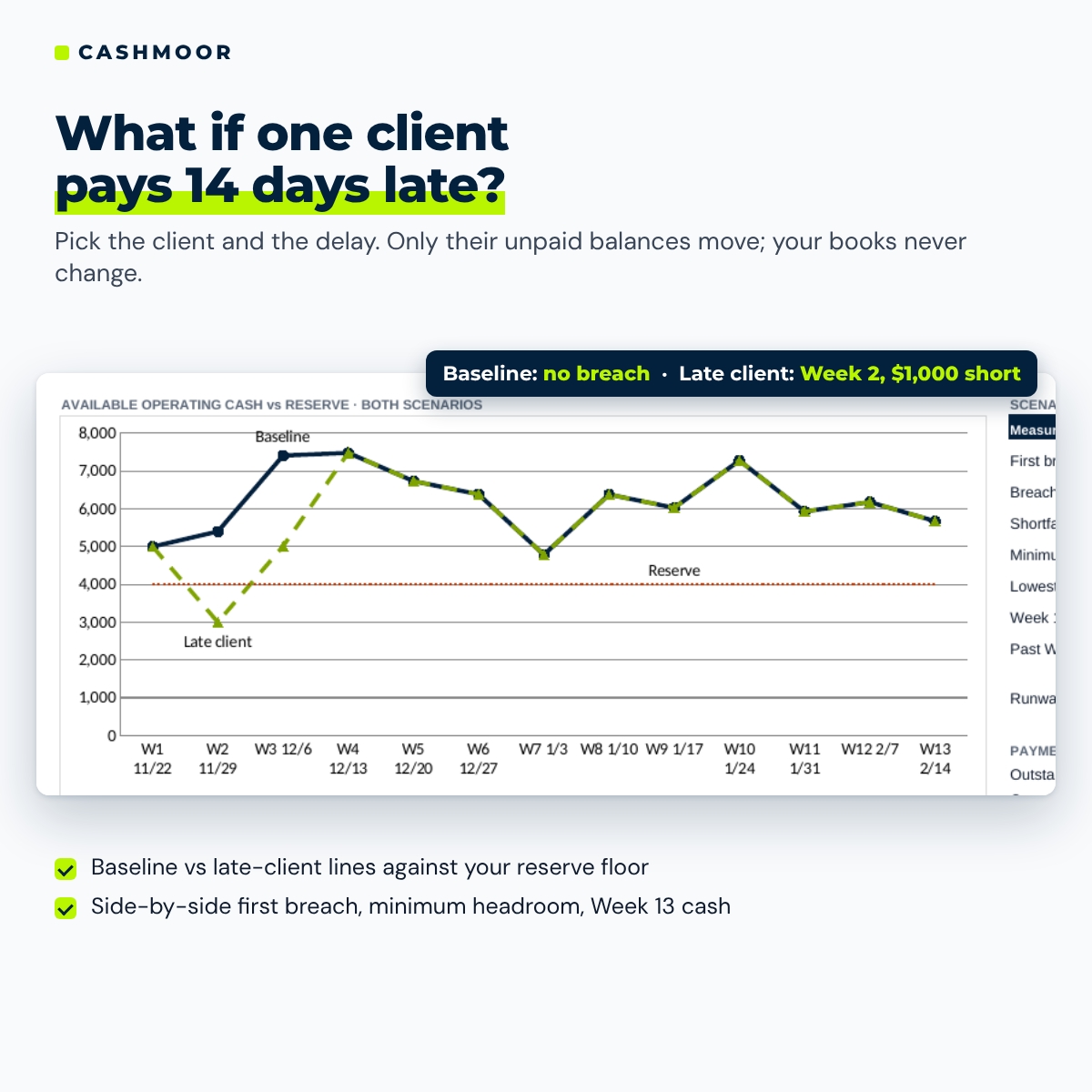
Late payment is the most common reason a small service business runs short. A useful test is to take your largest unpaid client and push their payment back two weeks, keeping everything else unchanged. If that single change drops you below your reserve, you know where to focus your follow-up.
In the free file you can test this by hand by typing a later expected payment date for that client. The full Cashmoor workbook builds it in: pick a client and a delay of 1 to 90 days, and the forecast, dashboard and printable decision pack show the baseline and late-client results side by side, including the first breach week, the shortfall and the collections pushed past the 13-week horizon.
Do not spend your tax money: the set-aside earmark
If you pay estimated taxes, part of every customer payment is not really yours to spend. A simple rule, such as setting aside a fixed percentage of what you receive, keeps that money out of your spendable cash. The IRS explains how estimated tax payments work on IRS.gov; the right percentage for you is a question for your tax professional.
The full workbook keeps a tax earmark ledger: it adds your chosen percentage of each customer receipt, releases the earmark when you record a tax payment and subtracts it from bank cash to give available operating cash. The forecast extends the same rule to future collections. It is a savings rule, not a tax calculation, and moving money to a tax savings account is not an expense.
Common bookkeeping spreadsheet mistakes (and how to avoid them)
- Counting a paid bill twice. Record the bill once as an expense and its payment once as cash out. One cost, one cash outflow.
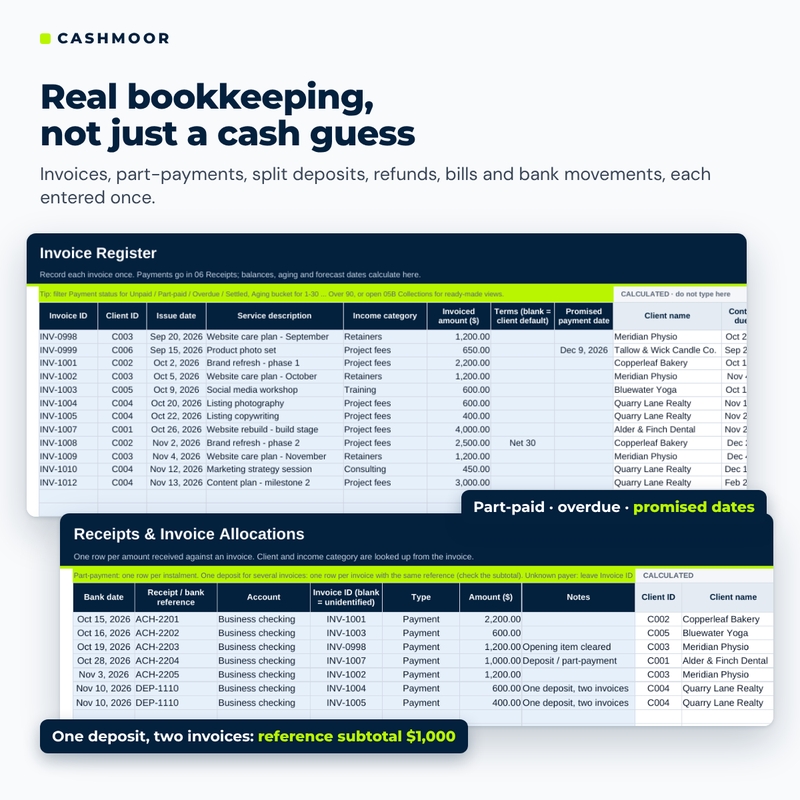
- Forecasting the full invoice after a part-payment. Only the unpaid balance is still coming.
- Treating owner draws, loans or transfers as income or expenses. They move cash but do not change your operating profit.
- Never reconciling. If your spreadsheet balance does not match the bank statement, the forecast starts from the wrong number.
- Ignoring unidentified deposits. Cash you cannot match to an invoice still leaves that invoice looking unpaid, so collections look bigger than they are.
When to upgrade to the full Cashmoor workbook
The free file is great for a quick look ahead. When you want your bookkeeping and your forecast to run from the same records, with checks that catch mistakes, the Cashmoor small business bookkeeping spreadsheet and cash runway dashboard is the next step.
Cashmoor full version: bookkeeping + cash runway dashboard
- Invoices, receipts with part-payments, split deposits and refunds, bills and every type of bank movement
- Rolling 13-week forecast with an on-time vs late-client scenario and week-by-week drill-down
- Tax set-aside earmark, profit summary with 12-month trend, aging and collections views
- Cash runway dashboard, 32 data checks, bank reconciliation and a printable decision pack
- Worked example workbook and an illustrated user guide
$34.99 one-time · Excel and Google Sheets · instant download
FAQ
Is this bookkeeping spreadsheet really free?
Yes. Enter your email to download the file. There is no trial period and no subscription.
Can I use it in Google Sheets?
Yes. Upload the .xlsx file to Google Drive and open it with Google Sheets.
Is a spreadsheet enough for bookkeeping?
For many small service businesses, a well-built spreadsheet covers invoices, expenses, bank activity and a cash forecast. If you need payroll, inventory, sales-tax returns or formal financial statements, keep using accounting software alongside it.
How often should I update my cash flow forecast?
Weekly works best for a 13-week forecast: same day, same routine, starting from a reconciled bank balance.
Download the free invoice tracker and 13-week cash forecast below, and when you are ready for full books, the late-client test and the dashboard, get Cashmoor.
This article is for general information and planning only and is not financial, tax or legal advice.