A small business bookkeeping spreadsheet that also tells you when cash runs short
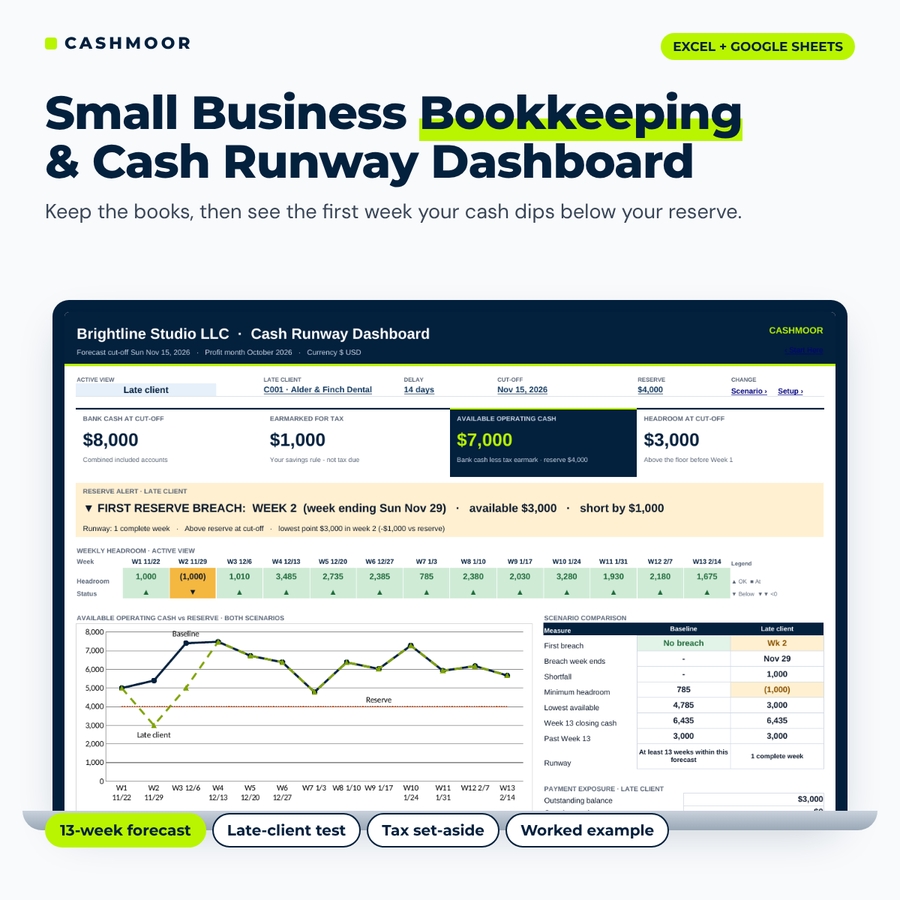
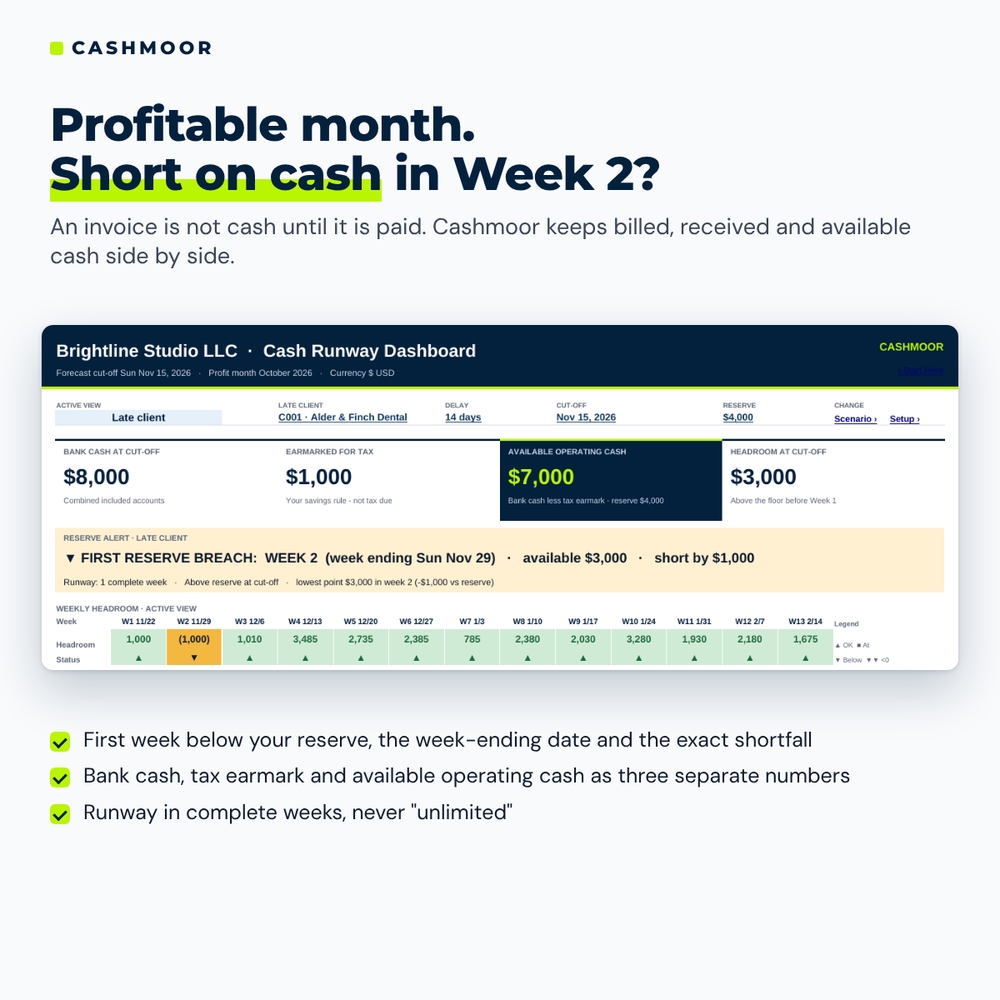
A profitable month can still leave you short of cash on Friday. An invoice counts toward the work you have billed, but it cannot pay a supplier until the money arrives. Cashmoor is a small business bookkeeping spreadsheet and cash runway dashboard in one Excel and Google Sheets workbook. Record each invoice once, enter the payments against it, record your bills and bank movements, and the workbook builds a rolling 13-week cash forecast from your real books. The dashboard names the first week your available cash dips below your chosen reserve, the week-ending date, the shortfall and the entries behind it.
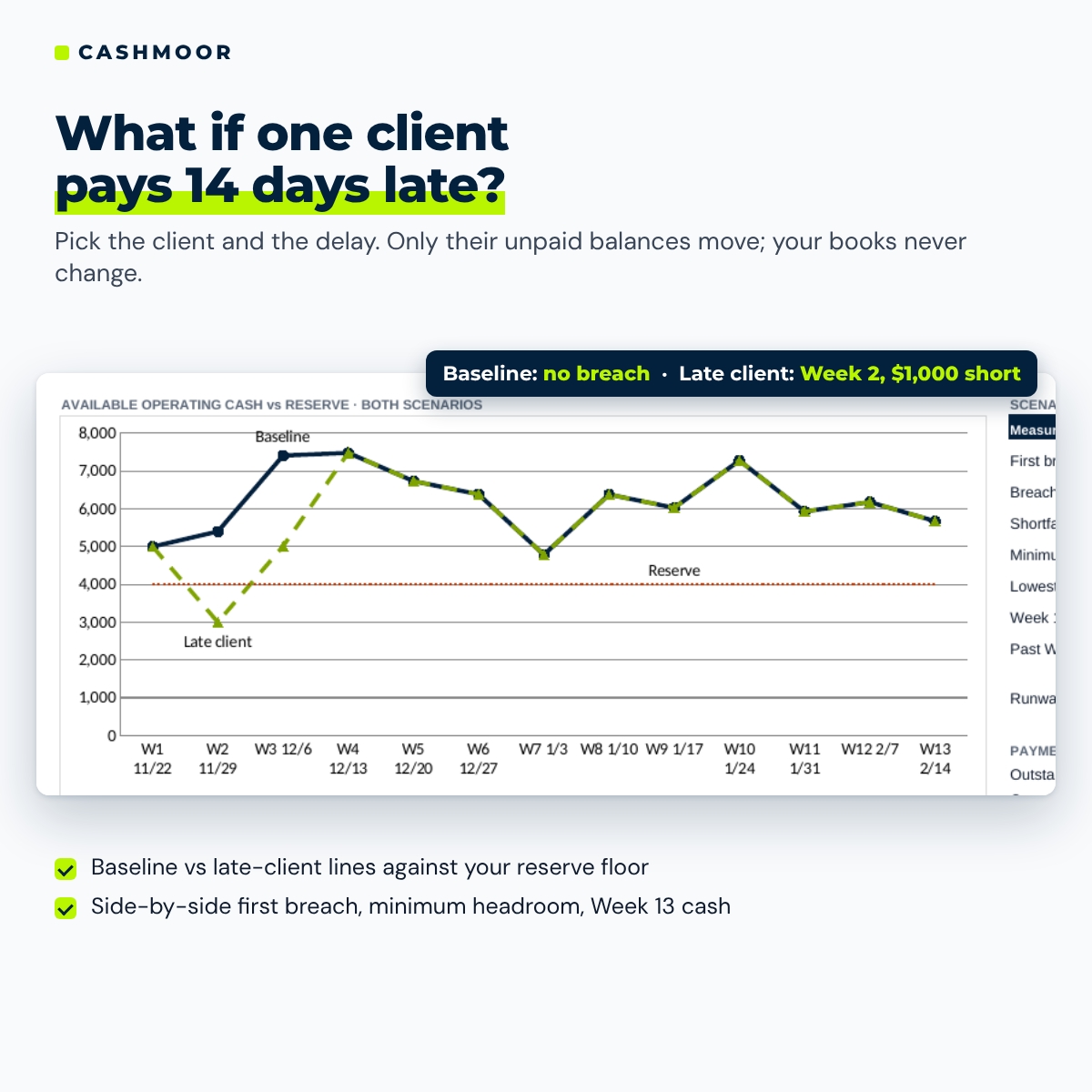
Then switch to the late-client view. Choose one client and a delay of 1 to 90 days, and only that client’s unpaid balances move. Your costs, your reserve and every other client stay the same, so you see the effect of one late payer without touching your bookkeeping.
Who it is for
- Owners of service businesses: consultants, design and marketing studios, agencies, IT and web freelancers with contractors, coaches and trainers, trades that invoice their work
- Bookkeepers who want a clear weekly cash briefing for a small client
- Anyone who has been surprised by a bill landing before a client paid
What the workbook does
Keep the books
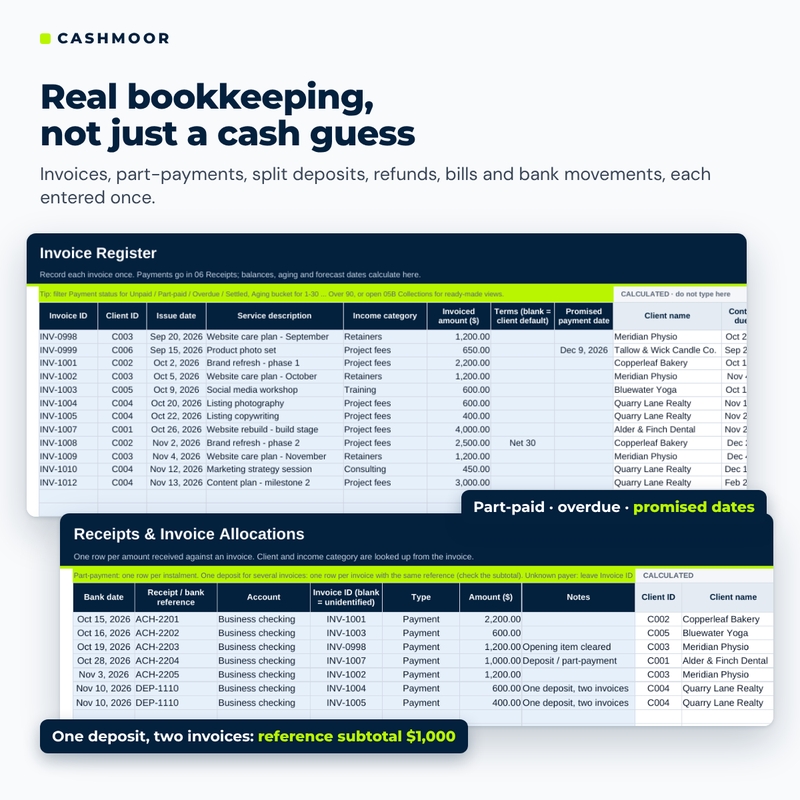
- Invoice register: due dates from payment terms (or a client default), balances, days overdue, payment status, aging buckets (current, 1-30, 31-60, 61-90, over 90) and promised payment dates that change the planning date but not the overdue status.
- Receipts and allocations: part-payments, one deposit split across several invoices with a reference subtotal, refunds and reversals that reopen a balance, and unidentified deposits flagged until you match them.
- Expenses and bills: what you incurred, what you paid, the unpaid balance and the week it is planned. A paid bill is one cost and one cash outflow, never two costs.
- Cash movements: bill settlements, owner funding and drawings, loans and principal repayments, tax payments and transfers between accounts.
- Planned and recurring items: owner draws, unbilled work, estimated tax payments, subscriptions and rent, with a skip-one-occurrence table.
Plan your cash
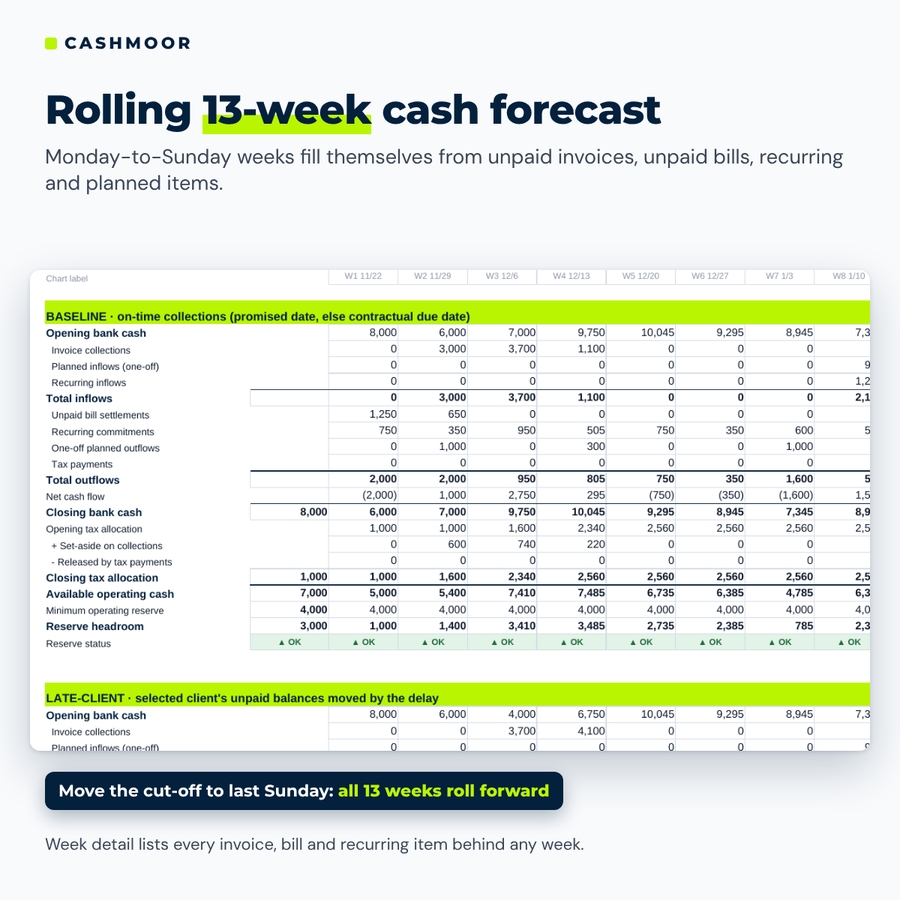
- Rolling 13-week cash forecast: Monday-to-Sunday weeks that roll forward when you move the cut-off to last Sunday, shown for the baseline and the late-client scenario side by side.
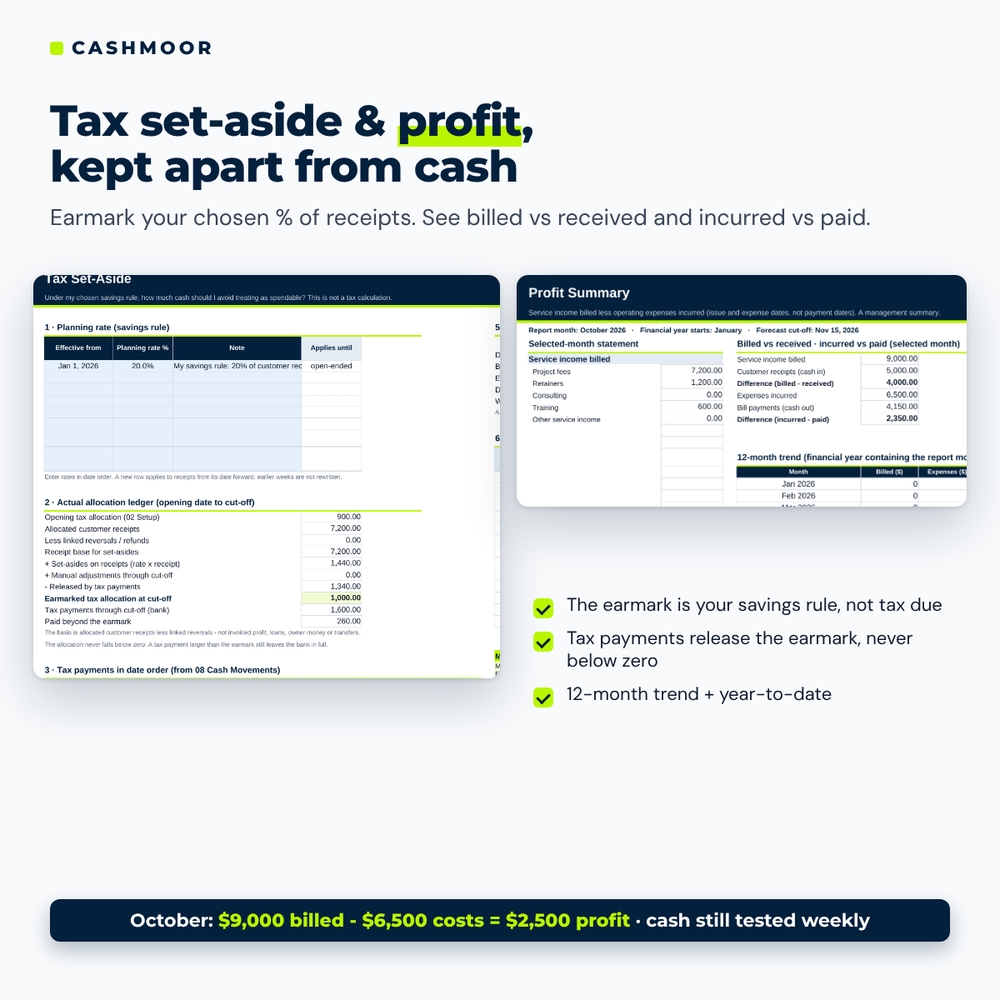
- Tax set-aside: earmark your chosen percentage of customer receipts so it is not counted as spendable. It is a savings rule you choose, not a tax calculation.
- Reserve tests: first breach week, shortfall, lowest point, runway in complete weeks and Week 13 position. A result with no breach reads “at least 13 weeks within this forecast”, never unlimited.
- Week detail: pick any week to list the invoices, bills, recurring occurrences and planned items behind it, with dates and signed amounts.
See it and act on it
- Cash runway dashboard: bank cash, tax earmark, available operating cash and headroom cards, a reserve alert, a 13-week headroom strip, a baseline vs late-client chart against your reserve line, scenario comparison cards, payment exposure for the chosen client, a profit context card and a review banner.
- Profit summary: billed income less expenses incurred for any month, by category, plus billed vs received, incurred vs paid, a 12-month trend and year to date.
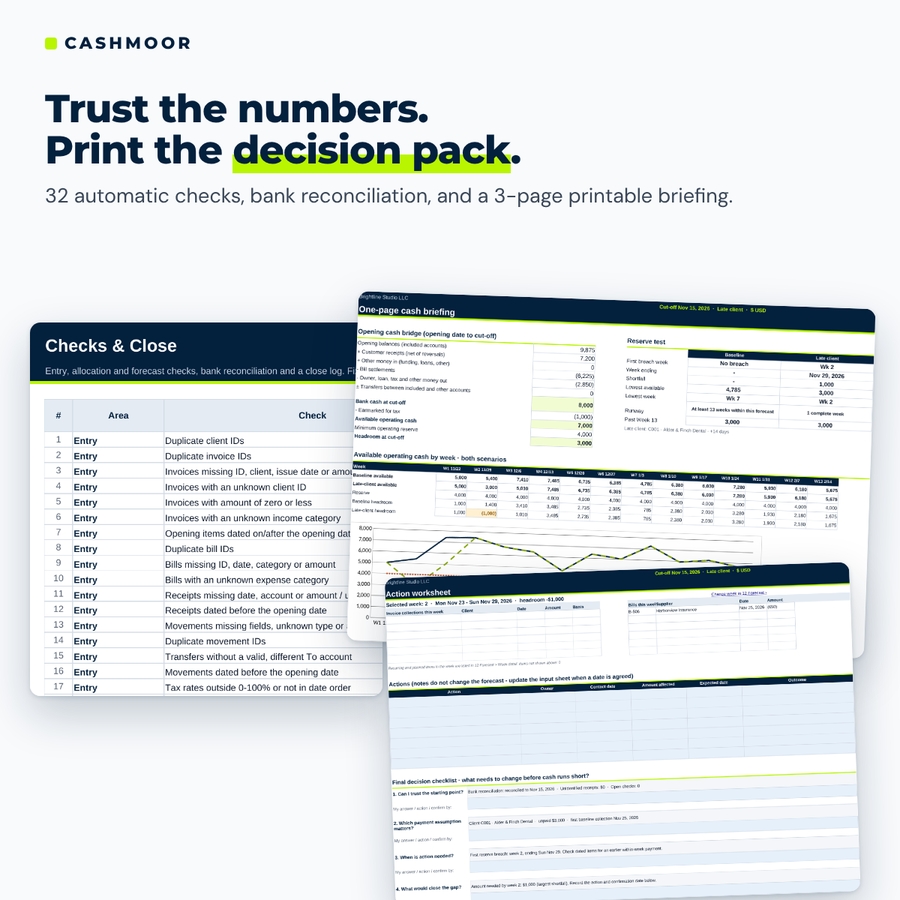
- Checks and close: 32 automatic checks, a bank reconciliation grid for each account and a close log.
- Printable decision pack: a one-page cash briefing, a 13-week schedule and an action worksheet with a four-question decision checklist.
What is included
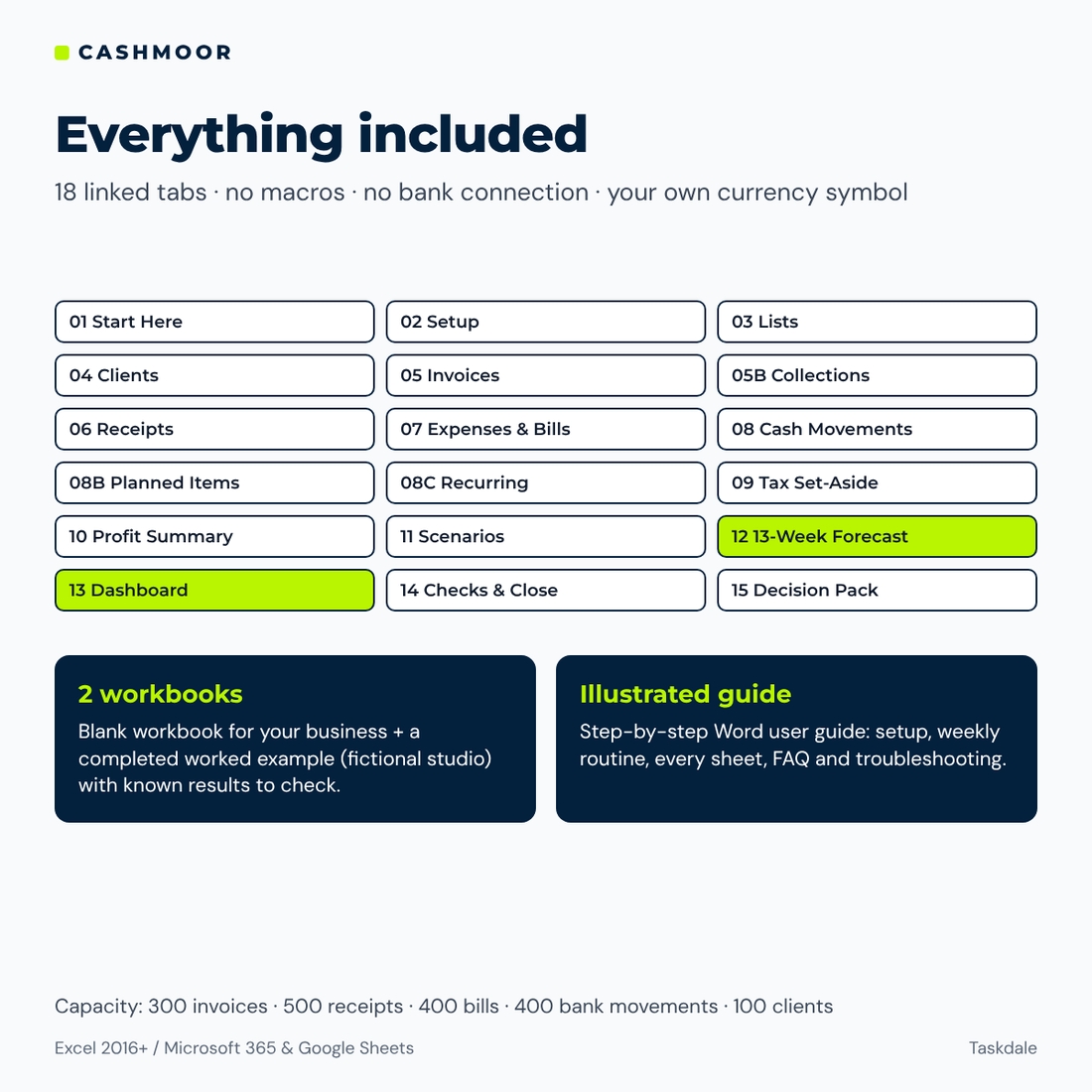
- Cashmoor Bookkeeping & Cash Runway Workbook (.xlsx): 18 linked tabs, ready-made expense and income categories, payment terms and a setup checklist
- Worked example (.xlsx): the same workbook filled in for a fictional design studio. It has a $2,500 profit month and a Week 2 reserve gap of $1,000 when one client pays 14 days late, so you can check known results before entering your own figures.
- Illustrated user guide (.docx): setup in 20 minutes, the weekly routine, every sheet, customizing, troubleshooting and FAQ
How it works
- Enter your business name, opening date, bank accounts, opening balances, reserve and tax planning rate.
- Add clients, invoices, receipts, bills and bank movements as they happen.
- Each week, reconcile to your bank statement, set the cut-off to last Sunday and review any warnings.
- Read the dashboard, test the late-client view and print the decision pack.
File formats and software requirements
One .xlsx workbook plus a worked example and a Word user guide. Works in Microsoft Excel 2016 or later (Windows and Mac), Microsoft 365 and Google Sheets (free Google account). No macros, no add-ins, no bank connection and no external links. Formula cells are protected without a password, so you can unprotect them to customize the layout. Capacity: 100 clients, 300 invoices, 500 receipt rows, 400 bills, 400 bank movements, 100 planned items and 20 recurring templates per file.
Customization
Set your own currency symbol once and every money header and dashboard card follows ($ by default; it is a label, not a currency converter). Add expense categories and reporting groups, income categories, payment terms and cash movement types. Retire a category from dropdowns without losing its history.
Real situations it helps with
- A big client asks for “a couple more weeks” and you need to know if payroll for contractors still clears
- You want to take an owner draw but your quarterly estimated tax payment is coming up
- Your profit report looks healthy, but the bank balance keeps feeling tight
- You are deciding whether to chase an overdue invoice today or next week
Digital download
This is a digital product: nothing is shipped. Download the files right after purchase from your Taskdale account. Personal use only (or use within your own business). You may not resell, share or redistribute the files. For planning and education only; it is not financial, tax, legal or accounting advice.
FAQ
Does this small business bookkeeping spreadsheet work in Google Sheets?
Yes. Upload the .xlsx to Google Drive and open it in Google Sheets. It uses no macros and only functions that work in both Excel and Google Sheets.
Is it double-entry accounting software?
No. It is a management workbook for one service business: invoices, operating expenses, bank activity, a profit summary and a weekly cash forecast. It does not do inventory, payroll, sales-tax returns or tax filings.
Does it calculate the tax I owe?
No. You choose a planning percentage of receipts to set aside, and the workbook keeps that amount out of spendable cash. Ask a tax professional what you actually owe.
What is cash runway here?
The number of complete weeks before your available cash (bank cash less the tax earmark) first falls below your reserve within the 13-week forecast.
Can I test more than one late client?
Test one client at a time. Change the client or the delay and the forecast, dashboard and decision pack update instantly.
Does it connect to my bank?
No. You enter or paste transactions yourself, and the bank reconciliation confirms your entries match each statement.
Which Excel version do I need?
Excel 2016 or later on Windows or Mac, or Microsoft 365.

Reviews
There are no reviews yet.