A free grocery budget spreadsheet with a built-in meal planner is the easiest way to stop deciding what’s for dinner at 5 pm and to stop buying the same thing twice. Below you can download Plenticart Lite, a free 7-day meal planner and grocery list template for Excel and Google Sheets. After the download, this guide walks through how to plan a week of meals in a spreadsheet, build a grocery list that combines every recipe, and keep the shop within a budget.
Free Grocery Budget Spreadsheet: 7-Day Meal Planner + Grocery List (Excel & Google Sheets)
A 7-day breakfast, lunch and dinner planner for up to 10 recipes that builds one combined, aisle-sorted grocery list with an estimated total.
Want everything unlocked?
The free file is a sample. The full version has every page, tab and feature, plus the user guide.
See the full versionThe download is free. You enter your email address to get the file, and free downloads are limited to 3 per day.
What’s in the free grocery budget spreadsheet
Plenticart Lite is a small, complete planner with four tabs:
- Recipes: up to 10 recipes, each with its servings and ingredients. You can add an optional price per unit for each ingredient.
- Planner: 7 days of breakfast, lunch and dinner, with a recipe dropdown and the number of servings to cook.
- Grocery List: every ingredient the week needs, combined across recipes, sorted by aisle and ready to print, with an estimated total.
- Upgrade: what the full Plenticart workbook adds.
Three example recipes are filled in so you can see how it works. Overwrite them with your own. The file works in Microsoft Excel and Google Sheets and has no macros.
How to plan meals in a spreadsheet: a 6-step method
1. Start with the meals you already cook
Write down 8 to 10 meals your household eats regularly, with how many servings each recipe makes. A spreadsheet meal plan works best when it starts from meals people already like, not from a list of new recipes.
2. Enter ingredients with consistent names and units
Type each ingredient the same way every time (“Yellow onion”, not “onion” in one recipe and “onions” in another), and use the same unit. That is how the grocery list knows to combine them. If a recipe uses cups but the store sells the item by weight, weigh it once and use the weight.
3. Plan the week around your calendar
Look at the week first. Late practice on Tuesday means a quick meal. A free Sunday afternoon is the time to batch-cook. Fill dinners first, then lunches, then breakfasts.
4. Cook once, eat twice
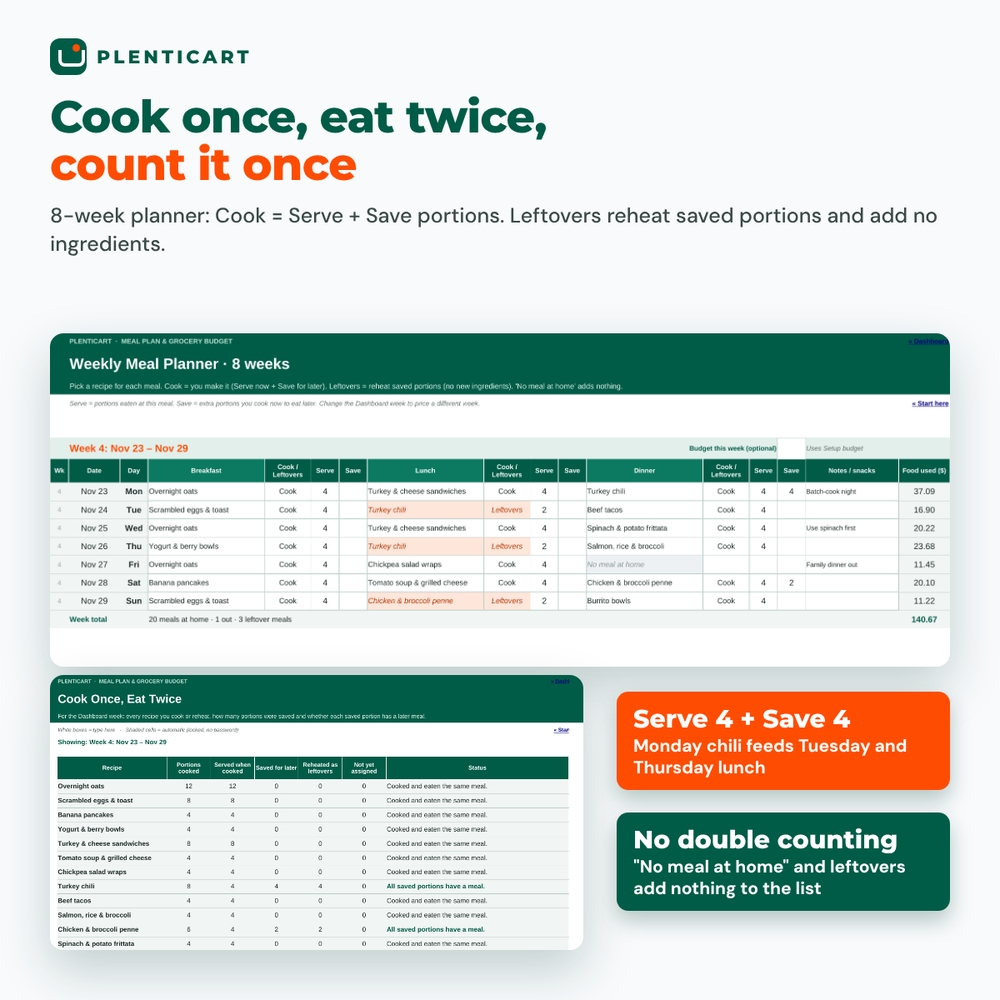
Batch cooking is the best way to save time and money, but it’s easy to count twice. If Monday’s chili makes 8 servings and 4 are for later, enter 8 servings on Monday and leave the later lunches without new servings, so the ingredients are counted only once.
5. Check what you already have
Before you shop, go through the cupboard, fridge and freezer and cross off what you already have. The free planner lists what the recipes use. The full Plenticart meal planning spreadsheet does this step for you by deducting pantry stock automatically.
6. Shop by aisle and keep the receipt
Print the aisle-sorted list or open it on your phone. After you shop, compare the receipt with your estimate. That’s where most of the savings come from over a few weeks.
Why your grocery bill is higher than your meal plan says
Most meal planner templates add up what each recipe uses. If chili uses a third of a bag of rice, they count a third of the price. That is the value of the food you eat, and it’s worth knowing. But at the store you pay for the whole bag. Over a week of ten or more recipes, these part-packs add up, and the shop comes in well above the plan.
There are two numbers to track:
| Figure | What it answers |
|---|---|
| Food used | What do my planned meals cost to eat? |
| Checkout spend | What will I pay for the whole packs I need, after counting what I already have? |
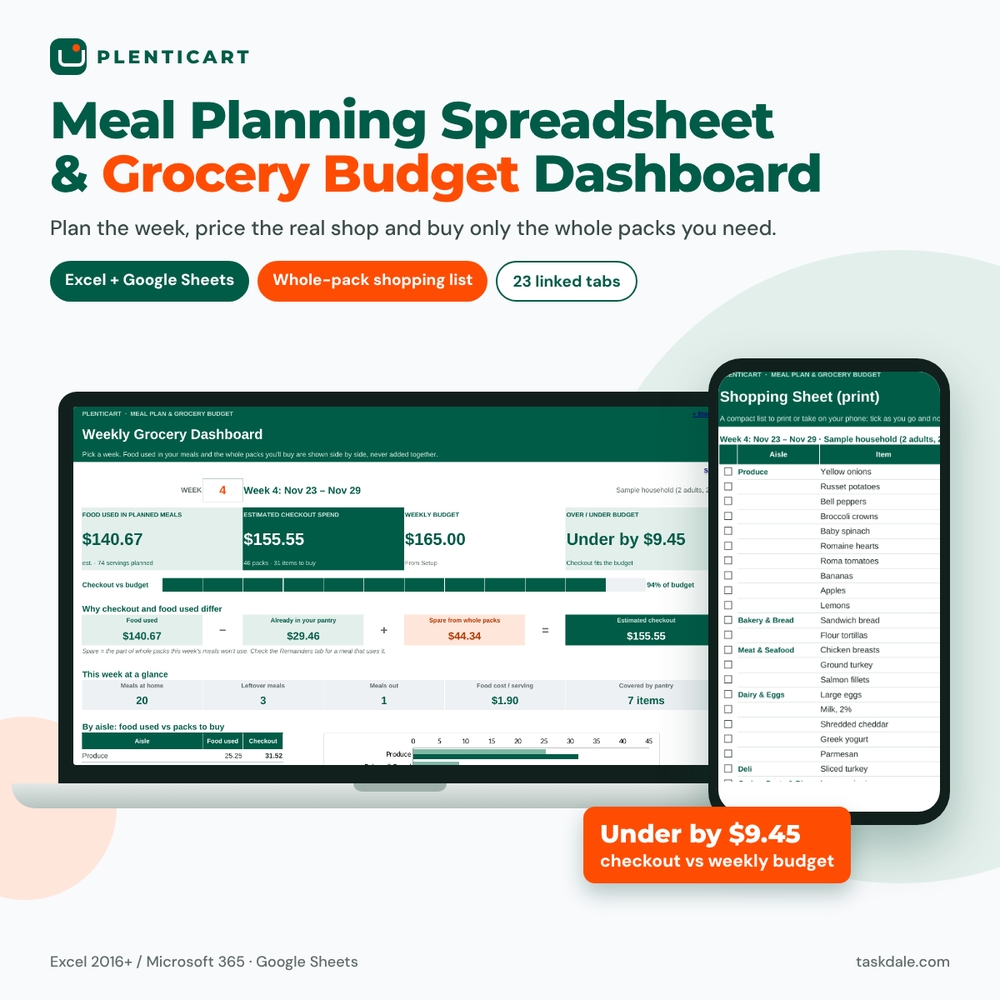
The difference is made up of the food you take from your pantry and the spare part of new packs. Plenticart shows this as a simple equation on its dashboard: food used − already in your pantry + spare from whole packs = estimated checkout. Your budget should be compared with the checkout figure, because that’s what leaves your bank account.
A worked example: 600 g of rice
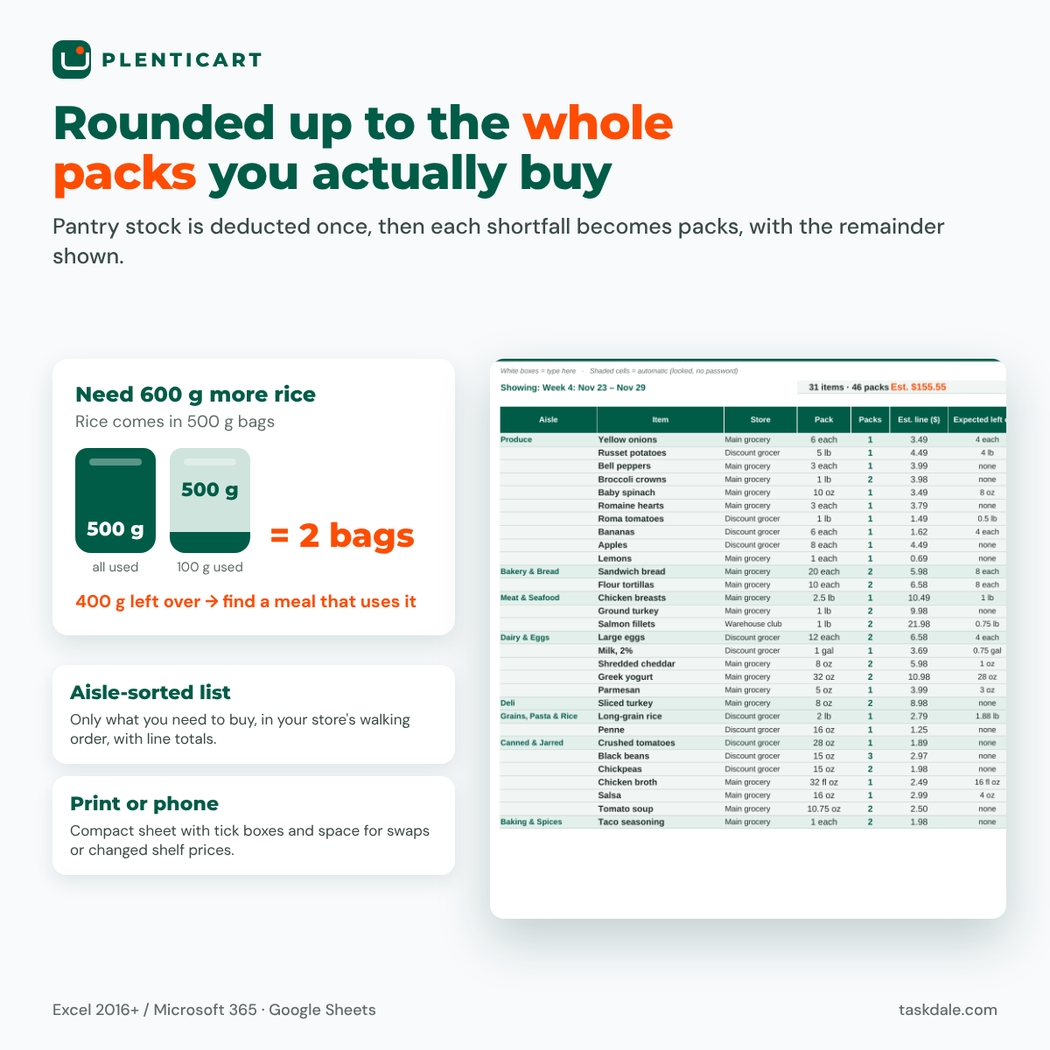
Your week needs 600 g more rice than you have, and rice comes in 500 g bags. You must buy 2 bags, and you’ll have 400 g left over. A good plan does two things with that number. It prices the second bag in your budget, and it reminds you to plan a meal that uses the 400 g. In the Plenticart grocery budget dashboard, the whole-pack calculator does the rounding, and the Remainders tab lists recipes that use the leftover rice and shows whether cooking one would add anything to the bill.

How to set a realistic weekly grocery budget
- Start from your receipts. Average your last four weekly shops. That’s your real starting point.
- Compare with a public benchmark. The USDA publishes monthly Food Plans: Cost of Food at Home reports for different household types. They can show whether your number is in a typical range.
- Budget the checkout, not the recipes. Plan with whole packs, as above.
- Leave room for staples. Oil, spices and breakfast basics run out on their own schedule.
- Review weekly. Note why a receipt was higher than planned: price changes, substitutions or extras.
Ways to cut the grocery bill without changing what you eat
- Use what’s about to expire first. Plan the first two dinners around the foods with the shortest use-by dates.
- Share ingredients across meals. A bag of peppers can cover tacos, a salad and chili.
- Swap one meal, not the whole plan. If you’re over budget, replacing one expensive dinner often removes several packs from the list. The Plenticart swap preview shows which packs disappear and the net saving before you change anything.
- Compare pack sizes on two numbers. The bigger bag usually has the lower unit price, but the smaller bag can still cost less this week. Check both.
- Keep a price book. Record the pack size and shelf price you usually pay, and re-check prices every couple of months.
Free meal planner vs the full Plenticart workbook
The free spreadsheet covers the basics well: one week, 10 recipes and one combined grocery list. If you also want to control what you spend, the full version adds the money side.
Plenticart: Meal Planning Spreadsheet & Grocery Budget Dashboard
- Whole-pack calculator: shortfalls rounded up to packs, with the remainder shown
- Pantry, fridge and freezer stock deducted automatically, plus a use-first list
- Dashboard with food used, checkout spend, budget and over/under, plus charts
- 8-week planner with Cook / Leftovers portions that never count ingredients twice
- One-meal swap preview, remainder-to-recipe finder and pack-size comparison
- 120-recipe library with cost cards, a 250-item price catalog, spend log and a worked example
$24.99 · Excel and Google Sheets · instant download
Frequently asked questions
Is the meal planning spreadsheet really free?
Yes. Plenticart Lite is free for personal use. Enter your email address in the box to download it.
Does it work in Google Sheets?
Yes. Upload the .xlsx file to Google Drive and open it with Google Sheets, or open it in Excel 2016 or later.
Can I add more than 10 recipes?
The free version holds 10 recipes and 100 ingredient rows. Plenticart holds 120 recipes and 1,500 ingredient rows.
How do I make the grocery list combine ingredients?
Use exactly the same ingredient name and unit in every recipe. The list adds up matching rows and sorts them by the aisle you choose.
Download your free grocery budget spreadsheet
Get the free 7-day planner and grocery list below. When you’re ready to plan with whole packs, your pantry and a budget dashboard, take a look at Plenticart.
Some ideas in this guide refer to US public resources, such as the USDA Food Plans reports and the FoodKeeper app. They are not connected with Taskdale and do not endorse this product.