A youth sports team budget spreadsheet that splits costs to the cent
Collecting team fees gets messy fast. One family has twins, the coach’s family doesn’t pay the league fee, only half the team wants jackets, a sponsor covers part of the bill, and when you divide the total by the number of players the shares never quite add up. Playbook Team Season Budget is a youth sports team budget spreadsheet for Excel that handles all of that. You enter the households, the season costs and the payments. The workbook works out what every household owes, keeps the shares adding up exactly, and shows what has been collected, what is still outstanding and what nobody is covering yet.
It’s built for team managers, team parents and treasurers of recreational, school, club and travel teams: softball, baseball, soccer, basketball, hockey, volleyball, swim, cheer or any sport where families share the bills.
What it does, with a real example
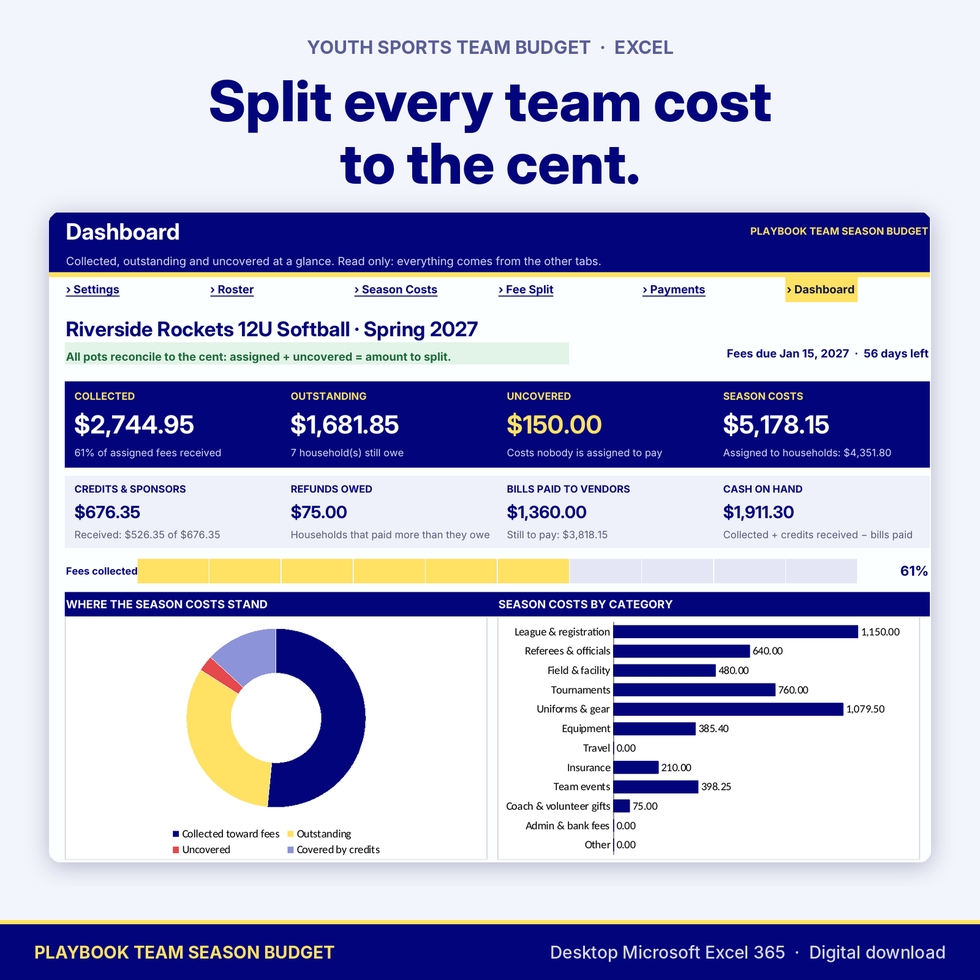
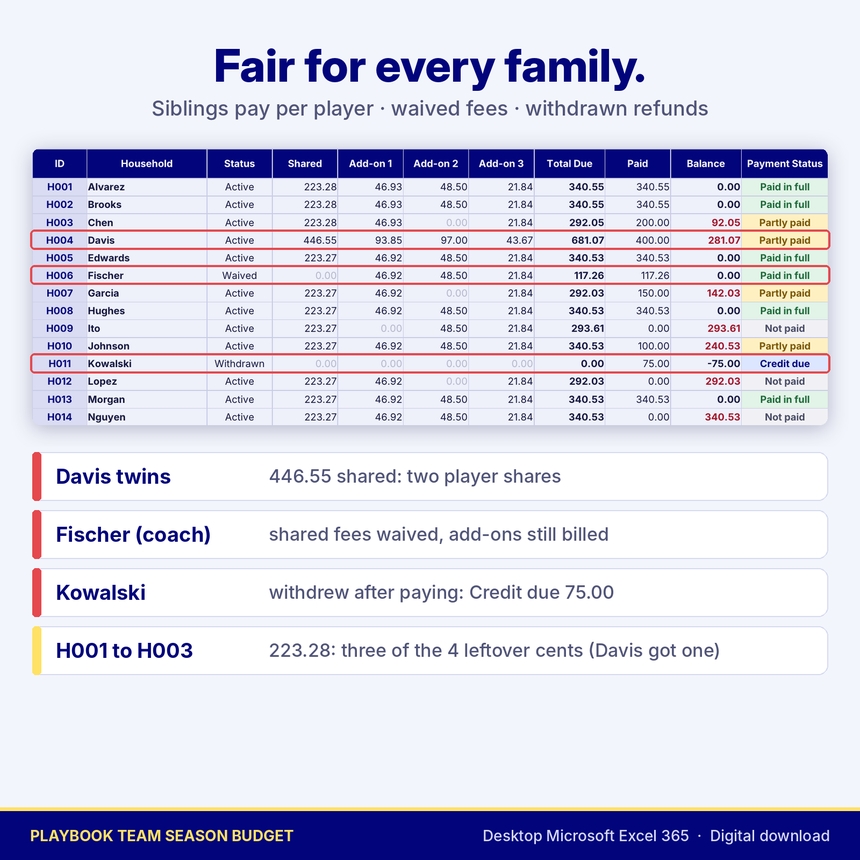
In the demo workbook shown in the images, a 12U softball team has 13 active players in 12 households (one family has twins), a coach’s family whose shared fees are waived, and a family that withdrew after paying a deposit. Shared costs come to 3,578.90. Two sponsors and last season’s carryover add up to 676.35 in credits, so 2,902.55 is left to split per player.
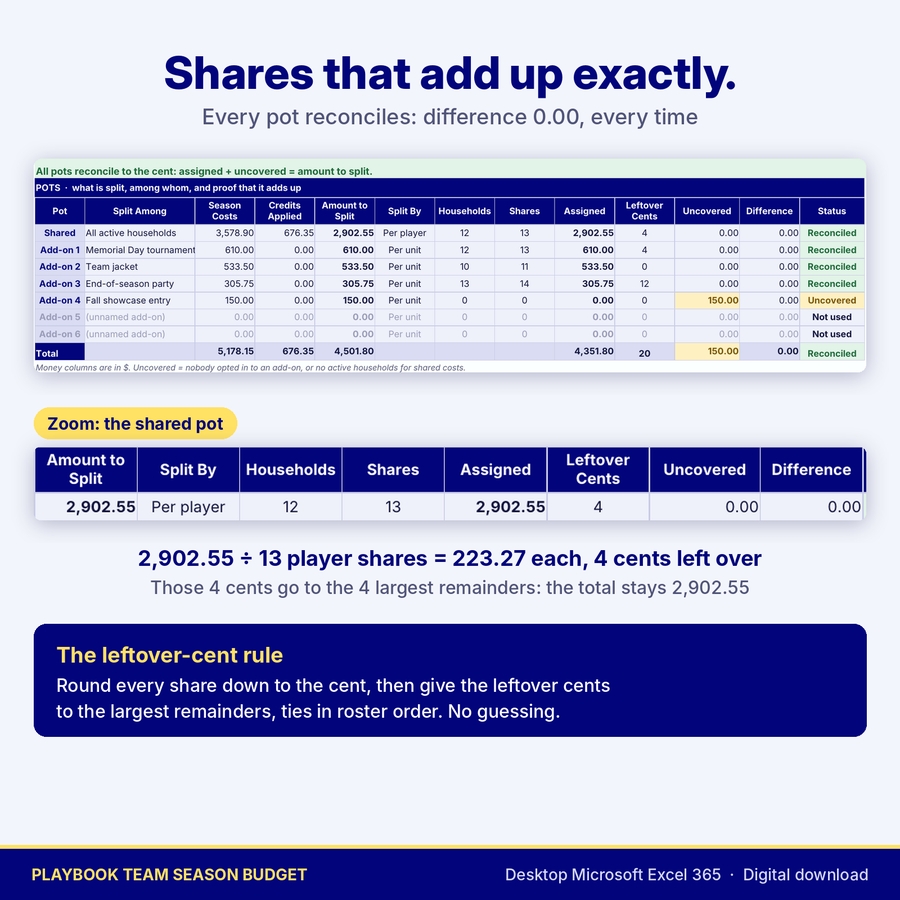
- 2,902.55 ÷ 13 player shares = 223.273… Every share is first rounded down to 223.27, which leaves 4 cents over.
- The 4 cents go out by a fixed rule: one each to the largest remainders, ties in roster order. The twins’ household pays 446.55 for two shares, three households pay 223.28 and the rest pay 223.27.
- The pot table proves it: assigned 2,902.55, difference 0.00.
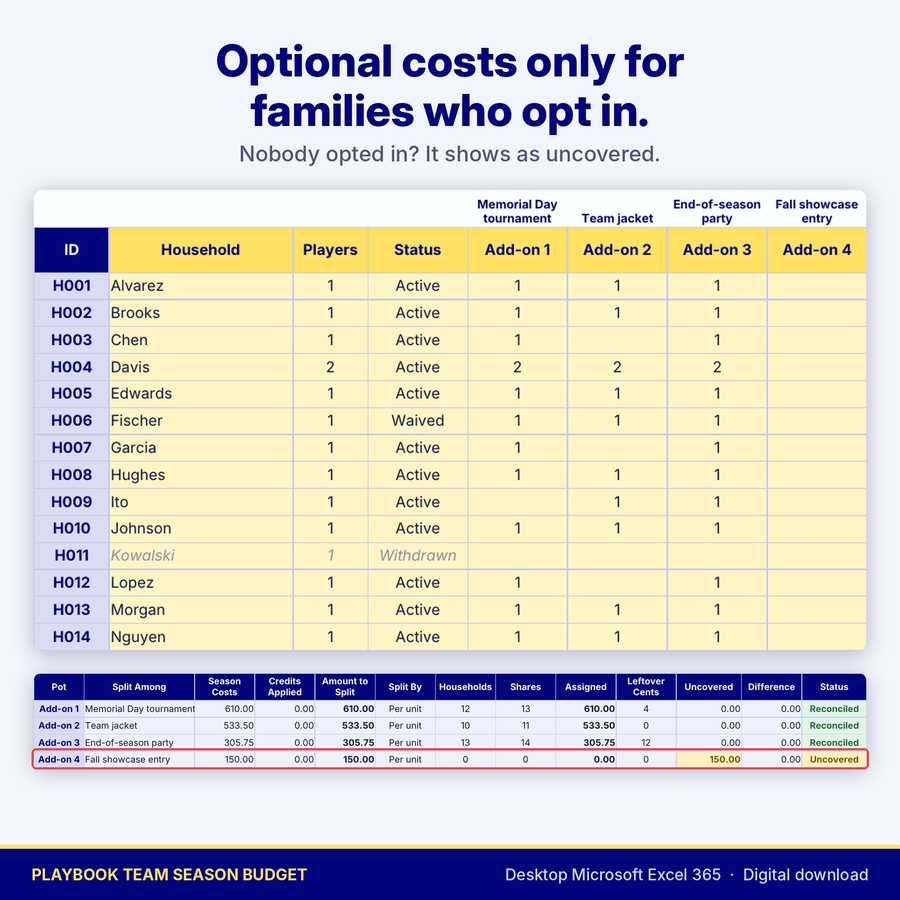
The same happens separately for each optional add-on. The Memorial Day tournament (610.00) is split across the 13 units opted in, the team jackets (533.50) across 11 jackets, and the end-of-season party across 14 places. A Fall showcase entry that nobody has signed up for yet shows as 150.00 uncovered, so you can find a sponsor, move it to shared costs or wait for sign-ups.
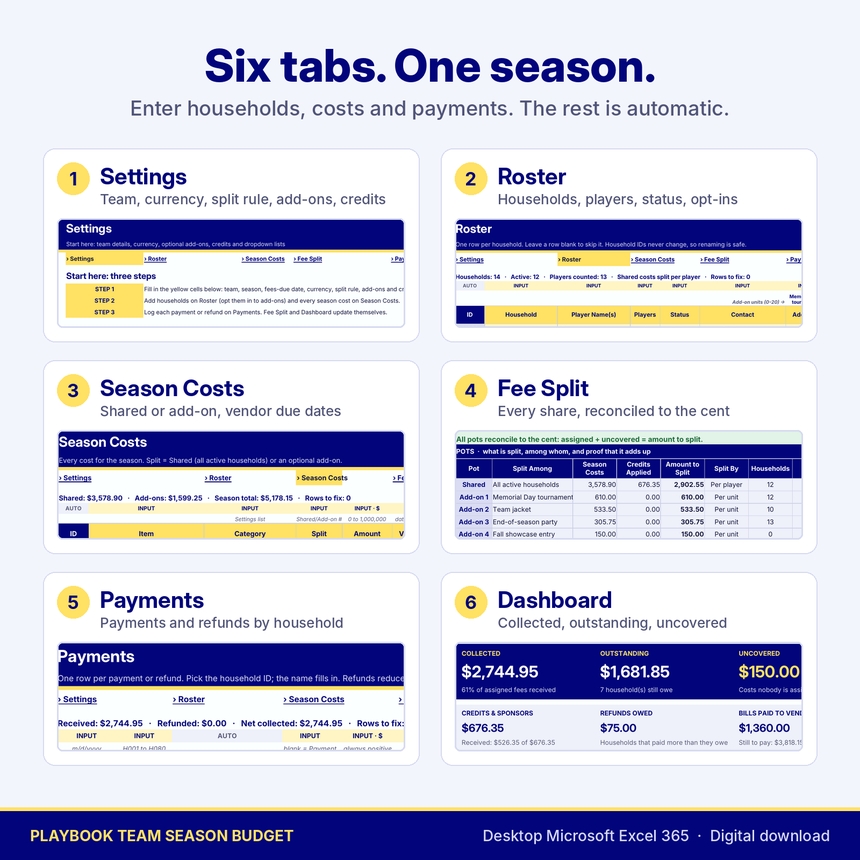
Six tabs, one season
- Settings: the start page with three setup steps, team name, season, fees-due date, currency label, the split rule (per player or per household), up to six optional add-ons, sponsor, fundraising and carryover credits, and editable dropdown lists.
- Roster: one row per household with player names, number of players, status (Active, Waived or Withdrawn), contact details and add-on opt-ins. Household IDs are fixed, so renaming a family never breaks a payment.
- Season Costs: every cost line marked Shared or Add-on 1 to 6, with a category, vendor due date and a Paid to Vendor flag.
- Fee Split: each household’s share of every pot, total due, paid, balance and payment status (Paid in full, Partly paid, Not paid, Overdue or Credit due), plus a pot table that shows leftover cents, uncovered amounts and a zero difference.
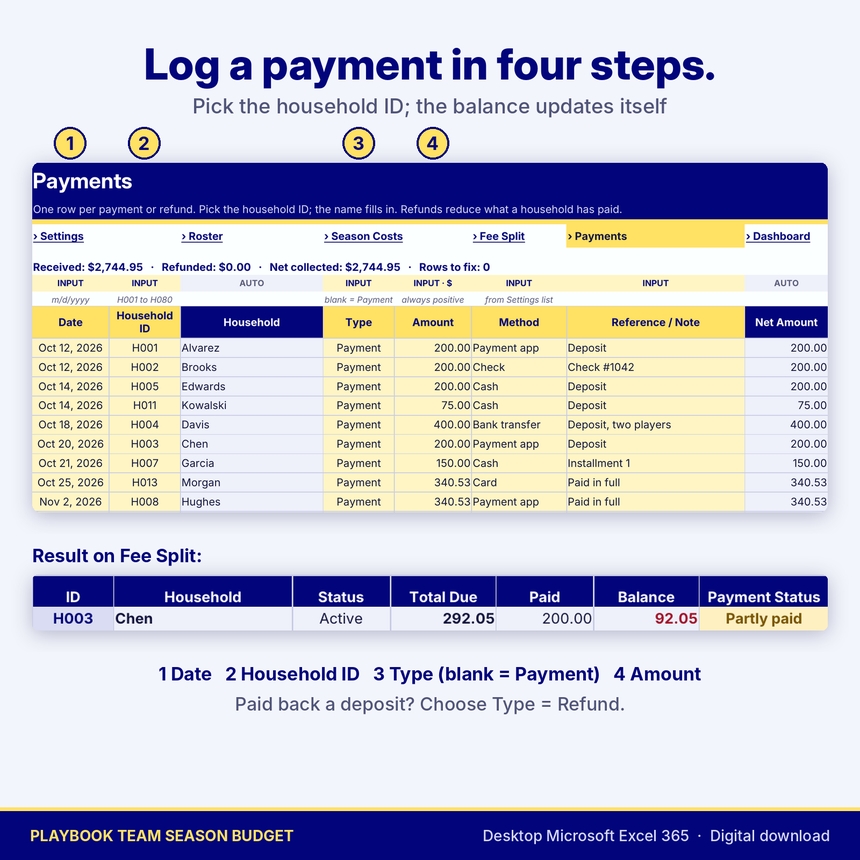
- Payments: a payment and refund log by household ID. The family name fills in automatically.
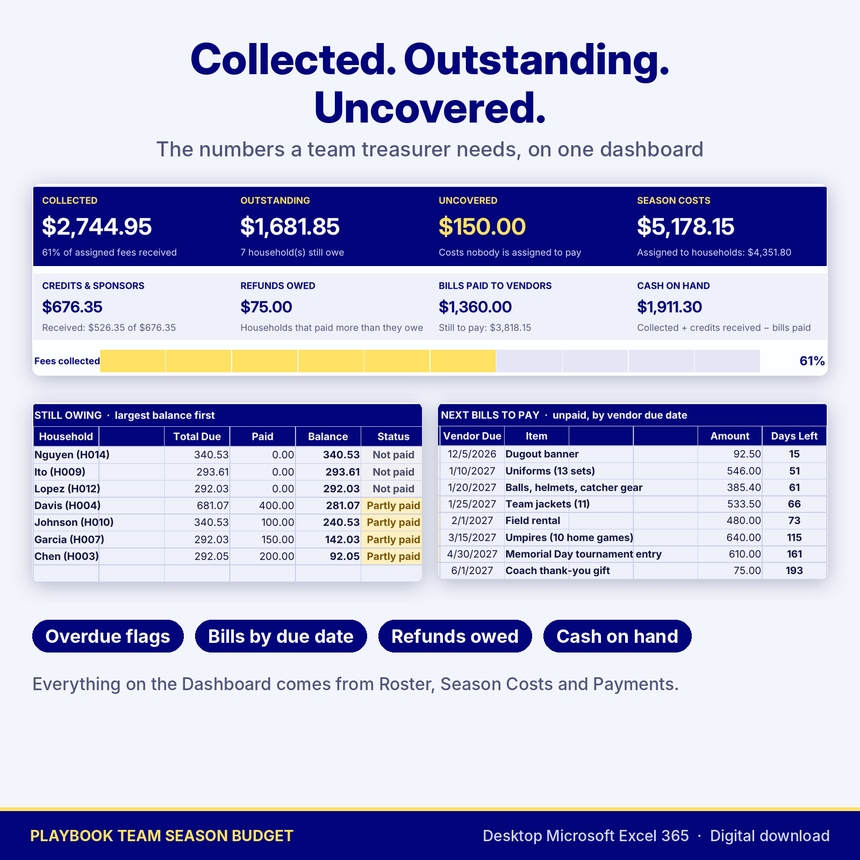
- Dashboard: collected, outstanding, uncovered and season costs, then credits and sponsors, refunds owed, bills paid to vendors and cash on hand. A collection progress bar, a donut chart of where the season costs stand, costs by category, a still-owing list sorted by balance and the next unpaid vendor bills.
How to use it
1. Set up the season. On Settings, enter the team name, the date fees are due and your currency label, choose per player or per household, and name any optional add-ons. Add sponsor money or last season’s balance as credits.
2. Add households and costs. List each family on Roster, set its status and enter add-on units (1 for one jacket, 2 for two). List every cost on Season Costs as Shared or as an add-on.
3. Log payments. For each payment, enter the date, pick the household ID, and enter the amount. Leave the type blank for a payment or choose Refund. Fee Split and the Dashboard update automatically.
Built to catch mistakes
Every input table has a Check column. A pasted text amount, a status typed with a stray space, a category that isn’t on the list, a payment for an unknown household or an amount with more than two decimals is flagged and left out of the totals. The Dashboard then says the totals are not final until it’s fixed. Formula cells are locked to prevent accidental typing (sheet protection has no password), while the yellow input cells stay editable. Dropdowns guide normal entry. The workbook was tested with 80 households, 150 cost lines and 1,000 payments, and every share matched an independent calculation.
Format, customization and download details
- For desktop Microsoft Excel 365. A macro-free .xlsx workbook with no add-ins or external links.
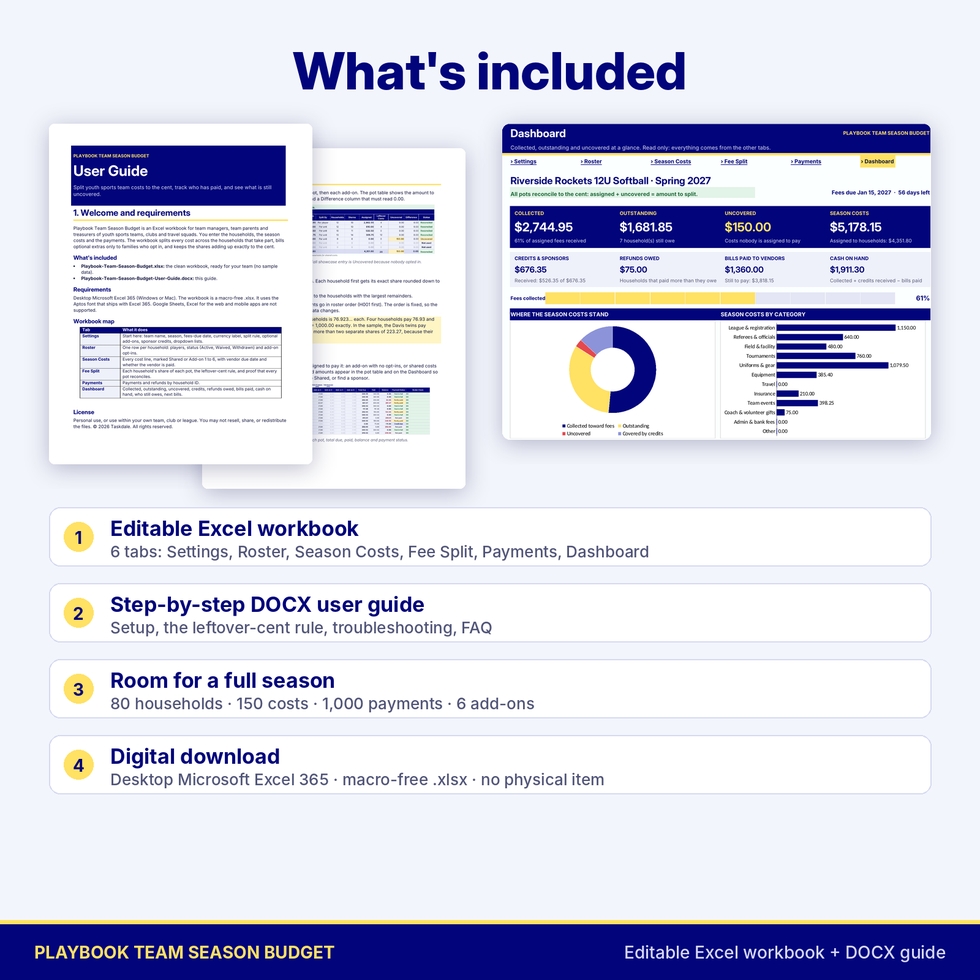
- Includes a six-page DOCX user guide covering setup, the leftover-cent rule, Dashboard definitions, printing, troubleshooting and FAQ.
- Capacity: 80 households, 150 cost lines, 1,000 payment rows, 6 add-ons, 8 credit lines, up to 9 players per household.
- One currency label setting, $ by default, shown on every money display. Changing it does not convert amounts.
- Rename add-ons, cost categories and payment methods. Print-ready page setup on every tab.
- Digital download. No physical item will ship. The workbook you receive is clean, and the filled workbook in the images is a demonstration.
- License: personal use, or use within your own team, club or league. You may not resell, share or redistribute the files.
Known limitations
The workbook splits and tracks team costs. It is not accounting software, does not collect payments online, does not send reminders, and does not handle tax or payroll. Payments apply to a household’s total balance, not to individual cost lines. Google Sheets, Excel for the web and mobile apps are not supported.
Frequently asked questions
How do I split team fees with siblings on the team?
Choose Per player on Settings and enter the number of players for each household. A family with two players pays two shares.
Why does one family pay a cent more than another?
Some totals don’t divide evenly into cents. Each share is rounded down, then the leftover cents go one at a time to the largest remainders, in roster order when the remainders are equal, so the shares always add up exactly.
Can only some families pay for a tournament or jackets?
Yes. Up to six optional add-ons are billed only to the households that opt in, by unit.
How do sponsors and fundraising money work?
Enter them as credits. They reduce shared costs before those costs are split. Credits marked as received count toward cash on hand.
What if a family leaves the team?
Set its status to Withdrawn. It stops sharing costs, and any money it paid shows as Credit due until you record a refund.
Does it work in Google Sheets?
This listing is for desktop Microsoft Excel 365 only.
Can I use it for more than one team?
Use one copy of the workbook per team and season, within your own team, club or league.

Reviews
There are no reviews yet.