



Civil Engineer Resume Template for Word
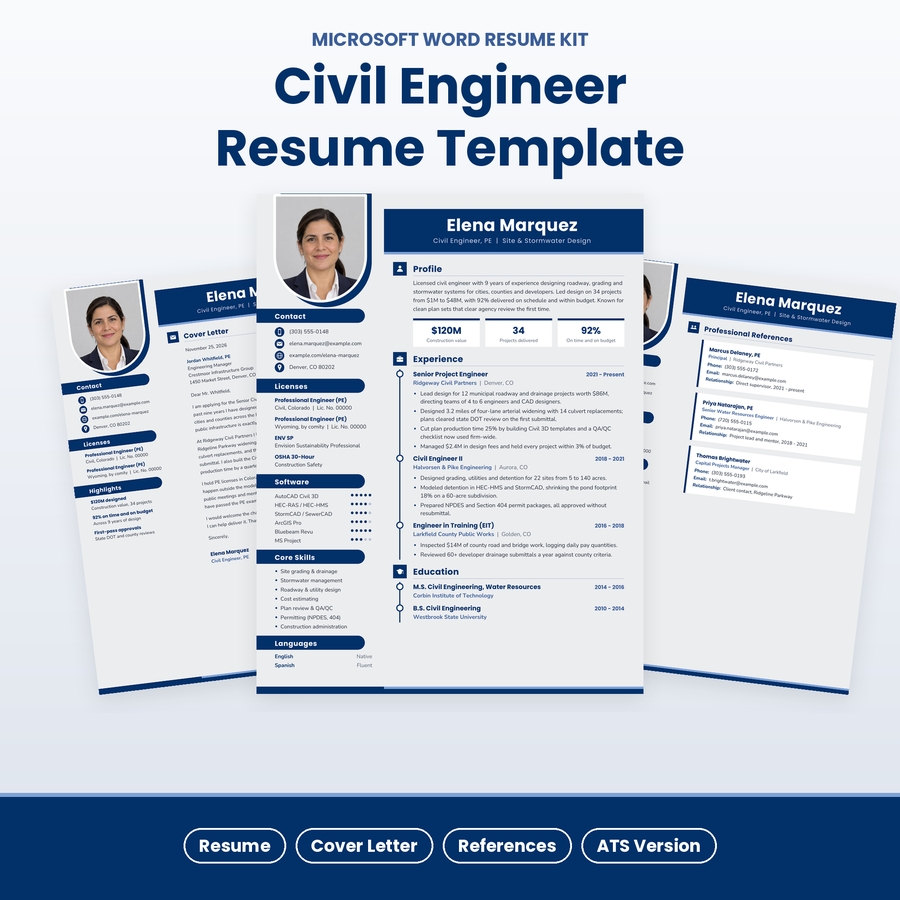
Bluebanner is a civil engineer resume template for Microsoft Word, made for engineers whose work is measured in miles, acres and construction dollars. A navy banner carries your name across a light grey page, a cut-out portrait sits top left, and a navy timeline runs down through your experience and education. Every file is a real .docx you can type straight into, in both US Letter and A4.
The sample resume is written for a licensed PE with nine years in roadway, grading and stormwater design, so you can see how a $48M arterial widening or a 60-acre detention design reads on the page. Swap in your own projects and numbers and you have a resume that talks the way hiring managers at consulting firms, public works departments and DOTs expect.
What is included in the kit
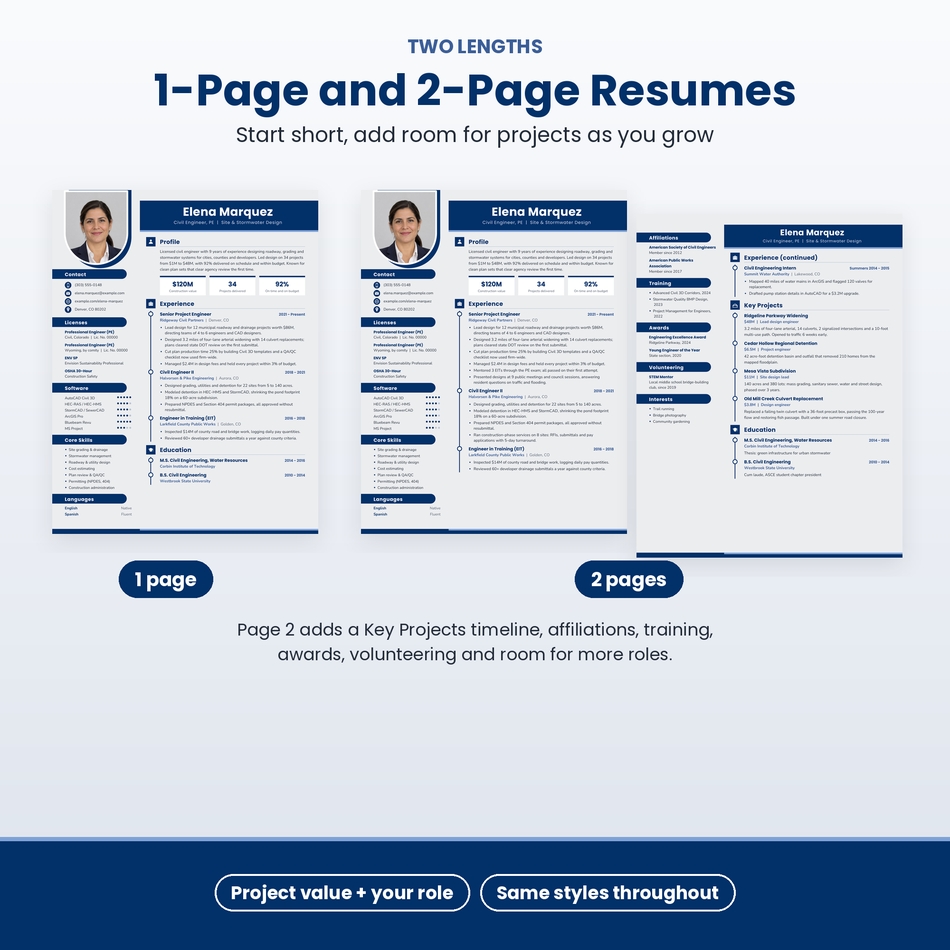
- Resume, 1 page: photo, contact details, a Licenses block for PE numbers, software ratings for tools like AutoCAD Civil 3D and HEC-RAS, core skills, languages, a profile, three result tiles, an experience timeline and education.
- Resume, 2 pages: extra room for more roles plus a Key Projects timeline (project value and your role), affiliations, training, awards, volunteering and interests.
- Matching cover letter: same banner and photo, a Highlights column for your three best numbers and a sample letter for a senior civil engineer role.
- Matching references page: three reference cards with role, company, phone, email and relationship.
- ATS plain resume: a single column version with no photo and no tables, using the same fonts and navy accent.
- Fonts folder: Poppins and Nunito (free SIL Open Font License) as a backup install.
- User guide (DOCX): step-by-step editing help plus a civil engineer resume cheat sheet.
That is 10 Word files in total: five designs, each in US Letter and A4, plus the guide as a separate download.
Why this civil engineer resume template works
Licensure up front
Recruiters scan civil engineering resumes for PE or EIT status before anything else. The Licenses block sits right under your contact details, with space for state and license number. The guide shows how to switch it to EIT and FE exam details if you are still working toward your PE.
Projects with scale
Result tiles under your profile show three numbers at a glance, such as construction value designed, projects delivered and on-time rate. The 2-page version adds a Key Projects timeline where each project gets its value, your role and one line on scope and outcome.
Software that recruiters search for
A software section with five-dot ratings lists AutoCAD Civil 3D, HEC-RAS and HEC-HMS, StormCAD, ArcGIS Pro, Bluebeam Revu and MS Project in the sample. Change the names and recolor the dots in seconds.
Features that make editing easy
- Fonts embedded: Poppins and Nunito travel inside each file, so your resume looks the same on any computer with Word.
- No floating text boxes: the layout is built from table cells, so text stays put when you edit and ATS software can read it.
- Real Word styles: Title, Heading 1, Heading 2, Job Meta, Body Text and List Bullet. Change one style and every matching line updates.
- Photo that keeps its shape: right-click and choose Change Picture. The cut-out frame and white edge stay in place.
- Recolor in Word: the banner, icon squares, pills, timeline dots and grey page are Word shading or shapes, not flat images.
- Stays on one page: the 1-page resume was tested with three extra bullets and a long job title in both paper sizes.
How it works
- Download the kit zip and the user guide after checkout, then unzip the kit.
- Open the US-Letter or A4 folder and open the 1-page or 2-page resume in Microsoft Word.
- Type over the sample text, swap in your photo or delete it, and update your licenses and software.
- Copy your header details into the cover letter and references page.
- Save as PDF to send, or upload the ATS version to online job portals.
File formats and software requirements
All files are Microsoft Word .docx documents for Word 2016 or newer and Microsoft 365, on Windows and Mac. Sizes: US Letter (8.5 x 11 in) and A4 (210 x 297 mm). The files also open in Google Docs and Apple Pages with minor layout differences, so for the cleanest result, edit in Word and export your PDF from there. No Canva account is needed.
Customization
Change the navy to your own color with Shading and Shape Fill, switch fonts through the Styles pane, add a role by inserting a timeline row, or remove the photo if you are applying to employers who prefer resumes without one. The user guide covers each of these with clear steps.
Who this civil engineer resume is for
- Site and land development engineers moving to a larger firm
- Transportation and roadway engineers applying to consultants or state DOTs
- Water resources and stormwater engineers
- Municipal and public works engineers
- EITs and recent graduates applying for their first civil engineering role
- PEs stepping up to project manager or senior project engineer
Digital download
This is an instant digital download. Nothing ships. After checkout you get two files: the Bluebanner Civil Engineer Resume Kit (zip) and the user guide (DOCX). The sample person, companies and schools are fictional, and the sample portrait was generated for this template. License: personal use for your own job applications. Please do not resell or share the files.
FAQ
Is this civil engineer resume template editable in Word?
Yes. Every file is an editable .docx for Microsoft Word. Click the sample text and type your own.
I am an EIT, not a PE. Will it still work?
Yes. Rename the license entries to EIT and FE exam passed. The guide includes a sample EIT profile.
Is it ATS friendly?
The main design uses normal text in table cells with no text boxes, and the kit includes a single column ATS version for strict online portals.
Can I remove the photo?
Yes. Delete the photo and the navy shape behind it and the layout holds. The ATS version has no photo at all.
Do I need to install fonts?
No. The fonts are embedded in every file. A Fonts folder is included as a backup.
Does it come in A4?
Yes. Every file comes in US Letter and A4.
Can I open it in Google Docs or Pages?
Yes, with minor layout differences. For the best result, edit in Word and save your PDF from there.
Reviews
There are no reviews yet.