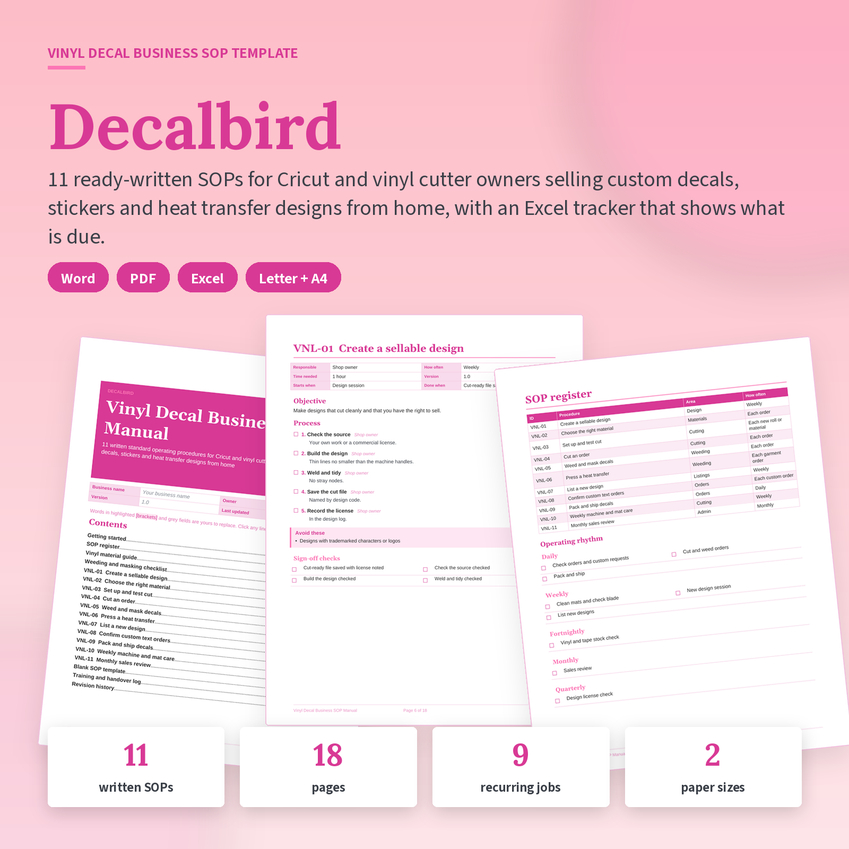


A vinyl decal business SOP template written for Cricut and vinyl cutter owners selling custom decals, stickers and heat transfer designs from home
The cut takes 90 seconds. The weeding, the transfer tape, the wrong vinyl and the reprint are what eat your evening. This vinyl decal business SOP template gives you 11 procedures written out step by step, so you edit instead of starting from a blank page.
Decal shops lose money on small mistakes: permanent vinyl sent for a wall, an iron-on design cut without mirroring, a dull blade that tears letters, a design you never had the right to sell. These SOPs set a material guide, a test cut routine, weeding and masking steps, flat packing and a clear process for custom text orders, so a helper can cut and pack to the same standard.
Built for
- Cricut, Silhouette and other cutter owners selling decals online or locally
- Shops offering custom names, car decals and shirt transfers
- Makers training a helper to weed and pack
Files included
- Editable Word manual in US Letter and A4
- Print-ready PDF
- Blank SOP template (Word)
- Excel SOP tracker with dashboard
- User guide (Word)
Procedures inside
11 written SOPs, grouped by area:
- Design: Create a sellable design
- Materials: Choose the right material
- Cutting: Set up and test cut, cut an order, weekly machine and mat care
- Weeding: Weed and mask decals, press a heat transfer
- Listings: List a new design
- Orders: Confirm custom text orders, pack and ship decals
- Admin: Monthly sales review
Each one lists who does it, how often, the time it takes, what starts it and what done looks like, followed by numbered steps with tick boxes, common mistakes and a final check.
Also included
A business snapshot, the SOP index, a daily, weekly and monthly rhythm, vinyl material guide, weeding and masking checklist, a blank SOP template, a training log and a revision history.
The Excel SOP tracker
- All 11 SOPs listed with automatic review dates and status
- 9 recurring jobs with next due dates and overdue flags
- A dashboard with a health score, status counts and charts
- Settings for your areas, people, review cycle and currency
Your first hour
- Open the manual in your paper size.
- Read the SOPs you use most and change the [bracketed] details.
- Use the tick boxes the first few times through.
Compatibility
- Word .docx for Microsoft Word 2016 or newer, Microsoft 365 or LibreOffice
- PDF for printing or reading on a tablet
- Excel .xlsx for Excel 2016 or newer or LibreOffice Calc
- Fonts: Georgia and Arial, already on Windows and Mac
Who uses it and how
- A seller stops reprinting car decals after switching to the material guide and a 7-day cure note.
- A helper weeds and masks 50 name decals in an evening using the weeding checklist.
- An owner checks every design source and removes 12 listings that used images she had no license for.
Digital download
Instant download with unlimited re-downloads from your Taskdale account. Nothing is shipped. For use in your own business. Please do not resell or share the files.
Frequently asked questions
Does it work with any cutting machine?
Yes. The steps cover settings, test cuts and blade care for any desktop cutter.
Does it cover heat transfer vinyl?
Yes. There are steps for mirroring, pressing and care cards for iron-on and heat press work.
Can I edit it?
Yes, every page is editable in Microsoft Word, and the tracker in Excel.
Does it work in Google Docs?
You can upload the files to Google Drive and open them there. Word gives the best results because the tick boxes and click-to-type fields are Word features.
Which paper sizes?
US Letter and A4 are both included.
Reviews
There are no reviews yet.