



Solar project tracker for installers: every project from lead to PTO in one Excel file
The Sunyard Solar Project Pipeline Tracker is a solar project tracker built for residential installers and solar dealers. You type the date each step is finished. The workbook works out the stage, counts the days the project has waited, compares that to your target and tells you the next action. Overdue permits and utility applications stand out on an Action Board, so Monday’s chase list writes itself.
It is a solar installer spreadsheet you own. There is no monthly fee, no login and no seat count. Your data stays on your computer.
What this solar installer spreadsheet does
A project row holds the customer, utility, permit office (AHJ), sales rep, financing, panel count and watts, contract price, adders and thirteen milestone dates. From those dates the tracker sets one of eleven stages, plus On hold, Canceled and Lost. A project with permit approval but no interconnection approval stays in Permit & IX until the utility answers, then moves to Ready to schedule by itself.
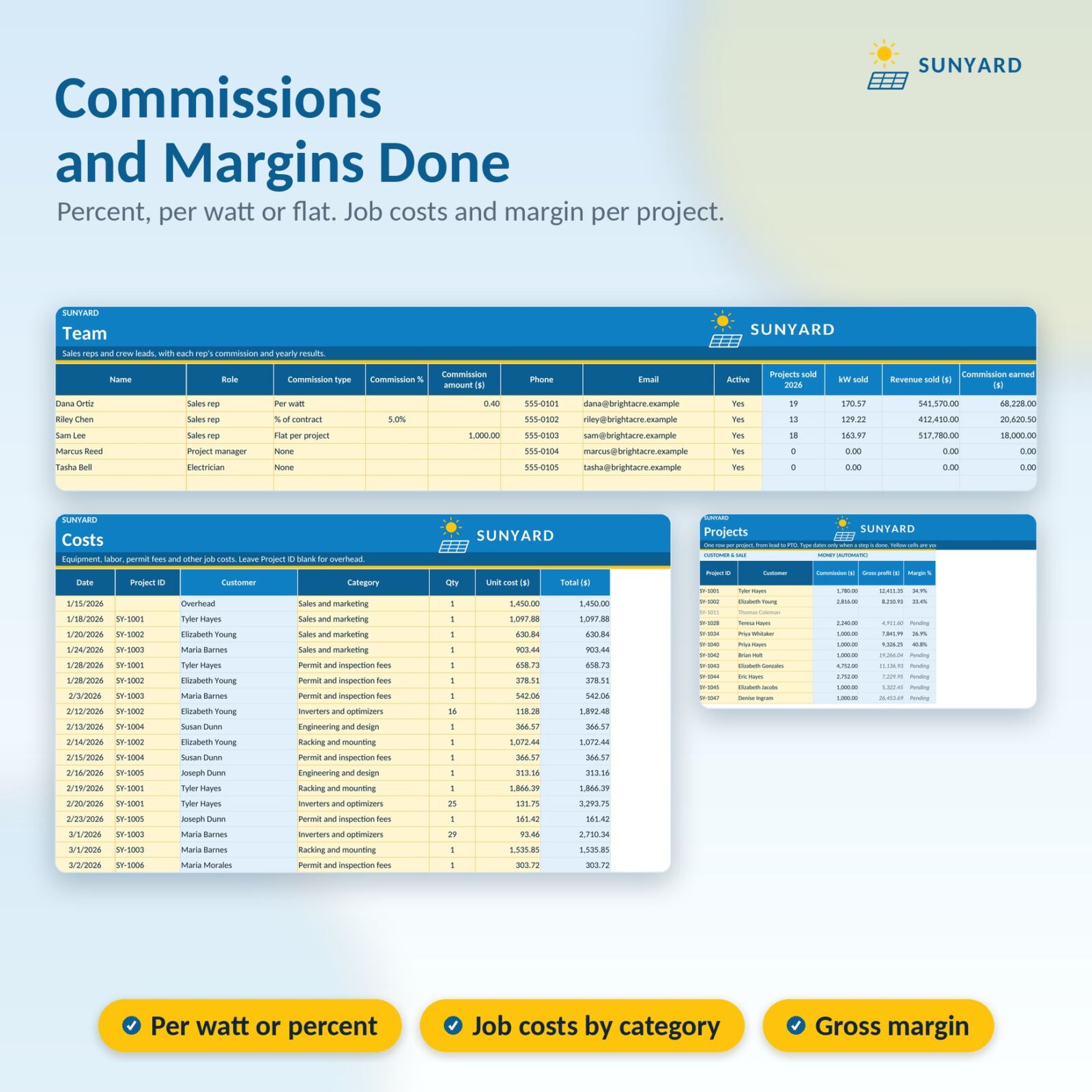
Money sits on the same row. Lender payments (M1, M2, M3), deposits and customer payments roll up into Collected and Balance due. Dealer fees, job costs and the sales commission come off the contract to give gross profit and margin per project. On a loan job you enter each lender payment at its full amount, before the fee is held back, and the fee comes off profit once.
Who it is for
Owners, operations managers and project coordinators at solar companies with 1 to 25 people and roughly 5 to 60 installs a month. It suits a six-person installer that reviews stuck permits every Monday, a dealer that wants to see lender funding gaps, and a crew lead who needs a one-page project summary before a customer call.
Solar permit and interconnection tracker, built in
- Two approval threads. Permit submitted and approved, interconnection (IX) submitted and approved. The stage waits for both.
- Days in stage and target days. Defaults such as 30 days for Permit & IX and 21 for Awaiting PTO. Change them to match your area.
- Alerts that say something. “Overdue 15 days”, “Install in 7 days”, “Install date passed” or “Check date order”.
- Utility and AHJ turnaround. Open applications and average approval days for each utility and each permit office, so you see who is slow.
Solar sales pipeline tracker and PTO tracker for solar installers
- Eleven stages from Lead to Complete (PTO), colored so a full list reads at a glance.
- Proposal close rate, lead source table and kW sold by financing type.
- Price per watt on every project and on the dashboard.
- Sold to PTO days, with average days per phase against your targets: survey, design, permit, interconnection, install wait, inspection and PTO wait.
- Upcoming installs for the next eight booked dates.
Solar job costing spreadsheet and commissions
- Log job costs by category: modules, inverters and optimizers, racking, battery, electrical and BOS, crew labor, permit fees and more.
- Overhead lines with no Project ID stay out of project profit.
- Commission by percent of contract, per watt or flat per project, set for each rep on the Team sheet.
- Gross profit and margin per project, after dealer fee and commission. Margin waits until the install is complete, so a job with equipment costs still to come never shows a 70% margin.
What is included
- Sunyard-Solar-Project-Pipeline-Tracker.xlsx: 10 sheets (Start Here, Dashboard, Projects, Payments, Costs, Action Board, Project Sheet, Team, Settings, Chart Data). Room for 500 projects, 1,500 payments, 2,000 cost lines and 25 team members.
- User guide (DOCX): setup in 10 minutes, every sheet explained, troubleshooting and FAQ.
The dashboard has 12 tiles and 5 charts. Pick a year and a month to see kW sold against kW installed, revenue against cash collected, pipeline by stage, days per phase against target and financing mix. The Project Sheet prints one project on a single US Letter page with its timeline, payments, costs and profit.
How it works
- Type your currency symbol and business name on Settings. Every money heading follows it.
- List your utilities, permit offices and lead sources, then add your reps on Team.
- Add one row per project on Projects with a Project ID such as SY-1001.
- Enter dates only when a step is done. Leave Status blank unless a project is On hold, Canceled or Lost.
- Log payments and costs, then open the Action Board each morning.
Solar project management template Excel: real situations
- A coordinator filters Projects by utility and finds three interconnection applications past 40 days.
- An owner compares kW sold with kW installed before hiring a second crew.
- A dealer checks which loan projects still wait on Lender M2.
- A project manager prints the Project Sheet and keeps it open during a customer call.
Customize it
Yellow cells are yours. Rename utilities, lead sources, financing types, cost categories and roles and every dropdown updates. Edit the target days and the next-action wording for each stage. Formula cells are locked without a password, and sorting and filtering stay available.
File formats, software and download
Made for Microsoft Excel 2016 or later (Windows and Mac), including Excel for Microsoft 365. The workbook has no macros and uses standard functions only. Google Sheets is not tested. This is a digital download: you receive the files right after purchase. Nothing is shipped.
Frequently asked questions
Does this solar project tracker work in Excel for Mac?
It is made for Microsoft Excel 2016 or later on Windows and Mac.
Can I use it in Google Sheets?
Google Sheets is not tested. The workbook is made for Excel.
What are PTO and IX?
PTO is Permission to Operate from the utility. IX is interconnection, the application that connects the system to the grid.
Does it track leases and PPAs?
Yes. Choose Lease or PPA as the financing type and enter what you are paid as the contract price.
Can I change the target days?
Yes. Every stage target is editable on Settings.
Does it calculate incentives or tax credits?
No. It follows your projects, dates and money only. Incentive and tax rules change, so check them with your tax professional.
How many projects does it hold?
500 projects, 1,500 payments, 2,000 cost lines and 25 team members.
Is there a monthly fee?
No. You pay once and keep the file.
License
One business license. Do not resell or share the files. The stages, alerts and profit figures are estimates based on what you enter, not financial, tax, legal or compliance advice, and permit and utility rules differ by area. © Taskdale.

Reviews
There are no reviews yet.