



Solar Payback Calculator Spreadsheet for Excel: Size the System, Show the Savings, Print the Proposal
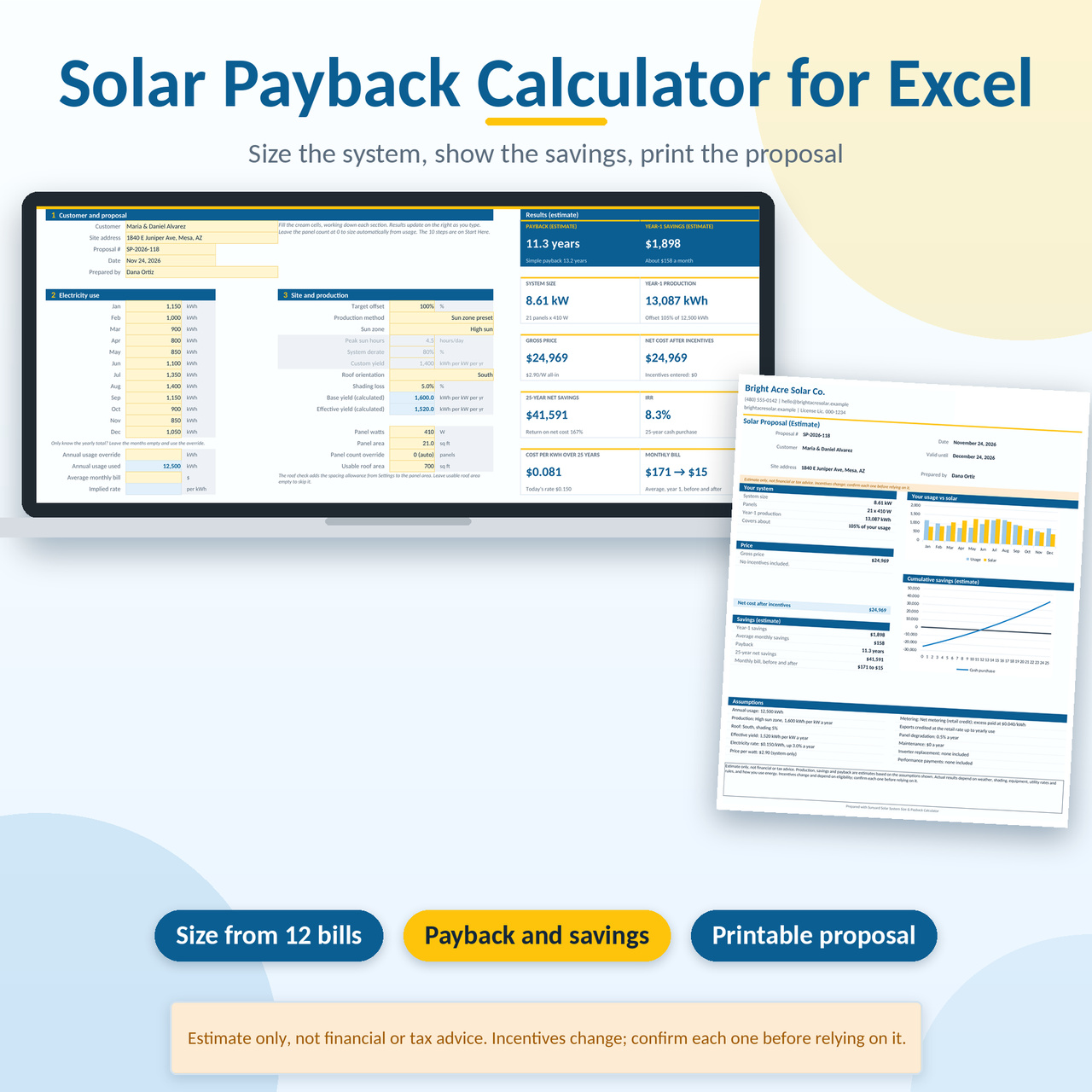
The Sunyard Solar System Size & Payback Calculator is a solar payback calculator for Excel that turns 12 months of electric bills into a system size, a price, a 25-year cash flow and a one-page customer proposal. Type the monthly kWh, your price per watt and your utility rates. The workbook sizes the array to your offset target, rounds up to whole panels, checks the roof area and estimates how many years the system takes to pay for itself.
Take a home that uses 12,500 kWh a year in a good-sun zone with a south roof and 5% shading. With 410 W panels the calculator lands on 23 panels and 9.43 kW. At $2.90 a watt that is a $27,347 gross price, and with the default utility inputs the estimate is about 11 years to payback. You see every step behind it.
Who this solar system size calculator is for
It is made for solar sales reps, small installer owners and energy consultants who sit with a homeowner, or run a phone consult, and need a fast and honest first estimate. Homeowners checking a quote can use it too. This solar ROI calculator spreadsheet covers the first estimate without a monthly fee.
What you get
- The solar payback calculator Excel workbook with 10 sheets: Start Here, Calculator, Monthly Energy, Cash Flow, Options, Proposal, Proposal Log, Production Factors, Settings and a locked helper sheet.
- A user guide (DOCX) with setup, worked examples, customizing, troubleshooting and FAQ.
- Locked formulas and open input cells. No macros and no password.
How the solar savings calculator works
- Open Settings and enter your currency symbol and business details.
- Check Production Factors: sun zones, roof orientation factors and the monthly production shape. Every value is editable.
- On the Calculator, enter the customer and 12 months of kWh, or just the yearly total.
- Choose the production method, roof orientation, shading and panel size. Leave the panel count at 0 to size automatically.
- Enter your price per watt, battery and adders, then the electricity rate and metering type.
- Read the results and the checks list, compare options, and print the proposal.
Estimate only, not financial or tax advice. Incentives change; confirm each one before relying on it.
Solar system size calculator from 12 monthly bills
Think of it as a solar panel calculator that starts from real bills. Enter each month’s kWh and a target offset such as 100%. The workbook divides yearly usage by the effective yield, rounds up to whole panels and shows the actual kW, year-1 production and the offset you really get. Type a panel count to use a designed system instead. A usable roof area and a spacing allowance give you a “Fits” or “Short by 120 sq ft” answer before you promise a layout.
Three ways to estimate production
Pick a sun zone preset (four zones plus two blank rows for your own), peak sun hours with a derate, or a custom kWh per kW from PVWatts or your design software. Roof orientation and shading loss adjust the yield, and rows the chosen method does not use turn gray. The presets are rough starting points, and the workbook says so next to the table.
Solar net metering savings calculator with net billing
How your utility credits exports changes the payback by years. Choose net metering, where yearly excess is paid at a true-up rate, or net billing, where you set an export credit rate and the share of solar used in the home as it is made. A battery raises that self-use share. Rate increases apply to the retail rate only, which keeps the estimate cautious.
25-year cash flow, payback, IRR and cost per kWh
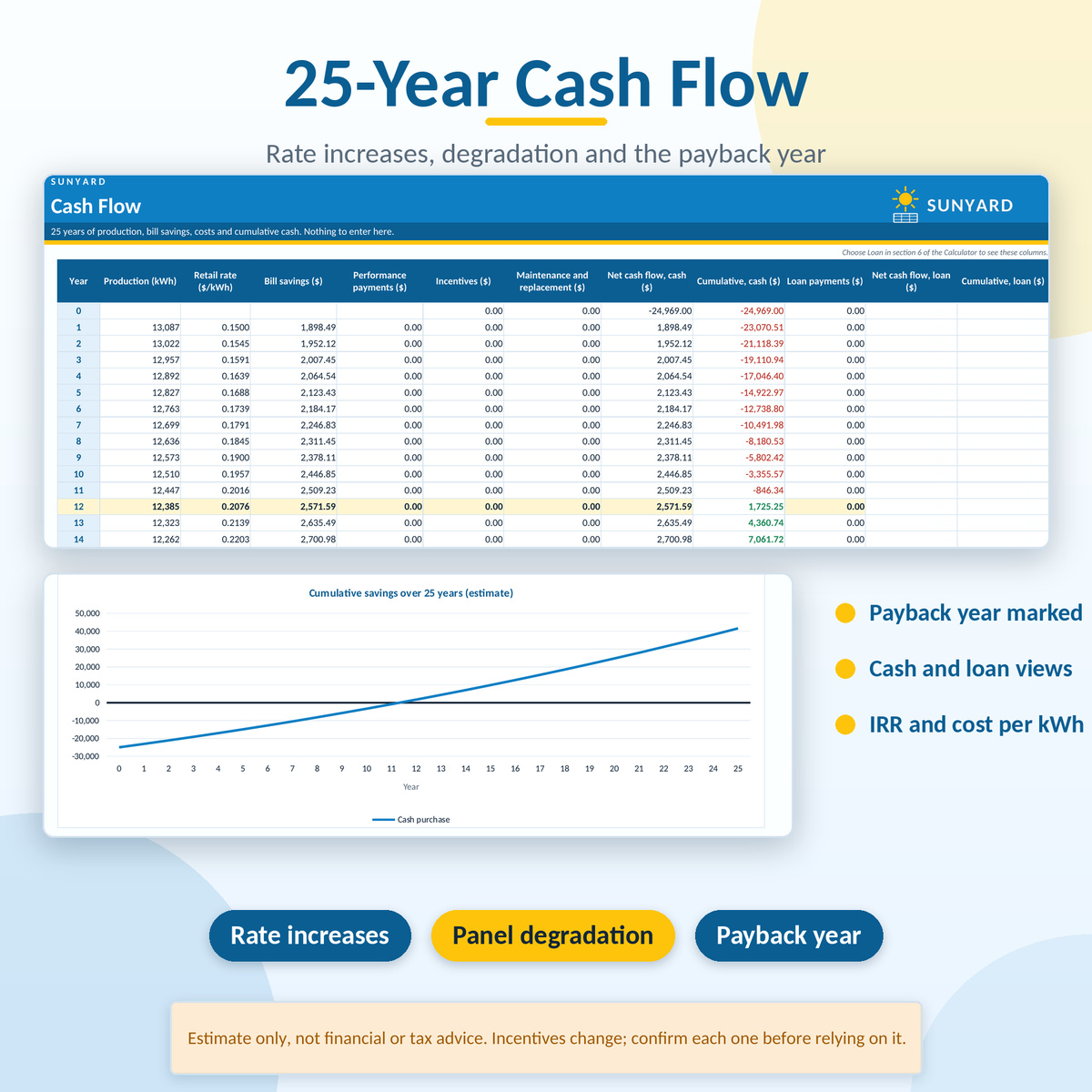
The Cash Flow sheet runs 25 years with a yearly rate increase, panel degradation, maintenance, an optional inverter replacement and optional performance payments per MWh. The payback year is found to a fraction and highlighted, and a chart shows cumulative savings crossing zero. You also get simple payback, IRR, cost per kWh over 25 years and the monthly bill before and after solar.
Incentives table that ships empty
Incentives change, so none are built in. The table holds five rows. Each one takes a name, a type (percent of gross price, fixed amount or per watt) and a timing (at install or in year 1). Add only the incentives you have confirmed for the customer. That way you never present an expired credit as fact.
Loan compare and good, better, best options
Switch to Loan and enter the down payment, APR and term. The workbook shows the monthly payment next to the monthly savings, and the new bill plus the loan against the old bill. The Options sheet compares three setups side by side, with the quickest payback and the highest 25-year savings highlighted.
Printable solar proposal template for Excel
The Proposal sheet fits one page on US Letter or A4. It prints your business name and license number, the customer and site, system size, price, incentives, savings, two charts, an assumptions box and your disclaimer. The Proposal Log keeps up to 300 proposals with status, win rate, average kW won and average payback won.
Use cases
- A kitchen-table appointment: size the system from the customer’s bills while you talk.
- A phone consult: run the numbers, then send the proposal as a PDF.
- Checking whether a battery is worth it under net billing, using Options.
Customize it to your business
Change the currency symbol once on Settings and every label, tile and proposal total follows. Edit the sun zones, orientation factors, the monthly production shape, the proposal validity, the roof spacing allowance and the disclaimer wording. The defaults are placeholders, so use your own pricing.
File format, requirements and digital download
You receive this solar payback calculator Excel workbook (.xlsx) and a .docx user guide by instant digital download. The workbook is made for Microsoft Excel 2016 or later (Windows and Mac), including Excel for Microsoft 365. Not tested in Google Sheets. Grid-tied systems only. License: one business, no resale or sharing.
Frequently asked questions
How do I calculate solar payback?
Divide the net cost by the yearly savings for a simple payback. The workbook goes further and finds the year when cumulative cash turns positive after rate increases and degradation.
How many solar panels do I need for my usage?
Enter 12 months of kWh and an offset target. The workbook divides by the effective yield and rounds up to whole panels.
Does it include tax credits?
No. The incentives table ships empty. Enter only incentives you have confirmed, because rules change.
Does it work for net billing?
Yes. Choose net billing and set the export credit rate and the self-use share.
Does it work on a Mac?
It is made for Microsoft Excel 2016 or later (Windows and Mac).
Can I use Google Sheets?
It is made for Excel and is not tested in Google Sheets.
Is it financial advice?
No. Every figure is an estimate built from the inputs you type.
Can I print a proposal?
Yes. The Proposal sheet prints on one page, or saves as a PDF.
Reviews
There are no reviews yet.