



Cabinet Cut List Calculator for Excel: Type the Cabinets, Get the Parts
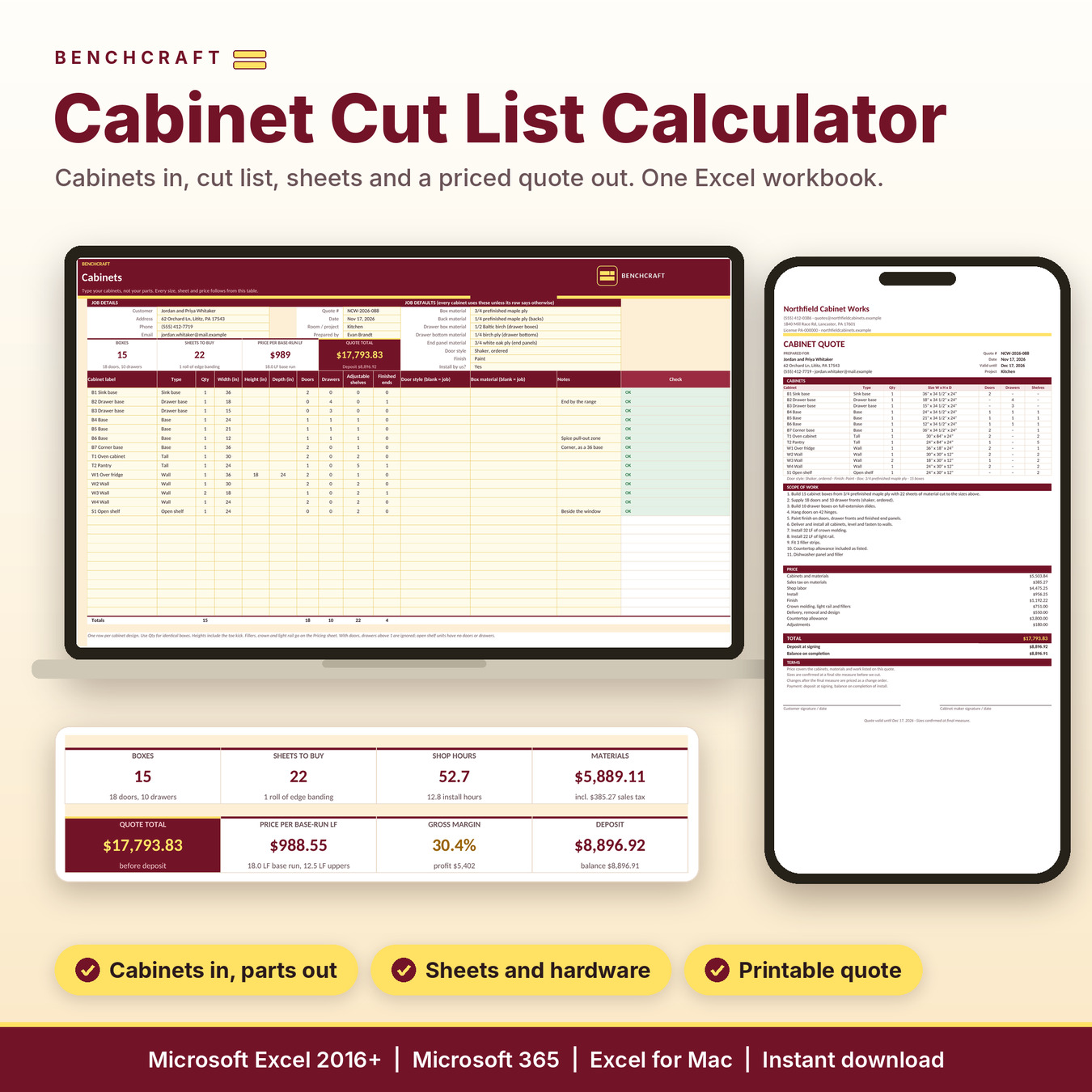
This cabinet cut list calculator turns a list of cabinets into a full cut list, a buy list and a priced cabinet quote. You type each cabinet once: type, width, doors, drawers, shelves and finished ends. Benchcraft writes every part from construction rules you can edit, counts the sheets of plywood, edge banding and hardware, and builds the price from your own shop rates. No monthly software, no macros, one Excel workbook.
Who It Is For
It is built for a cabinet maker in a one to five person shop, a finish carpenter or a woodworker who builds frameless, full overlay boxes from 3/4 in sheet goods and quotes kitchens, vanities, laundry rooms, pantries and built-ins. If you now work out parts on a notepad, count sheets by eye and price “per foot” from memory, this replaces that with numbers you can check.
Main Benefits
- No hand-figured parts. A 36 in sink base with two doors gets its sides, bottom, stretchers, back, toe kick and two doors at 30 3/8 in by 17 7/8 in without a calculator.
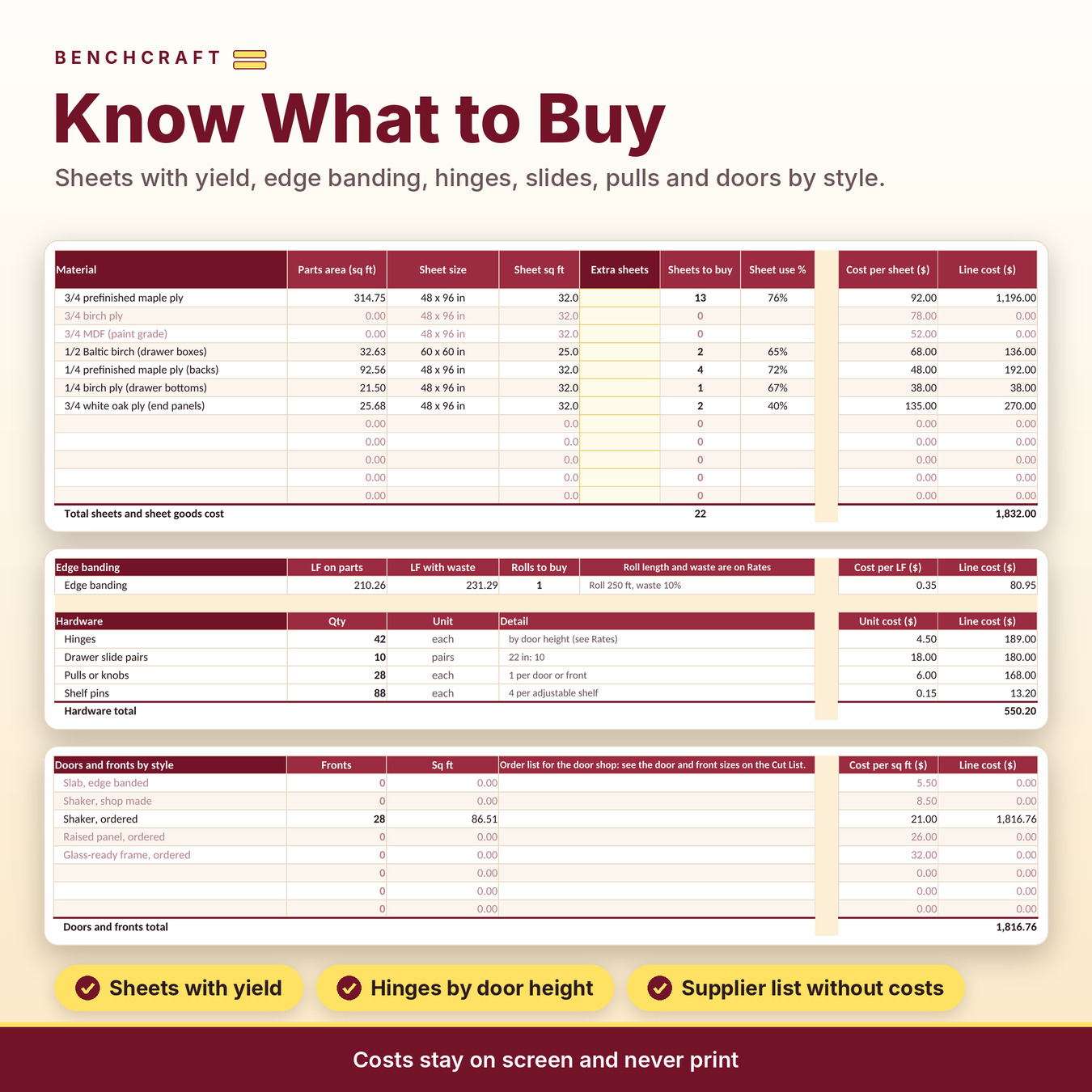
- Buy the right amount. Sheets per material with a yield factor, edge banding feet and rolls, hinges by door height, slides by cabinet depth, pulls and shelf pins.
- Quote with real hours. Shop hours by box type plus drawers, shelves, ends and fronts, install hours, finish by square foot, crown, light rail, fillers, delivery and a countertop allowance.
- Check the price before you send it. Price per linear foot, price per box and a profit check that turns red, amber or green.
Cabinet Cut List Spreadsheet Features
- 25 cabinet rows with a quantity for each, so a 14-box kitchen takes 14 lines or fewer.
- Seven cabinet types with editable default heights, depths and hours: base, sink base, drawer base, wall, tall, vanity and open shelf.
- Frameless full overlay construction with an editable toe kick, stretchers, hanging rail, reveals, gaps, shelf clearance and end panel depth.
- Doors, a shallow top drawer over doors, and drawer stacks with equal lower fronts.
- Drawer boxes sized for side-mount slides, with the slide length picked from the cabinet depth.
- Sizes in 1/16 in fractions or decimals on every printed list.
- A list of 12 materials with real thickness and sheet size, and a “part longer than the sheet” check.
- Door styles priced per square foot with shop hours per front, and a finish price per square foot.
- A cabinet door size calculator built in: the reveal and the gap set every door and front.
- Itemized or total-only customer quote, deposit, balance and a minimum job charge.
- A quote log for up to 300 quotes with win rate and average price per linear foot.
- One currency setting, formulas locked with no password, no macros.
What Is Included
- The Excel workbook with ten sheets: Start Here, Cabinets, Cut List, Materials, Pricing, Quote, Quote Log, Rates, Settings and Parts.
- A DOCX user guide with screenshots, the construction rules, a worked kitchen example, troubleshooting and a FAQ.
How It Works
Set up Rates once with your materials, door styles, hardware prices and labor rates. For each job, fill in the customer and job defaults on Cabinets, then add one row per cabinet. The Check column flags anything that needs fixing. Print the Cut List by cabinet for assembly or by material for the saw, print the Materials order list for your supplier (your costs never print), add crown, fillers and delivery on Pricing, and print or save the quote as a PDF.
The worked example in the guide is a small kitchen of seven boxes. It produces 57 part rows, 12 sheets of material, 18 hinges, 5 pairs of slides and a quote total of $6,836.20 with the default rates.
File Format and Software Requirements
An .xlsx workbook made for Microsoft Excel 2016 or later, Excel for Microsoft 365 and Excel for Mac. It uses standard functions and no macros. The guide is a .docx file you can open in Word. The workbook is not made for Google Sheets or Numbers.
Customize It to Your Shop
Type the thickness you really buy (23/32 in, for example) and every part adjusts. Change the toe kick height, the stretcher width, the reveal at each outside edge, the gap between fronts, the drawer box clearances and the slide lengths you stock. Add your own materials and door styles in the free slots. Set your labor rates, markup, sales tax, deposit and minimum job charge. Add your business details and five lines of terms for the quote.
Digital Download Information
This is an instant digital download. After purchase you get the Excel workbook and the DOCX guide. Nothing is shipped. License: one purchase covers one business, for your own quotes and jobs. No resale, sharing or redistribution.
Use Cases
- Quoting a 14-box kitchen from a site measure, with crown, light rail and a countertop allowance.
- Pricing a bathroom vanity with a top drawer over two doors.
- Planning a pantry and a laundry room built-in with tall cabinets and finished end panels.
- Seeing that a small open shelf job lands on the minimum job charge.
- Printing a cut list by material for the panel saw.
- Sending a supplier a sheet and hardware list without your costs.
Frequently Asked Questions
How many sheets of plywood for kitchen cabinets do I need?
The workbook adds up the area of every part by material and divides by the usable share of a sheet (80% yield by default), then rounds up. The kitchen in the guide needs 12 sheets across five materials.
Does it do face frame cabinets?
Not directly. It models frameless boxes. For a face frame job, use the box parts it gives you and add the face frame stock as a custom line.
Does it make a cutting layout?
No. Sheet counts use the parts area and a yield factor, not a nesting layout.
Does it work on a Mac?
It is made for Microsoft Excel 2016 or later on Windows and Mac.
Does it work in Google Sheets?
It is made for Microsoft Excel. Google Sheets has not been tested, so it is not claimed.
Can I use my own plywood thickness?
Yes. Enter the actual thickness for each material and every size follows.
Can I change the currency?
Yes. Type any symbol on Settings and every money value follows it.
Is it a subscription?
No. You pay once and download the files.
This workbook is a cutting aid. Check every size against your own construction, material thickness and hardware instructions before cutting. Sales tax on cabinet work varies by state. Follow your saw and machine safety rules.


Reviews
There are no reviews yet.