


Moving Quote Calculator for Excel: Price Every Move by Rooms, Cubic Feet and Crew Hours
The Haulwise Moving Quote Calculator is a moving quote calculator that thinks the way a good estimator does. Type in the rooms (or fill in a 56-item cube sheet), pick the stairs and distance, and it builds the cubic feet, the crew, the billable hours and the price from your own rate card. Before you send a number, it shows your margin against your target. A moving estimate spreadsheet that only multiplies hours by a rate misses most of this.
Who this moving estimate calculator is for
It is made for owners, estimators and office managers of local moving companies with 1 to 5 trucks who price most moves by crew hours. If you quote over the phone, from a video walkthrough or after a home visit, and you are tired of guessing hours, this movers pricing calculator gives the whole office one way to quote. It prices the work from the mover’s side. It is not a tool for people planning their own move.
What you get
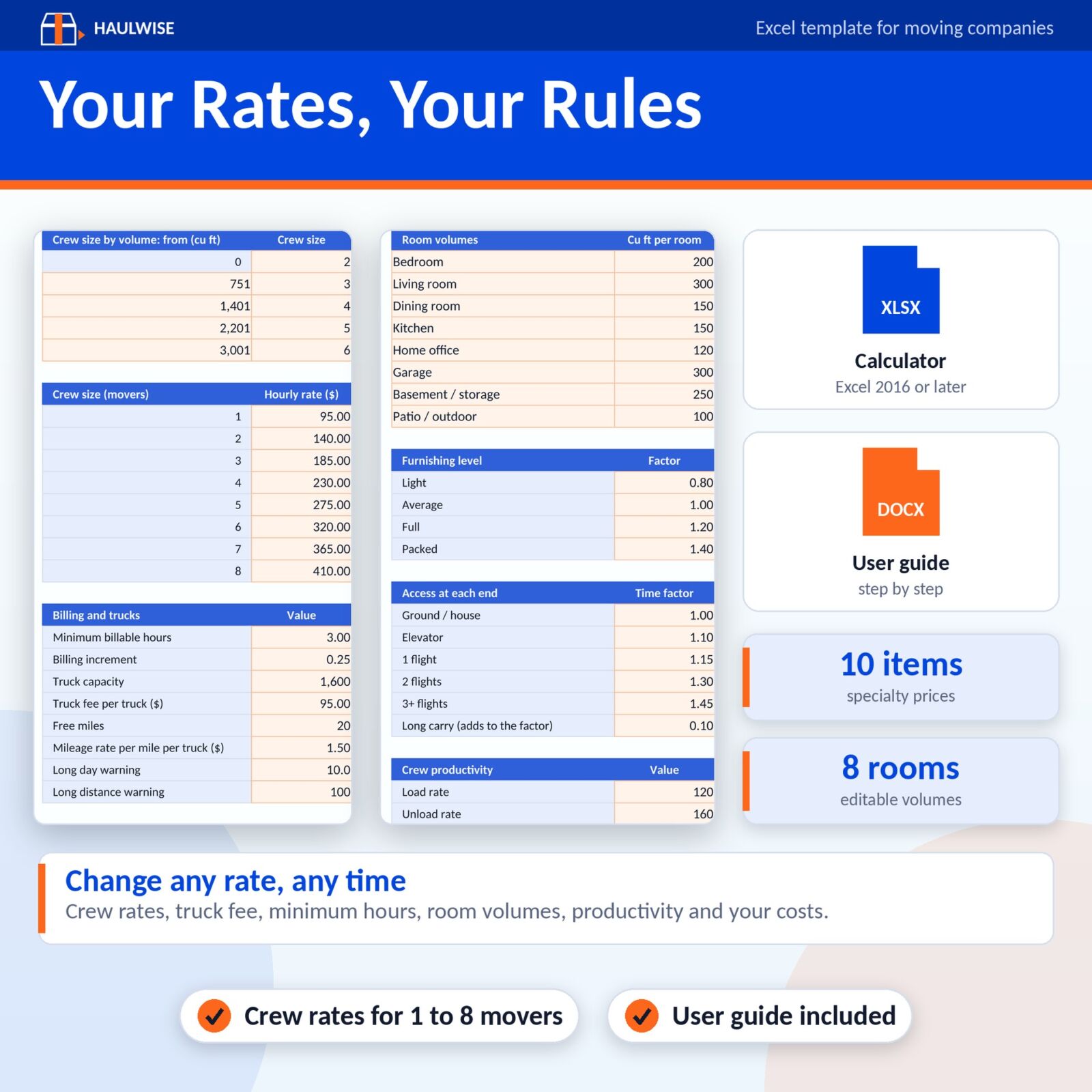
- Two ways to size a move. Quick room counts with a furnishing level (Light, Average, Full, Packed), or a 56-item cube sheet with room totals and a Going? switch that leaves out the items staying behind. A cubic feet moving calculator in one file.
- Weight, boxes, crew and trucks. 1,000 cu ft becomes 7,000 lb, about 50 boxes, a crew of 3 and one truck that is 62.5% full.
- Access at both ends. Ground, elevator, 1, 2 or 3+ flights, plus a long-carry add-on, set separately for pickup and delivery. Extra stops add their own time.
- A real moving crew hours calculator. Load, unload, packing, extra stops, drive time and travel time are shown line by line, then rounded up to 15-minute steps with a minimum you set.
- Your own rate card. Hourly rates for crews of 1 to 8 movers, truck fee, free miles and a mileage rate per truck, 10 specialty items such as pianos and safes, packing materials, a discount, sales tax on materials and full value protection.
- Estimate range, deposit and balance. A low and high figure, an optional not-to-exceed line, a 25% deposit by default and the balance due on move day.
- Profit check. Wages, labor burden, truck cost and materials cost give you the margin on every quote, with a green or red flag against your target and eight plain-English warnings.
- Printable estimate. A one-page customer moving estimate in hourly or flat price style that fits Letter and A4, with your business details, terms and a signature line.
- Quote log with win rate. Paste each quote in, set a status, and see quotes won and lost by month for the year you pick.
- One currency setting. Use $, €, £, R or any symbol up to 4 characters. Every label and the printed quote follow it.
How it works
Take a 2-bedroom apartment with a living room, dining room and kitchen, two flights of stairs at pickup, 18 miles to the new place and partial packing. The sheet shows 1,000 cu ft, a crew of 3, a load time of 3.61 hours, 2.08 hours to unload, 7.75 billable hours and a quote of 1,640.00 with an estimate range of 1,495 to 1,860. The deposit is 410.00. The profit check shows a 53.1% margin before you print anything.
The same file handles a 3-bedroom house with a piano, a small studio that only hits your minimum hours, and a video survey priced from the cube sheet. Every example in the user guide is walked through number by number so you can check the math against your own jobs.
Built to be trusted
- Formula cells are locked (no password) and input cells are open, so a stray click cannot break a calculation.
- Every input has a limit and a friendly message, for example “Extra stops must be a whole number from 0 to 5.”
- Drop-down lists cannot be renamed into a broken formula. Room names and specialty items are yours to edit.
- No macros. Standard Excel formulas, drop-downs, conditional formatting and two charts.
- Protected sheets still let you sort and filter your own quote log.
File formats and requirements
You receive an Excel workbook (.xlsx) and a Word user guide (.docx). The workbook is made for Microsoft Excel 2016 or later, Excel for Microsoft 365 and Excel for Mac. The guide opens in Word or any app that reads .docx files. Nothing needs to be installed.
Customization
The rates that ship with the file are starting points. Replace the room volumes, load and unload speeds, crew rates, minimum hours, truck fee and your own costs after a few moves. The user guide shows how to calibrate load and unload rates from your last 10 jobs: cubic feet divided by movers times hours. Rename rooms and specialty items, change the crew-size thresholds, edit your terms text and set your own target margin.
Digital download
This is a digital product. After purchase you can download the files right away. Nothing is shipped.
Ways movers use it
- A phone quote for a 2-bedroom walk-up while the customer is still on the line.
- A 3-bedroom house with a garage, a piano and full value protection.
- A quick studio move that lands on the minimum hours.
- A video survey priced from the cube sheet, with the refrigerator marked as staying.
- Checking whether a 10% discount still clears your target margin.
Frequently asked questions
Is this for moving companies or for people moving?
For moving companies. It prices a move from the mover’s side, with your rates and costs.
Can I use my own rates?
Yes. Every rate, factor, wage and price is an editable cell on the Rates sheet.
Does it work on a Mac?
It is made for Excel for Mac as well as Excel for Windows, version 2016 or later.
Does it work in Google Sheets?
It is not designed or tested for Google Sheets. Use Microsoft Excel.
Does it price long-distance moves by weight?
No. It prices by crew hours and shows a warning when the drive is longer than the limit you set (100 miles by default).
Can I change the currency?
Yes. Type any symbol on the Settings sheet and every label follows.
Can I print or save the estimate as a PDF?
Yes. The Quote sheet fits one page on Letter and A4.
Do I need macros?
No. There are no macros in the file.
License and notes
Single business license: use it for your own moving company. Do not resell, share or upload the files. The calculator produces estimates only. Some states regulate how movers give estimates and what liability they offer, so check your state’s rules. The liability and valuation settings are examples you can change. This is not legal, tax or insurance advice.


Reviews
There are no reviews yet.