

Window Cleaning Business Spreadsheet: Routes, Recurring Customers and Profit in One Excel File
Panewise is a window cleaning business spreadsheet for owners with one to four cleaners and a route of recurring customers. It keeps every customer on a cycle, works out the next due date from the last visit you marked Done, and prints the day’s route in stop order. When the week is over, it shows what each route earned per hour, who still owes you and what is left after costs.
If your route lives in a notebook or a phone calendar, you know the problem: a rainy Tuesday rolls every stop to Wednesday, two homes were locked out, and by the following month nobody can say who is overdue. Panewise remembers for you, with no monthly software fee.
What this window cleaning route tracker does
The workbook has 12 sheets that work together. You enter a customer once, log visits as you finish them, and the rest fills itself in.
- Customers on cycles. Weekly, every 2, 4, 6 or 8 weeks, quarterly, twice a year, annual or one-time. A quarterly home last cleaned September 7 is next due December 7.
- Next due dates, calculated. Each customer shows Overdue, Due now, Due next week or Upcoming, with a grace-days setting so a customer is Overdue only after the days you choose.
- Inside and outside visits. Pick Never, Every visit, or every 2nd, 3rd or 4th visit. The tracker knows when the inside is next due and adds the inside price.
- Rain days that never lose a customer. Log Rain moved, No access or Skipped by customer and the customer stays due. Only a Done visit resets the cycle.
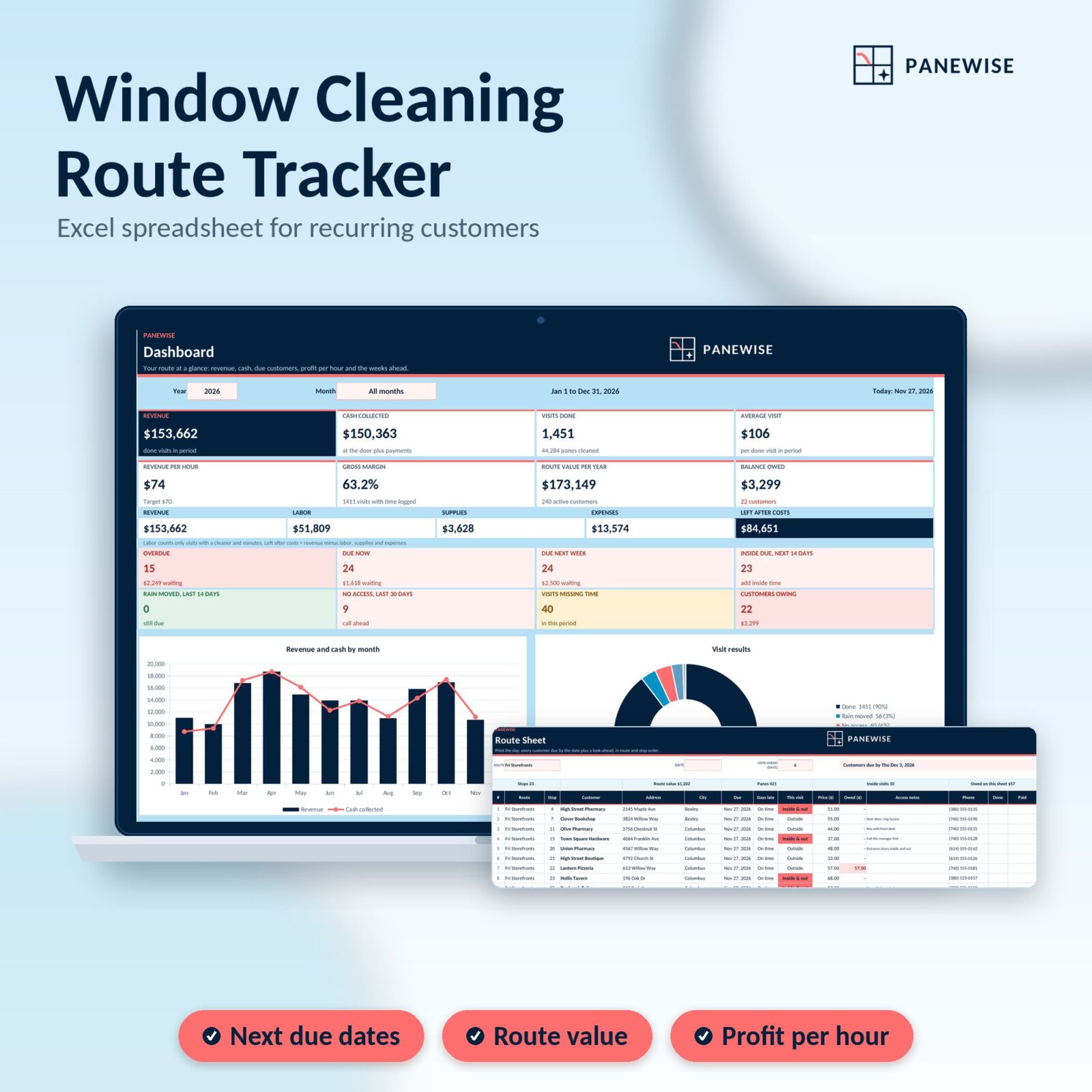
- A printable window cleaner round sheet. Pick a route, a date and look-ahead days. Everyone due prints in stop order with days late, inside or outside, price, money owed, gate codes and tick boxes.
- Price rise dates. Type the date of your yearly increase and the old prices. Past visits keep the price they were charged.
- Money, time and profit. Money taken at the door, later payments, balances, cleaners and minutes on site, labor cost with your own time counted, profit per visit and revenue per hour.
Who this window washing business template is for
Panewise suits residential window cleaners on quarterly, twice-a-year and annual cycles, storefront and restaurant routes every 1, 2 or 4 weeks, and small offices every 4 or 8 weeks. It works for ladder and water-fed pole crews, for a solo owner with 40 customers and for a company with 600. The workbook holds 1,000 customers, 6,000 visits, 3,000 payments, 2,000 expenses and 15 routes.
Window cleaning customer tracker for Excel: what is inside
Customers, Visits and Route Sheet
The Customers sheet holds contact details, route, stop order, cycle, inside plan, outside and inside prices, panes, a start date and access notes such as “Gate code 4412” or “Dog in back yard”. The Visits sheet takes one row per stop: result, inside cleaned, suggested price, extras like screens and tracks, discounts, money paid at the door, the cleaner and minutes on site. The Route Sheet prints landscape, 20 stops per page with readable type, up to 40 stops.
Dashboard, Routes and Customer Statement
Pick a year and a month on the Dashboard to see 8 tiles (revenue, cash, visits, average visit, revenue per hour, gross margin, route value per year and balance owed), a Money left strip, 8 alerts, 5 charts, the next 10 customers due and customers by cycle. The Routes sheet compares up to 15 routes on value, revenue per hour, rain days and no-access visits. The Customer Statement prints one page with the latest 20 visits, the latest 10 payments and the balance due, handy for offices billed monthly.
Payments, Expenses, Team and Settings
Track later payments and refunds, then log fuel, soap, squeegee rubber, water-fed pole resin, insurance and miles in this window cleaning income and expense tracker. Add each cleaner with an hourly rate and add yourself with the hourly value of your own time, so margins are honest. One currency setting changes every heading, tile and printout.
How it works
- Set your currency, grace days and target revenue per hour on Settings, and name your routes.
- Add your team, then add your customers with a cycle, inside plan, prices and a start date.
- Print the Route Sheet the night before.
- Log every stop on Visits: date, Customer ID and result.
- Read the Dashboard once a week.
Cells you type in are light coral. Cells with formulas are light blue and locked (no password), so a stray click cannot break the math.
Real situations Panewise handles
- A Monday residential route with 14 homes and three gate codes.
- A Friday storefront route on a 2-week cycle.
- A rainy Tuesday where every stop rolls to Wednesday.
- Raising prices every March without changing old visits.
- A dental office billed monthly, with a statement to print.
- Deciding whether the Westerville route earns enough per hour.
File formats, software and download
You receive an Excel workbook (.xlsx) and a user guide (.docx), as an instant digital download. It is made for Microsoft Excel 2016 or later (Windows and Mac), including Excel for Microsoft 365. There are no macros and the workbook uses standard functions only. The guide walks through every sheet with screenshots, worked examples, troubleshooting and FAQ. Colors, lists, routes and expense categories are easy to customize. License: single business use. Please do not resell or share the files.
Panewise is a record-keeping and planning tool, not accounting, tax, payroll or legal advice. Follow ladder and height safety rules and your insurer’s requirements for upper-story work.
Window cleaning business spreadsheet FAQ
Does it work on a Mac?
It is made for Microsoft Excel 2016 or later on Windows and Mac, including Excel for Microsoft 365. It has no macros and uses standard functions only.
Does it work in Google Sheets?
It is made for Excel and has not been tested in Google Sheets, so it is not recommended there.
How does it know when a customer is due?
It takes the date of the last Done visit and adds the cycle length. A customer with no Done visit is due on the start date.
Can I clean the inside every other visit?
Yes. Choose Every 2nd visit and the tracker alternates outside and inside, adding the inside price when it is due.
What happens on a rain day?
Log the stop as Rain moved. The customer stays due and appears on your next route sheet. Only a Done visit resets the cycle.
Can I change the currency?
Yes. Type any symbol in Settings and every heading, tile, route sheet and statement follows.
How many customers does it hold?
1,000 customers, 6,000 visits, 3,000 payments and 2,000 expenses.
Is it a subscription?
No. You buy the workbook once and use it in your own business.
Reviews
There are no reviews yet.