


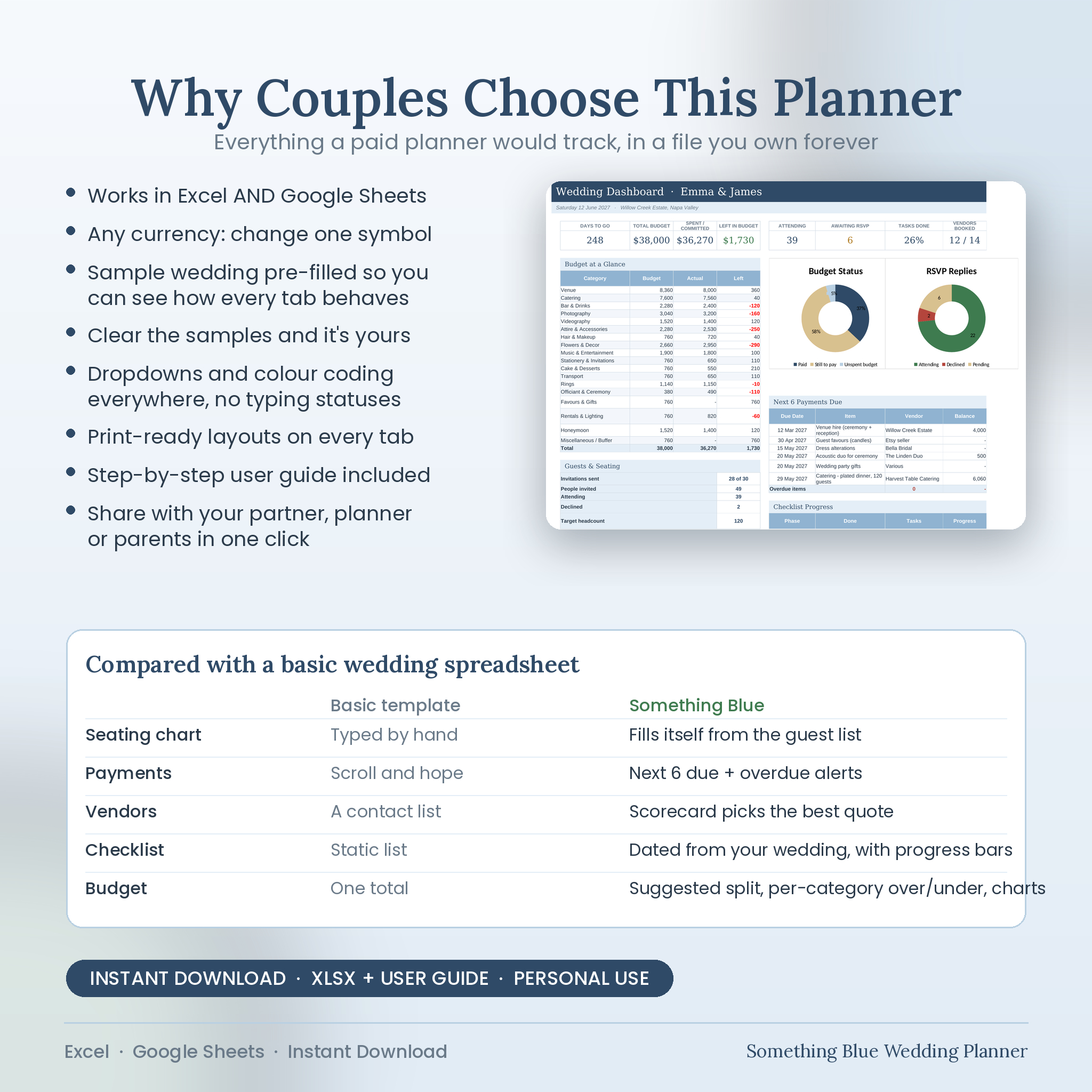
Plan the whole wedding in one file.
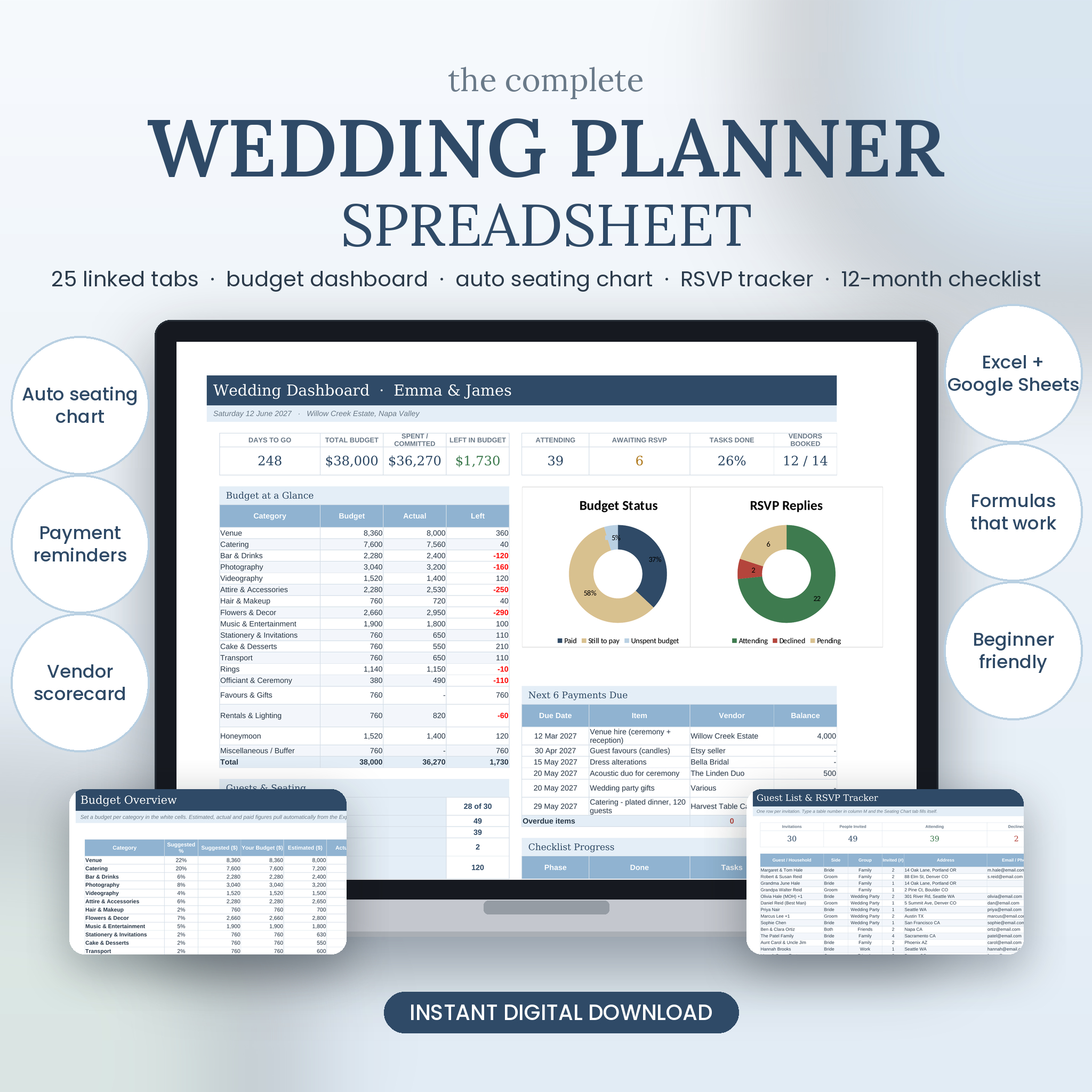
The Something Blue Wedding Planner is a 25-tab spreadsheet that keeps your budget, guests, vendors, timeline and to-do list in one place and connects them. Type a cost once and it shows on the budget and the dashboard. Give a guest a table number and the seating chart updates. Change the wedding date and every checklist due date moves with it.
Who It Is For
Couples planning their own wedding, with or without a coordinator. It works for a backyard ceremony for forty and a 200-guest reception alike, because every list has room to grow. If you can type into a cell and pick from a dropdown, you can use it.
What Makes It Different
- Works in Microsoft Excel AND Google Sheets (import the file, everything carries across)
- Dashboard with countdown, budget position, RSVP replies, task progress and the next 6 payments due
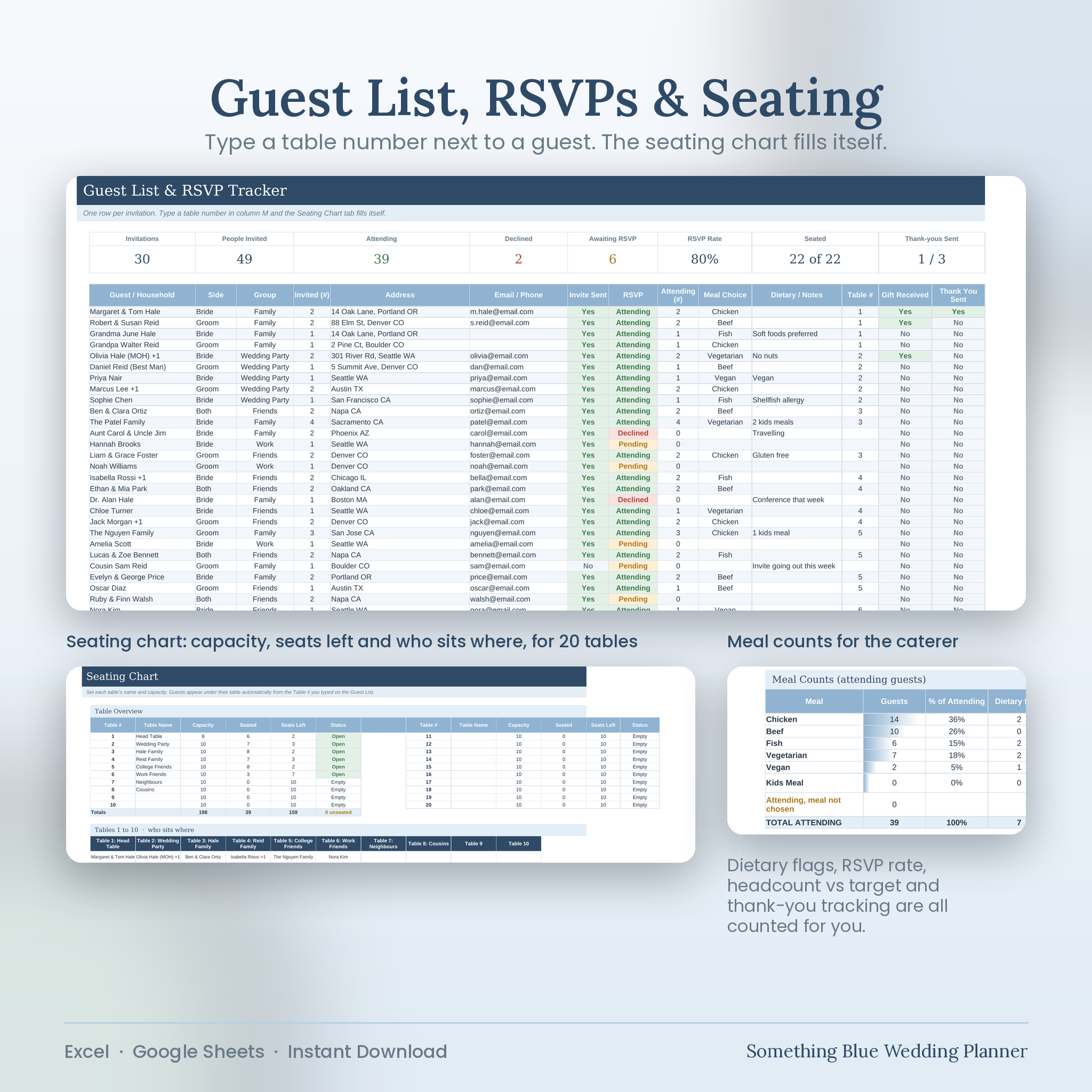
- Seating chart that fills itself from the table numbers on your guest list, 20 tables
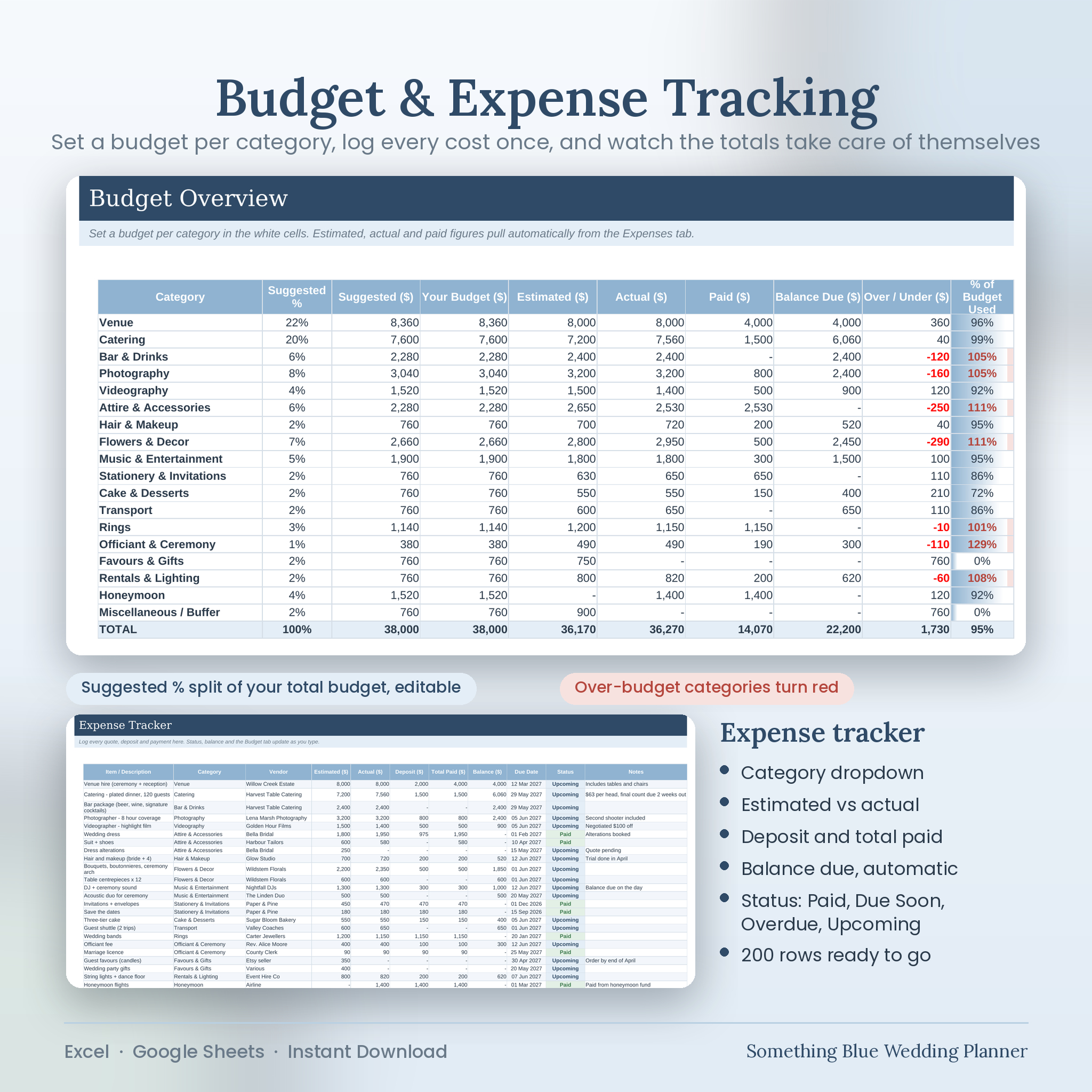
- Expense tracker that works out balance due and status: Paid, Due Soon, Overdue, Upcoming
- Vendor comparison scorecard that scores up to four quotes on weighted criteria and names the best one
- 12-month checklist with 70 dated tasks and progress bars by phase
- Any currency: change one symbol and every money column follows
- A full sample wedding already filled in so you can see how each tab behaves, then clear it
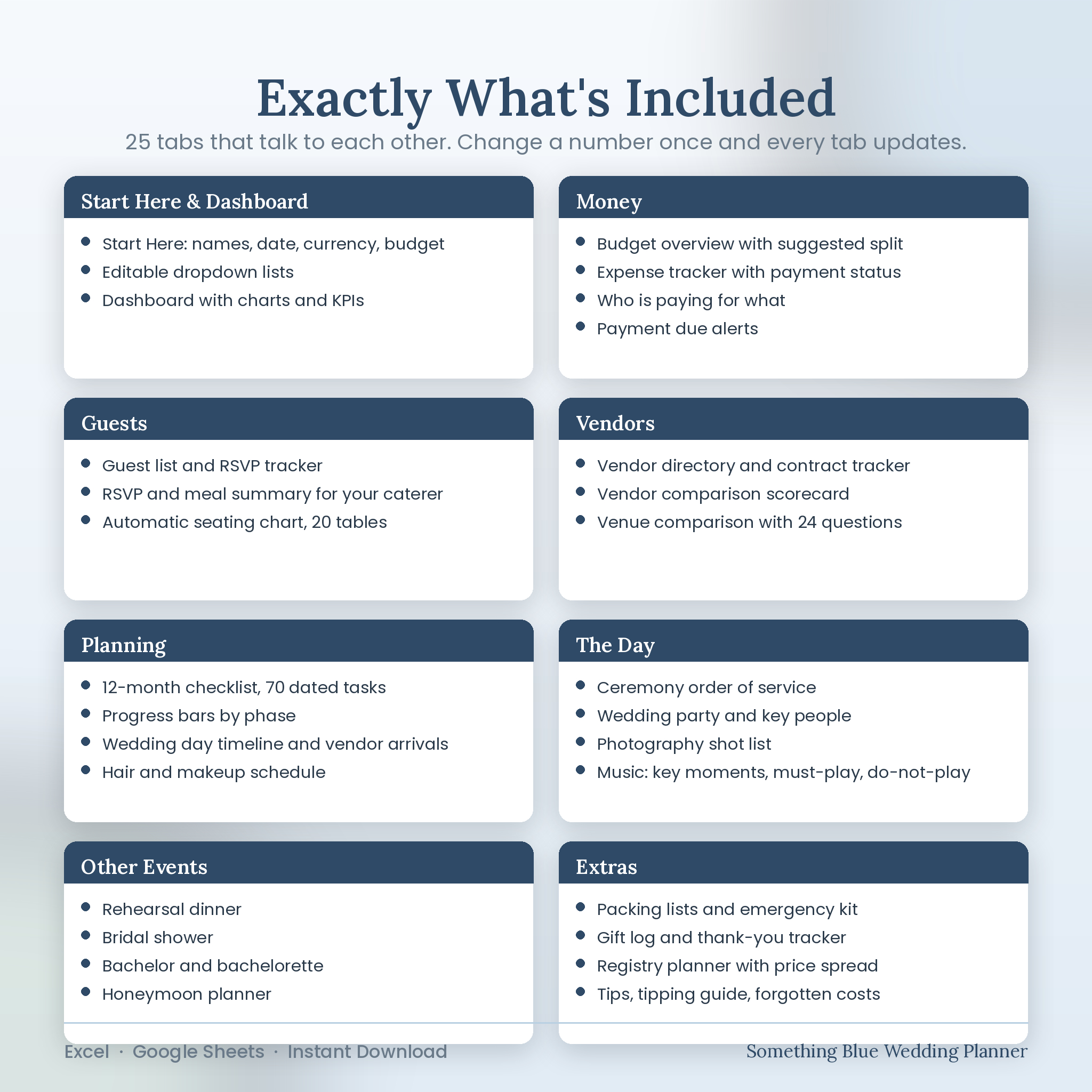
What Is Included (25 Tabs)
Start Here: names, date, currency, budget, headcount and editable dropdown lists
Dashboard: KPI tiles, budget and RSVP charts, payments due, checklist progress, vendor warnings
Budget: budget per category with a suggested split, actual, paid, over/under and a chart
Expenses: 200 rows with category dropdown, deposits, balances, due dates and automatic status
Contributions: who is paying what, received so far and the funding gap
Guest List: 400 rows with side, group, address, invite sent, RSVP, attending count, meal, dietary notes, table, gift and thank-you
RSVP & Meals: meal counts and dietary flags for the caterer, RSVP totals, headcount vs target
Seating Chart: capacity, seated, seats left and status for 20 tables, plus names at each table
Vendors: directory with status, contract signed, deposit paid, cost, final payment date and rating
Vendor Compare: six weighted scorecards
Venue Compare: 24 questions across up to four venues
Checklist: 70 tasks, 12 months to the day, owners, due dates, status and progress
Day-Of Timeline: master run sheet, hair and makeup schedule, vendor arrival times
Ceremony: order of service, processional, readings and vows
Wedding Party: roles, contacts, attire, gifts, day-of responsibilities
Photo Shot List: 39 shots across four parts of the day
Music: key moments, must-play, do-not-play, MC announcements
Rehearsal Dinner, Bridal Shower, Bachelor & Bachelorette, Honeymoon: details, guests, to-do, mini budget for each
Packing & Emergency Kit: three checklists
Gifts & Thank Yous: gift log with thank-you tracker
Registry: registry planner with price-band spread
Tips & Guides: forgotten costs, tipping guide, money-saving ideas, questions for vendors
How It Works
- Download the file and open it in Excel, or import it into Google Sheets.
- Fill in the eight cells on the Start Here tab.
- Add your expenses, guests, vendors and tasks. The dashboard and every summary update as you go.
- Share one copy with your partner, planner or parents.
File Formats
- Something-Blue-Wedding-Planner.xlsx (the planner)
- User Guide as Word (.docx) and PDF, 20 pages, with screenshots
Software Requirements
Microsoft Excel 2016 or later (Windows, Mac or Excel for the web), or Google Sheets via File > Import. Apple Numbers opens the file but a few colour rules behave differently.
Customisation
Every header colour, category name, dropdown option and sample entry can be changed. The guide explains how to rename categories, edit dropdown lists, add rows and clear the sample wedding in a few minutes.
Digital Download
This is a digital product. No physical item will be shipped. Files are available immediately after payment. Because of the nature of digital files, the purchase is non-refundable. For personal use only; please do not share, resell or redistribute.
Reviews
There are no reviews yet.