A monthly budget assumes your money arrives once a month. For a lot of people it doesn’t. It shows up every Friday, or every other Friday, and rent still wants paying on the 1st. That mismatch is why so many monthly budgets feel wrong by the second week.
A paycheck budget fixes it. Instead of planning the month, you plan each paycheck: what this specific deposit has to cover before the next one lands. It’s the most practical way to budget if you’re paid weekly or biweekly, and it’s a lifesaver if you’re living close to payday.
Here’s how to set one up.
How a paycheck budget works
The idea is simple. Every bill gets assigned to the paycheck that will pay it. Then whatever’s left from that paycheck, after its bills and savings, is your spending money until the next one.
Say you’re paid $1,400 every other Friday. Paydays fall on the 5th and the 19th this month. Rent ($1,100) is due on the 1st, so it has to come out of the paycheck before it: the one on the 19th of the previous month. Your phone, car insurance and streaming bills, due on the 10th to the 15th, come out of the 5th’s paycheck. Now each paycheck has a clear job.
Step 1: List your paydays for the next two months
Write out the actual dates. Not “biweekly”. The real Fridays.
This is where you’ll spot the three-paycheck month. With biweekly pay you get 26 paychecks a year, so two months a year have three. Weekly pay gives you four months with five paychecks. Those extra checks are gold: they’re not needed for the usual bills, so they can go straight to debt, savings or a buffer.
Step 2: List every bill with its due date
Rent, utilities, phone, insurance, loan payments, subscriptions. Include the annoying quarterly ones too, like water or car registration.
Sort them by due date. You’ll often see a clump: three big bills in the first week and almost nothing in the third. That clump is why a single monthly view hides problems.
Step 3: Assign each bill to a paycheck
Go down the list and give each bill to the last paycheck that arrives before its due date. Add savings transfers and debt payments the same way.
If one paycheck ends up overloaded (the rent check usually is), you have three options:
- Move some smaller bills to the other paycheck if they’re due late enough.
- Ask a provider to change your due date. Many will, especially utilities and phone companies.
- Set money aside from the lighter paycheck into a “rent” pot that tops up the heavy one.
Step 4: Work out spending money per paycheck
Paycheck minus its bills, savings and debt payments equals what’s left for groceries, gas and everyday spending until the next payday. Divide by the number of days in that period and you get a daily number.
That daily number is the most useful figure in personal finance for people on tight pay cycles. $310 for 14 days is about $22 a day. Easy to hold in your head at the checkout.
Step 5: Track spending against the period, not the month
Log what you spend from payday to payday. When the next check lands, start the count fresh. If you overspent, the damage is limited to two weeks rather than quietly spreading across the month.
Tools that handle paycheck budgeting
You can do all this with pen and paper. A template saves the date maths.
Clarity Budget Planner: payday-to-payday in a spreadsheet
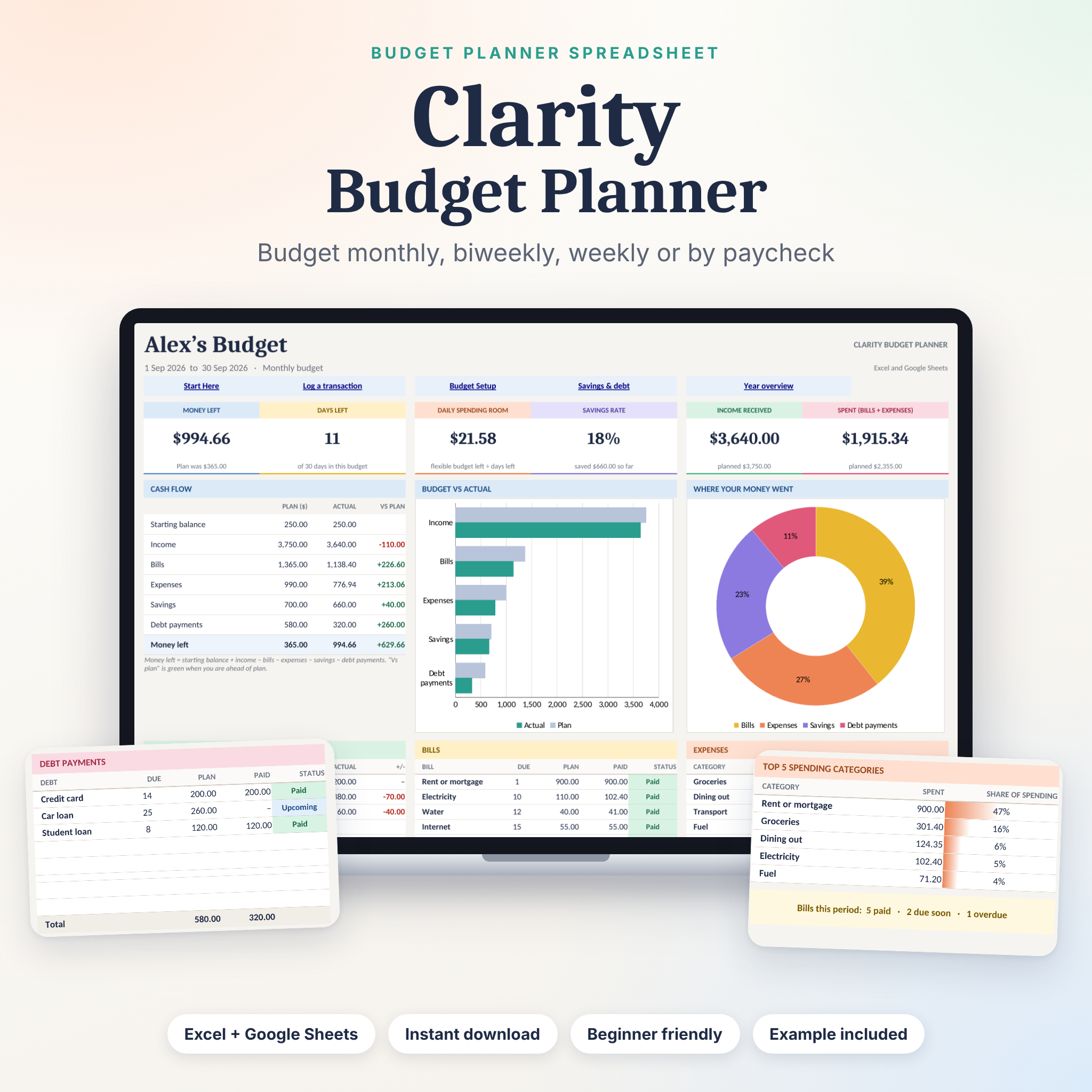
The Clarity Budget Planner spreadsheet works for monthly, biweekly, weekly or payday-to-payday budgets. Change one date and you’re on to the next period. No copying tabs.
The dashboard shows six live cards: Money left, Days left, Daily spending room, Savings rate, Income received and Spent. Give each bill a due day and it shows Paid, Due soon, Upcoming or Overdue. You get the blank workbook, a filled example and an illustrated user guide. It runs in Excel 2010 or newer and in Google Sheets.
This is the simplest of the three, which is why I’d start most people here.
Lilac Ledger: plan a whole year of paychecks
The Lilac Ledger budget spreadsheet goes further. Enter each paycheck and bill once with its frequency, and it works out which days each one lands across all 12 months, including three-paycheck months. Its paycheck planner lets you pick a paycheck and see every bill, savings transfer and loan payment it has to cover, sorted by due date, and what’s left. A bill and payday calendar shows your projected balance each day and flags any day you’d dip below your low-balance alert.
Peony: a paycheck budget app, no spreadsheet
If spreadsheets put you off, Peony Budget Planner is a one-file app that opens in Chrome or Edge on your computer and works offline. Its paycheck plan groups bills under the paycheck that pays them (weekly, every two weeks or monthly), and a “safe to spend” number shows what you can spend this month and per day.
Paycheck budget FAQ
Is a paycheck budget better than a monthly budget?
If you’re paid weekly or biweekly, usually yes. It matches how money actually arrives, so you won’t think you’re fine in week one and come up short in week four.
What do I do with a third paycheck?
Treat it as extra. Your regular bills are already covered by the other two, so put it toward debt, an emergency fund or next month’s buffer.
How do I budget biweekly pay when rent is due monthly?
Assign rent to the paycheck right before the due date, and if that check is too small, set aside part of the other paycheck each cycle to top it up.
Can I use a paycheck budget with irregular income?
Yes. Treat each deposit as its own period and cover the most urgent bills first. Clarity mentions freelancers with uneven income among the people it’s built for.