Accounting software is great until you realise you’re paying every month for 50 features and using four. For a lot of small businesses, a good bookkeeping spreadsheet for small business use does the job just as well: log money in, log money out, see your profit, and have clean numbers ready when tax time comes.
The catch is that spreadsheets vary wildly. Some are a blank grid with a nice header. Others quietly do your tax split, chase your invoices and build a profit and loss report for you.
Below are six options from the Taskdale shop, what each one does well, who it suits, and a quick guide to choosing.
What to look for in a bookkeeping spreadsheet for small business
Before comparing templates, decide what you actually need. Most small businesses want:
- Separate income and expense logs with category dropdowns, so totals stay clean
- Automatic tax split if you charge VAT, GST or sales tax
- An invoice tracker that shows who owes you and how late they are
- A profit and loss report you don’t have to build yourself
- Receipt tracking, because a missing receipt in March is a headache in January
- Software fit: does it run in your version of Excel, or in Google Sheets?
If a template does all six, you’re in good shape. Anything extra (forecasts, pricing tools, dashboards) is a bonus that may or may not be worth it for you.
The 6 best bookkeeping spreadsheets for small business
1. Sorbet Books: best all-rounder for beginners
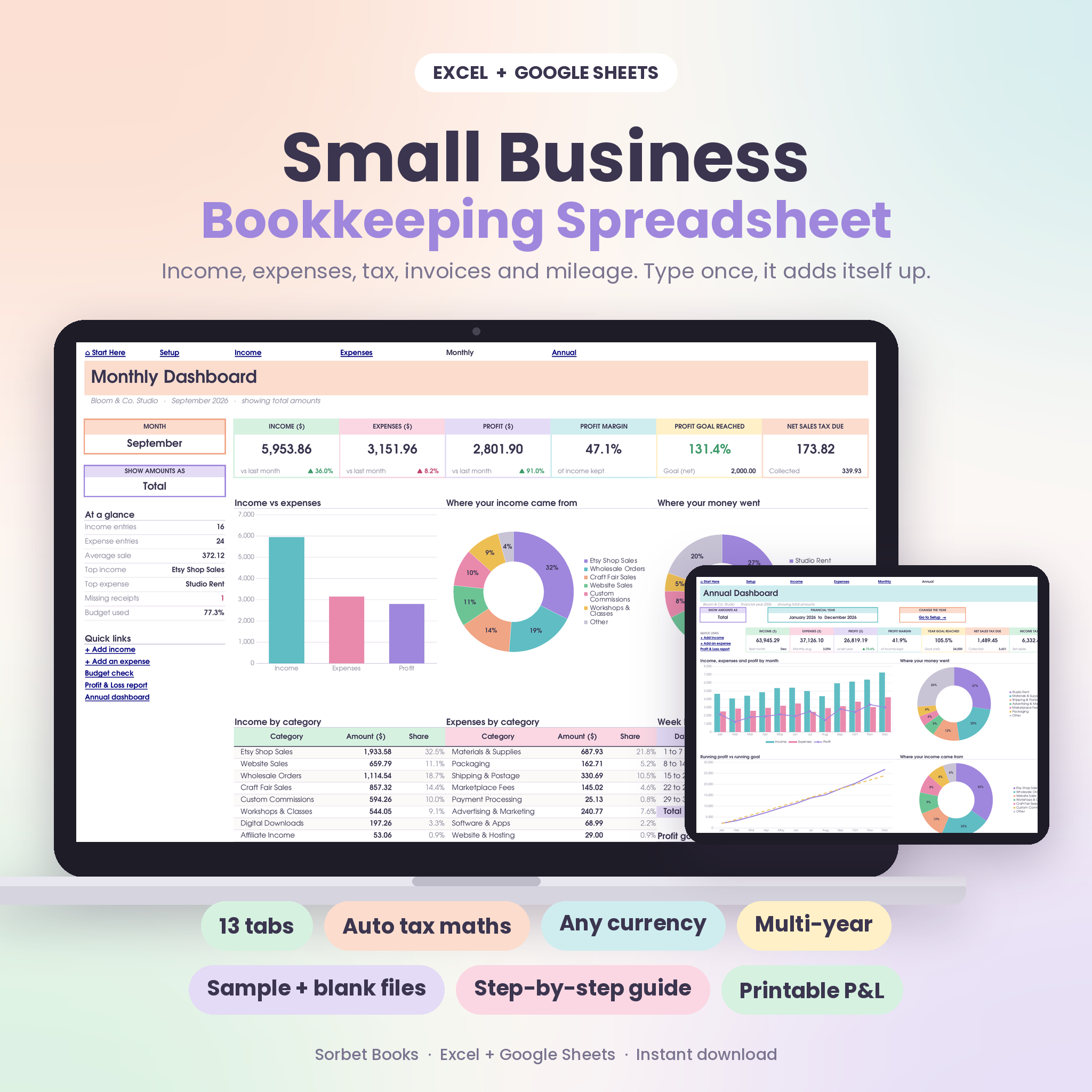
Sorbet Books is a colourful, beginner-friendly workbook with 13 connected tabs. You type each payment once and it handles tax, net amounts, monthly and yearly totals, charts, budgets, account balances, invoices, a Profit & Loss report and a five-year comparison.
A few things stand out. The income and expense logs each hold 1,500 rows, and missing receipts get flagged in pink. You can name your tax anything (VAT, GST, Sales Tax, HST) and choose tax-inclusive or tax-added amounts. There’s a mileage log, a quarterly tax summary and an income tax savings pot. It works in Excel 2010 or newer and Google Sheets, and multiple years live in one file.
Best for: Etsy sellers, freelancers and service businesses who want proper books without learning accounting. Comes with a sample file, a blank file and a 23-page guide.
2. Small Business Finance HQ: best for tax and cash planning
Small Business Finance HQ is a 20-sheet workbook: five for logging, seven that calculate and six dashboards. The rule is simple: type in the yellow cells, leave the rest alone.
Its strength is looking ahead. There’s a Tax Centre covering income tax and VAT with a quarterly breakdown and a monthly reserve plan, a Cash Flow Forecast with a lowest-point warning, Pricing & Break-Even, and Budget vs Actual. The Business Snapshot writes its own summary from your figures, handy when a bank or accountant asks how things are going.
Best for: VAT-registered businesses and owners who want to plan cash and tax, not just record the past.
3. The Complete Bookkeeping Spreadsheet System: best for product sellers
This one is different. The Complete Bookkeeping Spreadsheet System is a business finance hub that opens in your web browser as an HTML file. No install, no login, and your records stay on your own computer, with one-click backup and CSV export for Excel or Google Sheets.
It’s built for selling products across channels. The Sales Log works out fees, product cost, true profit and margin on every order line. Etsy, Shopify, Amazon Handmade, direct invoices and craft fairs are set up, and the effective fee turns red when a channel takes more than 12%. There’s inventory with reorder alerts, a Pricing Lab, a 0 to 100 Profit Health Score and 18 plain-English bookkeeping lessons.
Best for: makers and online sellers who need profit per product and channel. Less suited if you specifically want a spreadsheet file to edit.
4. Clarity Books Easy Bookkeeping: best for a full set of reports
Clarity Books Easy Bookkeeping packs 13 tabs, including income and expense logs, invoices with automatic Paid, Unpaid and Overdue status, a mileage log, live account balances, monthly and annual dashboards, plus an automatic Profit & Loss, Balance Sheet, Cash Flow and Tax Summary with quarterly estimates.
The balance sheet is the notable extra. Many simple templates skip it. You also get 10-year profit goals and a step-by-step PDF guide.
Best for: freelancers and small businesses who want the standard financial reports in one go.
5. Small Business Bookkeeping Spreadsheet Bundle Plan: best for simplicity
The Bookkeeping Spreadsheet Bundle Plan runs off three sheets: money in, money out and transfers. From those it builds a running register, a monthly profit and loss, category breakdowns, an invoice tracker that counts days overdue, a tax estimate sheet and a dashboard.
Best for: owners who want the fewest moving parts. It ships with a sample business you clear out when you’re ready.
6. Bookkeeping Spreadsheet Dashboard Bundle: best for service businesses with bills
The Bookkeeping Spreadsheet Dashboard Bundle covers income and expense trackers, monthly profit and loss summaries, a cash flow dashboard, an invoice log, a bill tracker for recurring obligations and tax estimate tabs, with setup instructions.
Best for: solo owners, consultants and virtual assistants who want one tidy file for everyday bookkeeping and monthly reviews.
Quick comparison
| Template | Standout feature | Good fit |
|---|---|---|
| Sorbet Books | Receipt flags, multi-year, any tax name | Beginners, Etsy, services |
| Finance HQ | Tax Centre and cash forecast | VAT-registered, planners |
| Complete System | Profit per product and channel | Product sellers |
| Clarity Books | Balance sheet included | Report lovers |
| Bundle Plan | Three simple input sheets | Minimalists |
| Dashboard Bundle | Bill tracker | Solo service businesses |
Which one should you pick?
If you’re not sure, start with Sorbet Books. It covers the essentials, it’s forgiving for beginners and it runs on older Excel as well as Google Sheets.
If you charge VAT and want to know what to set aside each month, Finance HQ. If you sell physical products on Etsy or Shopify and suspect fees are eating your margin, the Complete System will tell you quickly. If your accountant keeps asking for a balance sheet, Clarity Books. And if you just want something small you’ll actually keep up, the Bundle Plan.
Whichever bookkeeping spreadsheet for small business use you choose, the habit matters more than the template. Fifteen minutes a week, every week, beats a frantic weekend in January.
FAQ
Can a spreadsheet replace accounting software?
For many sole traders and small businesses, yes. A well-built spreadsheet handles income, expenses, invoices and reports. Once you have staff payroll, stock across locations or several people entering data, software starts to make more sense.
Do these templates work in Google Sheets?
Most of them do. The Complete Bookkeeping System is a browser-based HTML file instead, but it exports any sheet to CSV for Excel or Google Sheets.
How often should I update my bookkeeping spreadsheet?
Weekly is a good rhythm for most small businesses. Busy shops may prefer a few minutes daily. Whatever you pick, reconcile against your bank at month end.
Will a bookkeeping spreadsheet do my taxes?
No. It organises your numbers and estimates what to set aside, which makes filing much easier. Check your actual return with an accountant or your tax office.