The first wedding budget most couples make is a guess with a dollar sign in front of it. “Twenty grand?” “Sounds right.” Then the first venue quote arrives and the guess falls over.
A wedding budget calculator is how you replace that guess with a number you can defend. Not a fancy one. Just a tool that gives straight answers to three questions: what can we afford, what will our choices cost, and can we save enough in time?
Below is how to work through those three questions in order, and how I’d use Wedding Budget Pro to do it without building the formulas yourself.
Question 1: What can we actually afford?
Start from money, not from Pinterest. Add up three things:
- What you’ve already saved for the wedding
- What you can realistically save each month until the date
- What family has promised, in actual figures, not “we’ll help”
Say you have $6,000 saved, can put aside $700 a month for 14 months, and parents have offered $4,000. That’s $6,000 + $9,800 + $4,000 = $19,800. Round down to $19,000 to leave yourself breathing room. That’s your budget.
If the number is lower than you hoped, better to know now than after the venue deposit.
Question 2: Will the savings arrive in time?
This one catches people out. The total might work, but deposits are due early and the savings build slowly. If the venue wants $4,000 in month two and you’ve only saved $1,400 by then, you have a timing problem even though the overall plan is fine.
The Wedding Budget Pro spreadsheet has a Savings Calculator for exactly this. You put in what you’re saving each month and it tells you straight whether that will fund the day in time, with a chart showing the gap or the cushion. Pair that with its Vendor Payment Log, which tracks deposits and balances and turns any due date inside seven days red, and you can see whether your savings curve and your payment dates line up.
Question 3: What will our choices cost?
Now spread the budget across categories. If you don’t know what’s normal, you’ll either under-budget the things that matter or overspend on things that don’t.
This is where benchmarks help. Wedding Budget Pro’s Cost Averages sheet loads realistic benchmarks for your US region. So if a photographer quotes $3,800 and your region’s benchmark is noticeably lower, you know to get a couple more quotes before signing.
The Budget Tracker comes pre-loaded with 30-plus line items across every category, so you start with a full list instead of a blank page and won’t forget things like postage or alterations.
The useful part: testing “what if” before you sign
Most budget mistakes happen at the moment of booking. A venue is lovely and only $2,000 over. You sign. Only later do you work out what has to give.
A good wedding budget calculator lets you test that before you commit. Wedding Budget Pro has a What-If tool where you can try a change, such as catering going up and flowers coming down, and see the new total before you spend anything.
A few what-ifs worth running early:
- Guest count 20 lower, and 20 higher
- Friday instead of Saturday (ask venues for the price difference)
- Photographer for 6 hours instead of 9
- Buffet instead of plated dinner
The guest list also ties your confirmed head count straight to catering cost. Every RSVP shows its true price, which turns “should we invite the Johnsons’ kids?” into a number rather than a feeling.
Keeping the calculator honest after you book
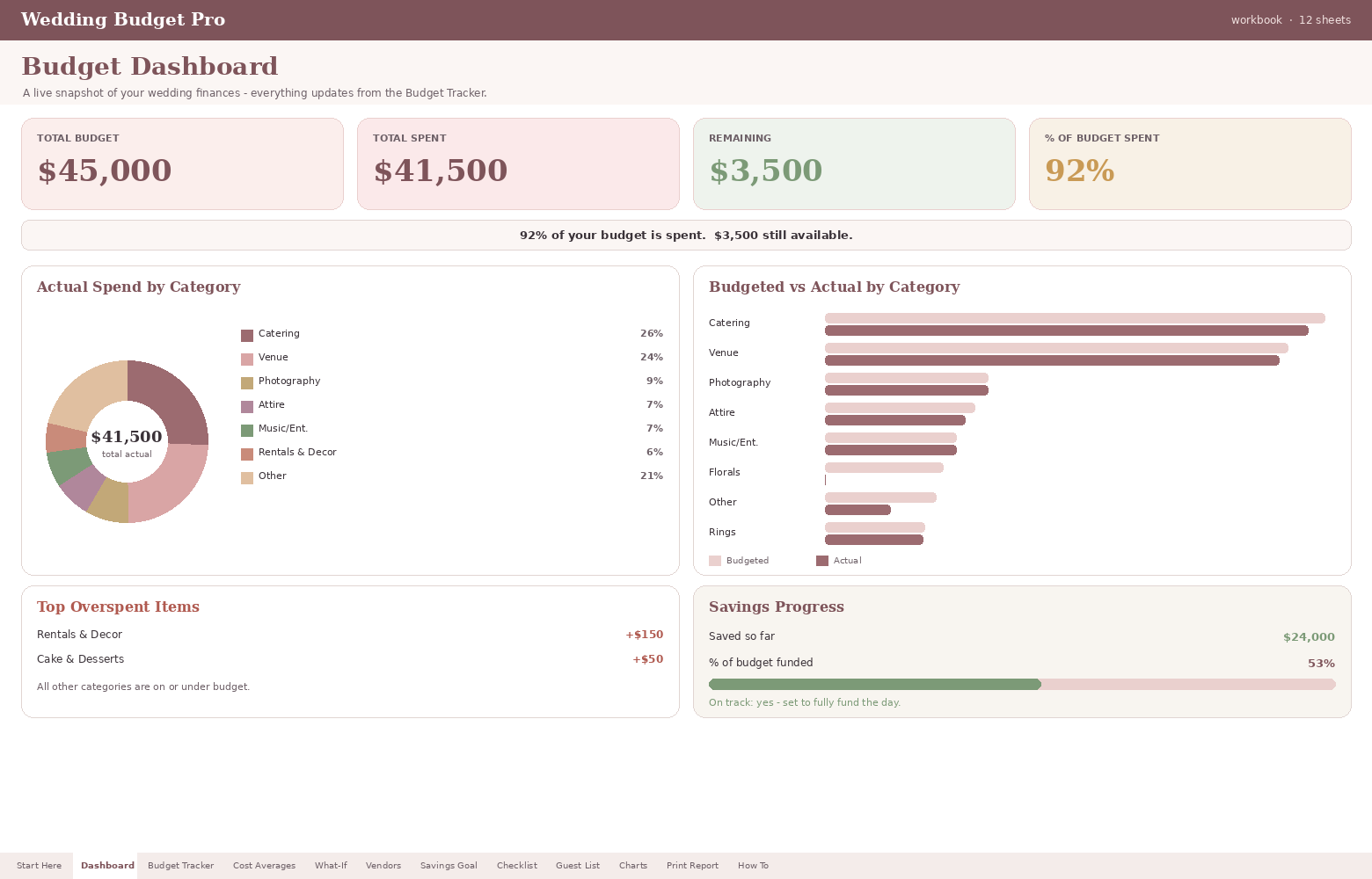
Once contracts are signed, the job changes from planning to tracking. Wedding Budget Pro’s live dashboard shows total budget, total spent, what’s left and how much of the budget is gone, in big cards. There’s a donut chart of spending by category, a budgeted-versus-actual comparison, and an auto-ranked list of where you’ve overspent, so the worst offender is at the top.
Rows change colour as you go: green on budget, yellow when you creep over, red when you’re ten percent past. A savings progress meter sits on the dashboard too. And since there’s a 100-plus task checklist with overdue items turning red, the non-money side lives in the same file.
It’s one self-contained workbook that works in Excel 2016 and newer and in Google Sheets, with a How To sheet inside the file.
Who Wedding Budget Pro suits, and who it doesn’t
It suits you if:
- You like seeing the numbers and want to test scenarios before booking
- You’re in the US and want regional cost benchmarks to sanity-check quotes
- You’re saving toward the wedding and want to know if the timing works
- You want one file for budget, payments, guest costs and tasks
It’s probably not for you if:
- You’re outside the US and the regional benchmarks are the main reason you’d buy it
- You want a big all-in-one planner with seating charts, vendor scorecards and day-of timelines; a full wedding planner spreadsheet would suit better
- You’d rather not look at your numbers at all (no judgment, but a calculator can’t help if it never gets opened)
A simple routine that keeps the numbers true
Once a week, log any new payments, glance at the overspend list, and check the savings meter. Ten minutes. If something’s turned red, decide that day where the extra comes from. Budgets go wrong slowly, then all at once, and a weekly look stops the slow part.
Wedding budget calculator FAQ
How do I calculate a realistic wedding budget?
Add your current savings, what you can save each month until the wedding, and any confirmed family contributions. Subtract a small cushion. That’s your ceiling, before you look at a single venue.
How much should we save each month for a wedding?
Divide the amount still needed by the number of months left, then check it against deposit dates. Many payments land early, so you may need to save faster in the first few months.
Does a wedding budget calculator work in Google Sheets?
Wedding Budget Pro works in Excel 2016 and newer and in Google Sheets, so you can share it with your partner and both update it.
Are regional wedding cost averages accurate?
They’re a starting point, not a quote. Use them to spot prices that look unusually high or low, then get real quotes from two or three vendors in each category.