An annual budget template does something a monthly budget can’t: it shows you November in March. That matters, because most money stress doesn’t come from ordinary months. It comes from the lumpy ones. The month the car insurance renews, school starts and two birthdays land in the same week. A year view spots those months while there’s still time to prepare.
Monthly budgets are great for the day to day. But if you only ever look one month ahead, every big annual cost feels like a surprise, even though it happens every single year.
Here’s how to plan a full year of money in one sitting, and keep it on track with a short check-in each quarter.
Why plan a whole year at once?
Three reasons.
You see the uneven months. Income is often steady. Spending isn’t. December, back-to-school and insurance renewal months can be hundreds of dollars heavier than a normal month.
You can set real goals. “Save more” is a wish. “$4,800 into the emergency fund by December, $400 a month” is a plan, and only a year view shows whether it fits.
You stop rebuilding the budget every month. Set the year up once and each month becomes a quick check rather than a fresh project.
How to build an annual budget in six steps
1. Estimate the year’s income
Start with take-home pay per paycheck and count the paychecks. Biweekly pay means 26, not 24, so two months get a third check. Add any known extras like a tax refund or annual bonus, but only if you’re confident they’ll arrive. If not, leave them out and treat them as a nice surprise.
2. List your monthly fixed costs
Rent or mortgage, utilities, phone, insurance paid monthly, loan payments, subscriptions. Multiply by 12. These are the easy ones.
3. Map the irregular costs onto their months
This is the heart of an annual budget. Go month by month and write in what’s coming:
- January: post-holiday credit card, gym renewal
- March: car service
- June: summer camp deposit
- August: back to school
- September: car insurance
- November and December: holidays, gifts, travel
Pull last year’s bank statements to fill the gaps. You’ll remember most of it once you see it.
4. Estimate variable spending
Groceries, fuel, eating out, personal spending. Use the average of the last three months, and bump December and any holiday months up a bit.
5. Set yearly goals and split them by month
Emergency fund, extra debt payments, a holiday, a new laptop. Give each a yearly target and divide by 12, or by the months left until you need it.
6. Check each month balances
Now look across the year. Any month where planned spending beats income? Fix it now. Move a goal contribution from that month to a lighter one, or start saving for the heavy month earlier. This is the step that makes an annual budget worth the effort.
The quarterly check-in
A year is a long time, and plans drift. Every three months, spend 20 minutes on three questions:
- Did income come in as expected?
- Which categories are running over, and are they one-offs or new normal?
- Are the goals on track for the year?
Adjust the remaining months. That’s it. Four check-ins a year keeps the plan honest without becoming a chore.
When to start
December is the classic time, with the new year a few weeks away. But you don’t have to wait. You can start an annual budget in any month and plan the next 12 from there. A July to June year works just as well.
Annual budget templates that do the maths
Ultimate Annual Budget Spreadsheet
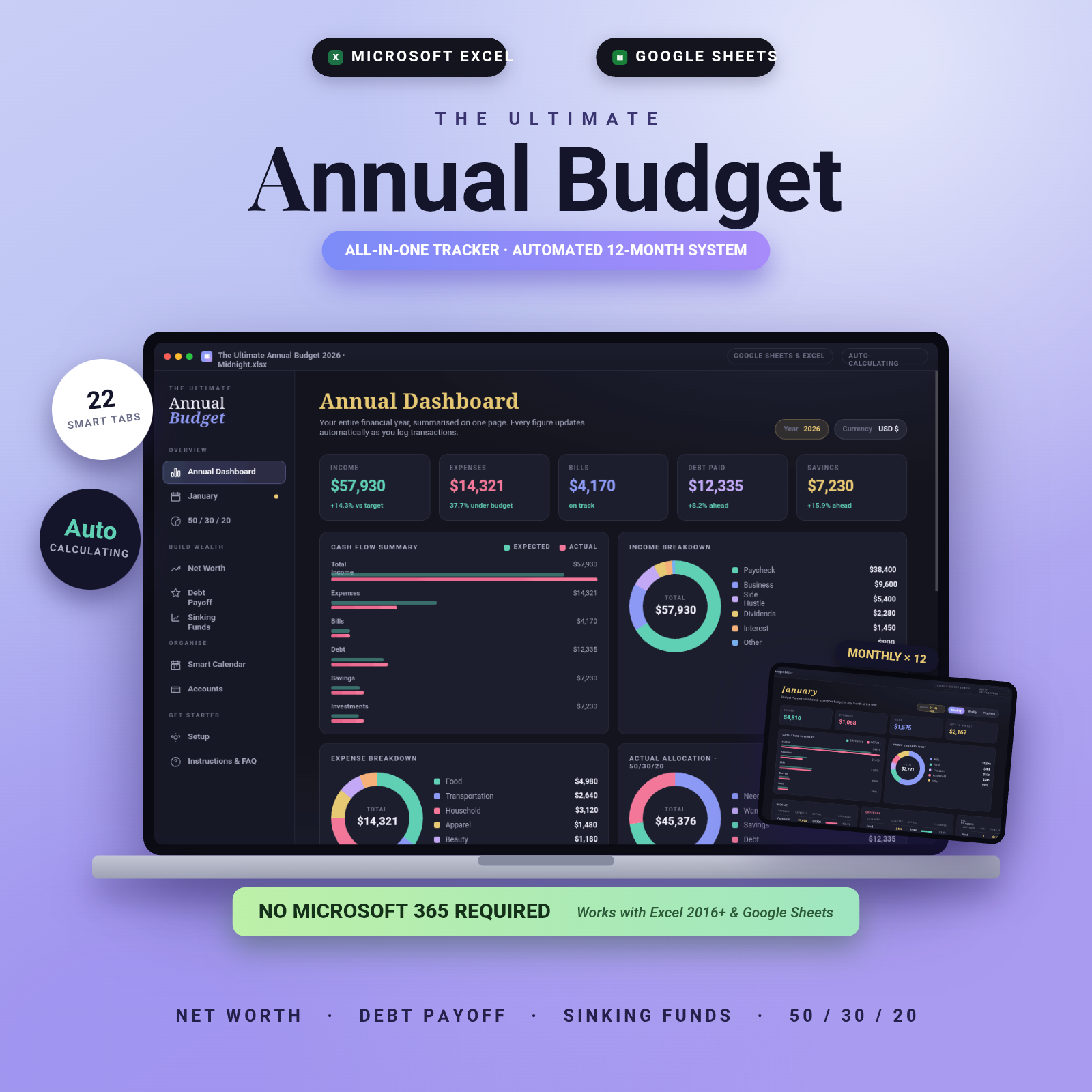
The Ultimate Annual Budget is built for exactly this: one workbook, 22 tabs, and a full year on one Annual Dashboard. There are 12 monthly dashboards with expected vs actual and progress bars, and you can start in any month. A 50/30/20 dashboard shows your needs, wants and savings split, and it includes a net worth tracker, a debt payoff calculator (snowball and avalanche), a sinking funds tracker for those lumpy costs, an accounts dashboard and a smart calendar.
You only fill in the gold cells; everything else calculates. It works in Excel 2016 or newer, Google Sheets and LibreOffice, with no Microsoft 365 needed. Three themes are included (Midnight, Rose, Sage), plus sample data, a quick-start guide and a Google Sheets access link. If you want a clean yearly overview without much setup, this is a good first pick.
Lilac Ledger: recurring items spread across the year for you
The Lilac Ledger budget planner takes a different approach to step 3. You enter each recurring item once with its frequency (weekly, biweekly, semi-monthly, monthly, quarterly, yearly or one-time) and first due date, and it places every occurrence in the right month. Quarterly car insurance and three-paycheck months land where they should without you counting.
Its annual dashboard has six summary cards, a month-by-month table, an income vs spending chart, quarterly totals and your top five spending categories. It’s a good fit if you plan next year’s budget in December and then just log spending from January.
Annual budget template FAQ
What is an annual budget template?
It’s a spreadsheet or planner that lays out income, expenses and savings for all 12 months in one place, so you can see the whole year and plan for uneven months.
Can I start an annual budget in the middle of the year?
Yes. Both templates above let you start in any month. You can plan the next 12 months from today rather than waiting for January.
How is an annual budget different from a monthly budget?
A monthly budget plans one month at a time. An annual budget plans all 12 together, which makes irregular costs and yearly goals much easier to handle. Most people use both: the year for planning, the month for tracking.
How often should I review an annual budget?
Track spending as you go, and do a deeper review once a quarter to adjust the remaining months.