The paper vs digital travel planner debate usually gets framed as two choices. There are really three. There’s paper you print and write on. There’s a digital planner you write in by hand on a tablet. And there’s a spreadsheet that does the sums for you.
Each one is best at something different. Paper is best for slow, screen-free planning and keepsakes. A handwritten tablet planner gives you the feel of paper with tabs, links and no extra weight in your bag. A spreadsheet is best when money, currencies or a group are involved. Many travelers end up mixing two: plan the money in a spreadsheet, and carry a few printed pages.
This guide compares all three, so you can pick the one that fits how you think, not just the one that looks nicest.
Every planner mentioned in this guide is made and sold by Taskdale.
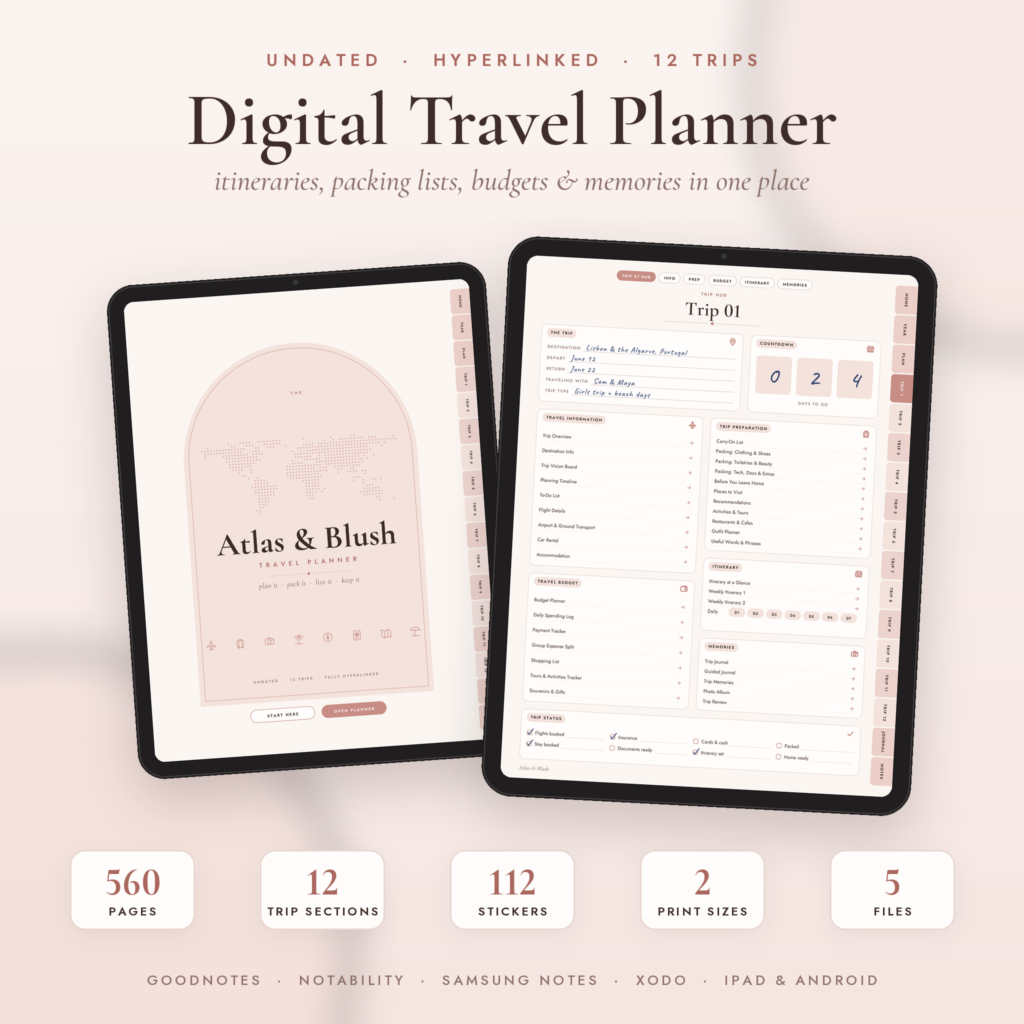
Best if you can’t decide. You get a 560-page hyperlinked planner for your tablet plus printable US Letter and A4 versions of 85 pages each, in one download.
See it on Taskdale →The three formats, side by side
| What matters | Printed paper | Handwritten on a tablet | Spreadsheet |
|---|---|---|---|
| Feels like a notebook | Yes | Yes | No |
| Adds up your budget | No | No | Yes |
| Splits group costs | By hand | By hand | Yes, automatically |
| Jump to any page in a tap | No | Yes, hyperlinked | Yes, by tab |
| Easy to share with a group | Photocopy or photo | Export as PDF | Share in Google Sheets |
| Weight in your bag | A binder or notebook | None extra | None extra |
| Works without a battery | Yes | No | No |
| Good for journaling and memories | Yes | Yes | Not really |
| Easy to change plans | Messy | Easy, erase and rewrite | Easy |
Paper travel planners
There’s a reason people still print planners. Writing things down slows you down in a good way. You notice that day four is packed. You remember the reservation because you wrote it, not because you pasted it.
Where paper wins:
- No screens, no batteries, no apps to open.
- It’s the best format for a trip journal you’ll keep for years.
- Children can use it too, colouring in a map or ticking off a packing list.
- In a dead zone or a power cut, it still works.
Where paper struggles:
- Changes get messy. Move a booking twice and the page is a tangle of arrows.
- No sums. You’ll add up the budget yourself, and probably make a mistake around day nine.
- A full binder is heavy, and if it’s lost, it’s gone.
Best for: slow planners, journal keepers, family trips with children, and anyone who wants a break from their phone.
The printable versions of Atlas & Blush come in US Letter and A4, 85 pages each, with a full trip set plus the planning and journal pages. Print at actual size on any home printer and punch them for a binder.
Digital planners you write in by hand
A digital planner is a PDF designed for a tablet. You open it in an app like GoodNotes or Notability and write on it with a stylus. It feels like paper, but you can jump between pages with a tap, erase cleanly and carry dozens of trips without any weight.
Where handwritten digital planners win:
- Hyperlinked tabs. In Atlas & Blush, side tabs on every page jump to Home, Year, Plan, any of 12 trips, Journal and Notes.
- Clean changes. Erase a time and rewrite it without a mess.
- Reusable. Undated planners work for any year. Atlas & Blush holds 12 trips, each with its own 43-page section.
- Stickers and photos. Drop in a photo of your hotel or one of the 112 included stickers.
Where they struggle:
- No automatic maths, the same as paper. A written budget won’t add itself up.
- They need a charged tablet and a PDF note-taking app.
- Sharing with a group means exporting pages, not working in one live file.
Best for: people who love writing by hand but already carry an iPad or Android tablet, solo travelers and couples, and anyone who wants planning and a journal in one file.
Spreadsheet travel planners
A spreadsheet doesn’t feel like a notebook. That’s its strength. It does the work you’d otherwise do with a calculator, a currency app and an awkward group chat.
Where spreadsheets win:
- Budgets that add up. Lilac Compass lets you set each of its 15 budget categories as a total, per day, per person or per person per day.
- Foreign currencies. Lilac Compass handles up to 12 foreign currencies, using rates you enter.
- Groups. Its Group Split tab works for up to 12 travelers and gives plain settle-up steps, such as “Mia pays Daniel $1,922.89.”
- Sharing. Save it as a Google Sheet and everyone can log their own costs.
- Booking status. Transport, stays, rentals and activities switch between Unpaid, Part paid and Paid on their own.
Where spreadsheets struggle:
- They’re not pretty to flick through on a train.
- There’s a setup step, and it’s easiest on a computer.
- Nowhere good to write a journal entry or stick a ticket stub.
Best for: group trips, long trips with many bookings, tight budgets and anyone traveling between currencies.
Which format suits which kind of trip
The best format often depends on the trip more than the person.
| Trip | Best format | Why |
|---|---|---|
| City break for two | Handwritten tablet planner | Few bookings, lots of notes and photos |
| Family road trip | Spreadsheet plus printed pages | Fuel, stops and stays add up fast |
| Friends’ villa holiday | Spreadsheet | Shared costs and who owes whom |
| Slow travel or a gap year | Handwritten tablet planner | Many trips, one reusable planner |
| Trip with young children | Printed paper | Kids can tick off and colour in |
| Multi-country trip | Spreadsheet | Several currencies and many bookings |
Taking your planner on the road
Whichever format you pick, a few habits keep it useful once you leave home.
- Spend five minutes on it each evening. Log the day’s costs and look at tomorrow. It’s the habit that makes the planner worth having.
- Keep the tablet charged and the file downloaded. A cloud-only copy won’t help in a valley with no signal.
- Carry printed pages in a zip pouch. A spilled coffee shouldn’t take out your booking list.
- Back up a digital planner before you leave. Export a copy to email or cloud storage so a lost tablet doesn’t mean a lost trip.
- Photograph paper pages. If you plan on paper, a photo of each page on your phone is a cheap backup.
The hybrid that works for most people
You don’t have to choose just one. A setup we see work well:
- Plan the money and bookings in a spreadsheet. Budget, group costs, booking status and the checklist.
- Print a few pages to carry. Each day’s itinerary, the booking list with confirmation numbers and the emergency contacts.
- Keep the journal on paper or a tablet. Notes, photos and the “we must come back” list.
Lilac Compass makes step two easy, because every tab has a print area already set to fit US Letter or A4 width. Atlas & Blush covers steps two and three in one download, since you get the tablet planner and the printable versions together.
What to print before you go, whatever format you choose
Even fully digital travelers should carry a few pages on paper:
- Passport and visa copies
- Insurance policy number and emergency phone line
- The address of your first night’s stay, in the local language
- The booking list with confirmation numbers
- Your itinerary for travel days, with times
If your phone dies at border control or the airport Wi-Fi won’t load your boarding pass, those pages will get you through. Our travel planner checklist lists everything else worth writing down.
How to choose
| If this sounds like you | Choose |
|---|---|
| “I want to switch off from screens.” | Printed paper |
| “I like writing, but I already travel with an iPad.” | A handwritten digital planner |
| “We’re six people splitting everything.” | A spreadsheet |
| “I want the trip and the memories in one place.” | A handwritten digital planner |
| “Our budget is tight and in two currencies.” | A spreadsheet |
| “I can’t decide.” | A digital planner that also prints |
Two planners for paper and digital travelers
| Planner | Format | Works in | What’s inside | Best for | |
|---|---|---|---|---|---|
| Atlas & Blush Digital Travel Planner $2.45 · No set traveler limit | Hyperlinked PDF, 560 pages, plus printables | GoodNotes, Notability, Noteshelf, Samsung Notes, Xodo, CollaNote | 12 trip sections, itineraries, packing lists, budget pages, journal, 112 stickers | Planning by hand on an iPad or Android tablet | View |
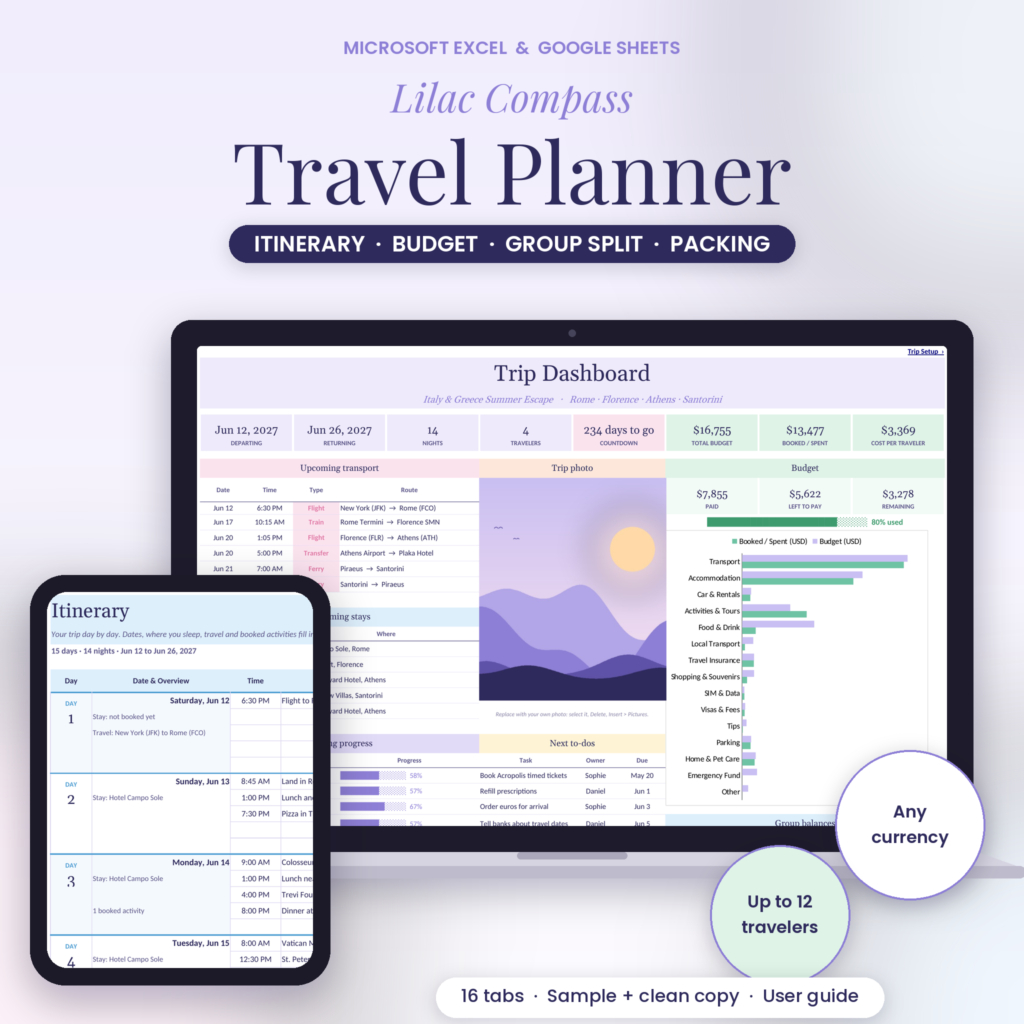 Lilac Compass Travel Planner Lilac Compass Travel Planner$5.79 · Up to 12 travelers | Excel spreadsheet, 16 tabs | Excel (Windows, Mac, 365), Google Sheets | 60-day itinerary, booking trackers, per-person budget, group split with settle-up steps | Big groups sharing costs | View |
Prices as listed on Taskdale in October 2026.
A hyperlinked tablet planner with printable versions, so you get paper and digital in one download.
Good for: People who want to write by hand, on a tablet or on paper
What it does well- ✓ 560 linked pages for up to 12 trips
- ✓ Printable US Letter and A4, 85 pages each
- ✓ Works in GoodNotes, Notability, Noteshelf, Samsung Notes, Xodo and CollaNote
- • No automatic totals for the budget or group split
- • Writing on it needs a PDF note-taking app
A spreadsheet that handles the money and the group, with every tab ready to print.
Good for: Groups of up to 12 and trips across more than one currency
What it does well- ✓ Settle-up steps that name each payment
- ✓ Budget by total, per day or per person
- ✓ Print areas set to fit US Letter or A4
- • Not made for journaling or flicking through
- • Exchange rates are typed in by hand
FAQ
Is a paper or digital travel planner better?
It depends on the trip. Paper or a handwritten tablet planner is better for journaling and slow planning. A spreadsheet is better for budgets, currencies and groups. Many people use a spreadsheet for money and print a few pages to carry.
Can I print a digital travel planner?
Yes. Atlas & Blush comes with separate printable versions in US Letter and A4. Lilac Compass has print areas set on every tab, so each one prints cleanly.
Which apps work with digital travel planners?
PDF note-taking apps such as GoodNotes, Notability, Noteshelf, Samsung Notes, Xodo and CollaNote. They let you write on the pages and tap the links.
Do digital planners work on Android?
Yes, if you use an Android app that supports writing on PDFs with links, such as Samsung Notes or Xodo.
Should I still carry paper copies if I plan digitally?
Yes. Keep printed copies of passports, insurance, your first night’s address and the booking list. They’ll save you if your phone dies or there’s no signal.
The verdict
If you want one planner that covers both paper and screen, choose Atlas & Blush. If your trip runs on shared costs and more than one currency, choose Lilac Compass, and print the pages you’ll need on the road.
Still weighing up a phone app too? See travel planner vs itinerary app, or compare all four planners in best travel planners.