Best A4 Resume Template: Five Kits Compared
Choosing the best A4 resume template comes down to three checks: the file really is A4 (210 x 297 mm), the layout is plain enough for applicant tracking software to read, and it opens in the software you already use. Every kit on this page covers A4 and includes an ATS-friendly resume. They differ in page lengths, photo options and extras.
Key facts at a glance
- A4 measures 210 x 297 mm, and it is the standard paper size for UK, European and Australian applications.
- All five kits here include an ATS-friendly resume layout, either as the main design or as a second set.
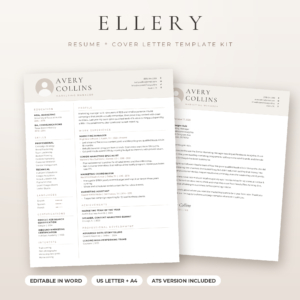
- Four of the five work in both Microsoft Word and Google Docs, while Ellery Resume Template is a Word template.
- Three kits include a three-page option, which suits long careers, and two stop at one and two pages.
- Every kit includes a job application tracker, so you can log applications as well as write them.
Picking a template can feel bigger than it is, because the listings are packed with file counts, colour names and icon packs. Most of that matters less than whether the layout suits your career stage and your software. We'll go through what to check, compare the options side by side, and finish with a simple rule for choosing. Browse all 5 options below once you know what you need.
On this page
- What should you look for in an A4 resume template?
- How do the A4 resume templates compare?
- Which template suits which person?
- How do you set up an A4 resume template?
- What mistakes should you avoid?
- What affects the price?
- Common questions
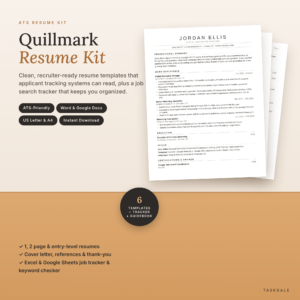 ATS Resume Template for Word & Google Docs | Quillmark Resume Kit with Cover Letter, References, Thank-You Letter & Job Tracker | 1 & 2 Page Resume, Entry-Level CV | US Letter & A4
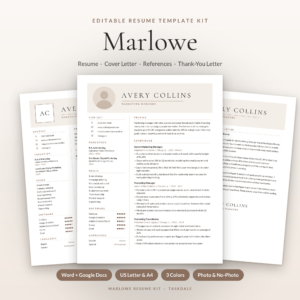 Marlowe Resume Template Kit for Word & Google Docs | Resume, Cover Letter, References & ATS Resume, 1 to 3 Pages
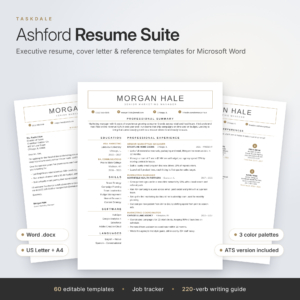 Ashford Resume Template Bundle for Word & Google Docs | Executive + ATS-Friendly Resume, Cover Letter, Reference Page | 1, 2, 3 Page CV + Job Tracker
What should you look for in an A4 resume template?
A good A4 resume template has the right paper size, a layout software can read, page lengths that fit your history, and an editor you already own. Seven factors separate the kits here, and the first few matter most.
Genuine A4 sizing
A4 is 210 x 297 mm, which is taller and narrower than US Letter at 8.5 x 11 inches. A template built for Letter and stretched to A4 can leave odd margins or push a last line onto a new page. Each kit here lists A4 as its own version, so you aren't resizing anything yourself.
An ATS-friendly layout
An ATS-friendly resume is one that applicant tracking systems can read in order, usually because it is single-column with standard headings and no text locked inside graphics. The Quillmark Resume Kit is built around a single-column design. The Marlowe, Ashford and Ellery products each include a separate ATS version alongside their more designed layouts.
Page lengths that match your history
One page suits early careers and tightly targeted applications. Two pages suit most people with several roles. Three pages only make sense for senior or technical profiles with a lot to show. The Quillmark kit and the plain ATS kit offer one and two pages, with Quillmark adding an entry-level layout. Marlowe, Ashford and Ellery go up to three.
Photo or no-photo designs
In the UK, CVs usually go without a photo, so a no-photo version matters. Marlowe, Ellery and the plain ATS kit all include both options. Some European and international employers do expect a photo, so having both saves you building a second document later.
Software and fonts
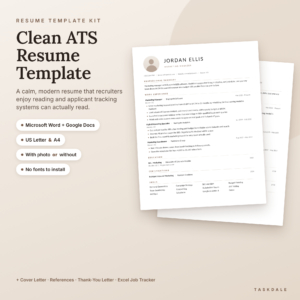
Check the editor first. The Quillmark kit, Marlowe, Ashford and the plain ATS kit work in Microsoft Word and Google Docs. Ellery Resume Template is a Word template, so it suits you only if you have Word. The plain ATS kit says it needs no font downloads, and Ellery has fonts built in. Marlowe supplies free fonts, which means a small install step.
Colour themes
Colour is the least important factor, but it can help a document stand out in a pile. Marlowe offers Mocha, Sage and Navy. Ashford has three colour palettes and Ellery has two themes. For ATS submissions, a muted colour or plain black text is the safe choice.
The extras that help you apply
Most kits add a cover letter, references page and thank-you letter. Beyond that, look at the writing help. The Quillmark kit has a 15-page guidebook with 60 bullet examples and over 300 action verbs. Ashford has writing tips in every placeholder and a 220-verb playbook. Ellery has a 21-page guide, and the plain ATS kit has a 12-page toolkit.
How do the A4 resume templates compare?
The five kits differ mainly in page lengths, photo options and the guidance they bundle. The table uses only what each listing states, and a dash means the listing doesn't say.
Which template suits which person?
The right kit follows your career stage and your software, not the length of the feature list.
The Quillmark Resume Kit suits first-time applicants and career changers. It has an entry-level layout and the most structured writing help, with 60 bullet examples to adapt if you're unsure how to phrase experience.
The Marlowe Resume Template Kit suits people applying in more than one country or sector. The photo and no-photo versions, three page lengths and three colours let you tailor one document to different audiences.
The Ashford Resume Template Bundle suits managers and senior professionals. It is the only kit with an executive layout, and the tips built into each placeholder help if you tend to stare at a blank line.
The plain ATS kit with 1 & 2 Page Resume, Cover Letter, References + Job Tracker suits anyone who wants the simplest set. The listing says it needs no font downloads, and the follow-up reminders in the tracker help if you're sending many applications.
Ellery Resume Template suits Word users who want a tidy layout that stays put as they type. It stops short of Google Docs, so check your editor first.
How do you set up an A4 resume template?
Setting up an A4 resume template takes about six steps, and doing them in order stops most formatting problems.
- Open the A4 version of the file in Word or Google Docs, and confirm the page size is A4 in the page setup.
- Install any fonts the kit supplies before you type, so the layout doesn't shift later.
- Replace the placeholder text section by section, rather than pasting your old resume over the top.
- Keep bullet points short, and lead each with an action verb and a result where you have one.
- Save a PDF copy and read it through, checking the page breaks and that the document ends cleanly.
- Keep the ATS version for online portals, and use the designed version for emailing or handing to someone directly.
Save a separate file for each role, named clearly, such as your surname and the job title. That also makes the job tracker useful, because you can note which version went where.
What mistakes should you avoid with an A4 resume template?
The most common mistakes are using the wrong paper size, choosing design over readability, and padding the document to fill the page.
- Picking the US Letter file by accident. It will print and send fine, but the page proportions differ from A4, and a UK reader may notice the margins.
- Uploading a heavily designed layout to an online portal. Columns, icons and graphics can scramble in an ATS. Use the ATS version there.
- Adding a photo by default. If the employer hasn't asked for one, leave it out.
- Filling three pages because the template allows it. If one or two pages say it all, stop there.
- Leaving placeholder text in. Search for leftover sample wording before you send anything.
- Sending the same cover letter every time. The matching letter in each kit is a starting point, so change the opening paragraph for each role.
What affects the price of a resume template kit?
The price of a resume template kit depends mostly on how much is bundled with the resume itself. A kit with one resume and a cover letter costs less than a bundle that adds three page lengths, photo variants, an ATS set, a tracker and a guide.
File count and colour choices play a part, so Marlowe's 84 editable files sit in a different class from a one-and-two-page set. Extra writing resources add to the total too. Compare the live prices on the product cards, and ask whether you'll use the extras. A tracker you ignore is no bargain, however cheap.
Which A4 resume template should you pick?
Pick the template whose page lengths match your career history and whose editor matches your software. If you're early in your career, start with the Quillmark Resume Kit. If you want the most flexibility, choose the Marlowe Resume Template Kit. If you're senior, go for the Ashford Resume Template Bundle. If you only use Word, Ellery Resume Template is a safe fit, and for the simplest set the plain ATS kit does the job.
Common questions
Is A4 or US Letter better for a UK resume?
A4 is the better choice for a UK resume, because UK employers and printers use A4 as standard. US Letter is slightly shorter and wider. Every kit on this page includes an A4 version, so you can pick the right one when you open the files.
Do all of these templates pass applicant tracking systems?
No template can promise to pass every system, because software varies between employers. Each kit here includes an ATS-friendly layout built to be read in order, and that is the one to use for online portals. Keep headings standard and avoid text boxes.
Can I use these templates in Google Docs?
Four of the five can be edited in Google Docs: the Quillmark Resume Kit, Marlowe, Ashford and the plain ATS kit. Ellery Resume Template is a Word template, and its listing doesn't mention Google Docs. Check the editor on the listing before you buy.
How many pages should my resume be?
Most resumes work best at one or two pages. Use one page if you're early in your career or applying for a tightly targeted role. Use three only if you have a long, senior or technical history, which the Marlowe, Ashford and Ellery kits allow for.
Should I include a photo on my resume?
In the UK you usually shouldn't, unless the employer asks for one. Some countries and industries expect a photo. Marlowe, Ellery and the plain ATS kit include photo and no-photo versions, so you can choose per application.