Best Back to School Planners for Students and Teachers
The best back to school planner depends on who is using it. Students need a tracker for deadlines and grades, so Semester Pilot or Semester HQ fits. Teachers need lesson plans, gradebooks and attendance, so Bright Days, Chalk & Bloom or Classroom Compass fits, depending on whether you print, use an iPad or work in a browser.
September can feel like a lot of new systems arriving at once, and a planner is meant to make that quieter, not louder. We'll keep this simple: what each planner does, who it suits, and how to choose without second-guessing yourself.
Key facts at a glance
- Two of the planners are for students: Semester Pilot works offline in one file, and Semester HQ is a spreadsheet for Excel and Google Sheets.
- Three are for teachers: Bright Days is printable and fillable, Chalk & Bloom is built for GoodNotes and Notability, and Classroom Compass opens in a web browser.
- Semester Pilot and Classroom Compass both keep your information on your own device, with no account or subscription.
- Chalk & Bloom includes dated 2026-2027 planners as well as undated ones, so it suits a school year that has already been set.
- Bright Days is the only one here that comes in A5 and Happy Planner Classic sizes for paper users.
 Student Academic Planner App | Semester Pilot Assignment Tracker, Calendar, Grade & GPA Calculator with Focus Timer | Offline HTML
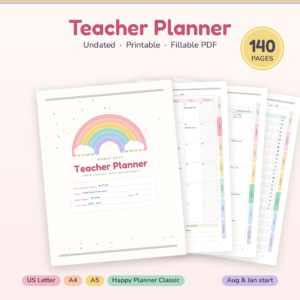 Bright Days Teacher Planner | 140-Page Printable & Fillable Undated Lesson Planner, Gradebook, Attendance & Sub Binder | Letter, A4, A5, Happy Planner
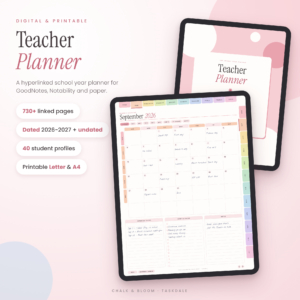 Chalk & Bloom Digital Teacher Planner 2026-2027 + Undated | Hyperlinked GoodNotes Lesson Planner | Printable Letter & A4
Table of Contents Toggle
- What should you look for in a back to school planner?
- How do the best back to school planners compare?
- Which back to school planner suits which person?
- How do you set up a back to school planner in the first week?
- What mistakes should you avoid when choosing a back to school planner?
- What affects the price of a back to school planner?
- How do you decide on the best back to school planner for you?
- Common questions
What should you look for in a back to school planner?
Look for a planner that matches your role, your device and the way you already work. A feature list matters less than whether you will open the file on a busy Tuesday.
Role: student or teacher
A student planner tracks deadlines, grades and study time. A teacher planner tracks lessons, attendance, seating and student details. Semester Pilot and Semester HQ are the student options, while Bright Days, Chalk & Bloom and Classroom Compass are for teachers. Mixing them up is the quickest way to buy something you won't use.
Device and format
A planner is only useful on the device you actually carry. Semester Pilot is one file that runs on a computer, tablet and phone. Semester HQ lives in Excel or Google Sheets. Classroom Compass opens in a web browser with nothing to install. Chalk & Bloom is designed for GoodNotes and Notability, and Bright Days is a PDF you can type into or print.
Privacy and accounts
Some people prefer that their data stays put. Semester Pilot and Classroom Compass both say your information stays on your own device, with no login or subscription. If you are entering student names, that is worth weighing up.
Grade tools
A grade calculator is a feature that works out your current standing from marks and weightings. Both student planners include a "what do I need?" style calculator for a final exam, and Semester Pilot adds a GPA planner. Semester HQ adds a full degree planner and live course grades.
Dated or undated
An undated planner lets you start on any date, which suits a mid-year start or a part-time timetable. Bright Days is undated. Chalk & Bloom gives you both dated 2026-2027 and undated versions, which is handy if you want a daily page for every date already waiting.
How do the best back to school planners compare?
The five planners differ mainly in audience, format and where your data lives. This table shows the differences that affect most decisions.
| Product | Best for | Format | Standout feature |
|---|---|---|---|
| Student Academic Planner App | Semester Pilot Assignment Tracker, Calendar, Grade & GPA Calculator with Focus Timer | Offline HTML | Students who want one offline tool | Single HTML file for computer, tablet and phone | Tells you what to do this week, with a focus timer and 8 printable reports |
| Bright Days Teacher Planner | 140-Page Printable & Fillable Undated Lesson Planner, Gradebook, Attendance & Sub Binder | Letter, A4, A5, Happy Planner | Teachers who print or type into a PDF | Fillable and printable PDF, 140 pages | Four paper sizes, room for 35 students |
| Chalk & Bloom Digital Teacher Planner 2026-2027 + Undated | Hyperlinked GoodNotes Lesson Planner | Printable Letter & A4 | Teachers who use an iPad and handwrite | GoodNotes, Notability and print | 730+ linked pages and 40 student profiles |
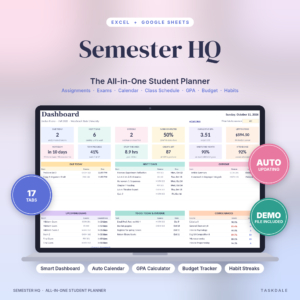 Semester HQ Student Planner Spreadsheet | Excel & Google Sheets Assignment Tracker, GPA Calculator, Class Schedule & College Budget | Students who like spreadsheets and want a budget | Excel and Google Sheets, 17 tabs | Due dates feed a dashboard, and late work turns red |
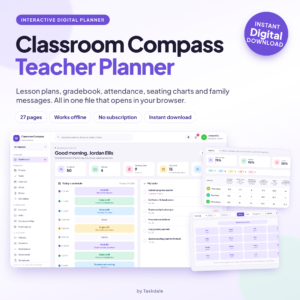 Classroom Compass Digital Teacher Planner | Lesson Plans, Gradebook, Attendance and Seating Charts | Teachers who want something quick and browser-based | Web browser, 27 pages, plus a Word user guide | A bell schedule that drives your day |
Which back to school planner suits which person?
Each planner suits a specific kind of user, and the best match is usually obvious once you know your device and role.
Semester Pilot suits a student who wants everything in one place without an account. It includes an assignment tracker with board view, quick add (type "bio quiz fri 9am" and it files it), a weekly timetable, weighted grades, a habit tracker, exam prep and a costs section. It is a good fit for a student who switches between a laptop and a phone.
Semester HQ suits a student who is comfortable in a spreadsheet. You type a due date once and it appears on the dashboard and calendar with a live countdown. Its budget tab and degree planner make it more of a whole-of-university tool. It arrives with a clean planner, a filled sample file and an illustrated user guide, so you can see how it should look before you start.
Bright Days Teacher Planner suits a teacher who likes paper or a fillable PDF. It has lesson plans, gradebook, attendance, student info and sub plans, with clickable tabs and an index. You can pick August or January starts, and Sunday or Monday calendars.
Chalk & Bloom suits a teacher who writes on an iPad. It includes weekly lesson grids, gradebooks, attendance, seating charts, parent logs, 194 stickers and 10 covers, in Blush and Sage colourways.
Classroom Compass suits a teacher who wants to be planning within about ten minutes. You plan lessons, take attendance, enter grades, build seating charts and write to families. You pay once and download instantly.
How do you set up a back to school planner in the first week?
Set up your planner in the first week by entering fixed items first, then deadlines, then habits. This order stops the planner filling with detail before the structure exists.
- Enter your timetable or bell schedule. For teachers, Classroom Compass builds its day from the bell schedule. For students, Semester Pilot and Semester HQ both have class schedule sections.
- Add every known deadline, exam and parents' evening or marking date.
- Enter your class or student list. Bright Days has room for 35 students and Chalk & Bloom has 40 student profiles, so check your class size before you commit.
- Set a weekly review slot, ten minutes on a Sunday or Friday afternoon.
- Save a backup copy of the file. Because Semester Pilot and Classroom Compass keep data on your own device, a copy on a second drive is sensible.
What mistakes should you avoid when choosing a back to school planner?
The most common mistakes are choosing for features you won't use and ignoring the device you carry. A planner you don't open is worth nothing.
- Buying a teacher planner for a student, or the reverse. The names sound alike, but the contents are different.
- Ignoring class size. If you teach more than 35 students per class, check that Bright Days will suit before you start filling it.
- Choosing dated pages when your year starts differently. Chalk & Bloom's dated planners run 2026-2027. If your start date differs, use the undated version.
- Skipping the user guide. Semester HQ and Classroom Compass both include one, and ten minutes reading it saves frustration later.
- Entering everything at once. Start with the timetable and deadlines, then add the rest as you need it.
What affects the price of a back to school planner?
Price is mostly shaped by how much is included, how the planner is delivered and whether it is dated. Product cards show the live price, so we'll stick to what drives the differences.
A larger bundle, such as Chalk & Bloom with its 730+ linked pages, stickers and covers in several formats, generally costs more than a lean 27-page tool like Classroom Compass. A tool with many features, such as Semester HQ with 17 tabs, sits between the two. The planners here are digital downloads or files, so there is no printing or postage cost, though printing at home uses your own paper and ink. Semester Pilot and Classroom Compass both say there is no subscription, which keeps the cost to a single purchase.
How do you decide on the best back to school planner for you?
Choose by role first, then by device, then by how you like to write. Those three answers usually point to one planner.
- Student who wants one tool on every device, offline: Semester Pilot.
- Student who likes spreadsheets and wants a budget and degree plan: Semester HQ.
- Teacher who prints or types into a PDF: Bright Days Teacher Planner.
- Teacher who handwrites on an iPad: Chalk & Bloom.
- Teacher who wants a quick, browser-based start: Classroom Compass.
If two seem equally good, pick the one that opens fastest on the device in your bag. That is the one you will use in October.
Common questions
Can I use a teacher planner as a student planner?
Not well. The teacher planners here focus on lesson plans, attendance and gradebooks for a class. A student needs assignment tracking, personal grade calculators and study tools, which Semester Pilot and Semester HQ provide.
Do these planners work offline?
Semester Pilot is described as an offline planner, and it keeps your data on your device. Classroom Compass opens in a browser and also keeps information on your device. Check the product page for the other planners before relying on them without a connection.
What is the difference between Semester Pilot and Semester HQ?
Semester Pilot is a single HTML file that runs on a computer, tablet and phone. Semester HQ is a 17-tab spreadsheet for Excel and Google Sheets with a budget and degree planner. Pick Semester Pilot for simplicity and Semester HQ for spreadsheet control.
Which teacher planner is best for iPad?
Chalk & Bloom is built for GoodNotes and Notability, with hyperlinked pages, stickers and covers. Bright Days is a fillable PDF, so you can type into it, but Chalk & Bloom is the one designed around handwriting on a tablet.
Can I print these planners?
Bright Days is designed to print in US Letter, A4, A5 or Happy Planner Classic sizes. Chalk & Bloom includes US Letter and A4 printables, and Semester Pilot offers 8 printable reports. Classroom Compass and Semester HQ are mainly for on-screen use.