Best Business Planner Spreadsheet: How to Choose One
A business planner spreadsheet is a ready-built workbook that holds your goals, income, costs and forecasts in one file. Orchid Business Hub suits owners who want goals, budget, profit and marketing together. Small Business Finance HQ suits those who need bookkeeping, VAT and cash flow. The 1,3 Digital Product Ideas bundle suits anyone still deciding what to sell.
Choosing a planner can feel bigger than it is, because every listing promises to run your whole business. We'll keep it simple: work out which job you need done first, then match the workbook to it. Browse all 3 options below once you know which job that is.
Key facts at a glance
- Orchid Business Hub has 12 tabs, covering the dashboard, one-page business plan, goals, transactions, monthly P&L, budget, marketing ROI, action list, startup costs and pricing calculator.
- Small Business Finance HQ has 20 sheets and six dashboards, and is listed with no monthly fee.
- Both Orchid Business Hub and Small Business Finance HQ work in Excel and Google Sheets.
- The 1,3 Digital Product Ideas bundle includes a Launch Planner spreadsheet alongside a 224-page idea vault, 19 creation playbooks and 40 printable worksheets.
- Orchid Business Hub accepts any currency and any fiscal year start, which matters if you don't trade on a January to December year.
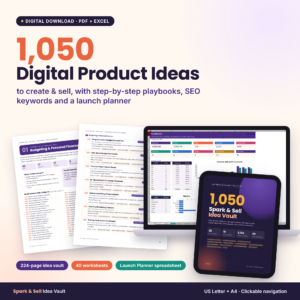 1,050 Digital Product Ideas to Create and Sell: Spark & Sell Idea Vault with SEO Keywords, Creation Playbooks, Creator Workbook and Launch Planner Spreadsheet
Table of Contents Toggle
- What should you look for in a business planner spreadsheet?
- How do the business planner spreadsheets compare?
- Which business planner spreadsheet suits which owner?
- How do you set up a business planner spreadsheet?
- What mistakes should you avoid?
- What affects the cost of a business planner spreadsheet?
- How do you decide in two minutes?
- Common questions
What should you look for in a business planner spreadsheet? {#what-should-you-look-for}
A good business planner spreadsheet does three things: it records your numbers simply, it calculates the results for you, and it shows them in a form you can read at a glance. Five factors separate a useful one from a file you'll abandon in a month.
Which tabs or sheets are included
Check the tab list against the questions you actually ask. If you ask "Am I profitable this month?", you need a monthly profit and loss sheet. If you ask "Can I afford to hire?", you need a budget or cash flow forecast. Orchid Business Hub lists a monthly P&L, a budget and a startup costs tab. Small Business Finance HQ adds an invoice log, tax and VAT calculator and cash flow forecast.
Whether the numbers calculate themselves
An auto-calculating spreadsheet is one where you type in transactions and the totals, charts and checks update without you touching a formula. Both Orchid Business Hub and Small Business Finance HQ are described this way. You log sales and expenses, and the rest follows. That's the difference between a planner and a blank grid.
Compatibility with Excel and Google Sheets
Compatibility decides where you can open the file. Orchid Business Hub and Small Business Finance HQ both state that they work in Excel and Google Sheets, so you can use a desktop copy or share a live version with a bookkeeper. The 1,3 Digital Product Ideas listing doesn't state which spreadsheet programs its Launch Planner supports, so check that before you buy.
Currency and financial year settings
A planner built for one country's tax year can frustrate you for months. Orchid Business Hub allows any currency and any fiscal year start, which suits owners outside the usual calendar year or those who trade in more than one country. Small Business Finance HQ includes a tax and VAT calculator, so it's worth checking that the rates fit where you trade.
Guidance and set-up support
A step-by-step guide cuts the time between buying and using. Orchid Business Hub comes with a step-by-step user guide. The 1,3 Digital Product Ideas bundle goes further for product creators, with 19 creation playbooks that include AI prompt scripts. Without some guidance, even a well-built workbook can sit unused.
How do the business planner spreadsheets compare? {#how-do-they-compare}
The three products on this page do different jobs, so the comparison is about purpose rather than a winner. This table sets out what each one is built to do, using the details supplied in the listings.
| Product | Main job | What's inside | Works in Excel and Google Sheets |
|---|---|---|---|
| 1,3 Digital Product Ideas to Create and Sell: Spark & Sell Idea Vault with SEO Keywords, Creation Playbooks, Creator Workbook and Launch Planner Spreadsheet | Choosing and launching a digital product | 1,050 ideas, 224-page vault, 19 playbooks, 40 worksheets, Launch Planner with idea scorer, profit calculator, launch tracker, sales log and dashboard | Not stated in the listing |
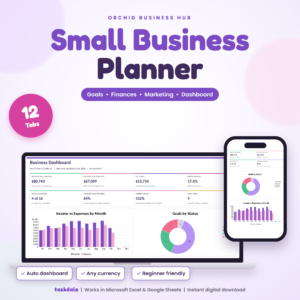 Orchid Business Hub: Small Business Planner Spreadsheet for Excel & Google Sheets, Goals, Budget, P&L and Marketing Dashboard | Planning goals, budget and marketing together | 12 tabs, from one-page business plan to pricing calculator | Yes |
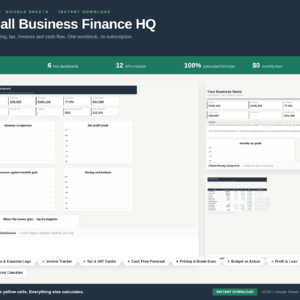 Small Business Finance HQ | Bookkeeping Spreadsheet Excel & Google Sheets | Income Expense Tracker, Invoice Log, Tax & VAT Calculator, Cash Flow Forecast, Profit & Loss, 6 Dashboards | Small Business Accounting Template | Bookkeeping, tax and cash flow | 20 sheets, six dashboards, invoice log, break-even and pricing | Yes |
Which business planner spreadsheet suits which owner? {#which-suits-whom}
Each of the three suits a different stage of business. Match yours to the description that sounds most like your week.
Orchid Business Hub suits owners who plan as much as they count. If you want a one-page business plan, goals and an action list sitting beside your budget and monthly profit, this is the closest fit. The marketing ROI tab helps you see whether your promotion spend earns its keep. It also includes startup costs and a pricing calculator, so it works for a business that's about to launch as well as one that's running.
Small Business Finance HQ suits owners whose main worry is the money itself. It behaves more like a bookkeeping system than a planning pad. You log what comes in and goes out, and it works out profit and loss, tax and VAT estimates, invoices to chase and cash flow forecasts. If you're registered for VAT or you lose track of who owes you, start here.
The 1,3 Digital Product Ideas bundle suits people who haven't picked a product yet. It isn't a general business planner. The Launch Planner spreadsheet scores ideas, calculates profit, tracks the launch and logs sales. Each of the 1,050 ideas comes with a target buyer, a sellable angle, effort level, price tier and three SEO search terms. It fits creators of digital products, and little else.
How do you set up a business planner spreadsheet? {#how-to-set-up}
Setting up a business planner spreadsheet takes about an hour if you follow a fixed order. The steps below apply to the two general planners, Orchid Business Hub and Small Business Finance HQ.
- Save a copy of the original file before you type anything, so you can start again if something breaks.
- Open the user guide, if one is included, and read the set-up pages first.
- Set your currency, and your financial year start where the file allows it.
- Enter your opening position, such as startup costs or money in the bank.
- Add last month's sales and expenses, so the dashboards have something real to show.
- Choose a fixed time each week, even 15 minutes, to log new transactions.
- Review the monthly profit and budget checks at month end and note one action from them.
If you use Google Sheets, keep one person responsible for entering data. Two people typing into the same tab is the quickest route to double entries.
What mistakes should you avoid? {#mistakes-to-avoid}
The commonest mistake is buying a workbook for the business you hope to have rather than the one you run now. These are the others worth steering clear of.
- Choosing the longest tab list. More sheets mean more upkeep. If you'll never use 20 sheets, a 12-tab planner is easier to keep current.
- Skipping the transactions log. The dashboards only read what you enter. Gaps in the log mean misleading charts.
- Mixing personal and business spending. One bank card for the business keeps the profit figure honest.
- Overwriting formulas. Type only in the input cells. Pasting over a calculated cell can break the totals quietly.
- Treating tax estimates as final. The tax and VAT calculator in Small Business Finance HQ gives an estimate. Check it with an accountant or the tax authority's guidance before you file.
- Using a product-idea bundle as a finance tool. The 1,3 Digital Product Ideas Launch Planner tracks one launch, not a whole business's books.
What affects the cost of a business planner spreadsheet? {#what-affects-cost}
The cost of a business planner spreadsheet mostly reflects how much it does and how much comes with it. A simple tracker with a few tabs costs less than a full accounting template with 20 sheets, six dashboards and tax calculators.
Bundles change the picture. The 1,3 Digital Product Ideas listing includes a large idea vault, playbooks and worksheets as well as a spreadsheet, so you're paying for content as well as formulas. Check whether the listing says there's no monthly fee. Small Business Finance HQ does, which means you pay once rather than subscribing. Compare each live product card on this page for the current figure.
How do you decide in two minutes? {#decide}
Pick by the question that worries you most today, and you'll rarely go wrong.
- "What should I sell?" Choose the 1,3 Digital Product Ideas bundle.
- "Where is my business heading, and am I on track?" Choose Orchid Business Hub.
- "Where is my money, and what do I owe?" Choose Small Business Finance HQ.
If two questions apply, pick the one that costs you sleep. You can add the second workbook later, once the first is a habit.
Common questions {#common-questions}
Is a business planner spreadsheet better than accounting software?
A spreadsheet suits owners who want to see and control every number without a subscription. Accounting software suits those who need bank feeds and automatic filing. If you have few transactions each month, a spreadsheet such as Small Business Finance HQ is usually enough to start.
Can I use these spreadsheets on a phone or tablet?
Excel and Google Sheets both have mobile apps, so the two general planners can be opened on a phone. Typing into large grids is slow on a small screen, so most owners enter data on a computer and check the dashboards on a phone.
Do I need to know Excel formulas to use them?
No. The listings describe Orchid Business Hub and Small Business Finance HQ as calculating results from the sales and expenses you log. You type figures into input cells and the profit, budget and dashboard views update. Basic comfort with typing into a table is enough.
Can a business planner spreadsheet replace a business plan?
It can cover the working part. Orchid Business Hub includes a one-page business plan tab beside goals and budget. A lender or investor may still want a longer written document, so treat the spreadsheet as the numbers and priorities behind it.
Which one should a new business start with?
A business that hasn't launched should start with Orchid Business Hub, because it includes startup costs, a pricing calculator and a one-page plan. If you're still choosing a digital product, begin with the 1,3 Digital Product Ideas bundle, then move to a planner once sales begin.