Carbon copy invoice books have been in vans, toolboxes and shop drawers for generations. Write on the top sheet, press hard, tear it off for the customer, and the copy underneath stays with you. Simple. But a digital duplicate, a saved PDF or a record in a spreadsheet, does the same job and does a lot more besides. So which should a small business use in 2026?
This guide is for tradespeople, cleaners, market sellers, home bakers and small shops who still write invoices in a duplicate book, or who are wondering whether to start. You will get a fair side-by-side comparison of carbon copy invoices vs digital duplicates, the cases where paper still wins, a hybrid setup that gives you both, and a plan for switching without losing a single record.
Quick picks: tools for paper, digital or both
| Product | Best for | Price | Link |
|---|---|---|---|
| Ledgerline Business Forms Kit | Printable blank forms plus digital Word and Excel versions | $2.99 | View |
| Gleamwise Cleaning Business Management App | Cleaning businesses moving jobs and invoices off paper | $77.96 | View |
| Proof & Profit Bakery HQ | Home bakers with orders, deposits and invoices | $47.00 | View |
| ProfitPetal Bookkeeping Spreadsheet | Logging every invoice and receipt into simple books | $26.00 | View |
How carbon copy invoice books work
A carbon copy book, often called a duplicate or triplicate book, has numbered pages stacked in sets. The top sheet is usually white and goes to the customer. The sheet below, often yellow or pink, picks up whatever you write through carbon or carbonless coating and stays in the book. Triplicate books add a third sheet, perhaps for the office or the accountant.
The appeal is easy to see. Every page is pre-numbered, so you never repeat an invoice number. You need no power, no signal and no charger. A customer standing at the door gets a paper invoice in their hand within two minutes. For a window cleaner doing 15 houses on a Saturday, that is hard to beat.
But the copy is only as good as the pressure of your pen. Write on a soft car seat and the yellow copy is faint. Write fast and the numbers smudge. Six months later, when a customer disputes a bill, you are squinting at a carbon ghost of what you meant to write.
What a digital duplicate is
A digital duplicate is the saved record of an invoice you created on a phone, tablet or computer. It might be a PDF in a folder, a row in an invoice spreadsheet or an entry in a small business app. The customer gets their copy by email, message or print. Your copy stays on your device, word for word, as clear as the day you made it.
The difference is not just neatness. A digital record can be searched, sorted, added up and backed up. A carbon book can only be flipped through.
Carbon copy invoices vs digital duplicates side by side
| Carbon copy book | Digital duplicate | |
|---|---|---|
| Works with no power or signal | Yes | Only if made offline or printed beforehand |
| Invoice numbering | Pre-printed, automatic | Needs a system or a template that suggests the next number |
| Totals and tax | Worked out by hand | Worked out by formula in Excel or apps |
| Readability years later | Can fade or smudge | Stays exactly as written |
| Finding one invoice | Flip through books | Search by name, number or date |
| Who has paid | Tick marks or memory | Status column or dashboard |
| Ongoing cost | New books as you run out | Usually none after the template |
| Risk of loss | Lost, wet or burned books | Lost device, unless backed up |
Both have weak spots. Paper hates rain and coffee. Digital hates a dead battery and no backup. The best answer for many small businesses is to keep the strengths of each.
When carbon copies still make sense
Paper is not old-fashioned for the sake of it. It still fits some jobs well:
- Cash jobs at the door. A customer pays a gutter cleaner in cash and wants a receipt there and then.
- No signal. Rural farms, basements, festival fields.
- Older customers who like a paper invoice to file in a kitchen drawer.
- Busy market stalls, where nobody has time to type on a phone between sales.
- Very low volume, such as a hobby seller writing six receipts a year.
If one of those describes most of your work, a printed form is still useful. The question is what happens to the copy afterwards.
When digital duplicates win
Here is a real-feeling scenario. It’s March. A letting agent emails to say they never received invoice 0347 from last August, for a boiler service at a rental flat. With a carbon book, you dig through a box of used books in the attic, find August, flip page by page, and find a faint yellow copy. Forty minutes, a dusty sneeze and some swearing.
With digital duplicates, you type “0347” into a search bar. Ten seconds. You email the PDF back before your tea goes cold. That is the moment most people decide they are done with carbon.
Digital also wins at tax time. If your invoices sit in a spreadsheet or app, totals by month or year are already there. With carbon books, someone has to add up every page by hand, usually you, usually in January. Our guide on how to do bookkeeping in Excel shows how quickly those totals come together once invoices are logged digitally.
What each option costs you over a year
The money side is closer than people think, so it helps to count the time too. Take a handyman who writes 25 invoices a month, 300 a year. The figures below are only an example.
Carbon books
Say a 50-set duplicate book costs around 12.00. Six books a year comes to 72.00. Then add the time: roughly 4 minutes to write each invoice by hand and add it up, plus an afternoon at year end totaling every page for the tax return. Call it 25 hours a year, before any time spent searching for old copies.
Digital duplicates
A one-off template or app, then nothing more to buy. Each invoice takes 2 or 3 minutes because clients and prices are saved, and the year-end totals already exist. Call it 15 hours a year, with searches taking seconds.
Ten hours saved might not sound like much. Spread across a year, it is a full working day and a bit more, given back. For a tradesperson billing at an hourly rate, that is real money, and it is the boring part of the job that disappears.
The hybrid setup: paper on the job, digital at home
You do not have to choose one forever. Many tradespeople do this:
- Print a stack of blank invoice and receipt forms in your own design, with your details at the top.
- On the job, fill one in by hand and give it to the customer.
- Before handing it over, take a quick photo of the page with your phone. That photo is your duplicate.
- That evening, type the invoice into your spreadsheet or invoice maker so the totals and payment status are tracked.
The printed forms look more professional than a generic shop-bought pad, because they carry your name and match your digital invoices. And the evening entry takes a couple of minutes per job.
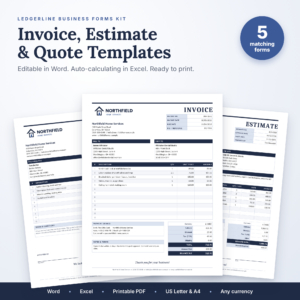
Ledgerline Business Forms Kit
Price: $2.99 | Best for: Trades who write on site, file digitally
Ten blank printable PDF forms with writing lines (invoice, estimate, quote, sales receipt and purchase order) in US Letter and A4, plus the same five forms as editable Word templates and an 11-tab Excel Invoice Maker with an invoice tracker and dashboard. Print a stack of blank receipts for the van, then log each handwritten job in the Excel tracker so it marks itself PAID or OVERDUE.
Moving a cleaning business off carbon pads
Cleaning businesses often start with a duplicate book because jobs are small and frequent. Then the client list grows to 30 recurring homes and the book cannot keep up. Which clients pay weekly? Who skipped last Tuesday? Whose invoice includes the oven add-on?
An app built for cleaners links the schedule to the invoice, so a completed job becomes an invoice without rewriting anything. A solo cleaner with 12 recurring clients can invoice everyone on Friday in one go, rather than writing 12 carbon slips. The relief of not hunting for the pad is real.
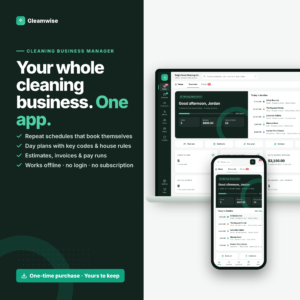
Gleamwise Cleaning Business App
Price: $77.96 | Best for: Solo cleaners and small crews
An offline cleaning business app in a single HTML file that opens in Chrome or Edge, with a recurring scheduler, square-foot quote calculator, client records, checklists and a billing queue. Invoices and receipts handle discounts, tax, partial payments, automatic overdue status, recurring invoices and branded PDF printing. Your data stays on your own device. Add your recurring clients first, then invoice a week of finished jobs.
Home bakers and order-based sellers
Home bakers often write order details and deposits on paper slips, which then live in a shoebox. A deposit for a wedding cake taken in February is easy to forget by June. Digital records keep the deposit, the balance and the pickup date together.

Proof and Profit Bakery HQ
Price: $47.00 | Best for: Home bakers taking custom orders
An offline bakery app in one HTML file for Chrome or Edge, with an order board, customer records, recipe cost calculator, inventory and finances. It tracks deposits and balances and prints quotes, invoices and pickup sheets, and invoices can carry QR codes for your own payment links. A sample bakery lets you explore before adding your own orders, and a one-click backup keeps your records safe.
Keeping digital duplicates safe
A carbon book can get rained on. A laptop can get stolen. Digital only beats paper if you back it up. Keep it simple:
- One folder per year, with a subfolder per month for invoice PDFs.
- Clear file names: invoice number, client, month. “0412 Baker Street flat Aug.pdf”.
- Two copies: one on your computer, one in cloud storage or on a USB stick kept elsewhere.
- App backups: if your tool offers a backup button, use it weekly. Put a reminder on your phone.
- An invoice log: a single list of every invoice number, client, amount and status. Our walkthrough on building an invoice tracker spreadsheet shows the columns to use.
Keep the old carbon books too, for as long as your local tax rules say records must be kept. Box them by year and label the box.
How to switch without losing records
- Finish the current book. No need to waste pages. Set a switch date for when it runs out.
- Carry the numbering on. If the last carbon page is 0500, your first digital invoice is 0501.
- Enter any unpaid carbon invoices into your new digital log, so you keep chasing them.
- Keep a few printed blank forms in the van for no-signal days.
- Review after a month. If you are still writing by hand most of the time, lean on the hybrid setup.
Who should stay with paper for now
Digital is not the right move for everyone this year. Stay with a carbon book, or printed forms, if you write fewer than ten invoices a month, nearly all your customers pay cash on the spot, and you rarely need to look anything up later. A retired joiner doing a few repair jobs for neighbors is a good example. The book works, and switching would add effort without much reward.
Just keep the books in one dry box, labeled by year, and add up each book’s totals as you finish it rather than all at once at tax time.
Frequently asked questions
Are carbon copy invoices still legal?
Yes. A handwritten invoice is valid if it carries the details your tax office expects, such as your name, the customer’s, a unique number, date, description and amount. The same applies to a digital one.
Is a photo of a handwritten invoice a valid record?
Many businesses keep photos or scans as their copy. Check your local tax rules on record keeping, and make sure the photo is clear and stored safely.
What is the difference between duplicate and triplicate invoice books?
A duplicate book makes two copies of each invoice, one for the customer and one for you. A triplicate book makes three, often for the customer, the office and a file.
Can I print my own invoice pads?
You can print blank invoice forms with your own details at home and fill them in by hand. They will not make carbon copies, so take a photo or log each one digitally.
What is the cheapest way to stop using carbon invoice books?
A one-off invoice template or small business app, plus a phone camera for jobs where you still write by hand. No ongoing book purchases.
Your next step
Look at your current carbon book and count the pages left. Mark that date in your calendar as your switch day, then set up a digital invoice template before it arrives, with the next invoice number ready to go. For printable forms that match your digital invoices, start with the Ledgerline Business Forms Kit.