Best Class Schedule Planners for College Students
The best class schedule for most students is one that sits beside your deadlines and grades instead of living on its own page. If you want a dedicated schedule tab with live countdowns, choose Semester HQ. For offline use on any device, choose Semester Pilot. For paper, choose the Syllabloom printable PDF. Semester Studio suits Notion users who also want budgeting.
A class schedule can feel like a small job until a lecture moves, a seminar clashes with a shift and an essay lands the same week. We'll keep this practical: what to check, how the four planners here differ, and how to pick one without a week of trial and error.
- A class schedule planner is a template or app where you record when and where each class meets, then link it to deadlines, exams and grades.
- Semester HQ has a dedicated class schedule tab among its 17 tabs, in Excel and Google Sheets.
- Semester Pilot works offline from one file, with no account and no subscription.
- The Syllabloom PDF has 115 hyperlinked, fillable pages and can be printed or typed into on screen.
- Semester Studio works on Notion's free plan and updates grades and budgets automatically.
 Undated Student Planner Printable PDF | Syllabloom College Academic Planner with Assignment Tracker & GPA Worksheet
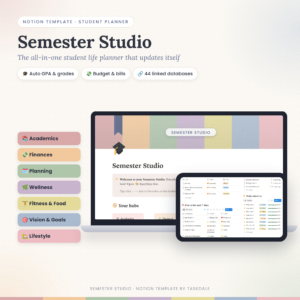 Student Notion Planner | Semester Studio All-in-One Student Life Template with Auto GPA Calculator, Assignment Tracker, Budget & 70+ Linked Pages
Table of Contents
Toggle
- What should you look for in a class schedule planner?
- How do the four class schedule planners compare?
- Which class schedule planner suits which student?
- How do you set up a class schedule planner?
- What mistakes should you avoid?
- What affects the price?
- Which class schedule planner should you choose?
- Common questions
What should you look for in a class schedule planner?
A good class schedule planner does three things: it shows your week at a glance, it connects to your deadlines, and it takes little effort to keep current. Everything else is a bonus. These are the factors that separate the options on this page.
Format you will actually open
A planner only works if you open it. Printable pages suit people who think better with a pen and want a sheet on the wall. A spreadsheet suits those already living in Excel or Google Sheets. A Notion template suits people who already use Notion. An offline app file suits anyone who wants to open one thing on a laptop, tablet or phone. Choose by habit, not by feature count.
Whether the schedule links to deadlines
A timetable on its own tells you where to be. A linked one tells you what is due. In Semester HQ, you type a due date once and it appears on the dashboard and calendar with a live countdown, and late work turns red. Semester Pilot pairs a weekly timetable with an assignment tracker and a "what to do this week" view. With the printable PDF, the linking is done by hyperlinks between pages, so you move around but fill in each page yourself.
Grade and GPA tools
If you want to see how a clash between classes and coursework affects your marks, check the grade tools. Semester HQ, Semester Pilot and Semester Studio all include a "what do I need" calculator for upcoming assessments. Semester Studio updates course grade, letter grade and semester GPA as soon as you add a score. The PDF has a grade tracker for every class and a GPA worksheet, which you complete by hand or on screen.
Offline use and data privacy
Offline means the planner opens without a connection. Semester Pilot is built that way: no account, no subscription, and your data stays on your device. A printed PDF is offline by nature. Spreadsheets and Notion templates depend on the apps they run in, so check how you plan to open them on campus where wifi can be patchy.
Setup time and guidance
Every planner here includes some guidance. The PDF has a step-by-step user guide, Semester HQ has an illustrated guide plus a filled sample file, and Semester Studio includes a DOCX guide. A sample file is particularly useful for a schedule, because you can see a finished week before you enter your own.
How do the four class schedule planners compare?
The four planners differ mainly in format, offline access and how automatic the updates are. The table uses only details from each listing.
| Product | Format | Class schedule and calendar | Grade tools | Works offline | Best for |
|---|---|---|---|---|---|
| Undated Student Planner Printable PDF | Syllabloom College Academic Planner with Assignment Tracker & GPA Worksheet | Printable PDF, fillable on screen | Class schedule pages, 8 course pages, 18 weekly planners | Grade tracker per class, GPA worksheet | Yes, once printed or saved | Paper lovers who want a full semester pack |
| Student Notion Planner | Semester Studio All-in-One Student Life Template with Auto GPA Calculator, Assignment Tracker, Budget & 70+ Linked Pages | Notion template | Assignment and exam countdowns across 70+ linked pages | Auto course grade, letter grade, semester GPA, "what I need" calculator | Not stated | Notion users who also want a budget |
 Student Academic Planner App | Semester Pilot Assignment Tracker, Calendar, Grade & GPA Calculator with Focus Timer | Offline HTML | Offline HTML file | Calendar, weekly timetable, holidays, calendar export | Weighted grade calculator, "what do I need?", GPA planner | Yes | Students moving between laptop, tablet and phone |
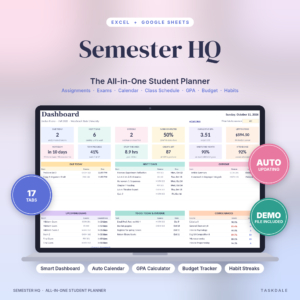 Semester HQ Student Planner Spreadsheet | Excel & Google Sheets Assignment Tracker, GPA Calculator, Class Schedule & College Budget | Excel and Google Sheets, 17 tabs | Class schedule tab and smart calendar with live countdown | Live course grades, "what do I need on the final?", degree planner | Depends on how you open it | Anyone who wants a dedicated schedule tab plus automation |
Which class schedule planner suits which student?
Each planner suits a different working style, and the right one is usually obvious once you know whether you prefer paper, screens or automation.
The Syllabloom printable PDF suits students who plan on paper. It gives you 115 pages covering class schedules, Cornell notes, Pomodoro study logs and exam planners with a 7-day countdown. It includes US Letter and A4 sizes in Colour and Ink Saver versions, which matters if you print at a library or at home. The trade-off is that nothing updates itself.
Semester Studio suits students already comfortable in Notion. Its strength is automation: add a score and your grades update, add a transaction and your budget and savings goals follow. The listing highlights grades, money and countdowns more than a timetable view, so check that its layout gives you the weekly picture you want.
Semester Pilot suits students who want one file that travels. It has a weekly timetable, a calendar with holiday and export options, a quick add such as "bio quiz fri 9am", a focus timer and eight printable reports. With no account to create, it also suits anyone cautious about where their data goes.
Semester HQ suits the student who wants the schedule to feed everything else. The class schedule sits alongside a dashboard, budget, habits and a full degree planner. It is the broadest option here, which is helpful for a long course and a lot to set up for a short one.
How do you set up a class schedule planner?
Setting up a class schedule planner takes about one sitting if you collect your information first. The steps work for any of the four.
- Gather your timetable, module handbooks and any assessment dates from your course.
- Enter each class with its day, time and room, starting with fixed sessions.
- Add term dates, holidays and reading weeks so free time is visible.
- Enter every assessment deadline and exam date once, in whichever page or tab holds them.
- Add your fixed commitments, such as work shifts or caring duties, so you can see true free time.
- Check the week ahead every Sunday and update anything that moved.
If you're using a spreadsheet or Notion template, save a spare copy before you start. With the printable PDF, print the schedule page first and check it against your timetable before printing the rest.
What mistakes should you avoid when choosing a class schedule?
The most common mistake is picking the planner with the most features instead of the one you'll open weekly. A tool with 17 tabs is wasted if you only ever use two.
- Choosing for the first week. Your timetable will change. Pick something easy to edit mid-term.
- Ignoring where you'll open it. A spreadsheet is awkward on a phone if you mainly check on the move.
- Keeping deadlines elsewhere. A schedule without assessment dates leaves clashes hidden until they bite.
- Skipping the user guide. All four include one, and a quick read saves time.
- Assuming automation is always better. Self-updating grades are handy, but some students find filling in a printed tracker helps them stay engaged.
What affects the price of a class schedule planner?
The price of a class schedule planner is shaped mainly by how much is built in and what you need to run it. A single printable pack generally costs less than a multi-tab automated system, because it has fewer moving parts. Extras such as sample files, several print versions, budgeting and degree planning add value and push the cost up.
Also consider what you need to use it. Notion's free plan covers Semester Studio, and Semester Pilot asks for no subscription. Excel and Google Sheets are separate tools you may already own. Check the live product cards for current prices.
Which class schedule planner should you choose?
Choose by habit first. If you plan on paper, take the Syllabloom PDF. If you live in Notion, take Semester Studio. If you want offline use across devices, take Semester Pilot. If you want a dedicated schedule tab driving a dashboard, take Semester HQ.
Browse all 4 options below and compare them against the table above. A tool that fits how you already work will still be in use by week ten.
Common questions
Can I use more than one planner for my timetable?
You can, but keep one as the master. A common split is a digital planner for the full semester and a printed weekly page for your desk. Updating two places for every change is where most clashes slip through, so make one the source of truth.
Is a printable class schedule as good as a digital one?
It depends on how often your timetable changes. A printed schedule is quick to read and needs no battery, while a digital one is easier to edit and can show countdowns. If your classes move rarely, paper works well.
Do these planners work for part-time or evening courses?
Yes, as long as you can enter your own times. The listings describe undated or flexible layouts, so you add your own days and hours. Check that the format suits how you'll open it, particularly if you study around work.
How early should I set up my class schedule?
Set it up as soon as your timetable is released, and ideally before teaching starts. Enter fixed sessions first, then add deadlines from module handbooks as you receive them. Early setup shows clashes while there's still time to rearrange your week.
Will the grade calculators tell me what I need to pass?
Semester HQ, Semester Pilot and Semester Studio each include a "what do I need" style calculator, and the Syllabloom PDF has a GPA worksheet. They work from the weightings and scores you enter, so check them against your course handbook.