
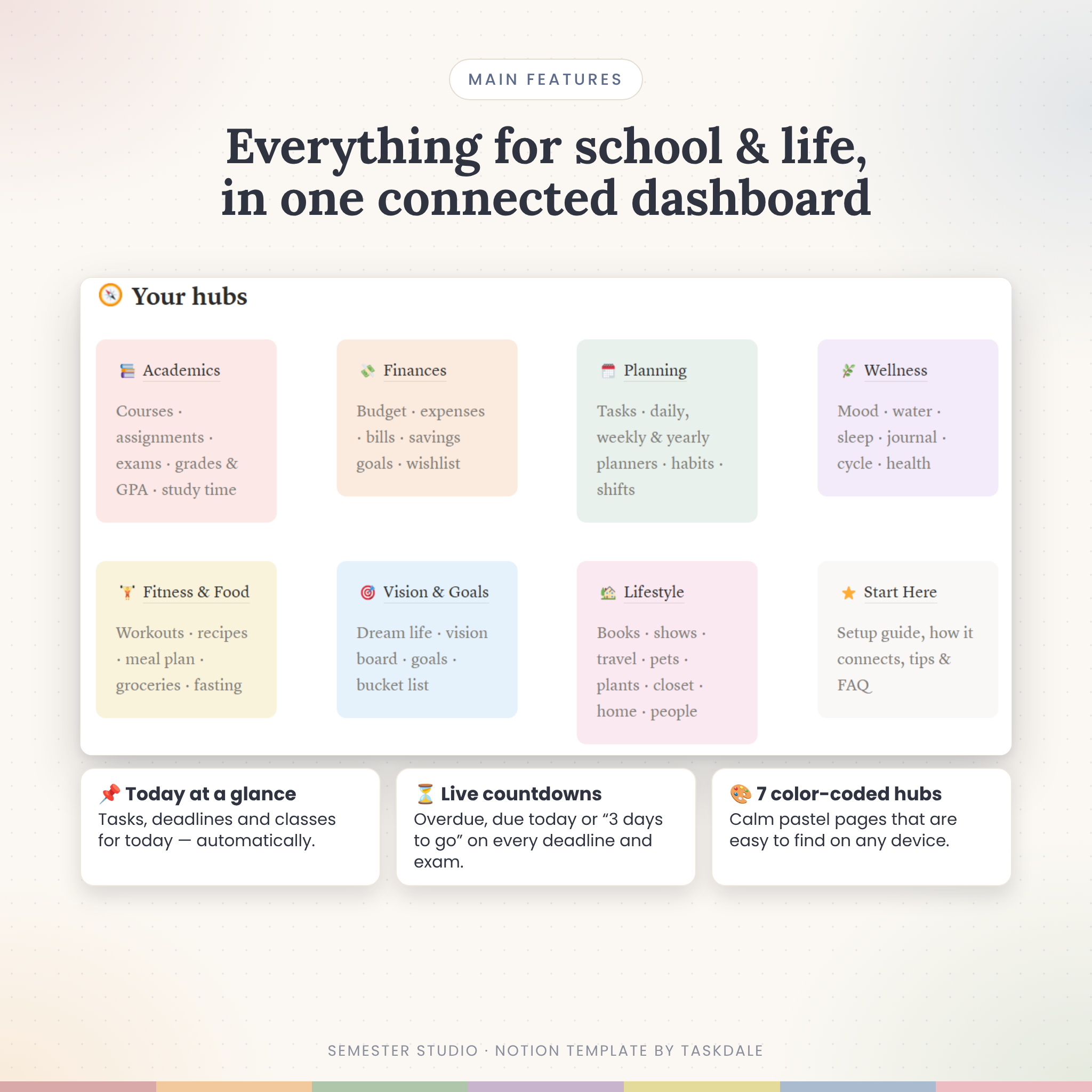



Semester Studio is a calm, color-coded student Notion planner for your classes, deadlines, grades, money, health, goals and everyday life. A lot of “ultimate” templates are piles of separate pages. Semester Studio is different: its 44 databases are linked, so one entry shows up everywhere it matters. Log a quiz score and your course grade, letter grade and semester GPA update on their own. Log a grocery receipt and your budget, account balance and monthly overview change right away.
What this student Notion planner does for you
Open the dashboard and you see what needs your attention today: tasks due today, assignments due in the next 7 days, your class schedule, an exam countdown, recent mood and habit check-ins, and how much of each budget category you have used this month. You don’t have to update any of it by hand.
- Weighted grades and automatic GPA: enter scores and weights from your syllabus and see each course’s grade, letter grade, grade points and semester GPA on the US 4.0 scale.
- “What I Need” calculator: set a target grade and see the average you need on the work that’s left.
- Deadline alerts: every assignment and task shows Overdue, Due today, Tomorrow or the number of days left. Each exam gets a live countdown.
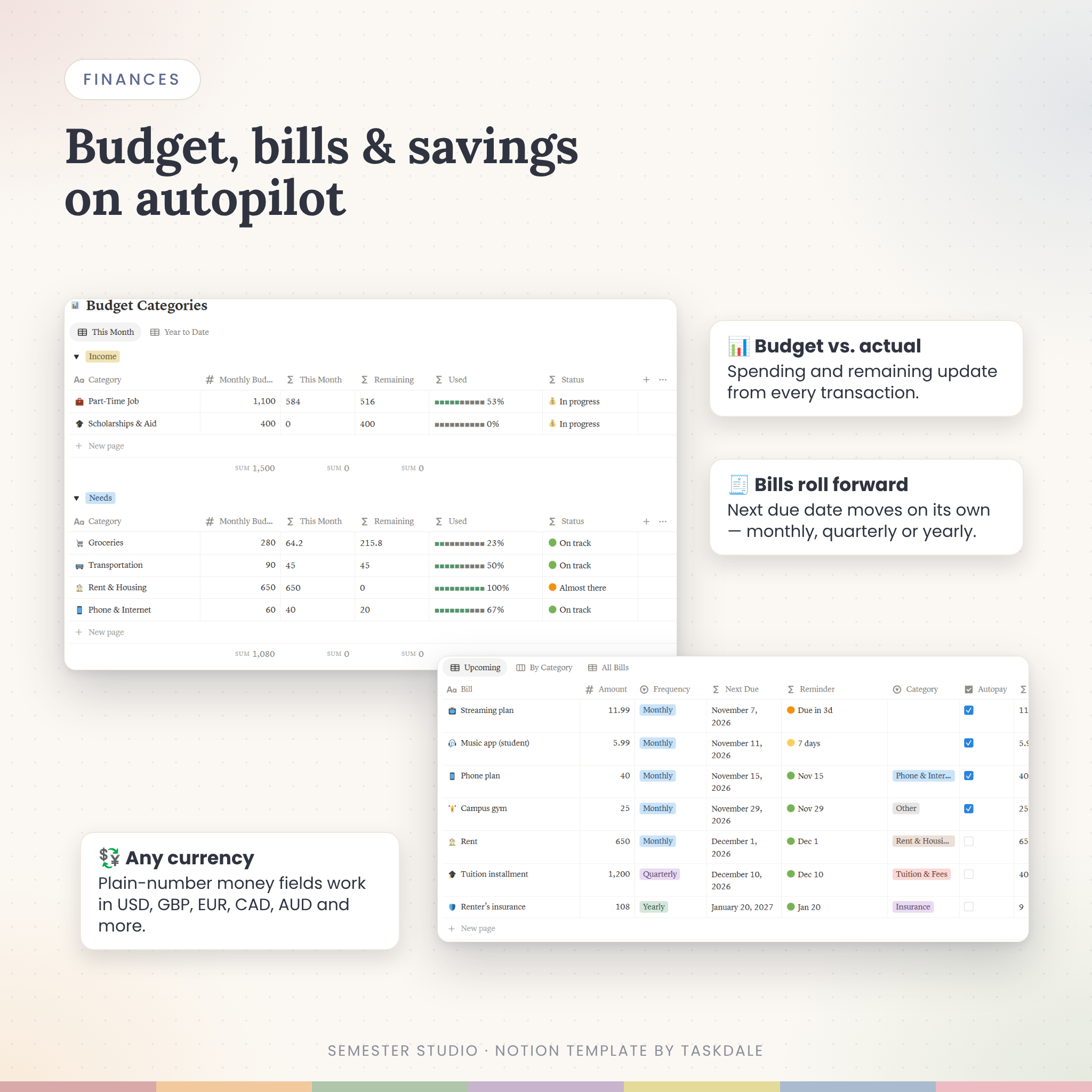
- Money on autopilot: budget vs. actual by category, account balances that handle transfers, bills whose next due date rolls forward automatically, and savings goals with a monthly target.
- One Daily Log, many trackers: mood, water, sleep, six habits and no-spend days all come from one daily page.
Who it’s for
- High school, college, university and graduate students who want one place for school and life
- Students juggling classes, a part-time job and a budget
- Anyone who found other mega templates overwhelming: every page has a short tip box explaining exactly what to do
- Complete Notion beginners. You can set up the template in about 10 minutes.
Features: 7 hubs, 70+ pages
📚 Academics
Semester Overview with GPA, a progress bar and weeks left · Courses & Weekly Class Schedule · Assignments & Homework (table, board, calendar) · Exam Prep with countdowns and confidence ratings · Grade & GPA Tracker · Study Sessions & Pomodoro log with hours per course · Study Notebooks with Cornell Notes, Flashcards and a spaced-repetition review queue · Projects & Research · Essay Planner · Textbooks with return-by alerts · Sources & Citations.
💸 Finances
Income & Expense Tracker · Budget & Spending Categories · Accounts & Transfers · Bills & Subscriptions with monthly and yearly totals · Savings Goals & Sinking Funds · Wishlist with a 30-day cool-off rule · Yearly month-by-month overview · Money Habits & No-Spend Days.
🗓️ Planning & Productivity
Task List linked to goals · Daily Planner · Weekly, Monthly, Quarterly & Yearly Planners with templates · Habit Tracker with % completed · Work & Shift Tracker that calculates your pay · Pomodoro Tracker.
🌿 Wellness & Self-Care
Mood Log calendar · Hydration Tracker · Sleep & Dream Journal · Gratitude & Reflection Journal · Thought Dump · Therapy Notes · Period & Cycle Tracker · Medicine & Symptom Log · Self-Care Menu.
🏋️ Fitness & Food
Workout Library & Equipment · Workout Log & Plan · Fitness Goals · Weight, Steps & Measurements · Recipe Book with cost per serving · Meal Planner calendar · Grocery List & Kitchen Inventory with expiry alerts · Intermittent Fasting log · Fitness Challenges.
🎯 Vision & Goals
Dream Life Vision · Vision Board gallery · Goal Setting with progress from linked tasks · Bucket List · Affirmations · Manifestation Planner.
🏡 Lifestyle & Organization
Reading Tracker with progress bars · Movies & Series · Podcasts & Music · Travel Planner with packing list and budget · Pet Log · Plant Care reminders · Wardrobe & Outfits with cost per wear · Household chores that reschedule themselves · Beauty & Toiletries expiry tracker · Relationships with birthday countdowns.
What’s included
- Semester Studio Notion template (link to duplicate into your own workspace)
- Access PDF with your template link (US Letter and A4)
- Semester Studio User Guide (DOCX), covering setup, every feature, customization, troubleshooting and FAQs
- 21 page templates, including Essay Planner, Project Breakdown, Exam Prep Plan, Cornell Notes, Daily Plan, Weekly Plan, journal prompts, Recipe Card, Trip Itinerary and Goal Map
How it works
- Download your files and open the Access PDF.
- Click the template link and press Duplicate to copy Semester Studio into your Notion workspace.
- Open Start Here and follow the 10-minute setup: add your semester, courses, syllabus deadlines, accounts and budget.
- Start each day in the Daily Planner, and let the dashboard handle the reminders.
File formats and software requirements
This is a Notion template, delivered as a PDF with your template link plus a DOCX user guide. You need a free Notion account (notion.com). It works in the Notion web app, the desktop apps for Mac and Windows, and the mobile apps for iPhone, iPad and Android. You don’t need a paid plan.
Customization
Everything is editable. You can change covers and icons, rename habits, add your own tags and categories, recolor sections and delete pages you don’t need. Money fields are plain numbers, so the planner works in any currency (USD, GBP, EUR, CAD, AUD and more). You can also switch any money column to your currency’s symbol in two clicks. Weight and measurements work in whichever units you prefer.
Digital download
This is an instant digital download. Nothing will be shipped. Your files are available right after payment.
Ways students use Semester Studio
- Copying every syllabus deadline into one place during the first week of term
- Checking what grade is needed on the final to keep an A-
- Planning study sessions backward from exam dates
- Tracking part-time job shifts and pay alongside a monthly budget
- Saving for a laptop or spring break with a sinking fund
- Building healthier sleep, water and exercise habits during busy weeks
Student Notion planner FAQ
Do I need a paid Notion plan?
No. Semester Studio works on Notion’s free plan.
Does the GPA calculator work automatically?
Yes. Add a score, an “out of” value and a weight to each assignment or exam and link it to a course. The grade and GPA update instantly.
Can I use it on my iPad or phone?
Yes, in the free Notion app on iPhone, iPad and Android. Boards and calendars are easiest on a tablet or computer.
Is it good for high school or grad school?
Yes. Rename terms, courses and options to match your school. The grade scale can also be edited.
Can I use my own currency?
Yes. Money fields are plain numbers that work with any currency, and you can switch them to a currency symbol.
Will it be empty when I get it?
Yes. Your copy arrives clean and ready for your information, with a tip on every page.
Can I share it with friends?
The license covers personal use by one person. Please don’t share, resell or redistribute the template.
License: personal use only. Please don’t share, resell, redistribute or upload this template or guide as your own product. © Taskdale.
Reviews
There are no reviews yet.