Best Client Intake Form: Editable Templates Compared
The best client intake form asks only what your service needs, suits your trade, and comes with the agreement and invoice that follow it. For most small businesses that means an editable template kit rather than a single blank page. Choose the kit written for your line of work, then adjust the wording to match how you talk to clients.
Setting up paperwork can feel like a job with no obvious start. We'll keep it simple: the five kits here each include an intake form, and the differences lie in the trade they're written for and the documents around the form.
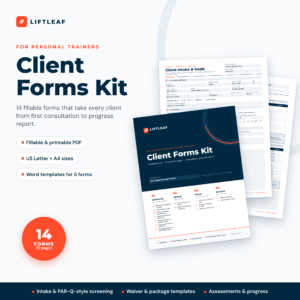 Personal Trainer Forms Kit: Fillable Client Intake, PAR-Q Style Questionnaire, Waiver & Assessment Templates | Liftleaf 14 Forms, Letter + A4
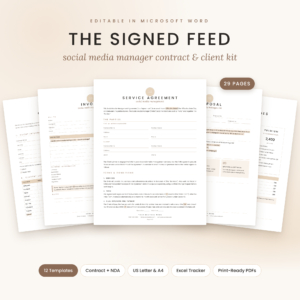 Social Media Manager Contract Template for Word | The Signed Feed Client Kit with NDA, Intake Form, Price List, Proposal, Invoice & Excel Tracker | US Letter & A4
 Professional Organizer Contract Template Bundle | Sorted & Signed Client Intake Form, Service Agreement, Invoice & Business Forms in Word | US Letter & A4
Key facts at a glance
- The Personal Trainer Forms Kit from Liftleaf has 14 fillable PDF forms across 20 pages, with five key forms editable in Word.
- The Sorted & Signed professional organiser bundle has 21 matching editable Word documents.
- The ScopeSigned bundle has nine matching forms and an Excel calculator for quotes, tax and deposits.
- The Signed Feed kit has 12 templates across 29 pages, plus an Excel tracker.
- The Rinsewell kit has 5 Word templates and an Excel quote and invoice calculator.
Table of Contents Toggle
- What should you look for in a client intake form?
- How do the client intake form kits compare?
- Which client intake form suits which business?
- How do you set up and use a client intake form?
- What mistakes should you avoid with a client intake form?
- What affects the price of a client intake form kit?
- Which client intake form should you choose?
- Common questions
What should you look for in a client intake form?
A client intake form is a document a new client completes before work starts, so you know who they are, what they want and what limits apply. A good one saves you a first meeting's worth of back and forth. Browse all 5 options below with these five factors in mind.
Fields that match your trade
An intake form for a personal trainer needs health and goal questions, while one for a pressure washer needs property type and access details. The generic "name, phone, notes" form leaves you chasing the real answers by phone. Look for a form written around the questions your own first call already includes.
An editable format you will actually use
Editable means you can change wording, delete questions and add your own. Word files suit most people, and fillable PDFs suit clients who type their answers on screen. The Liftleaf kit offers fillable PDFs with five key forms editable in Word, while the other four kits are built around Word files with printable PDFs.
Matching documents around the form
Intake is the first step of a chain: proposal, agreement, invoice, sign-off. Templates designed together share fonts, layout and wording, so a client sees one consistent business. Mismatched downloads from different places look patchy and invite questions.
How quickly you can add your branding
Branding means your business name, contact details and colours on every page. The Liftleaf kit fills your business name on every page from one box, and the Sorted & Signed bundle uses Find & Replace to brand every page in about 10 minutes. Slow branding is the usual reason templates stay half-finished.
Paper and screen use
Some clients prefer to fill in a form at your door, others want to do it at home on a laptop. US Letter and A4 versions are included across all five kits, so printing at home or in a UK print shop works. Clickable checkboxes, as in the organiser bundle, make screen completion quicker.
How do the client intake form kits compare?
The five kits differ mainly in trade focus and in what surrounds the intake form. The table below sets them side by side using the supplied details.
| Product | Best for | Format | Also included |
|---|---|---|---|
| Personal Trainer Forms Kit: Fillable Client Intake, PAR-Q Style Questionnaire, Waiver & Assessment Templates | Liftleaf 14 Forms, Letter + A4 | Personal trainers | Fillable PDF, five key forms editable in Word | PAR-Q-style questionnaire, waiver, package agreement, fitness assessment, logs, progress report |
| Social Media Manager Contract Template for Word | The Signed Feed Client Kit with NDA, Intake Form, Price List, Proposal, Invoice & Excel Tracker | US Letter & A4 | Social media managers | Word, with print-ready PDFs | 22-section service agreement, NDA, price lists, proposal, invoice, onboarding and reporting templates, Excel tracker |
| Professional Organiser Contract Template Bundle | Sorted & Signed Client Intake Form, Service Agreement, Invoice & Business Forms in Word | US Letter & A4 | Professional organisers | Word, with printable PDFs | Discovery call notes, 3-page service agreement, estimate, invoice, receipts, business cards, gift certificates |
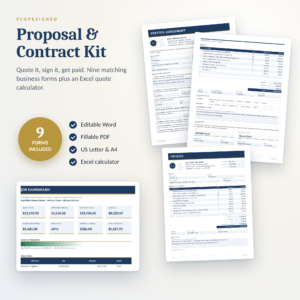 Contract and Proposal Template Bundle | ScopeSigned Service Agreement, Job Quote, Change Order & Invoice Forms | Editable Word + Fillable PDF, US Letter & A4 | General service businesses and freelancers | Word and fillable PDF | Project proposal, 16-clause service agreement, change order, invoice, completion sign-off, Excel calculator, user guide |
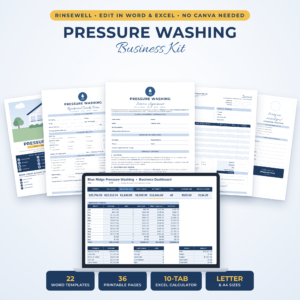 Rinsewell Pressure Washing Business Kit | Editable Contract, Client Intake Forms, Proposal, Invoice & Estimate Templates for Word + Excel Quote Calculator | Flyers, Door Hangers & Business Cards | US Letter & A4 | Pressure washing firms | Word and Excel | Residential and commercial intake forms, inspection form, proposals, invoices, flyers, door hangers, business cards |
Which client intake form suits which business?
Each kit suits a different kind of client relationship, and matching the two matters more than the number of documents. Here is how the five break down.
The Personal Trainer Forms Kit suits trainers who need health screening and progress tracking. It takes a client from first consultation to progress report, including a fitness assessment with a baseline and three retests. A PAR-Q-style questionnaire is a readiness screen, not medical advice, so it works best alongside your own professional judgement.
The Social Media Manager Contract Template suits freelancers who sell monthly packages. Its intake questionnaire sits beside an NDA, onboarding and offboarding templates, which matter when you hold client logins. The Excel tracker helps you price packages and log invoices.
The Professional Organiser Contract Template Bundle suits home organisers who start with a discovery call. It has the widest set of paperwork of the five, with 21 documents, and money fields that are neutral so they work in any currency. The bonus gift certificates and thank-you notes suit a business that sells to individuals.
The Contract and Proposal Template Bundle suits freelancers and trades with project-based work. Its change order form is the standout, because scope creep is a common cause of unpaid extra hours. It's also the most general of the five, so it's the safest pick if your trade isn't named in any other kit.
The Rinsewell Pressure Washing Business Kit suits pressure washing businesses that quote on the doorstep. Separate residential and commercial intake forms mean you ask different questions of a homeowner and a shop manager. The calculator uses your own rates and adds discount, tax and deposit.
How do you set up and use a client intake form?
Setting up a client intake form takes under an hour for most kits: brand it, trim it, test it, then send it. The same steps apply to every product here.
- Brand the file. Add your business name, contact details and logo, using Find & Replace or the single-box fill where the kit offers it.
- Cut questions you never use. If you wouldn't act on an answer, delete the question.
- Add one question only you ask. A line about how the client found you, or about access, makes the form feel written for you.
- Test it on a friend. Ask them to complete it cold and note where they hesitate.
- Send it before the first meeting. Include a short note saying how long it takes, then read the answers before you speak.
- File each completed form with the agreement. Keep intake, agreement and invoice together for each client.
What mistakes should you avoid with a client intake form?
The most common mistake is asking for too much, which slows clients down and leaves some boxes blank. Other pitfalls are easy to spot once you know them.
- Leaving template wording untouched. Placeholder text left in a form looks careless and can contradict your real terms.
- Treating a waiver or questionnaire as legal or medical cover. Templates are a starting point. For anything that carries real risk, have a qualified adviser review your final version.
- Collecting sensitive details you don't need. Health or access information should only be requested if your service uses it, and stored somewhere secure.
- Sending the intake form without the agreement. A form says what the client wants, and an agreement says what you'll do. You need both before work starts.
- Never revisiting the form. After your first five clients, note which answers you ignored and remove those questions.
What affects the price of a client intake form kit?
Price depends mainly on how many documents you get, how specialised they are, and what extras come with them. A single form costs less than a kit, while a kit with a calculator or tracker costs more up front. The bonus spreadsheet in the ScopeSigned, Signed Feed and Rinsewell kits adds working tools, not just paperwork.
Specialist content also matters. A kit with a screening questionnaire and assessment templates takes more subject knowledge to write than a general proposal form. Live prices appear on the product cards, so compare them there against the documents you'd use rather than the total number in each download.
Which client intake form should you choose?
Choose the kit written for your trade, and only fall back on the general bundle if no kit fits. That one rule settles most decisions.
- Training clients: the Personal Trainer Forms Kit.
- Selling monthly social media packages: the Social Media Manager Contract Template.
- Organising homes: the Professional Organiser Contract Template Bundle.
- Project work with changing scope: the Contract and Proposal Template Bundle.
- Quoting pressure washing jobs: the Rinsewell Pressure Washing Business Kit.
Whichever you pick, brand it, trim it and test it on one real client before you roll it out.
Common questions
What is the difference between a client intake form and a service agreement?
A client intake form records who the client is and what they want. A service agreement sets out what you'll deliver, when, and on what terms. Intake comes first and informs the agreement, so most kits supply both and you should use both for each new client.
Can I edit these client intake forms in Word?
Yes for most of them. The Signed Feed, Sorted & Signed, ScopeSigned and Rinsewell kits are built around editable Word files. The Liftleaf kit is mainly fillable PDF, with five key forms also editable in Word.
Do the templates work in the UK?
All five come in both US Letter and A4, and A4 is the UK standard. The ScopeSigned and Sorted & Signed products also state they work with any currency. Check agreement wording against your own local requirements before you use it.
Do I need a different intake form for each type of client?
Only where the questions differ. The Rinsewell kit has separate residential and commercial forms because the two customers need different details. If every client is asked the same things, one form is enough.
How long should a client intake form be?
Keep it to what you will actually use, usually one to two pages. If a question doesn't change how you quote, schedule or deliver the work, remove it. Shorter forms get completed more often and more accurately.