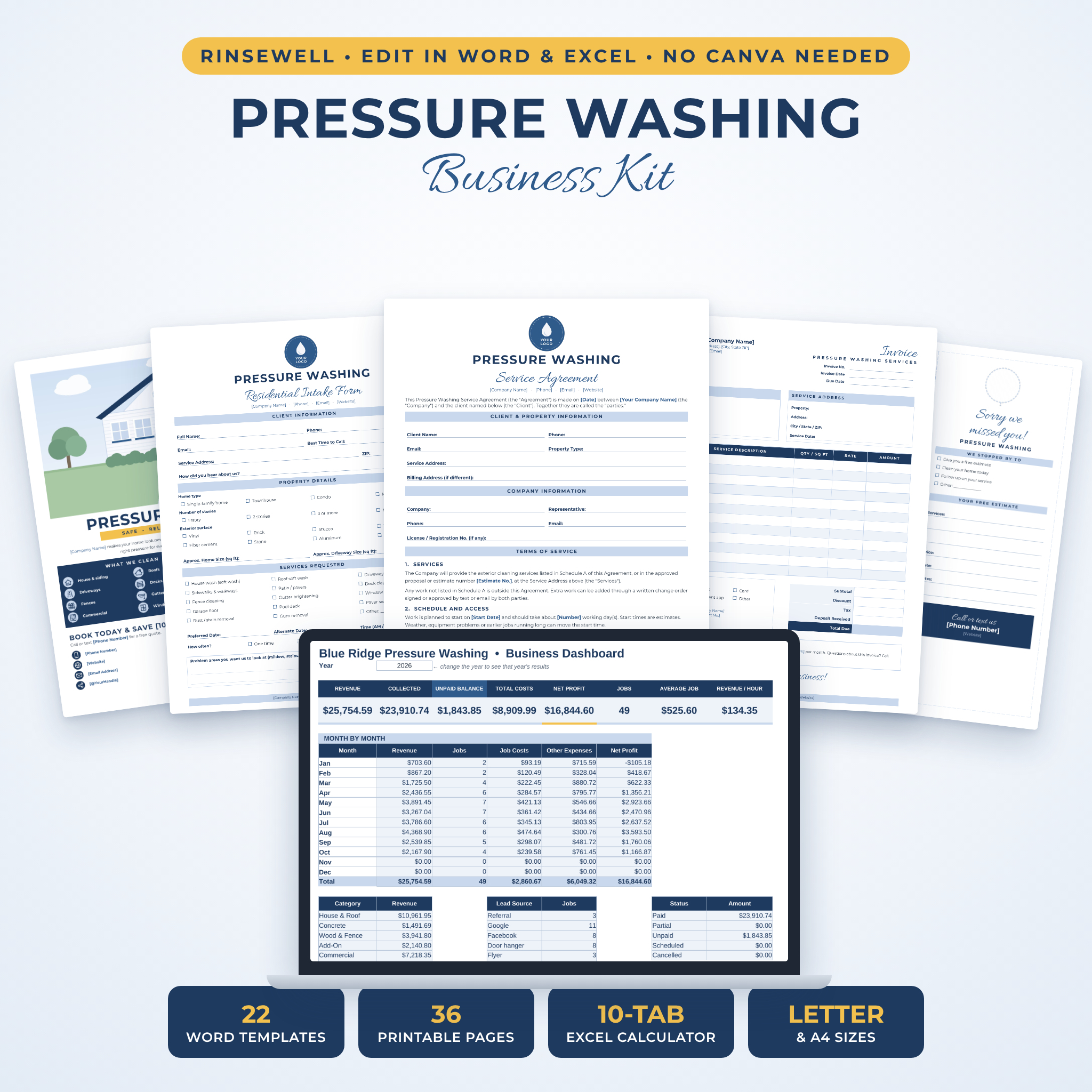




The Rinsewell Pressure Washing Business Kit is a set of pressure washing business templates you edit in Microsoft Word, plus an Excel quote and invoice calculator that does the math for you. It covers the whole job. A new lead calls, you send a proposal, they sign the agreement, you inspect the property, wash, get the sign-off and send the invoice. Then a door hanger goes on the neighbor’s door.
No Canva account. No subscription. Open a file, type over the blue placeholders, drop in your logo and print or save it as a PDF.
What’s Inside the Pressure Washing Business Kit
You get 22 Word templates (36 printable pages), each one in both US Letter and A4, along with a 10-tab Excel workbook and a 12-page user guide.
Contracts and agreements
- Pressure Washing Service Agreement (4 pages): 18 plain-English clauses covering scope, deposits, cancellations, weather, water and power, surface condition, existing damage, plants and runoff, liability, photos and more. Schedule A holds the services and pricing.
- Maintenance Plan Agreement (2 pages): three plan tiers, a 12-month visit calendar and renewal terms, so you can sell repeat work instead of chasing one-off jobs.
Client forms
- Residential Client Intake Form and Commercial Client Intake Form (2 pages each), with a signed acknowledgment and waiver
- Residential Proposal and Commercial Proposal, with add-ons, schedule and payment terms
- Pre-Service Property Inspection form to record cracks, loose siding and other damage before you start
- Job Completion Sign-Off with a final walkthrough checklist
- Customer Feedback Form with testimonial permission
- Before and After Photo Report you can hand clients after the job
- Daily Job Sheet for crew schedules, equipment checks and chemical mix logs
Pressure washing invoice, estimate and receipt templates
- Invoice with payment methods, pay-to details and totals
- Estimate / Quote with an acceptance signature line
- Payment Receipt for deposits, partial payments and paid-in-full jobs
Marketing pieces
- Two price lists, one with package deals
- Two flyers, including a tear-off tab flyer for community boards
- Two door hanger designs: “We were in your neighborhood” and “Sorry we missed you” with a free estimate section
- Two business card designs, front and back, ten per sheet (Letter sheets match the Avery 8371 layout)
- Thank you cards and loyalty stamp cards, four per sheet
- Three QR code signs: Let’s Get Social, Scan to Pay and Leave a Review
The Excel Quote and Invoice Calculator
This is the part most pressure washing template bundles leave out. Add your rates once in the Price Book. After that, pick a service on the Quote tab, type the square footage and the line total appears. Minimum charges are applied for you. Discount, sales tax, deposit and balance all calculate on their own.
- Settings: business details, tax rate, deposit, quote validity, payment terms and late fee
- One currency setting: pick from 18 symbols ($, €, £, R, A$, C$ and more) and every money value in the workbook follows
- Measure tab: works out area for driveways and patios, house walls by story and roofs with a pitch factor, plus linear feet for fences and gutters
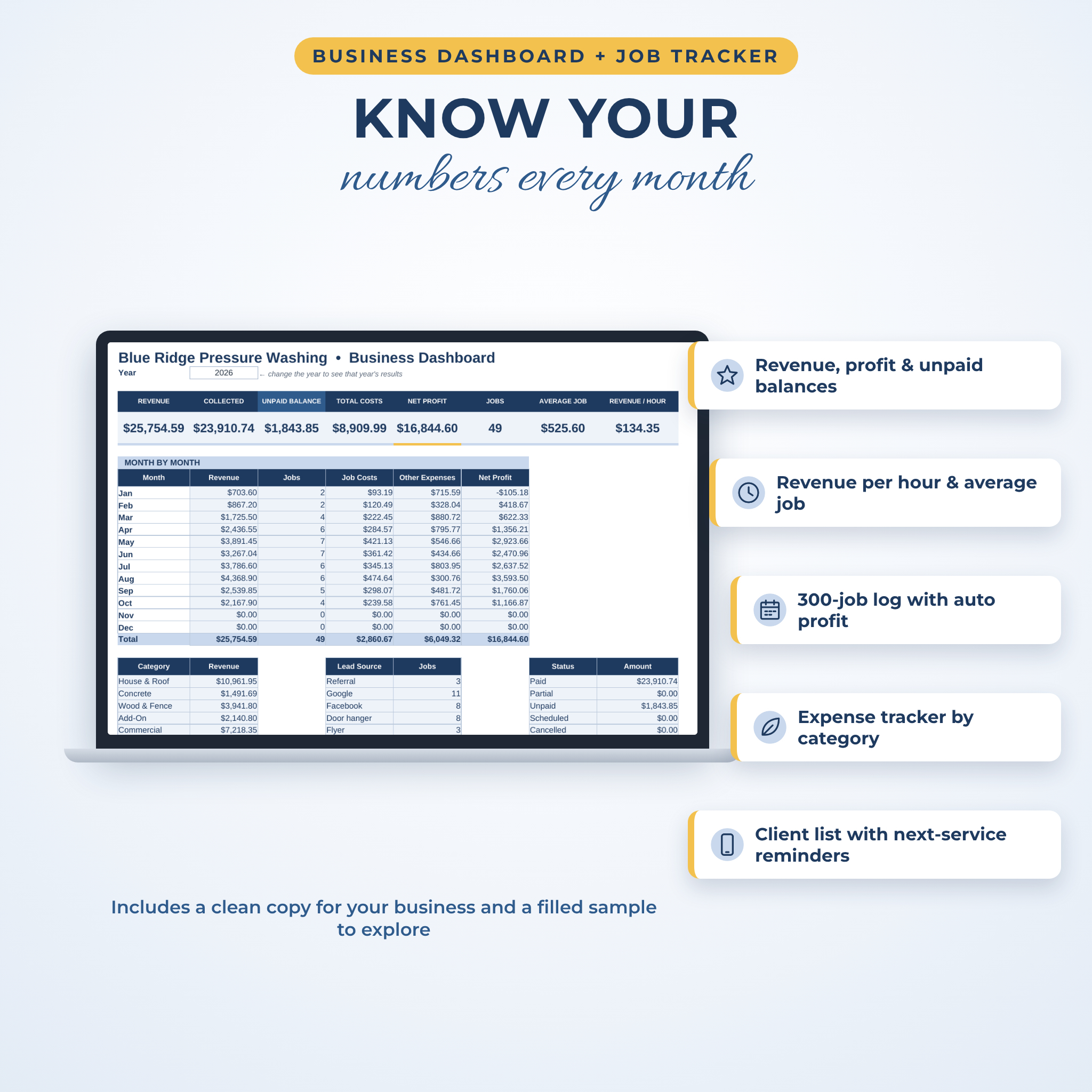
- Job Log: 300 rows for jobs, with automatic balance and profit, and unpaid jobs shown in red
- Expenses and Clients: track costs, see each client’s total billed and get next-service reminders
- Dashboard: revenue, collected payments, unpaid balances, net profit, average job and revenue per hour, with monthly results and charts
Formula cells are locked (no password) so you can’t wipe one out by accident. A filled sample copy comes with it so you can see the dashboard working before you add your own numbers.
Who It’s For
New pressure washing and soft washing businesses that want to look established from day one. Owner-operators who are tired of writing quotes by hand. Window cleaners, gutter cleaners and handymen who offer washing as an add-on. If you run residential jobs, commercial accounts or both, there is a form for each.
How It Works
- Download and unzip your files right after checkout.
- Open the Word templates in the US Letter or A4 folder.
- Use Find and Replace to put your business name, phone and website into a template in seconds.
- Right-click the logo circle and choose Change Picture to add your logo. QR code boxes and photo boxes work the same way.
- Set up the Excel calculator: fill in Settings, then your Price Book.
- Save as PDF to email, or print at home or at any print shop.
Customization
Every text box, table and color can be changed. Placeholders are blue and in [brackets], so they are easy to spot. The forms use real Word heading styles and table rows grow when you type longer answers. Checkboxes are clickable in Word and print as empty boxes for handwritten forms. Money fields on the Word templates are left neutral, so they work in any currency.
File Formats and Software
- 22 editable .docx templates in US Letter (8.5 x 11 in) and 22 in A4
- Excel .xlsx calculator, clean copy plus filled sample copy
- Preview PDFs of every template in both sizes
- User guide in Word and PDF
- Montserrat and Allura fonts (free, Open Font License), already embedded in the Word files
You need Microsoft Word and Microsoft Excel (desktop or Microsoft 365). The designs are built for Word. Google Docs and Apple Pages can open the files, but they may shift spacing, so editing in Word and sharing PDFs gives the best result.
Digital Download
This is an instant digital download. Nothing ships. Your files are ready on the order page and in your account as soon as payment goes through.
Ways People Use It
- Quoting a house wash and driveway on the spot from a phone measurement
- Getting a signed agreement and deposit before a big commercial job
- Recording an existing cracked window before washing so there’s no argument later
- Dropping door hangers on the street after every job
- Selling yearly maintenance plans to happy customers at sign-off
- Checking unpaid balances and profit at the end of each month
FAQ
Do I need Canva?
No. Everything opens in Microsoft Word and Excel.
Is the pressure washing contract template legally binding?
It’s a plain-English starting point, not legal advice. Laws vary, so have a local attorney review it before use.
Can I use it outside the US?
Yes. Every template comes in A4, money fields are neutral, and the calculator has 18 currencies and feet or meters.
What do I need to use the quote calculator?
Microsoft Excel on a computer, or Microsoft 365. It is not built for Google Sheets or Apple Numbers.
Can I print the business cards and door hangers at home?
Yes. Use cardstock and 100% scale. The user guide explains paper, cutting and front-to-back alignment.
Can I change the colors and fonts?
Yes. Shaded areas change with Word’s Shading tool, and you can pick any font you like.
Can I share the files with another business?
No. The license covers your own business only. Please don’t share or resell the files.
Reviews
There are no reviews yet.