




This auto body repair estimate template kit gives your shop a clean, insurance-ready estimate and invoice you can fill in on screen or print and write by hand. Use it in Word, Google Docs, a fillable PDF, or the auto-calculating Excel and Google Sheets estimator that works out labor, paint materials, tax and the deductible for you.
Most body shop forms stop at the paper. You still grab a calculator, add up hours, and hope nothing gets missed. CollisionDesk keeps the classic layout adjusters expect and adds the parts that save real time: automatic totals, a supplement request for hidden damage, and a check-in sheet that records the car’s condition before work starts.
What the auto body estimate template does
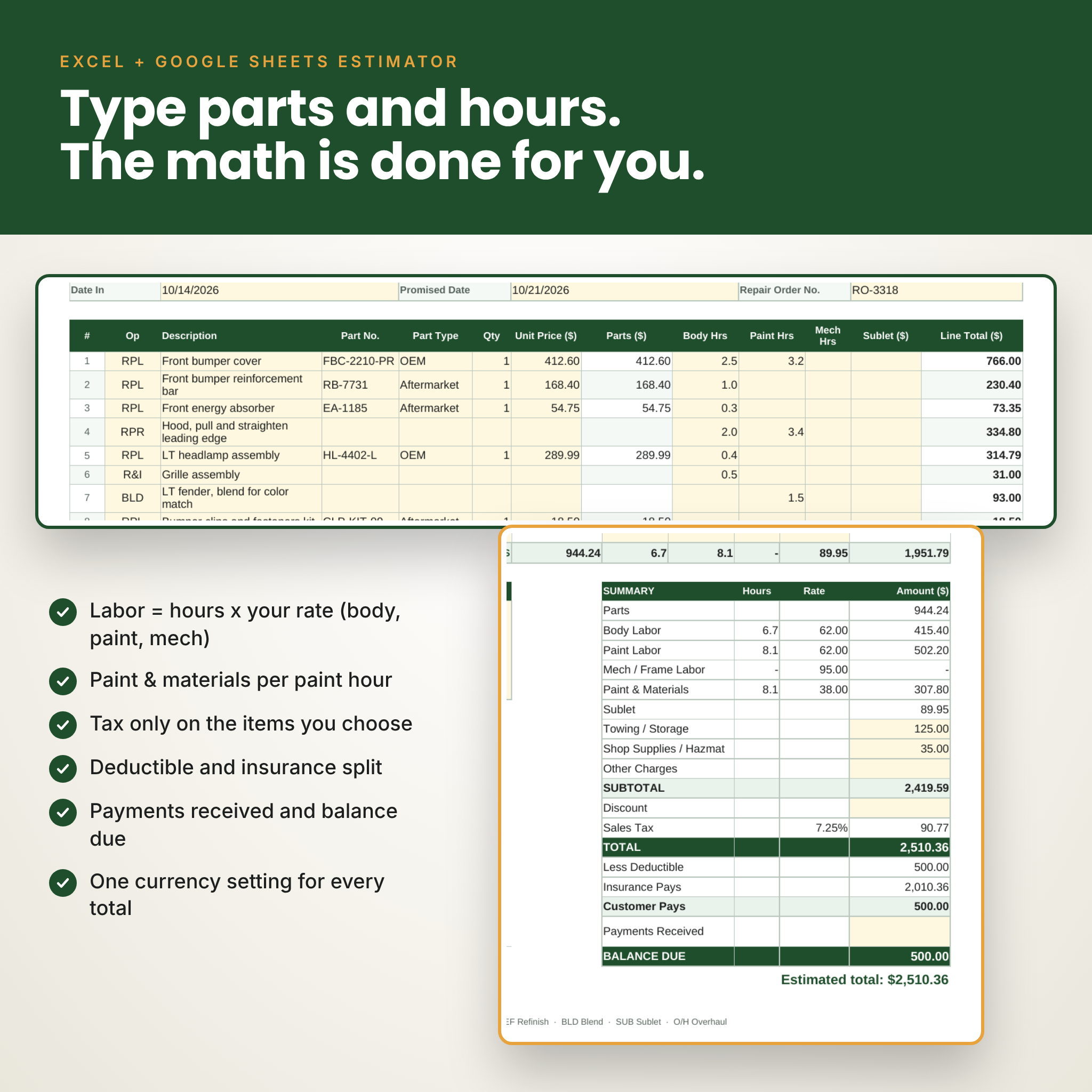
One form covers three jobs. Tick Estimate, Invoice or Supplement at the top. Customer, insurance and vehicle details sit in labeled boxes. Repair lines use standard op codes (RPL, RPR, R&I, REF, BLD, SUB) with columns for part number, quantity, parts price, labor hours, paint hours and sublet. The summary block shows parts, body labor, paint labor, mechanical or frame labor, paint and materials, sublet, towing, shop supplies, discount, sales tax, total, less deductible, insurance pays and customer pays.
Who it is for
- Collision and auto body repair shops writing insurance estimates
- Mobile dent repair and paint technicians
- Mechanic, tire, RV and truck repair shops that take on body work
- Small shops that want a professional estimate without paying for estimating software every month
What is included
- Estimate / Invoice, 1 page: Word template and fillable PDF
- Estimate / Invoice, 2 page: adds a vehicle damage diagram and room for 50 or more repair lines
- Insurance Supplement Request: lists added items with a reason and photo number, then shows original estimate total, previous supplements, this supplement and the revised claim total
- Vehicle Check-In & Damage Report: damage diagram, damage key, walk-around checklist, fuel level, keys received, drop-off and pick-up signatures
- Auto Body Estimator (Excel and Google Sheets): auto-calculating estimate and invoice, Settings tab, Job Log for 300 jobs and a live Dashboard
- User guide (Word): setup, every feature, customizing, troubleshooting and FAQ
Every Word and PDF form comes in US Letter and A4. That is 8 Word templates, 8 fillable PDFs, 1 spreadsheet and the guide.
Main benefits
- No more hand math. In the estimator, labor is hours times your rate, paint and materials are charged per paint hour, and tax applies only to the items you choose.
- Insurance split done for you. Enter the deductible and any customer-pay items. You see exactly what the insurer pays and what the customer owes.
- Fewer disputes at pick-up. The check-in report records existing dents, scratches and chips with a signature before you touch the car.
- Faster supplement approvals. Adjusters get a clear list of added items, reasons, photo numbers and the revised total.
- Works anywhere. Set your own currency symbol once in the spreadsheet. The Word and PDF forms use plain amount columns, so they suit any country.
Features of this body shop estimate and invoice kit
Word and Google Docs templates
- Logo box you can click and replace
- Rows grow as you type and flow onto the next page with the header repeated
- Real heading styles, so you can restyle colors and fonts in one place
- Footer with op code key and page numbers
Fillable PDF forms
- Over 200 typed fields on the 1 page form, plus tick boxes for Estimate, Invoice and Supplement
- Business details, notes, signature and date fields
- Print blank at 100% to write by hand
Excel and Google Sheets estimator
- 25 repair lines with op code and part type dropdowns (OEM, Aftermarket, Used, Reman, Customer Supplied)
- Separate body, paint and mechanical labor rates
- Paint and materials rate per paint hour
- Tax switches for parts, labor, materials, sublet and other charges
- Discount, deductible, insurance pays, customer pays, payments received and balance due
- One click switch from Estimate to Invoice or Supplement, with “valid until” date and terms that change to match
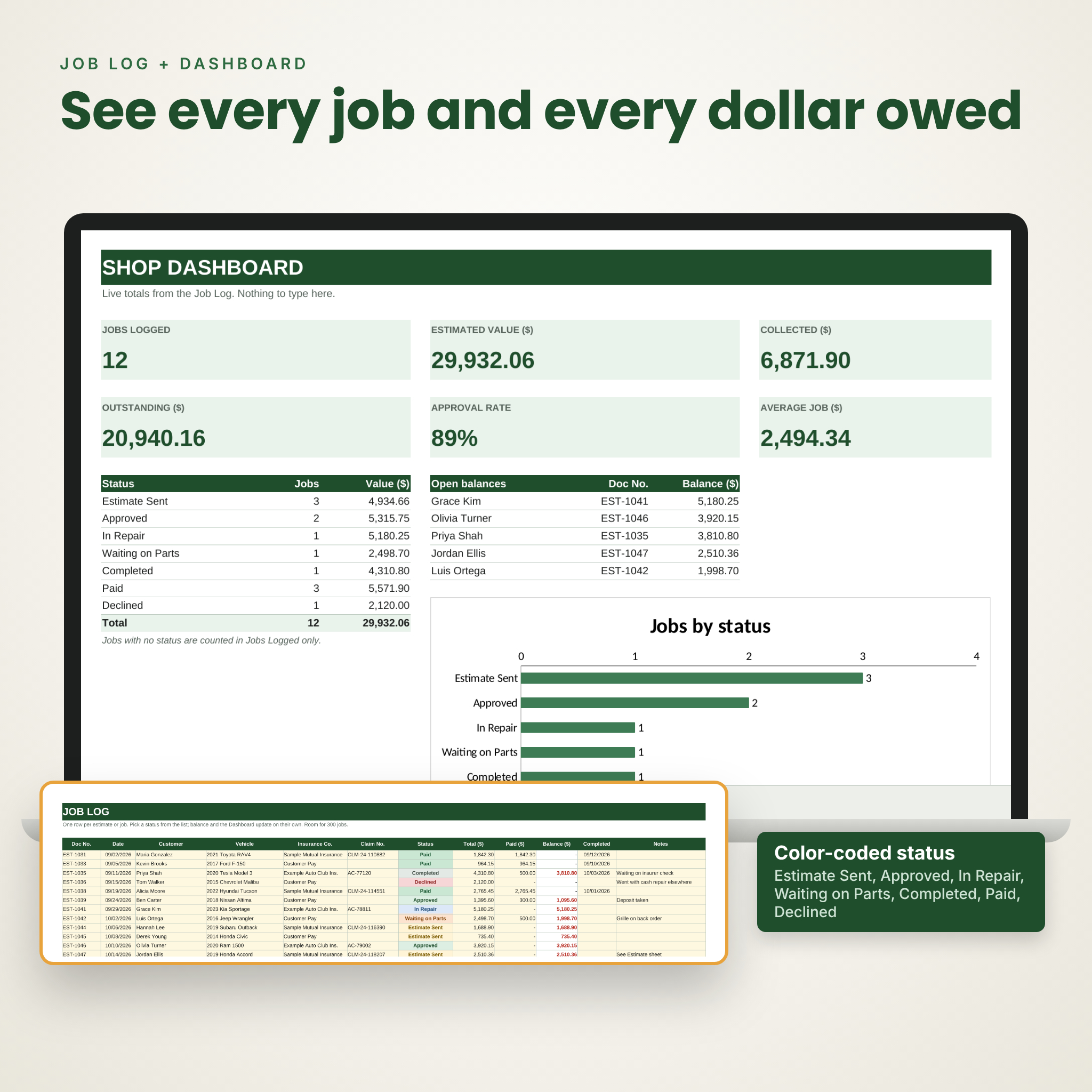
- Job Log with color-coded status: Estimate Sent, Approved, In Repair, Waiting on Parts, Completed, Paid, Declined
- Dashboard with jobs logged, estimated value, money collected, outstanding balance, approval rate, average job and largest open balances
- Formulas locked (no password) so a stray keystroke cannot break them; cream input cells stay open
How it works
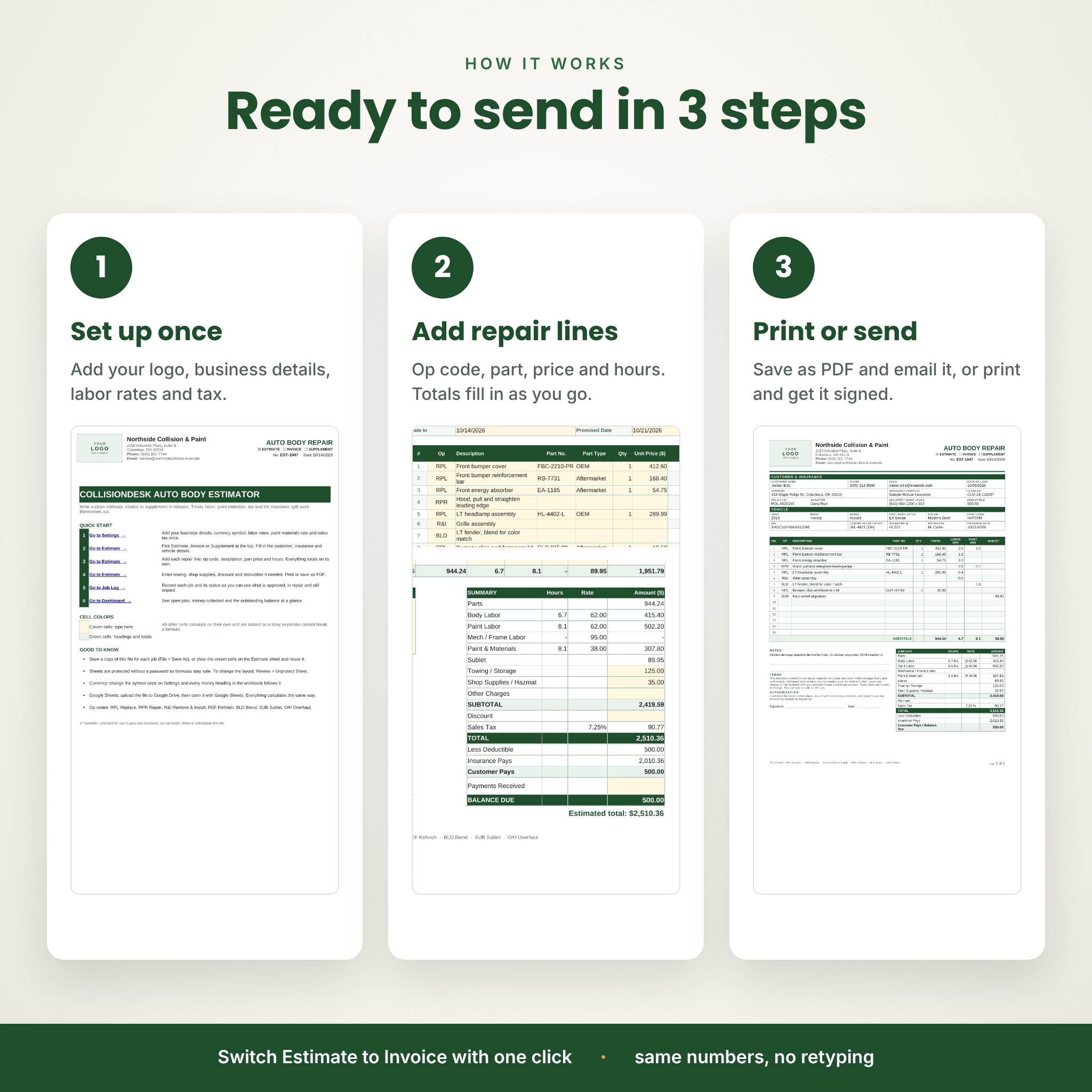
- Download and unzip the kit.
- Add your logo and business details. In the spreadsheet, set your labor rates, materials rate, tax rules and currency once.
- Fill in the customer, insurance and vehicle details, then add one line per repair operation.
- Save as PDF and email it to the customer or adjuster, or print it for a signature.
File formats and software
- .DOCX for Microsoft Word and Google Docs (upload to Google Drive and open)
- .PDF fillable forms for Adobe Acrobat Reader (free), browser PDF viewers and most PDF apps
- .XLSX for Microsoft Excel and Google Sheets
- US Letter (8.5 x 11 in) and A4 sizes
Word and PDF forms do not calculate. For automatic totals, use the Excel or Google Sheets estimator.
Customizing
Change field labels, terms wording, table colors and fonts. Rename op codes, part types and job statuses on the Settings tab and every dropdown follows. The guide walks through each change.
Real situations where shops use it
- Writing a front-end collision estimate for an insurance claim with a deductible
- Sending a supplement after teardown finds a cracked radiator support
- Recording a customer’s existing door dings at drop-off
- Turning an approved estimate into a final invoice without retyping
- Tracking which jobs are approved, waiting on parts or still unpaid
Digital download
This is an instant digital download. No physical item is shipped. You receive one ZIP file with all forms, the spreadsheet and the user guide, plus the guide as a separate download. Licensed for use in your own business. Please do not resell or share the blank templates.
FAQ
Can I use this auto repair estimate template in Google Docs?
Yes. Upload the .docx to Google Drive and open it with Google Docs. The forms were checked in Google Docs and keep their layout.
Does the estimate calculate totals automatically?
The Excel and Google Sheets estimator does. The Word and PDF forms are for typing or handwriting.
Can I add my logo?
Yes. Click the logo box in the Word template and insert your image.
Will it work for mechanic or truck repair invoices?
Yes. There is a mechanical and frame labor rate, and you can rename labels to suit your shop.
Can I change the currency?
Yes. Set the symbol once in the spreadsheet. The Word and PDF forms have no currency signs.
Can I print it blank?
Yes. Print the PDF at 100% on Letter or A4 paper.
Do I need Microsoft Office?
No. Google Docs, Google Sheets and a free PDF reader cover everything.

Reviews
There are no reviews yet.