The best fitness dashboard is a spreadsheet that fills itself in from your daily workout log, so you never maintain the charts by hand. Of the three here, Kestrel Workout Tracker suits people who want a daily gym log, Steady Reps Workout Planner suits those who plan months ahead, and Ironwood Workout Planner suits those who want meals and habits in one workbook.
A fitness dashboard can sound like one more thing to learn, but it is simply a summary page for numbers you already collect. We'll go through what to look for, how the three options differ and which one fits how you train.
Key facts at a glance
- A fitness dashboard is a summary sheet that turns your logged workouts into charts, streaks, totals and personal records.
- All three spreadsheets on this page work in both Google Sheets and Excel.
- Every option includes a personal record (PR) tracker and an estimated one-rep max (1RM) feature.
- Steady Reps Workout Planner offers 12 undated monthly planners, while Ironwood Workout Planner offers 6 weekly planners.
- Only Ironwood Workout Planner lists a meal planner and grocery list; only Kestrel Workout Tracker lists dark and light versions.
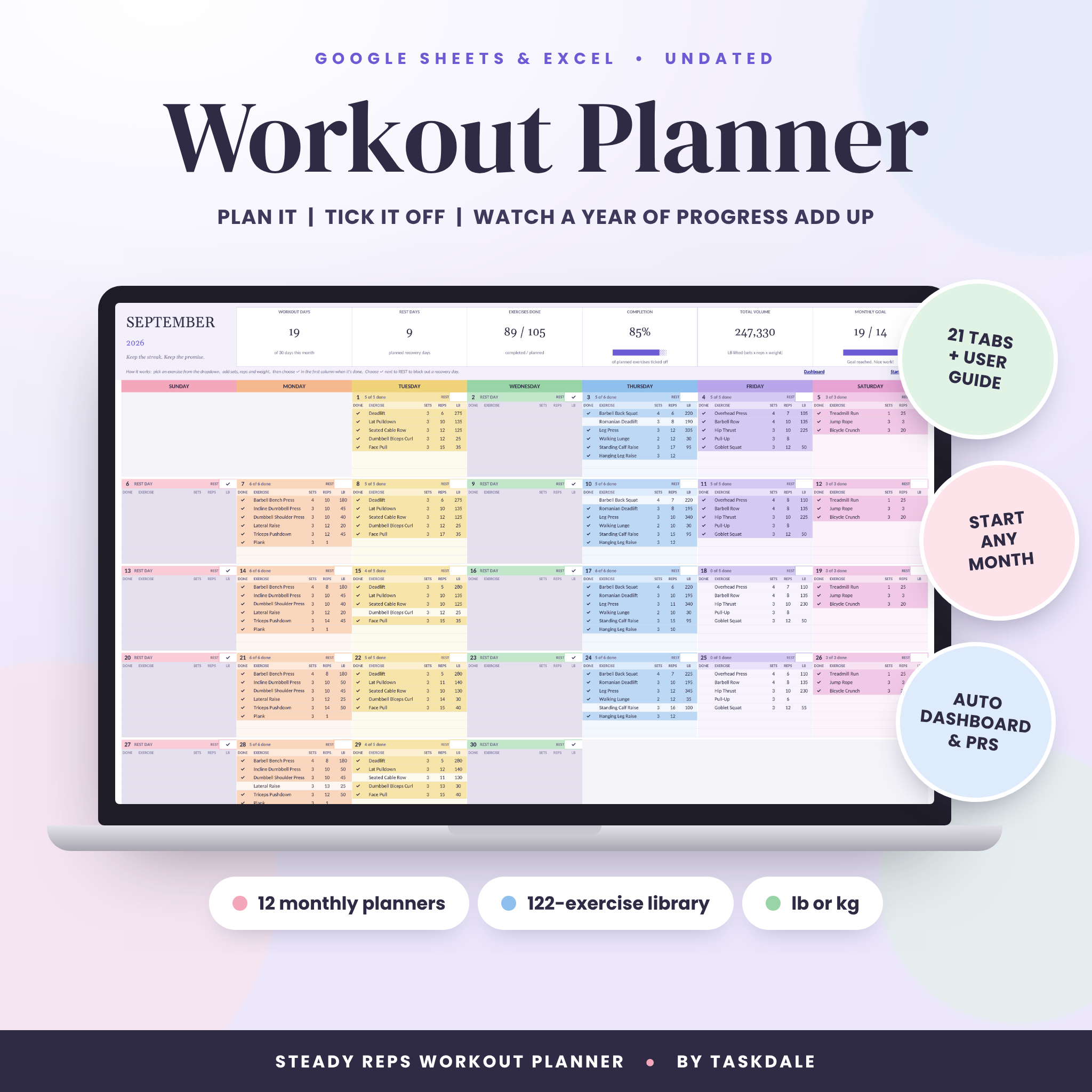 Steady Reps Workout Planner | Workout Planner Spreadsheet for Google Sheets & Excel | Undated Monthly Gym Planner with Workout Log, Fitness Dashboard, PR Tracker, 1RM Calculator & Body Measurements
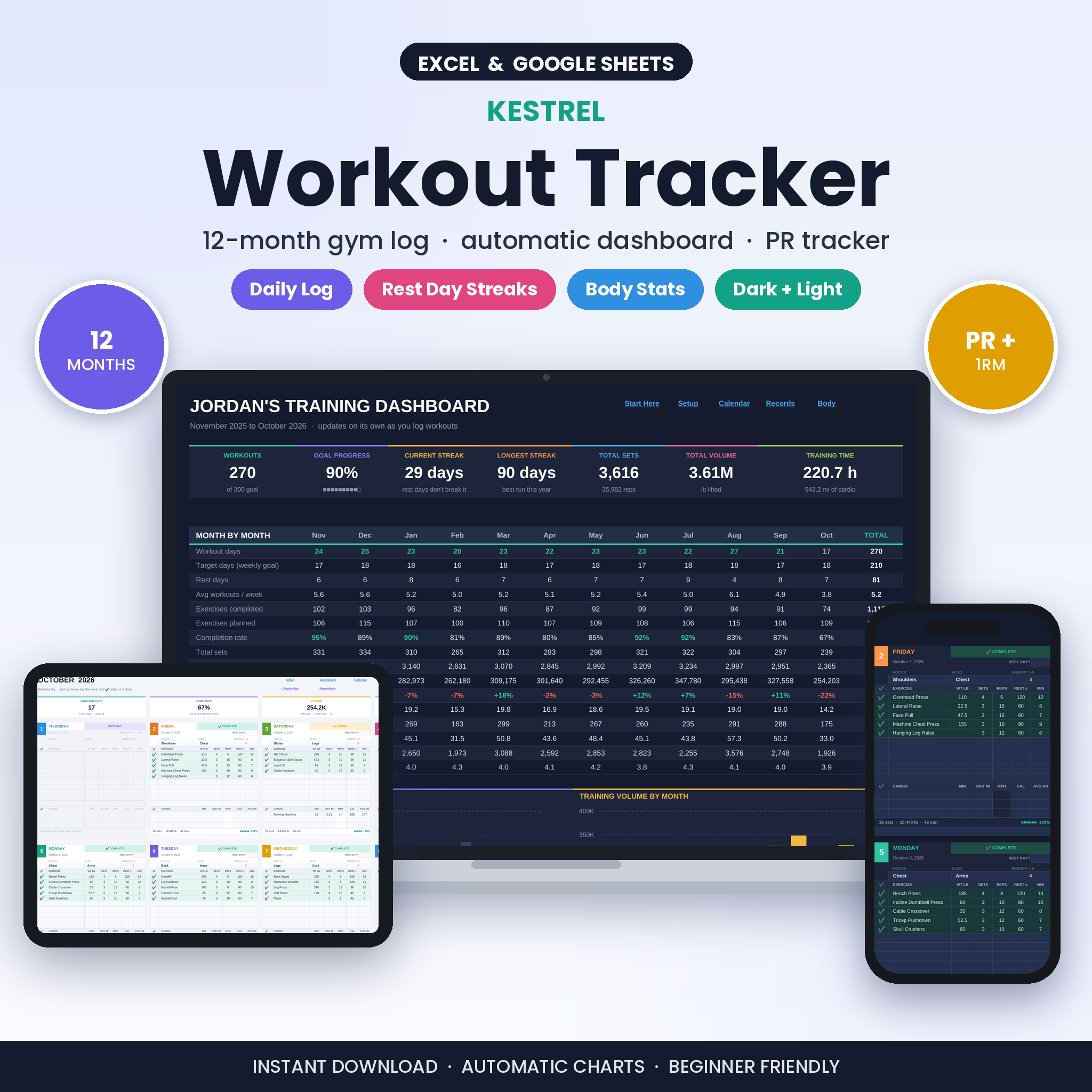
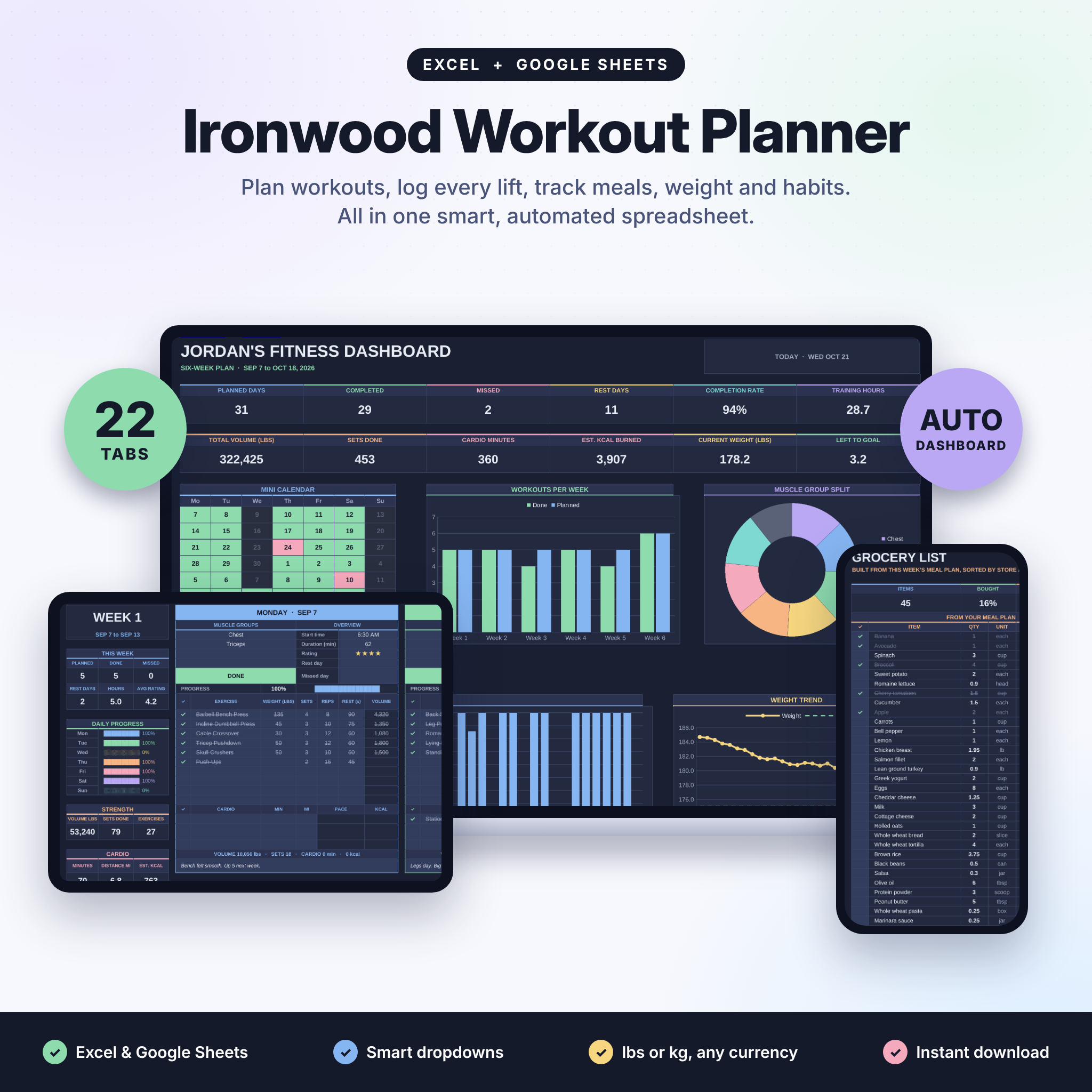
Table of Contents
Toggle
- What should you look for in a fitness dashboard?
- How do the best fitness dashboard spreadsheets compare?
- Which fitness dashboard suits which person?
- How do you set up and use a fitness dashboard spreadsheet?
- What mistakes should you avoid with a fitness dashboard?
- What affects the price of a fitness dashboard?
- How do you choose the best fitness dashboard for you?
- Common questions
What should you look for in a fitness dashboard?
A good fitness dashboard does four things: it collects your workouts with little effort, shows trends clearly, tracks your best lifts, and works in the software you already use. Anything beyond that is a bonus that only helps if you will actually use it.
How much does the dashboard fill in for you?
An automatic dashboard is one that updates its charts and totals the moment you tick off or enter an exercise. All three products here work this way. Kestrel Workout Tracker gives you a card for every day, and its dashboard, streaks, calendar and body stats fill in on their own. Steady Reps Workout Planner counts workout days, volume and personal records for you. If a dashboard needs you to copy numbers across tabs, you will stop using it within a few weeks.
Which charts and visual summaries are included?
Charts matter when they answer a question you really ask, such as "Am I training consistently?" or "Am I neglecting a muscle group?". Kestrel Workout Tracker lists four charts and a muscle balance heat map. Steady Reps Workout Planner lists three charts and a training log heat map, which shows at a glance which days you trained. Ironwood Workout Planner lists an automated dashboard and calendar without specifying chart numbers, so treat its visuals as a summary rather than a heavy analysis tool.
Does it track personal records and estimated 1RM?
A personal record tracker stores your best result for each lift, and a one-rep max (1RM) is the heaviest weight you could lift once. Because most people rarely test a true single, an estimated 1RM works it out from a heavier set of several reps. Kestrel Workout Tracker and Steady Reps Workout Planner both include a PR tracker and a 1RM calculator. Ironwood Workout Planner includes a PR tracker with e1RM, meaning estimated 1RM.
Can it use your units and your software?
Units and software decide whether the sheet feels natural or irritating. Kestrel Workout Tracker handles lb or kg and mi or km. Ironwood Workout Planner lists lbs or kg and lets you use your own currency in the meal planner. All three run in Google Sheets and Excel, so you can open them on a laptop or, with the right app, on a phone.
Do you need more than training?
Some dashboards stay focused on lifting and cardio, while others cover the rest of your routine. Ironwood Workout Planner adds a weight tracker, body measurements, habits, goals, a 75 day challenge and a meal planner that builds your grocery list. Steady Reps Workout Planner adds body measurements with BMI and a 122-exercise library. Kestrel Workout Tracker adds body stats. More features mean more to set up, so choose breadth only if you will use it.
How do the best fitness dashboard spreadsheets compare?
The three spreadsheets differ mainly in how they structure your time and how much they cover beyond the gym. The table below sets out the differences from the supplied product details.
| Product | Structure | Dashboard and visuals | Records and body data | Extras |
|---|---|---|---|---|
| Steady Reps Workout Planner | 12 undated monthly planners, 8 exercises a day | Dashboard, training log heat map and 3 charts | PR tracker, 1RM calculator, body measurements with BMI | 122-exercise library, 3 starter routines, user guide |
| Kestrel Workout Tracker | 12-month gym log with a card for every day | Automatic dashboard with 4 charts and a muscle balance heat map | PR tracker, estimated 1RM, 1RM calculator, body stats | Strength and cardio logging, dark and light versions, user guide |
| Ironwood Workout Planner | 6 weekly planners with exercise dropdowns | Automated dashboard and calendar, volume and cardio calories | PR tracker with e1RM, weight tracker, body measurements | Habits, goals, 75 day challenge, meal planner and grocery list, user guide |
The pattern is simple. Kestrel Workout Tracker is the most dashboard-focused, Steady Reps Workout Planner is the most planning-focused, and Ironwood Workout Planner is the widest in scope.
Which fitness dashboard suits which person?
Each spreadsheet suits a different habit, and the right one is the one that matches how you already organise your week.
Kestrel Workout Tracker suits you if you log after training rather than plan in advance. You tick exercises as you finish them, and the workbook builds your streaks and muscle balance picture. It also covers cardio in miles or kilometres, which helps if you mix running or cycling with weights. The dark and light versions are a small comfort if you cheque it in the evening.
Steady Reps Workout Planner suits you if you like to decide your sessions before you walk in. The undated monthly layout means you can start any month, and the colour-coded calendar shows your plan. With 8 exercises a day, it fits most gym sessions. The 122-exercise library and 3 starter routines make it friendlier if you are newer to structured training.
Ironwood Workout Planner suits you if training is one part of a wider routine. If you want your meals, grocery list, habits and a 75 day challenge in the same file, it removes the need for separate apps. Its exercise dropdowns also reduce typing and keep your exercise names consistent, which keeps your totals accurate.
How do you set up and use a fitness dashboard spreadsheet?
You set up a fitness dashboard spreadsheet by opening it in Google Sheets or Excel, choosing your units and entering your exercises, then logging each session as you finish. Each product includes a user guide, so follow its instructions where they differ from the steps below.
- Download the file and open it in the programme you prefer, either Google Sheets or Excel.
- Keep one untouched copy as a backup before you type anything.
- Choose your units, such as lb or kg, before you enter any weights.
- Add your current best lifts so the PR tracker starts with real figures.
- Log each workout straight after training, while you remember the weights.
- Cheque the dashboard once a week and note one thing to change, such as a neglected muscle group.
Treat the formulas as the engine. Type only in the cells meant for input, and your totals and charts stay reliable.
What mistakes should you avoid with a fitness dashboard?
The most common mistake is picking the spreadsheet with the longest feature list instead of the one you will open after every session. A dashboard that goes unfilled shows nothing.
- Overbuilding: switching on habits, meals and measurements all at once leads to burnout. Start with the workout log and add one extra at a time.
- Inconsistent exercise names: if you type "bench" one day and "bench press" the next, your totals and records split. Use dropdowns or the exercise library where they exist.
- Changing units mid-year: swapping between lb and kg partway through makes your volume figures meaningless.
- Ignoring the estimate: an estimated 1RM is a guide from submaximal sets, not a test result. Use it to compare progress over time, not as a target to attempt on a bad day.
- Overwriting formulas: typing into a calculated cell can break the dashboard. Keep that backup copy.
What affects the price of a fitness dashboard?
The price of a fitness dashboard spreadsheet is mostly shaped by how many tools it bundles and how much of the year it plans for. We don't quote figures here because they change, so cheque the live product cards for current prices.
- Scope: a workbook that adds meal planning, habits and a challenge covers more than one that focuses on training, which is why Ironwood Workout Planner is a different kind of purchase from the other two.
- Planning length and layout: 12 monthly planners or a 12-month daily log is more content than a short block of weekly planners.
- Built-in resources: an exercise library, starter routines and a user guide add value if you are still learning.
- Compared with apps: a one-off spreadsheet file avoids the monthly charge some fitness apps make, though we have no figures on that for these products.
How do you choose the best fitness dashboard for you?
Choose by your habit first and your feature list second. If you log after each session and want strong visuals, pick Kestrel Workout Tracker. If you plan sessions ahead and want a structured calendar, pick Steady Reps Workout Planner. If you want training, food and habits in one place, pick Ironwood Workout Planner.
Before you buy, ask yourself one question: what will I realistically enter every week? Let that answer, not the longest feature list, decide.
Common questions
Do these fitness dashboards work on a phone?
All three are built for Google Sheets and Excel. Both have mobile apps, so you can open the file on a phone, though a larger screen is easier for setting up. The product details do not describe a dedicated phone layout.
Can I use the dashboard with cardio as well as weights?
Kestrel Workout Tracker logs strength and cardio, with miles or kilometres. Ironwood Workout Planner tracks volume and cardio calories. Steady Reps Workout Planner's listing centres on exercises, volume and records, and does not describe cardio logging separately.
Do I need to know the formulas to use them?
No. The workbooks calculate totals, records and charts for you, and each comes with a user guide. You enter workouts and body data in the input cells, and the dashboard updates itself.
What does undated mean in Steady Reps Workout Planner?
Undated means the planner is not tied to a calendar year. You choose the start date, so you can begin in any month and still use all 12 monthly planners in order without wasted pages.
Is the estimated 1RM safe to rely on?
An estimated 1RM is a calculation, not a lift you have done, so use it as a comparison tool over weeks. Train with weights you can control, and speak to a qualified coach or doctor before attempting very heavy singles.