Best Focus Timer: Four ADHD-Friendly Planners Compared
A focus timer is best when you open it without having to think about it. For most people who lose track of time, that means a timer built into a planner you already use. Spark & Settle suits offline browser use, Hummingday suits computer and Android, and Calm Chaos suits anyone already living in Notion.
Choosing can feel more complicated than it should, because every option promises calm and structure. We'll keep it simple: what to check, how these four differ, and a clear rule at the end.
Key facts at a glance
- A focus timer in this guide means a countdown or time-visible tool inside a wider planner, not a stand-alone kitchen timer.
- Hummingday, Spark & Settle and Calm Chaos all list a focus timer by name, while Steadyday centres on making time visible.
- Steadyday, Hummingday and Spark & Settle work offline with no account and no subscription.
- Calm Chaos is a Notion template, so it runs on the free Notion plan on desktop and phone.
- The four options differ most in size (66 to 76 pages, or 14 spaces in Notion), device support and how they handle hard days.
Table of Contents Toggle
- What should you look for in a focus timer?
- How do these four focus timers compare?
- Which focus timer suits which person?
- How do you use a focus timer day to day?
- What mistakes should you avoid?
- What affects the price of a focus timer?
- Which focus timer should you choose?
- Common questions
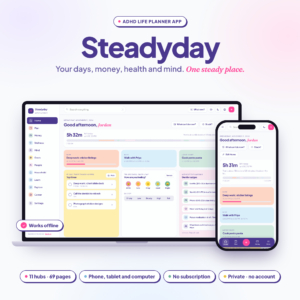 ADHD Life Planner App | Steadyday All-in-One Digital Planner for iPhone, Android & Computer with Daily Planner, Budget, Habit, Meal & Mood Tracker | Works Offline
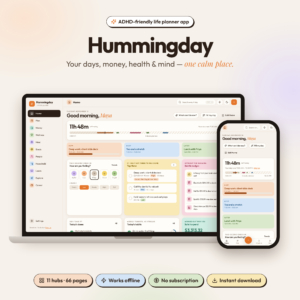 ADHD Life Planner App | Hummingday All-in-One Digital Planner with Daily, Weekly & Monthly Planner, Budget & Bill Tracker, Habit, Meal & Mood Tracker, Brain Dump & Focus Timer | Works Offline
What should you look for in a focus timer?
A good focus timer does three things: it starts quickly, it shows time clearly, and it stays out of your way. Everything else is a trade-off. The five factors below are where these four products genuinely differ.
Does the timer sit next to your tasks?
A focus timer works best when it lives beside your task list, so you pick a job and start the clock in one move. Hummingday, Spark & Settle and Calm Chaos all pair a timer with a brain dump and daily plan. Calm Chaos goes furthest here, with a live timer connected to its tasks and daily check-in databases.
Can you see time passing?
Visible time is the feature that matters most for people who say "where did the afternoon go?". Steadyday shows time on the page and pairs it with a top three. Hummingday shows time left today, along with Now & Next. Both help you judge what fits before you start a timer, not only while it runs.
Does it work offline and without an account?
Offline use means the timer still runs when your signal drops or you would rather not connect. Steadyday, Hummingday and Spark & Settle all say they work offline, with no account and no subscription. Calm Chaos runs inside Notion, and offline use is not stated, so check that before relying on it on a train.
Does it cope with a hard day?
A focus timer that demands 25 minutes of effort on a foggy day gets abandoned. Spark & Settle has Foggy-day and Low-battery modes for exactly that. Steadyday offers tiny steps for when you feel stuck, and Calm Chaos plans by energy rather than guilt. Hummingday includes guided routines. Look for something that lets you scale the day down.
Which devices will you use it on?
Device support decides whether you actually open the tool. Steadyday is described for iPhone, Android and computer. Hummingday works offline on computer and Android, and iPhone is not listed. Spark & Settle runs in a browser, so any device with a browser should manage it. Calm Chaos works on desktop and phone through Notion.
How do these four focus timers compare?
The four differ mainly in where they run, how large they are and how they handle bad days. This table uses only the details supplied for each product.
Browse all 4 options in the grid for current prices and full listings.
Which focus timer suits which person?
Each product suits a different working style, and the best match depends on your device and how much structure you want.
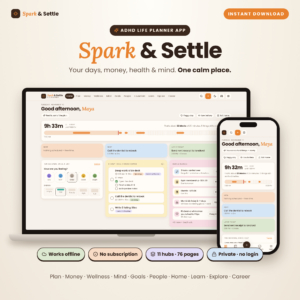
Spark & Settle suits people who want the biggest set of tools in one place. It has 11 hubs and 76 pages, a time-block day planner, 8 colour themes in light and dark, 10 printables and a full user guide. The guide is useful if you dislike working things out alone.
Hummingday suits people who work mostly on a computer or Android phone and want a clear view of the day. With 11 hubs and 66 pages, it is slightly smaller than Spark & Settle. It makes time left today and your top three visible at a glance.
Steadyday suits people who use an iPhone, or who move between phone, tablet and computer. It has 11 hubs and 69 pages linked to one Home dashboard. Its listing does not name a timer, so choose it for visible time and tiny steps, not for a countdown clock.
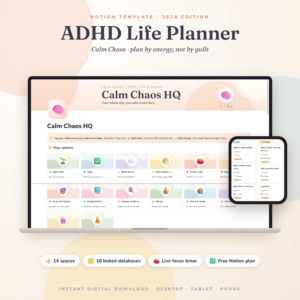
Calm Chaos suits people already comfortable in Notion. It has 14 spaces and 18 connected databases, and its smart columns update every day on their own. If you have never used Notion, expect to learn the tool as well as the template.
How do you use a focus timer day to day?
You use a focus timer by choosing one task, setting a short block, and stopping when it ends. The routine matters more than the app.
- Pick one task from your top three or your brain dump. Write it in a few words.
- Set a short block that feels almost too easy. Fifteen minutes is a sensible start if you have been avoiding the job.
- Remove one distraction before you press start, such as closing a tab or putting your phone face down.
- Work until the timer ends, then stop and note what you did.
- Take a real break before the next block, and choose the next task after the break, not during it.
On low-energy days, use the gentler tools: Foggy-day mode in Spark & Settle, tiny steps in Steadyday, or an energy-led plan in Calm Chaos. A shorter block you finish beats a long one you abandon.
What mistakes should you avoid with a focus timer?
The most common mistake is buying a tool for its feature list, then never opening it. A few others are easy to spot in advance.
- Setting blocks that are too long. If you have not focused for months, a 50-minute block sets you up to fail.
- Choosing by page count alone. More pages mean more to learn. A 76-page planner is only better if you will use the extra hubs.
- Ignoring your device. Hummingday does not list iPhone support, so check before you buy if you use one.
- Assuming a Notion template is offline. Calm Chaos does not state offline use.
- Treating a missed block as failure. Several of these planners use habits without streaks for that reason. Restart the timer and carry on.
- Using the timer for every task. Save it for work you tend to avoid, not for ten-second chores.
What affects the price of a focus timer?
The price of a focus timer depends mainly on whether it is a one-off product or a subscription, and on how much comes with it. We don't quote figures here because they change, and the live product cards show the current amounts.
Three of these four state that they need no subscription, which means you pay once and are not billed again. Size and extras can also move the price: the number of hubs or pages, printables, a user guide and theme options. A larger planner can cost more up front than a simpler one.
For Calm Chaos, the template runs on the free Notion plan, so you do not need a paid Notion plan to use it as described. Compare the cost of the product against how often you will realistically open it.
Which focus timer should you choose?
Choose by device first, then by how much structure you want. This rule covers most buyers.
- Use an iPhone or switch between devices: choose Steadyday.
- Work on a computer or Android phone and want a clear daily view: choose Hummingday.
- Want the most features, modes for hard days and printables: choose Spark & Settle.
- Already use Notion and want a live timer tied to your databases: choose Calm Chaos.
If you are unsure, pick the one that runs on the device you already have in your hand. A timer you can start in ten seconds will get used.
Common questions
Is a planner with a built-in timer better than a stand-alone timer?
For most people with scattered days, yes. A built-in timer sits next to your task list, so you choose a job and start the clock together. A stand-alone timer is simpler, but it does not remember what you were meant to be doing.
Do I need an account to use these focus timers?
Steadyday, Hummingday and Spark & Settle each say they need no account and no subscription. Calm Chaos is a Notion template, so you use it inside Notion. The listing says it works on the free Notion plan.
What does "habits without streaks" mean?
It means the planner tracks habits without counting consecutive days, so missing one day does not reset a score to zero. Steadyday, Hummingday and Spark & Settle all use this approach. It suits people who find streaks discouraging after a bad week.
Can I use Hummingday on an iPhone?
The Hummingday listing says it works offline on computer and Android. It does not mention iPhone, so we cannot say it works there. If you use an iPhone, Steadyday lists iPhone support and Spark & Settle runs in a browser.
How long should a first focus session be?
Start with 15 to 25 minutes, and shorten it if you keep abandoning sessions. The aim is to finish a block, not to beat a target. Once finishing feels normal, extend the length a few minutes at a time.