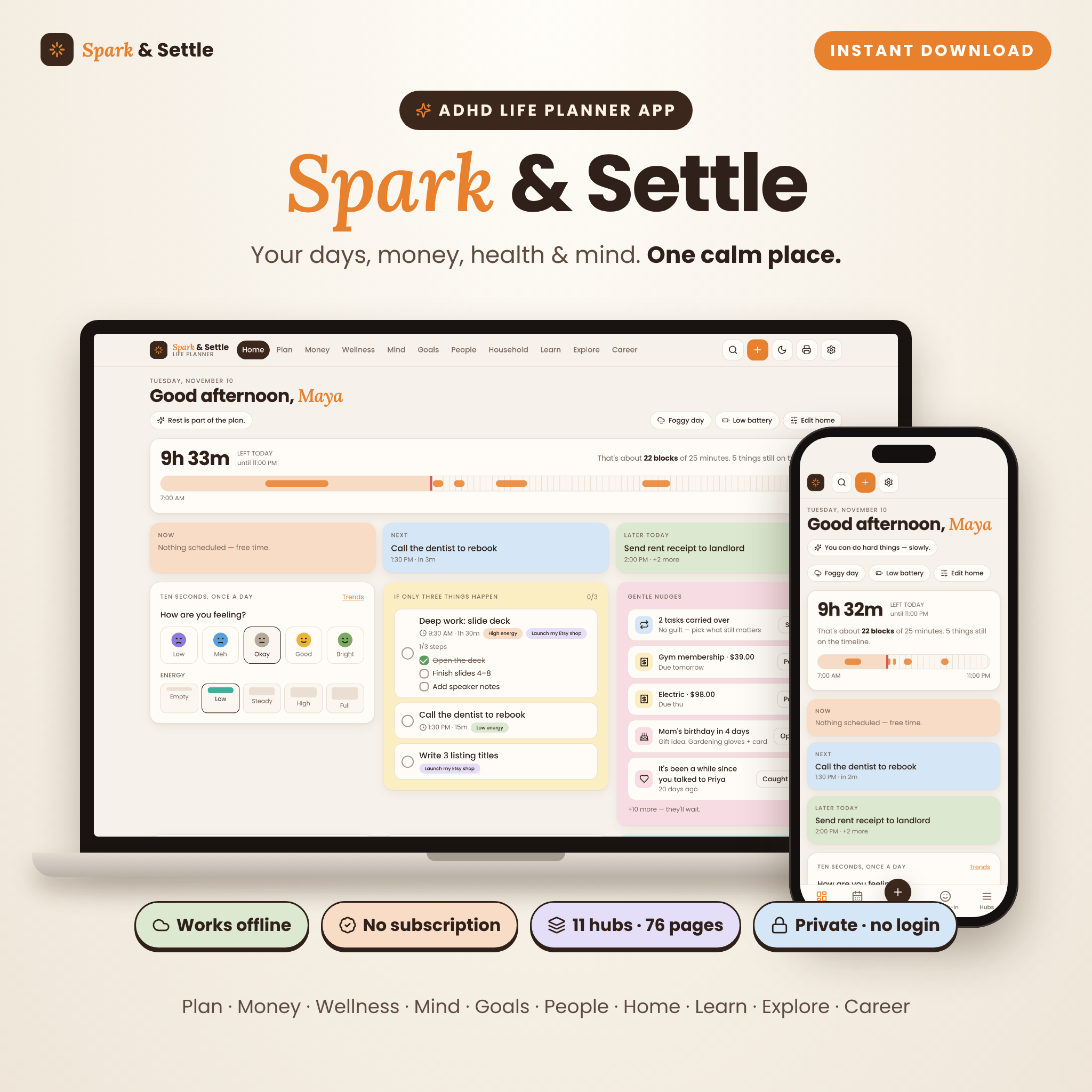
Spark & Settle is an ADHD life planner app that gathers your whole life into one calm, colorful place. It is a real, clickable planner that runs in your web browser, not a PDF you print or a spreadsheet full of formulas. You can plan the day you actually have, see what is safe to spend, look after your health and mood, and watch your goals move. It works offline, needs no account, and never charges a subscription.
What the ADHD life planner app does
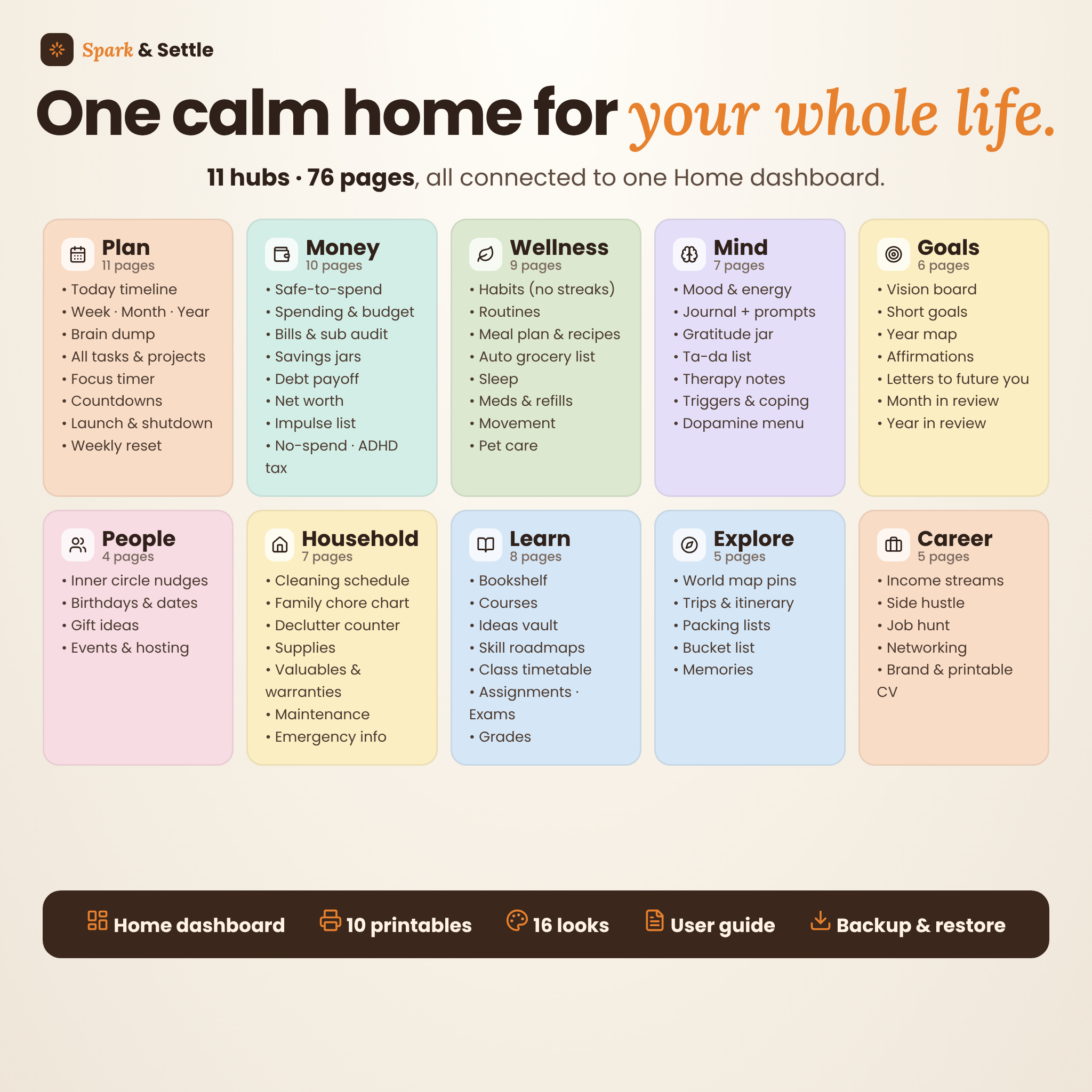
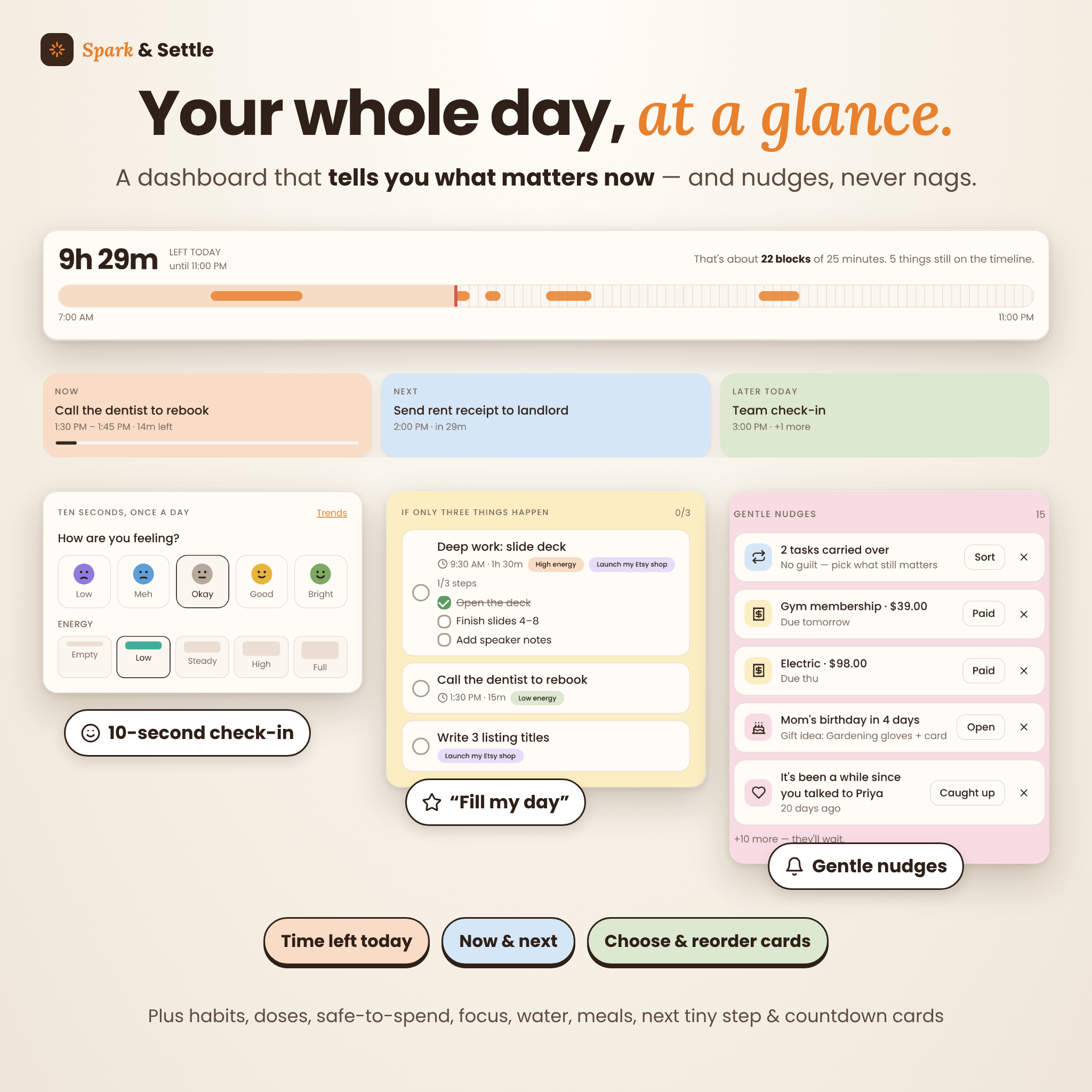
Spark & Settle brings 11 hubs and 76 pages together around one Home dashboard. Home shows how much time is left today, what you’re doing now and next, your top three tasks, a 10-second mood and energy check-in, and gentle nudges for bills due, birthdays, refills and people you haven’t talked to in a while.
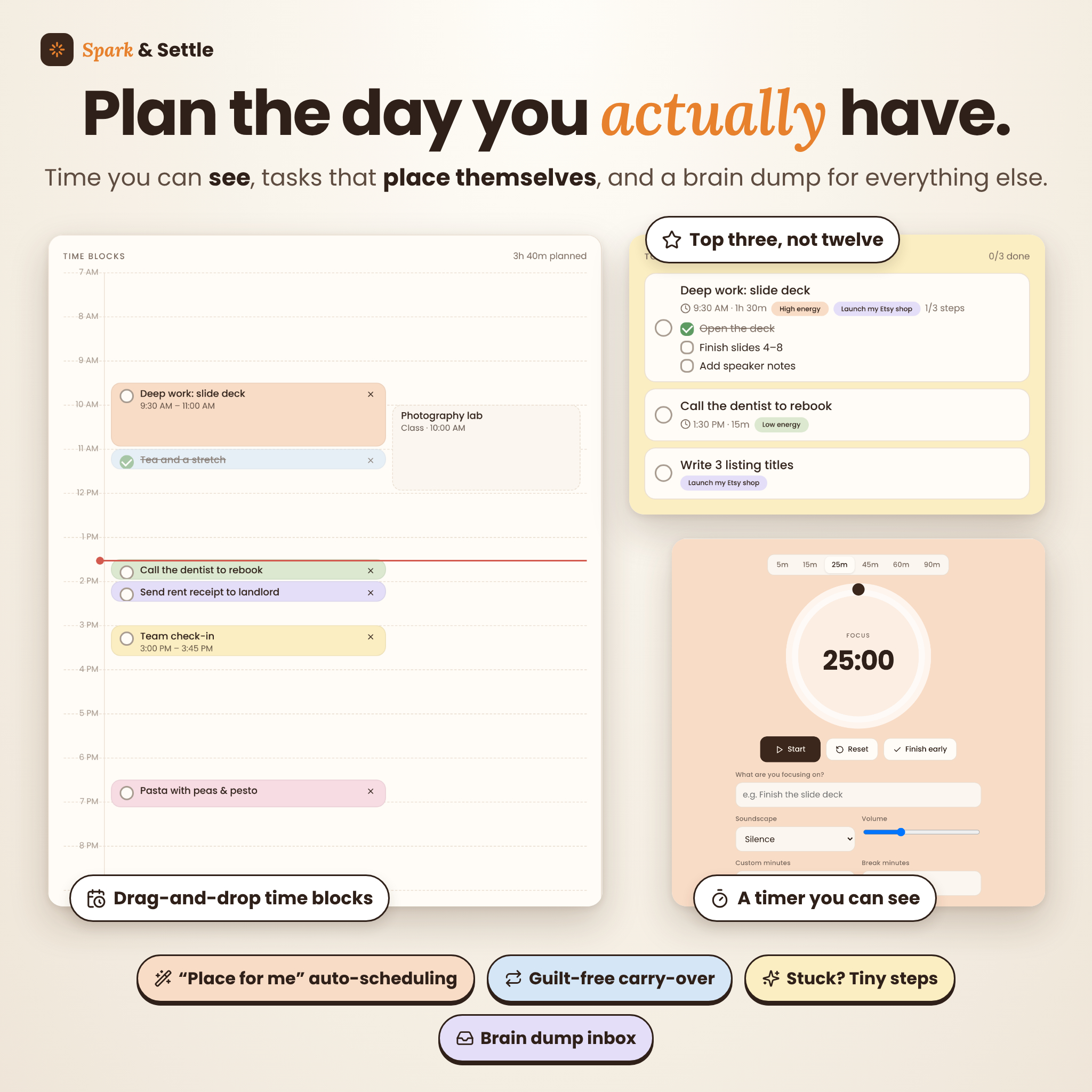
Plan: the day you actually have
- Today timeline with drag-and-drop time blocks, plus “Place for me”, which fits your tasks into the free gaps
- Top three and “Fill my day”, which picks tasks to match your energy
- Week, month and year calendars that pull in tasks, bills, birthdays, trips, exams and paydays
- A brain dump inbox where you capture now and sort later
- All tasks with repeating tasks, projects with “where I left off” notes, and countdowns
- A visual focus timer with breaks and brown noise, rain, ocean or white noise
- Morning launch, evening shutdown and a weekly reset, plus “Stuck?” tiny steps
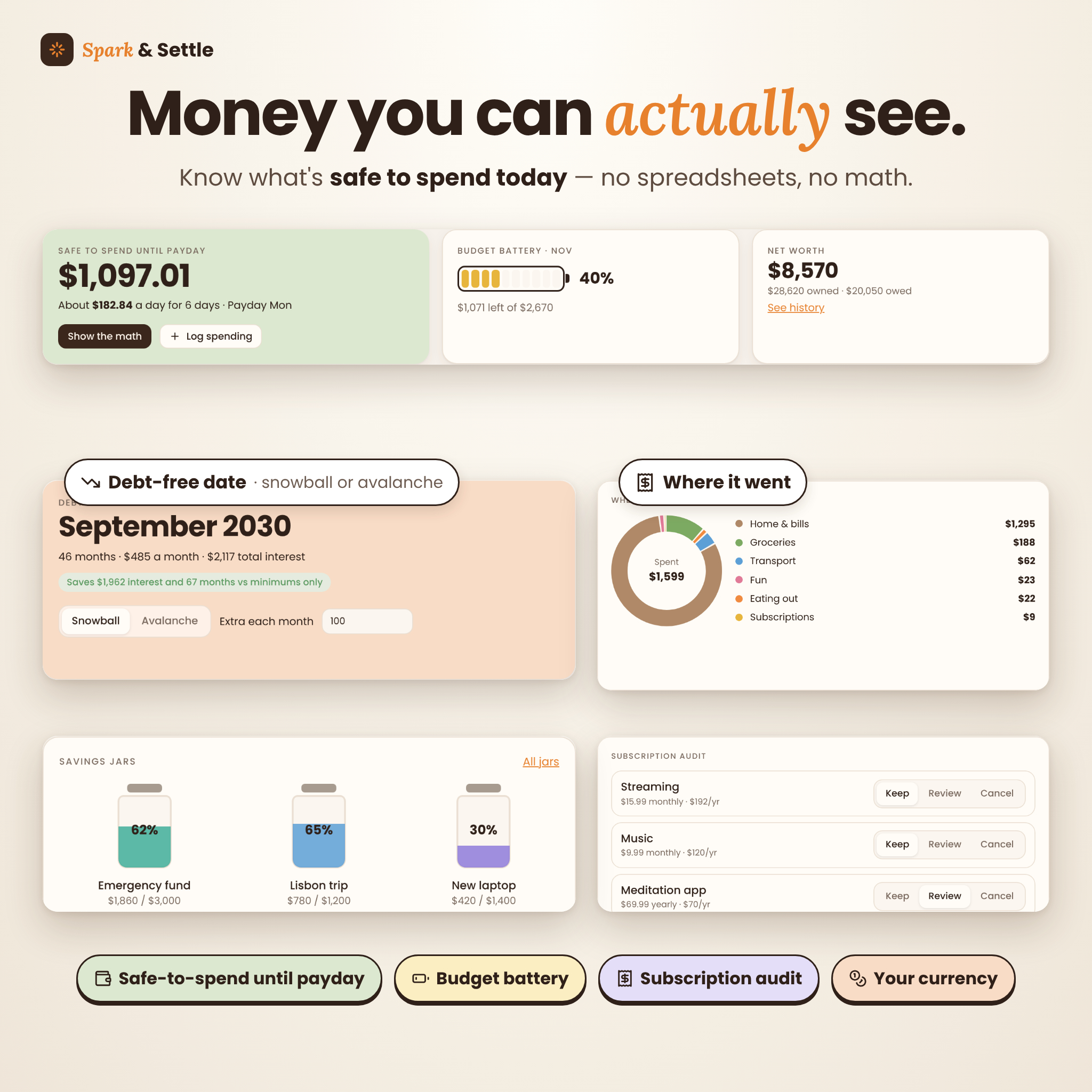
Money: see it at a glance
- Safe-to-spend until payday, with a “show the math” breakdown
- A spending tracker with one-line quick logging (type “12.50 lunch”) and a CSV export
- A monthly budget with a budget battery, and bills with a subscription audit
- Savings jars, a debt payoff planner (snowball or avalanche) with your debt-free date, and net worth history
- An impulse-buy waiting list, no-spend days and an ADHD tax tracker
Wellness and Mind: look after you, gently
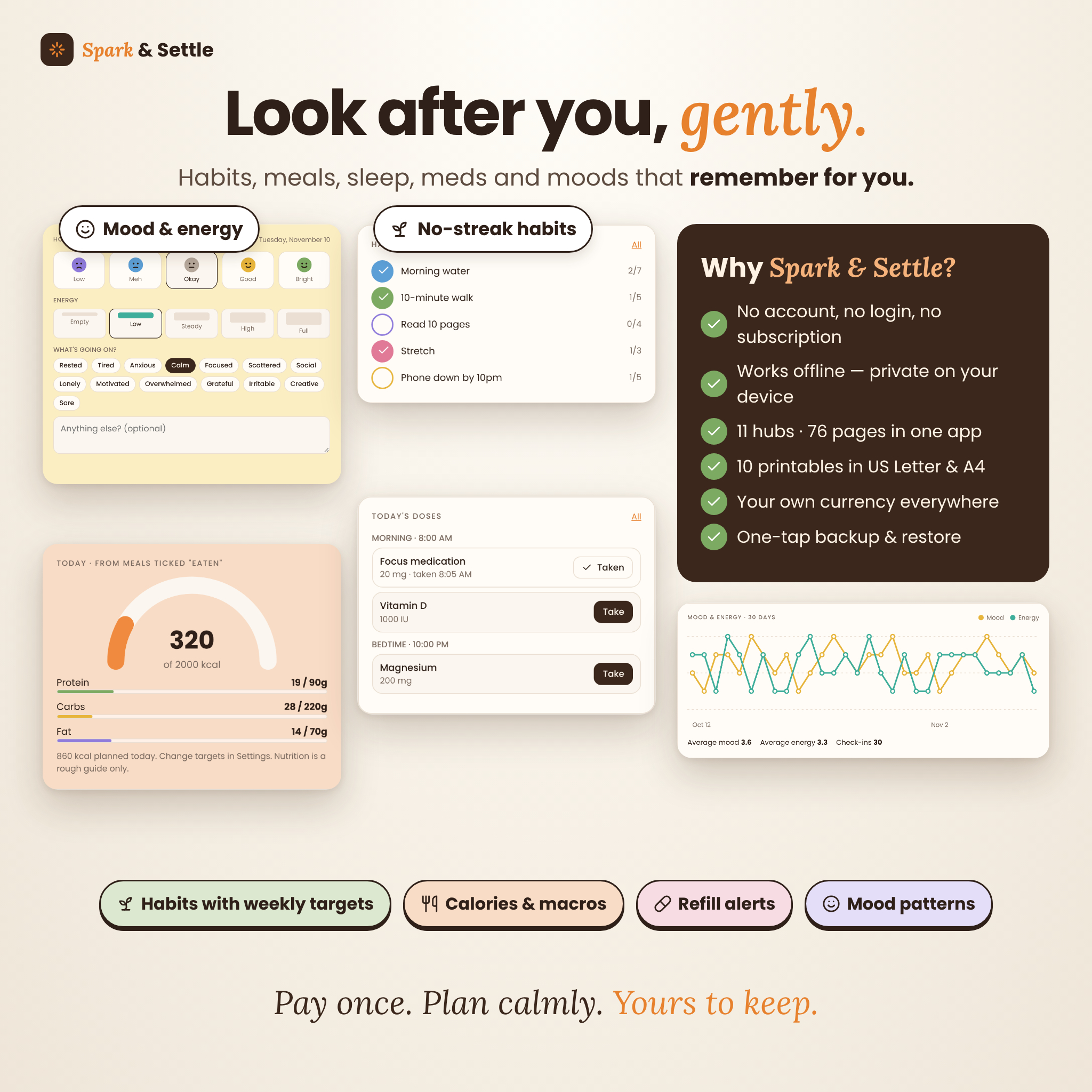
- Habits with weekly targets instead of streaks, and step-by-step routines
- A meal planner and recipe book with calories and macros, plus a grocery list that builds itself, grouped by aisle
- A sleep timeline, a medication and supplement tracker with pill counts and refill alerts, movement minutes and pet care
- Mood and energy tracker with patterns, journal with 30 prompts, gratitude jar, ta-da list, therapy notes, coping toolbox and dopamine menu
Goals, People, Household, Learn, Explore and Career
- Goals: vision board, short goals with tick-off steps, year map, affirmations, sealed letters to future you, and an automatic month and year in review
- People: catch-up reminders, birthdays and dates, gift ideas, events and hosting
- Household: a self-resetting cleaning schedule, family chore chart with rotation and points, declutter counter, supplies, valuables and warranties, home maintenance and printable emergency info
- Learn: bookshelf, courses with finish-date forecasts, ideas vault, skill roadmaps, class timetable, assignments, exams and weighted grades
- Explore: a world map you pin by tapping, trips and itineraries, packing-list templates, a bucket list and memories
- Career: income streams, side hustle sales, a job-hunt tracker, networking follow-ups and a printable CV
Who it’s for
This digital life planner is for adults with ADHD (diagnosed or not), busy parents, students, freelancers and side hustlers. It also suits anyone who has tried a dozen planning apps and abandoned them all by week two.
Main benefits
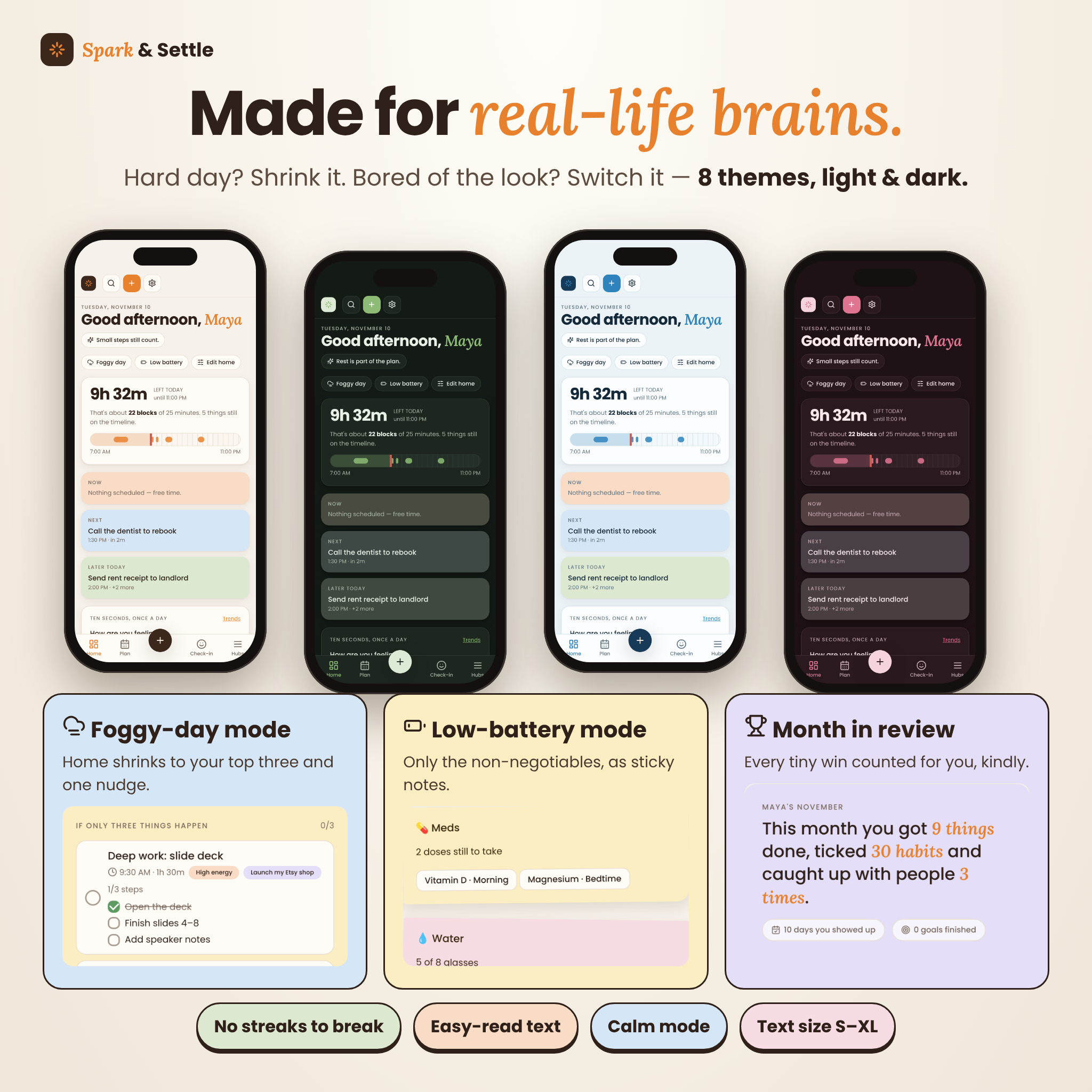
- Less overwhelm: Foggy-day mode shows only your top three and one nudge. Low-battery mode shows only the non-negotiables.
- Less guilt: there are no streaks to break, unfinished tasks simply carry over, and you can “let go” of a task on purpose.
- Less forgetting: nudges for bills, birthdays, refills and follow-ups.
- Private by design: your planner lives in your browser on your device. There is no login and nothing is uploaded.
- Pay once: no subscription, ever.
Make it yours
Choose from 8 color themes (Cocoa, Sage, Apricot, Lavender, Ocean, Rosewood, Citrus and Graphite), each in light and dark. Adjust text size, turn on easy-read text or calm mode, and hide or reorder hubs and Home cards. Money uses your own currency: set one symbol (such as $, £, €, R or ₹) and every amount in the planner uses it. Dollars are the default.
What’s included
- Spark-and-Settle-Life-Planner.html: the planner app (one file, works offline)
- Spark-and-Settle-User-Guide.docx: a 15-page illustrated user guide
- Quick Start Guide (PDF): in US Letter and A4
- 10 built-in printables in US Letter or A4: daily, weekly, monthly, habit tracker, budget, meal plan, brain dump, cleaning checklist, year in pixels and reading log
How it works
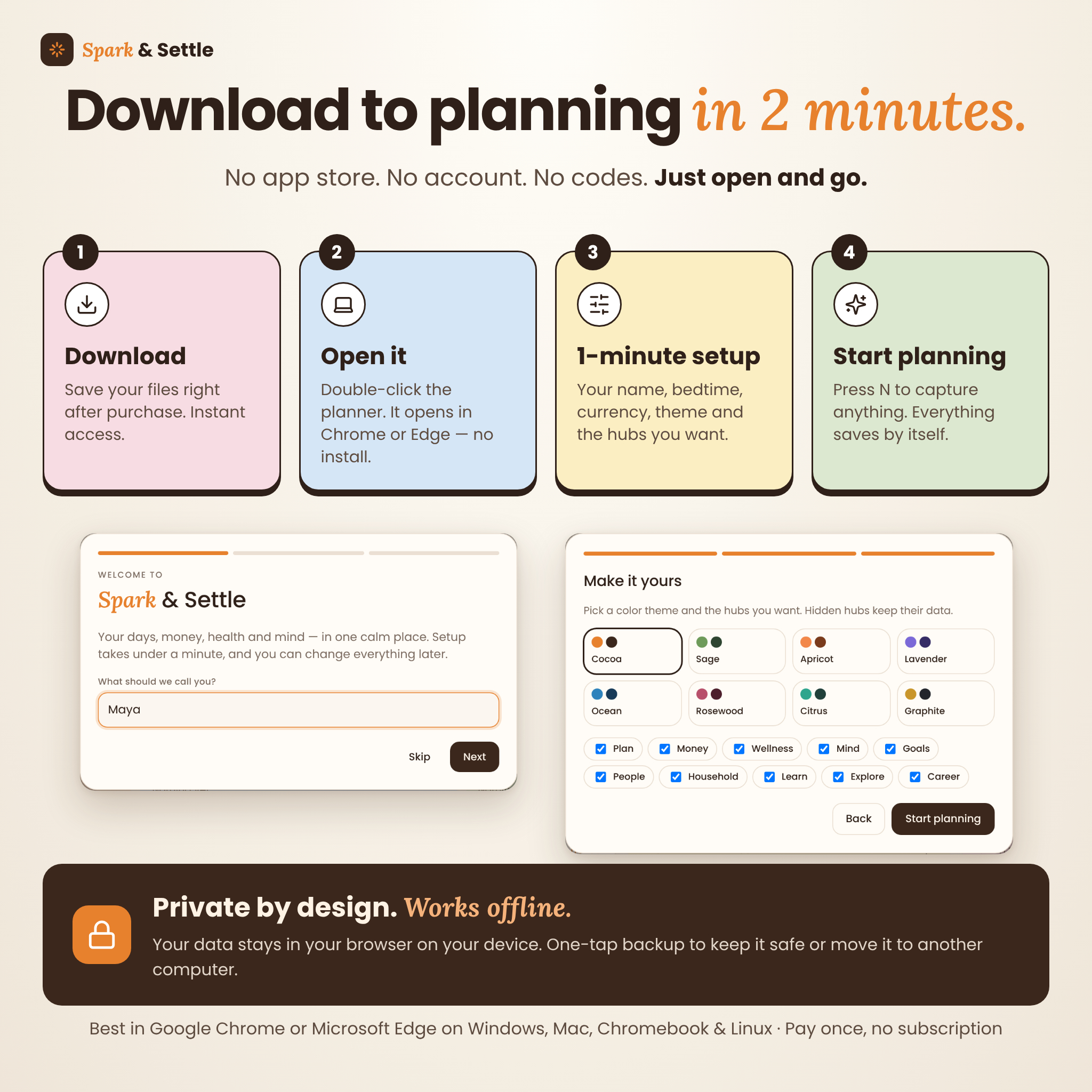
- Download your files right after purchase.
- Double-click the planner file. It opens in your browser, with nothing to install.
- Complete the one-minute welcome setup: your name, bedtime, currency, theme and hubs.
- Start planning. Press N anywhere to capture a thought. Everything saves automatically.
File formats and software requirements
The planner is a single HTML file. It is made for Google Chrome or Microsoft Edge on Windows, Mac, Chromebook and Linux computers, and its layout adapts to smaller windows. No internet connection, account or extra software is needed. The user guide is a Word document (.docx) and the quick start guide is a PDF.
Your data is saved in the browser where you use the planner. Clearing that browser’s site data erases it, so download a backup from Settings every week or two (Home reminds you). To move to another computer, restore your backup there. Changes do not sync between devices automatically.
Real-life ways to use it
- A Monday reset: empty the brain dump, check bills before payday, pick three priorities and let “Decide for me” plan the week’s dinners
- A foggy morning: switch on Foggy-day mode, tick your meds and do one tiny step
- Paying off a card: compare snowball and avalanche and watch your debt-free date move closer
- A side hustle: log sales, see what sells best, and print an up-to-date CV when an opportunity comes up
Digital download
This is an instant digital download. Nothing physical will be shipped. Your files are available as soon as payment is confirmed.
FAQ
Do I need an account, internet or a subscription?
No. There is no login, it works offline, and you pay once.
Does it sync between my phone and computer?
No. It is designed for Chrome or Edge on a computer, and your data stays on that device. You can move it to another computer with a backup file.
Can I use my own currency?
Yes. Set your currency symbol once in Settings and every money value updates.
Is it good for beginners?
Yes. A one-minute setup, a built-in help tour and a full user guide get you started.
Can I print pages?
Yes. There are 10 printable sheets in US Letter or A4, and you can also print your CV, emergency info and monthly or yearly reviews.
Is this medical or financial advice?
No. Spark & Settle is a personal organization tool and does not provide medical, mental health, financial, tax or legal advice.
License
Personal use only, single user. Please don’t share, resell, copy or redistribute the planner, its files or the guide. © Taskdale.
Reviews
There are no reviews yet.