Best Food Inventory Tracker: Four Spreadsheets Compared
The best food inventory tracker for most households is a meal planner spreadsheet with a built-in pantry tab, because it links what you own to what you cook and what you buy. Spoonwise suits anyone who wants use-by and restock alerts. Pantry to Plate suits planning up to four weeks ahead.
Keeping track of food at home can feel like a chore that never ends, and a simple list on the fridge rarely survives a busy week. This page walks through what to look for and how the four trackers differ. It also covers how to set one up so it stays useful, so you can choose with confidence.
At a glance
- A food inventory tracker is a spreadsheet or app that records what is in your fridge, freezer and cupboards so you buy only what you are missing.
- All four trackers here work in both Excel and Google Sheets, so you don't need special software.
- Every one subtracts pantry stock from your grocery list and sorts the list by store aisle.
- Spoonwise and Pantry to Plate both include use-by alerts, which show what to eat first.
- Pantry Bloom has the most tabs at 13, while Prep & Plenty has 11.
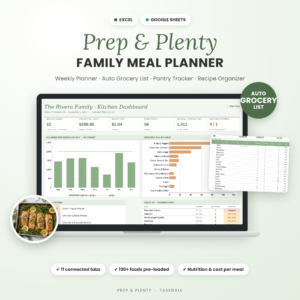 Weekly Meal Planner Spreadsheet for Excel & Google Sheets | Prep & Plenty Family Meal Planner with Auto Grocery List, Pantry Inventory & Recipe Organizer
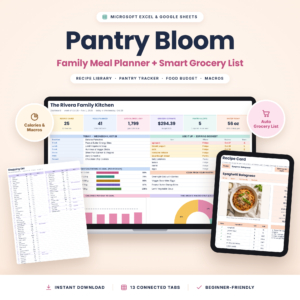 Pantry Bloom Meal Planner Spreadsheet | Excel & Google Sheets Weekly Meal Plan, Smart Grocery List, Recipe Organizer & Pantry Inventory
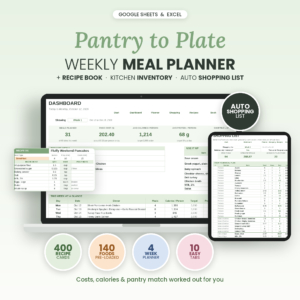
Table of Contents Toggle
- What should you look for in a food inventory tracker?
- How do the four food inventory trackers compare?
- Which food inventory tracker suits which household?
- How do you set up and use a food inventory tracker?
- What mistakes should you avoid with a food inventory tracker?
- What affects the cost of a food inventory tracker?
- Which food inventory tracker should you choose?
- Common questions
What should you look for in a food inventory tracker?
A good food inventory tracker does three things: it records what you have, tells you what is running low or running out of time, and turns that into a shopping list. Five features decide how well it does this, and they are worth checking before you download anything.
Pantry and freezer coverage
A pantry inventory is a tab listing every item you hold, with quantities. Prep & Plenty explicitly subtracts what is in your fridge, freezer and pantry, which matters if you batch-cook and keep a well-stocked freezer. The other three describe pantry subtraction, so check that the tab suits the way you store food.
Use-by and restock alerts
A use-by alert is a flag that warns you when an item is nearing its date. Spoonwise offers use-by and restock alerts. Pantry to Plate offers use-by alerts that show what to eat first. If wasted food is your main worry, this feature matters more than any other.
Automatic grocery list
The grocery list should be built from your chosen meals, minus what you already own. Spoonwise also merges duplicate ingredients, so two recipes needing onions appear as one line. All four sort the list by store aisle, which shortens a shop.
Recipe and nutrition data
Pre-loaded foods save typing. Prep & Plenty comes with 130+ common foods with nutrition, and Pantry to Plate with 140. Spoonwise includes a 500-recipe book with cost per serving, tags and nutrition. If you only care about stock levels, this is a bonus. If you count calories or watch a budget, it is a real saving of time.
Guidance and layout
A tracker you can't work out is one you will abandon. Prep & Plenty comes with a step-by-step user guide in DOCX and PDF. Pantry to Plate has a 19-page guide, Spoonwise an illustrated one, and Pantry Bloom adds a filled sample copy so you can see the sheets working before you enter your own food.
How do the four food inventory trackers compare?
The four trackers share the same core, a meal plan feeding an aisle-sorted list with a pantry tab, and differ mainly in size, planning range and extras.
| Product | Tabs or size | Pantry alerts | Planning range | Extras |
|---|---|---|---|---|
| Weekly Meal Planner Spreadsheet for Excel & Google Sheets | Prep & Plenty Family Meal Planner with Auto Grocery List, Pantry Inventory & Recipe Organiser | 11 connected tabs | Not stated | Weekly | 130+ foods with nutrition, cost per serving, weekly budget, DOCX and PDF guide |
| Pantry Bloom Meal Planner Spreadsheet | Excel & Google Sheets Weekly Meal Plan, Smart Grocery List, Recipe Organiser & Pantry Inventory | 13 connected tabs | Not stated | Weekly | Printable menu and recipe cards, blank and filled sample copies, budget tab |
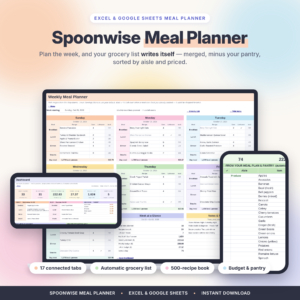 Weekly Meal Planner Spreadsheet for Excel & Google Sheets | Spoonwise Automatic Grocery List, Recipe Book, Pantry Inventory & Grocery Budget Tracker | 500-recipe book | Use-by and restock alerts | Weekly | Merged duplicate ingredients, optional calorie, water, weight and food-spending trackers |
| Pantry to Plate Meal Planner: Weekly Meal Planner Spreadsheet with Automatic Grocery List, Recipe Organiser & Pantry Inventory (Excel & Google Sheets) | Recipe cards with cost and calories | Use-by alerts | Up to four weeks | 140 foods with nutrition, 19-page guide |
Where the table says "not stated", the listing does not mention that feature, so check the product page before assuming either way. 4 options are shown on this page in all, and the four above are the ones compared here.
Which food inventory tracker suits which household?
Each tracker fits a different habit, and the right one is the one that matches how you already shop and cook.
Spoonwise suits households that throw away food. Its use-by and restock alerts do the remembering for you, and the 500-recipe book gives you plenty to cook from. The optional calorie, water, weight and food-spending trackers suit someone who wants one file for everything, though you can ignore them.
Pantry to Plate suits people who shop once or twice a month. Planning up to four weeks of meals lets you buy in bulk against a longer list, and the use-by alerts tell you which tins and packets to use first.
Prep & Plenty suits families who cook from the freezer. It subtracts fridge, freezer and pantry stock, and its weekly budget and cost per serving help when the main aim is spending less.
Pantry Bloom suits cautious spreadsheet users. With 13 tabs, a filled sample copy and a blank planner, you can see a working example first. The printable menu and recipe cards also suit anyone who likes paper on the fridge door.
How do you set up and use a food inventory tracker?
A food inventory tracker takes about an hour to set up and a few minutes a week to maintain. Follow these steps in order.
- Read the user guide first. Each product includes one, and ten minutes there saves an evening of confusion.
- Audit your cupboards, fridge and freezer. Work shelf by shelf and write down what you have and roughly how much.
- Enter your stock in the pantry tab. Start with the items you buy most often and add the rest as you go.
- Add use-by dates where the tracker supports them. Do the freezer and fresh items first, since they matter soonest.
- Pick this week's meals from the dropdowns. The grocery list will build itself and take away what you already hold.
- Shop from the list, then update the pantry. Add new purchases the same day, while the receipt is in your hand.
If you use Google Sheets, you can open the same file on a phone in the shop. In Excel, print the aisle-sorted list instead.
What mistakes should you avoid with a food inventory tracker?
The most common mistake is letting the pantry tab drift out of date, because a list built on wrong stock is worse than no list. Others follow a pattern.
- Entering everything at once. A full audit of every spice jar puts people off. Start with the 4 or so items you use most.
- Forgetting to deduct what you cook. If the tab isn't updated after meals, the next grocery list will under-buy.
- Ignoring the alerts. A use-by flag only helps if you glance at it before planning meals.
- Overwriting formulas. These sheets work through connected tabs. Type only in the cells meant for input, and keep a spare copy of the original file.
- Choosing on extras alone. Calorie and water trackers are pleasant, but if you never use them they are clutter.
What affects the cost of a food inventory tracker?
The cost of a food inventory tracker depends mainly on how much is built in, since all four are one-off spreadsheet downloads rather than subscriptions. A tracker with a large recipe book, more tabs, longer planning range and extra trackers generally costs more up front than a leaner one. Product cards on this page show the current price for each.
Think about what you would otherwise have to build yourself. A pre-loaded food database, a printable layout and a written guide each save hours, so a slightly dearer file can be the cheaper choice in time. Spending on features you won't open saves nothing.
Which food inventory tracker should you choose?
Choose by your main problem, and you will rarely go wrong.
- Food gets wasted: pick Spoonwise or Pantry to Plate for use-by alerts.
- You shop monthly: pick Pantry to Plate for four-week planning.
- You want to watch spending: pick Prep & Plenty or Spoonwise for cost per serving and budget tracking.
- You want a worked example and printables: pick Pantry Bloom.
Common questions
Do these trackers work without Excel?
Yes. All four are listed for both Excel and Google Sheets. Google Sheets is free with a Google account and runs in a web browser, so you don't need to buy Microsoft software to use any of them.
Can I use a food inventory tracker on my phone?
If you open the file in Google Sheets on a phone, you can check your pantry in the shop. Large multi-tab sheets are easier to read on a tablet or computer, so many people plan at a desk and only glance at the list on the move.
Do I need to enter every item I own?
No. Start with the foods you buy and use most often, then add others as they come up. A tracker covering the main items still gives accurate shopping lists, and it is far more likely to be kept up to date than an exhaustive one.
Are these trackers suitable for a single person?
Yes. They are described as family planners, but you can plan fewer meals and smaller quantities. Pantry to Plate's longer planning range suits a one-person household that shops infrequently, and Spoonwise's alerts help with items that spoil before one person finishes them.
Which tracker is best if I am new to spreadsheets?
Pantry Bloom is the gentlest start, because it includes a filled sample copy, a blank planner and a step-by-step guide. Seeing a finished example makes the layout clear. If wasted food is your goal, move to Spoonwise once you are comfortable.