Late fees are rarely about money. They are about timing. The electric bill lands on the 18th, the car payment on the 5th, the insurance twice a year in a month nobody remembers, and the reminder emails get buried under everything else. A free bill tracker spreadsheet puts every due date in one place, shows what is paid and what is not, and flags the bills that are late or coming up before they turn into a fee or a ding on your credit report.
Below you can download Duebell Lite, a free bill tracker for Excel and Google Sheets. After that, this guide walks you through setting it up in about 15 minutes, finding the bills people usually forget, lining due dates up with your paydays, and building a five-minute weekly habit that keeps everything on track.
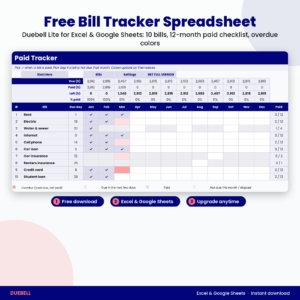
Free Bill Tracker Spreadsheet: Duebell Lite (Excel & Google Sheets)
Track up to 10 bills with next due date, days left and status, plus a 12-month paid checklist with overdue and due-soon colors. Works in Excel and Google Sheets.
Want everything unlocked?
The free file is a sample. The full version has every page, tab and feature, plus the user guide.
See the full versionWhy bills get missed (even when the money is there)
Most missed payments come from one of four gaps:
- Scattered reminders. One company emails, another texts, a third only shows the balance when you log in. Nothing brings them together.
- Odd billing cycles. Monthly bills become routine. Quarterly water bills, twice-yearly car insurance and yearly renewals do not, so they surprise you.
- Payday timing. If you are paid every two weeks, some months a bill falls three days before payday and you need to know that in advance.
- Autopay blind spots. Autopay is great until a card expires or a payment bounces. If you never check, you find out from a late notice.
A good bill tracker closes all four gaps. It lists every bill with its due day, handles bills that are not monthly, shows you what is due in date order, and makes you confirm each payment, even the automatic ones.
What a good bill tracker spreadsheet needs
Before you pick any template (ours or someone else’s), check it against this list:
- A single bill list. Name, due day, usual amount, how often it is billed and whether it is on autopay. You type each bill once.
- Automatic dates. The sheet should work out the actual due date each month. Typing dates by hand every month is how mistakes creep in.
- A paid checklist by month. One quick tick per bill per month, so you can see at a glance what is done.
- Status at a glance. Overdue, due soon or upcoming, with colors, so the urgent bills jump out.
- Room for irregular bills. Quarterly, twice a year and yearly bills belong in the same system as rent.
- No account numbers. A tracker only needs a nickname such as “Visa ending 3317”. Full account and card numbers have no place in a spreadsheet.
Duebell Lite covers points 1 to 6 for up to 10 bills. The full Duebell adds the parts that turn a list into a system: a calendar that places every bill on its due date automatically, a dashboard and charts, variable amounts and a payment log.
What’s inside the free Duebell Lite bill tracker
The free download is a real working tracker, not a picture of one. It has four tabs:
- Start Here: five setup steps, a color key and a privacy reminder.
- Bills: room for 10 bills. Type the name, account nickname, category, due day, usual amount, how often, first month due, autopay, payment method and where to pay. The sheet works out the next due date, days left and a status for each bill: Overdue, Due soon, Upcoming or All paid.
- Paid Tracker: 12 months across, one row per bill. Pick a check mark when you pay, or Skip when a bill is not due that month. Overdue cells turn coral, bills due in the next 7 days turn light coral, and paid ones turn lavender. The top rows show due, paid, left and % paid for every month.
- Settings: your currency symbol, tracker year (2027 by default), due-soon window, week start and the month you start tracking.
Formulas are locked so you cannot break them by accident, and there are no macros, so the file opens cleanly in Excel and in Google Sheets.
How to set up your free bill tracker in 15 minutes
Step 1: Open the file
In Excel, double-click the download and click Enable Editing if you see a yellow bar. In Google Sheets, upload the file to Google Drive, right-click it and choose Open with Google Sheets, then File and Save as Google Sheets. The navigation buttons are made for Excel; in Google Sheets use the tabs at the bottom of the screen.
Step 2: Settings first
Type your currency symbol and check the year. Then set Start tracking from to the current month. This one setting matters: without it, every bill from January would show as overdue just because you started in the middle of the year.
Step 3: Add your bills
Start with the big fixed ones (rent or mortgage, car payment, insurance), then utilities, phone and internet, then subscriptions. For anything that is not monthly, pick How often (every 2 months, quarterly, twice a year or yearly) and the first month of the year it is due. A bill due on the 29th, 30th or 31st moves to the last day of shorter months by itself.
Step 4: Tick off what you already paid this month
Go to the Paid Tracker and add a check mark for each bill you already paid. Everything else now shows its real status.
Step 5: Pick a check-in day
Choose one day a week (Sunday evening works for a lot of people) to open the file and tick off what went out. That is the whole habit.
TASKDALE PICK: THE FULL VERSION
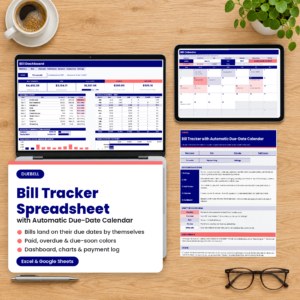
Duebell Bill Tracker Spreadsheet with Automatic Due-Date Calendar
Everything in the free version, plus the calendar view people ask for most: choose any month and year and every bill lands on its due date by itself, with paid bills ticked and overdue days in coral.
- Bill calendar for any month and year, with a month-at-a-glance list
- Dashboard: due, paid, still to pay, overdue and due-soon totals
- Next 10 bills in date order, autopay vs pay-by-hand split
- Paid vs still-to-pay chart for 12 months and yearly cost by category
- Room for 60 bills, a Monthly Amounts tab for bills that change, and a 300-row payment log
- Excel and Google Sheets, any currency, Word user guide included
Free vs full: what you get with each
| Feature | Duebell Lite (free) | Duebell (full) |
|---|---|---|
| Bills you can track | 10 | 60 |
| Next due date, days left and status | ✓ | ✓ |
| 12-month paid checklist with overdue colors | ✓ | ✓ |
| Monthly, quarterly, twice-yearly and yearly bills | ✓ | ✓ |
| Automatic bill calendar (any month and year) | ✗ | ✓ |
| Dashboard with paid vs remaining | ✗ | ✓ |
| Charts (monthly and by category) | ✗ | ✓ |
| Different amounts each month | ✗ | ✓ |
| Payment log with confirmation numbers | ✗ | ✓ |
| Word user guide | ✗ | ✓ |
If you have more than 10 bills, if your utilities change every month, or if you think in calendars rather than lists, the full Duebell bill tracker is the better fit.
How to find every bill you pay
The tracker only works if the list is complete. Here is a quick audit that catches almost everything:
- Pull three months of bank and card statements. Three months catches the quarterly bills that one statement misses.
- Highlight every repeat charge. Anything that shows up more than once is a bill, even if it is small.
- Search your email for words like “renewal”, “your bill is ready”, “receipt” and “subscription”.
- Check the app stores on your phone (subscriptions are listed in your account settings) and any payment apps you use.
- Think in years, not months. Write down anything you paid once in the last 12 months that will come back.
Bills people forget most often
- Car registration and vehicle inspection fees
- Renters or homeowners insurance paid once a year
- Twice-yearly car insurance premiums
- Quarterly water, sewer or trash bills
- Annual memberships (warehouse clubs, roadside assistance, professional dues)
- Domain names, cloud storage and software plans billed yearly
- Property tax installments and HOA dues
- Free trials that quietly turned into paid plans
Add these as yearly or twice-yearly bills in the tracker with the month they are due. They will appear in the right months and stop surprising you.
Line up due dates with your paydays
A bill tracker shows you something a list cannot: where your bills bunch up. Many households find that rent, the car payment and a credit card all land in the first week of the month while the second half is quiet. That is a cash flow problem even when the monthly total is fine.
Two simple fixes:
- Ask to move a due date. Many card issuers, lenders and utilities let you pick a new due date, often online in a few clicks. Moving one or two bills to after your second paycheck can smooth the whole month.
- Match the due-soon window to your pay cycle. If you are paid every two weeks, set the due-soon window in Settings to 14 days. Every time you get paid, the tracker shows exactly which bills that paycheck needs to cover.
If you budget by paycheck, our Stubwell biweekly paycheck budget pairs well with a bill tracker: one plans the money, the other makes sure every bill gets paid on time.
Autopay: set it, then check it
Autopay is one of the best ways to avoid late payments, and you should use it where it makes sense. But treat it as a payment method, not a reason to stop looking. Cards expire, accounts change, and a payment can fail without much warning.
In the tracker, mark autopay bills as Yes. Then tick them off only when you see the money actually leave your account, not on the due date. It takes seconds, and it catches failed payments while there is still time to fix them.
A good rule of thumb: keep autopay for fixed bills (loans, insurance, subscriptions) and pay variable bills (utilities, credit cards) by hand or with autopay set to the statement balance, so you see the amount each month.
The five-minute weekly bill routine
- Open the tracker on the same day each week.
- Look for coral cells. Anything overdue gets paid or a phone call today.
- Look for light coral cells. These are due within your window. Schedule them now.
- Tick off everything that went out since last week, including autopay.
- Glance at next month. Any yearly or quarterly bill coming up? Set the money aside now.
That is it. Five minutes, once a week, and you will rarely see a late fee again.
What to do if you already missed a payment
Pay it as soon as you can, then call the company. Many lenders and providers have a short grace period, and plenty will remove a first late fee if you ask politely and your history is good. Card issuers generally do not report a payment to the credit bureaus as late until it is 30 or more days past due, so acting quickly matters. Note the date you paid and any confirmation number. The full Duebell has a payment log for exactly this.
More free and paid money tools on Taskdale
| Product | Best for |
|---|---|
| Duebell Bill Tracker | Automatic bill calendar, paid checklist, overdue alerts and dashboard |
| Budgetmere Monthly Budget Spreadsheet | A full yearly budget with 12 monthly budgets and a dashboard |
| Stubwell Biweekly Paycheck Budget | Planning bills paycheck by paycheck when you are paid every two weeks |
| Kettlefund Sinking Funds Tracker | Saving ahead for yearly bills like insurance and registration |
| Evenstead Roommate Bill Splitter | Shared homes that split rent, utilities and other bills |
| Payvane Debt Payoff Calculator | Paying off cards and loans with the snowball or avalanche method |
Frequently asked questions
Is this bill tracker spreadsheet really free?
Yes. Enter your email in the download box above and the Duebell Lite file is yours. It tracks up to 10 bills with a 12-month paid checklist. There is nothing to cancel later.
Does the free bill tracker work in Google Sheets?
Yes. Upload the .xlsx file to Google Drive and open it with Google Sheets. The formulas and colors work the same way. Use the sheet tabs at the bottom to move around, since the buttons are made for Excel.
Can I track bills that are not monthly?
Yes. Pick every 2 months, quarterly, twice a year or yearly, and choose the first month the bill is due. The tracker shows it only in the right months.
What happens if a bill is due on the 31st?
In months with fewer days, the due date moves to the last day of the month, including February 28 or 29.
Should I store account numbers in my bill tracker?
No. Use a nickname or the last 4 digits only. Duebell blocks any nickname with 8 or more digits so a full number cannot be typed in by mistake.
How is the full version different?
The full Duebell adds an automatic bill calendar for any month and year, a dashboard with paid vs remaining and overdue totals, two charts, room for 60 bills, a tab for amounts that change each month, a 300-row payment log and a Word user guide.
Start with the free tracker today
You do not need a new app, a bank login or a complicated system to stop missing bills. You need one list, one check mark per payment and a quick look once a week. Grab the free Duebell Lite bill tracker above, add your bills tonight, and when you want the calendar and dashboard, the full Duebell bill tracker spreadsheet is ready on Taskdale.