A regular paycheck hides a lot of budgeting problems. Irregular income shows them all at once. One month a client pays three invoices together and you feel rich. The next month two payments slip, rent is due, and the good month is already gone.
If you freelance, drive for a gig app, earn commission, work for tips or sell online, the usual advice (“spend less than you earn each month”) does not help much, because you do not know what you will earn. This guide shows a method that works anyway: stop budgeting your income and start budgeting a salary you pay yourself. You will also get a free irregular income budget calculator for Excel and Google Sheets that does the math for you.
Free Irregular Income Budget Calculator (Excel & Google Sheets)
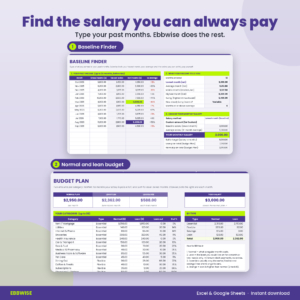
Ebbwise Lite: a Baseline Finder that turns up to 24 months of uneven income into a safe monthly salary, plus a normal and lean budget plan with 30 categories. Works in Excel and Google Sheets.
Want everything unlocked?
The free file is a sample. The full version has every page, tab and feature, plus the user guide.
See the full versionWhy budgeting with irregular income feels so hard
It is not a discipline problem. It is a timing problem. Your bills arrive on a schedule and your money does not. Three things usually go wrong:
- You budget from your best months. A $9,000 month makes a $4,000 lifestyle feel safe. Then a $3,000 month arrives.
- Taxes catch you out. Nobody withholds tax from a client payment. If you spend it all, the bill arrives later with nothing set aside.
- Every month is a new decision. When income changes, you rethink the whole budget, often while stressed. That is when the worst money choices get made.
The fix is to put a layer between the money you earn and the money you spend. That layer is a buffer.
The pay-yourself-a-salary method in 3 accounts
You only need three places for your money. They can be three bank accounts or, if you prefer, three numbers you track in a spreadsheet.
| Account | What goes in | What comes out |
|---|---|---|
| Buffer (income holding) | Every payment you receive, after the tax share | One fixed salary per month, plus any extra above the target |
| Tax pot | A set share of each taxable payment, for example 25% | Your tax payments when they are due |
| Everyday account | Your monthly salary | Rent, groceries, bills and everything in your budget |
You budget only the salary. It is the same every month, so your budget is the same every month. All of the ups and downs happen inside the buffer, where they cannot hurt you.
Step 1: Find your baseline (the salary you can always pay)
Write down what you earned in each of the last 12 months, before tax. Take off your tax set-aside to get the net amount for each month. Now look at the lowest one. That is your baseline.
Here is a real-looking example from a freelance designer:
| Month | Gross income | Net after 25% set-aside |
|---|---|---|
| Oct | $5,800 | $4,350 |
| Nov | $9,200 | $6,900 |
| Dec | $4,300 | $3,225 |
| Jan | $7,400 | $5,550 |
| Feb | $10,200 | $7,650 |
| Mar | $4,000 | $3,000 (lowest) |
| Apr | $6,600 | $4,950 |
| May | $8,300 | $6,225 |
| Jun | $4,900 | $3,675 |
| Jul | $7,100 | $5,325 |
| Aug | $11,200 | $8,400 (highest) |
| Sep | $6,000 | $4,500 |
The average net month is about $5,300, but the lowest is $3,000. If this designer pays themselves $3,000 a month, almost every month is a good month. The $2,300 gap between the average and the baseline is not lost. It builds the buffer and then flows to savings and debt.
Why not use the average? You can, but then about half of your months come in under your salary, and you need a much bigger buffer to survive a run of them. Starting from the lowest month is calmer. You can raise your salary later, once the buffer proves it can carry it.
The free Ebbwise calculator does this step for you: type up to 24 months, choose lowest month, 12-month average or a custom amount, and it gives you a rounded monthly salary along with your average, middle month, swing and a simple steadiness rating.
Step 2: Write two budgets, normal and lean
Most people write one budget. With irregular income you want two, side by side, for every category:
- Normal: what a regular month costs when your full salary is paid.
- Lean: the least you could live on for a month or two. Needs, minimum debt payments, nothing extra.
| Category | Normal | Lean |
|---|---|---|
| Rent | $1,050 | $1,050 |
| Groceries | $360 | $320 |
| Dining out | $90 | $25 |
| Subscriptions | $35 | $12 |
| Shopping and clothes | $50 | $0 |
| Retirement contribution | $75 | $0 |
| Total (all 22 categories) | $2,950 | $2,362 |
Writing the lean plan now, while you are calm, is the whole point. When a slow month arrives you do not have to decide what to cut. You switch columns. In the example above, a lean month spends $588 less without touching rent, food or insurance.
Check one thing: your salary should cover your normal budget. If it only covers the lean one, either trim the normal plan or accept that you will run lean until your income grows. The free calculator tells you which case you are in.
The free version covers steps 1 and 2. Steps 3 to 5 are where the full Ebbwise earns its keep: it runs your buffer month by month and switches between normal and lean for you. See the full Ebbwise spreadsheet ›
Step 3: Build a buffer before you need it
Your buffer target is a number of months of salary. Three months is a common starting point. Six is calmer if your work is seasonal or your clients pay slowly. With a $3,000 salary and a 3-month target, the buffer goal is $9,000.
If you are starting from zero, expect a bumpy first few months. Here is how the designer’s first months of the year played out, starting with only $800 in the buffer:
| Month | Net income in | Salary paid | Buffer at month end | Result |
|---|---|---|---|---|
| Jan | $2,700 | $3,000 | $500 | Lean month, covered |
| Feb | $1,800 | $2,300 | $0 | Short by $700, lean plan |
| Mar | $6,300 | $3,000 | $3,300 | Good month |
| May | $7,350 | $3,000 | $8,850 | Good month |
| Aug | $6,900 | $3,000 | $9,000 | Good, $3,225 extra swept out |
February hurt, but it was planned for: the salary came in $700 short and the lean budget kicked in. By May the buffer was almost full. By August it overflowed. Once the buffer is full, a lean month like July (only $2,400 net) simply does not matter. The buffer pays the full salary and you barely notice.
Step 4: Set aside tax from every payment
When income is irregular, tax is the expense people forget most often, because nobody takes it out for you. The simplest habit is a fixed percentage from every taxable payment, moved to the tax pot the day the money arrives.
- Pick a percentage. Many freelancers use somewhere between 20% and 35%, but the right number depends on where you live and how much you earn. A tax professional can tell you what fits. Ebbwise only tracks the money; it does not calculate what you owe.
- Skip money that is not income, such as a client paying you back for printing or travel costs.
- Log each tax payment you make, so you can see what is left in the pot.
With 25% set aside, the designer started the year with $1,500 in the pot, parked $13,325 more over nine months, paid three estimated payments of $4,200, $3,800 and $4,500, and still had $2,325 in the pot. No scramble, no surprise.
Step 5: Have a plan for good months and lean months
The last step is deciding in advance what happens in each kind of month.
In a good month
- The tax share goes to the tax pot first.
- The buffer refills to its target.
- Anything above the target gets split. For example: 40% to savings goals, 30% to extra debt payments, 20% to investing or retirement, 10% to guilt-free fun.
That 10% matters more than it looks. Irregular earners who never let themselves enjoy a good month tend to give up on the system. A planned treat keeps you on it.
In a lean month
- Spend from the lean column of your budget.
- Pause or downgrade extra subscriptions.
- Send every open invoice and chase late payers.
- Pitch three past clients or post your availability.
- Pay minimums only on debt this month.
- Leave the tax pot alone, even if it is tempting.
When to give yourself a raise
Not after one great month. A good rule: raise your salary a little only after three good months in a row with a full buffer. The full Ebbwise checks this for you and shows a salary review message on the dashboard.
EDITOR’S PICK · THE FULL VERSION
Ebbwise Irregular Income Budget Spreadsheet
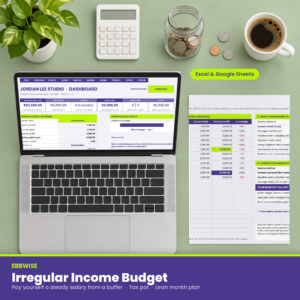
The free calculator finds your salary. The full Ebbwise pays it to you, month after month, and tells you what to do when a month comes in light.
- Pays you the same salary every month from a buffer, with shortfalls shown in red
- Sets aside a share of every taxable payment in a tax pot, by month and by quarter
- Switches to your lean budget automatically in months the buffer runs short
- Splits good-month extra between savings, debt, investing and fun
- Dashboard with runway, buffer vs target and good vs lean months
- 300-row income log, 400-row expense log, playbook checklists and a user guide
Excel and Google Sheets · any currency · instant download
Free calculator vs the full Ebbwise spreadsheet
| Feature | Ebbwise Lite (free) | Ebbwise (full) |
|---|---|---|
| Baseline Finder with up to 24 months | ✓ | ✓ |
| Lowest, average and middle month, steadiness rating | ✓ | ✓ |
| Salary by lowest month, 12-month average or custom | ✓ | ✓ |
| Normal and lean budget, 30 categories | ✓ | ✓ |
| Any currency, Excel and Google Sheets | ✓ | ✓ |
| Month by Month buffer: salary paid, shortfalls, runway | ✗ | ✓ |
| Automatic switch to the lean plan in short months | ✗ | ✓ |
| Good-month extra split between 4 buckets | ✗ | ✓ |
| Income Log (300 rows) with automatic tax set-aside | ✗ | ✓ |
| Expense Log (400 rows) with plan vs actual | ✗ | ✓ |
| Tax Pot by month and quarter with due date reminders | ✗ | ✓ |
| Dashboard with 3 charts and a month in focus | ✗ | ✓ |
| Playbook checklists and salary raise review | ✗ | ✓ |
| User guide (Word) | ✗ | ✓ |
Start with the free version if you just want to know your number. Move to the full spreadsheet when you want the system to run every month without a second thought. Get the full Ebbwise here.
More Taskdale templates that pair well
| Taskdale product | Why it helps with irregular income |
|---|---|
| Gigwise Freelancer Tracker Spreadsheet | Track clients, invoices and time, so you know which payments are coming |
| Deductory Tax Write-Off Tracker | Log business expenses and mileage alongside your tax pot |
| Kettlefund Sinking Funds Tracker | A home for the savings-goals share of your good months |
| Payvane Debt Snowball Calculator | Plan where the extra debt payoff share should go |
| Stubwell Biweekly Paycheck Budget | For a partner who is paid every two weeks on a fixed salary |
How the method changes for different kinds of irregular income
Freelancers with clients: your income depends on when invoices get paid, not when the work is done. Log payments on the day the money lands, and keep a short list of open invoices so a lean month tells you exactly who to chase.
Gig and delivery drivers: you are often paid weekly, so your month can hold four or five payouts. That is fine. Log each payout, and the month total does the rest. Costs like fuel belong in your budget, not in your salary math.
Commission and sales roles: you may have a small base salary plus large, rare commission checks. Treat the base as part of your income, and let the commission feed the buffer. Your baseline is still your lowest total month.
Tips and seasonal work: the swing is often yearly. A ski instructor or a summer tour guide should look at a full 12 months and probably aim for a 6-month buffer.
Shop owners and creators: payouts can arrive in odd amounts on odd dates. Mark client reimbursements as not taxable so your tax pot stays honest.
Common mistakes to avoid
- Using last month as the plan. One month says very little. Use at least six, ideally twelve.
- Leaving out the slow season. If December is always quiet, it belongs in your baseline.
- Raiding the tax pot. Treat it as money you already owe. Because you do.
- Making the lean plan unrealistic. If you would never cancel the internet, keep it in. A lean plan you cannot follow is worse than none.
- Logging only income. The buffer method works best when you also track spending, so you can see if the salary really covers the plan.
Frequently asked questions
How do you budget with irregular income?
Send all income to a buffer account, set aside tax from each payment, and pay yourself the same salary every month from the buffer. Then budget only that salary, with a normal plan and a lean plan for slow months.
How much should I pay myself if my income varies?
Start with your lowest net month from the past 12. It is the amount you know you can earn. Raise it only after several good months in a row and a full buffer.
How big should my buffer be?
Three months of salary is a solid start. Six months suits seasonal work or clients who pay late. Set it in months so it grows when your salary grows.
Is this the same as an emergency fund?
Not quite. The buffer smooths normal ups and downs in income. An emergency fund covers surprises like a car repair or a medical bill. Many people build the buffer first, then fill an emergency fund from the good-month extra.
Does the free template work in Google Sheets?
Yes. Upload the .xlsx file to Google Drive and open it with Google Sheets. Everything calculates; only the tab buttons at the top are made for Excel.
Does it calculate my taxes?
No. It sets aside a percentage you choose and tracks it. For the right rate, talk to a tax professional.
Your next step
Download the free calculator, type your last 12 months and find your number. It takes about ten minutes, and it is the most useful money number an irregular earner can have. Go back to the free download box.
When you are ready for the system that pays you that number every month, sets aside your tax, and knows what to do in a lean month, the full Ebbwise Irregular Income Budget Spreadsheet is on Taskdale.