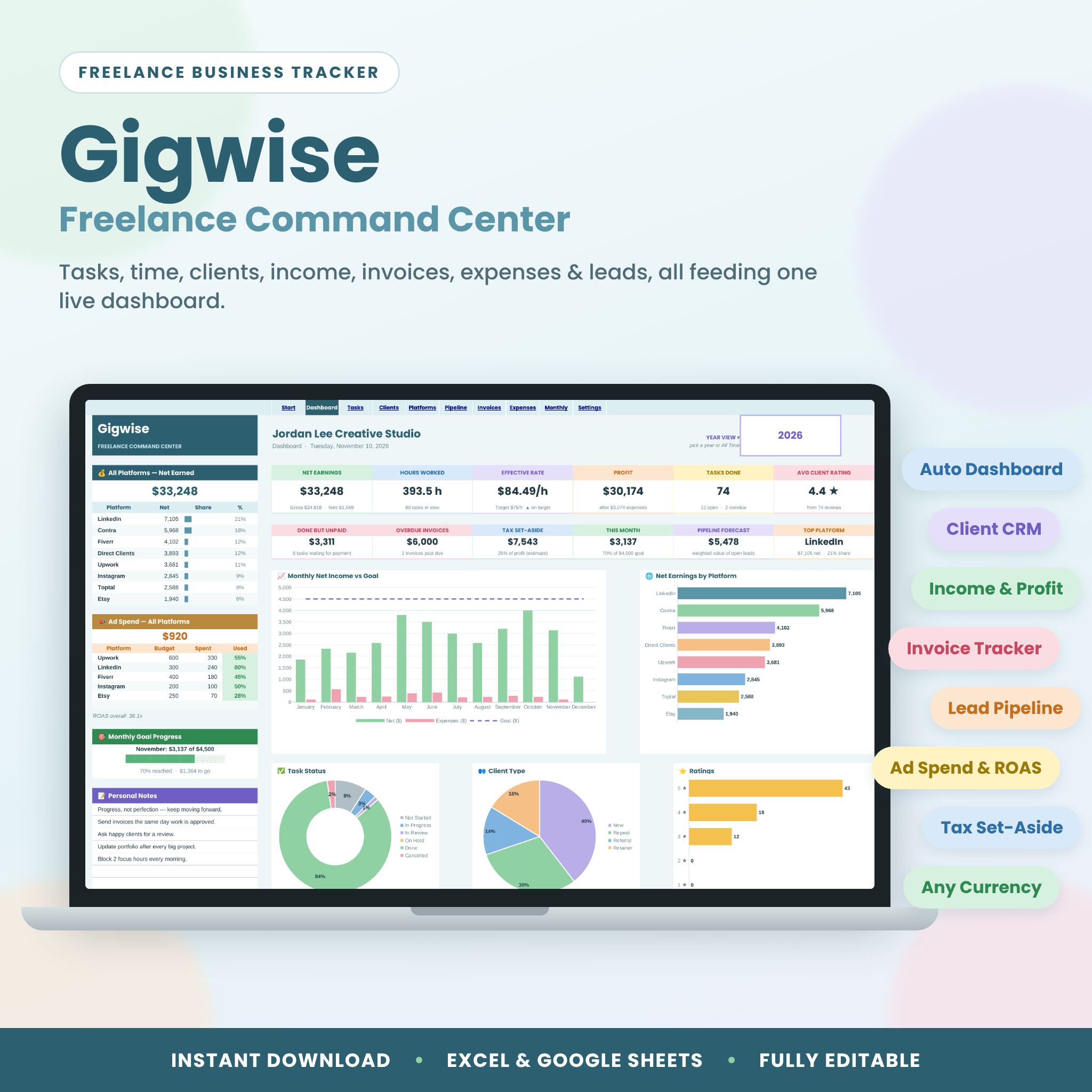


Gigwise is a freelancer tracker spreadsheet that runs your whole freelance business from one file. Log each task once and Gigwise works out your hours, earnings, platform fees, net income and real hourly rate, then feeds a live dashboard, a client CRM, a platform report, a monthly profit report, an invoice tracker and a lead pipeline. It works in Microsoft Excel and Google Sheets, in any currency, with nothing to set up beyond your goals.
Why this freelancer tracker spreadsheet is different
Most freelance trackers are one long sheet: a task list with a few totals. Gigwise gives you 10 connected tabs that talk to each other. Every client, platform, invoice and expense you add flows into the Dashboard, so you always know what you earned, what you’re owed, which clients and platforms pay best, and whether you’re on track for this month’s goal.
- See net, not just gross. Enter each platform’s fee % and every task shows earned, fee and take-home pay.
- Know your real hourly rate. Fixed-price or hourly, Gigwise shows what each task really paid per hour against your target.
- Get paid on time. Done-but-unpaid work and overdue invoices sit right on the Dashboard.
- Win more work. Track leads and proposals with win %, a weighted forecast and follow-up alerts.
What’s included
- Gigwise Freelance Command Center (.xlsx): opens in Excel or Google Sheets
- Gigwise User Guide (.docx): a 12-page illustrated, step-by-step guide
The 10 tabs
- Start: a 3-step quick start, clickable tiles to every tab and a cell legend.
- Dashboard: 12 KPI cards, 5 charts (monthly net vs goal, earnings by platform, task status, client type, ratings), platform earnings with share bars, ad spend vs budget, a monthly goal progress bar, upcoming and overdue deadlines, top clients, personal notes and quick links.
- Tasks: 500-row task and time log with client, platform, category, priority, work date, deadline, start and end times, manual hours, fixed or hourly pricing, earned, platform fee, net, $/hour, client type, 1–5 star rating, status, payment and an automatic deadline check.
- Clients: a 100-client mini-CRM with client-since date, task count, hours, lifetime net, average rating, last project and unpaid balance.
- Platforms: 20 platforms with status, fee %, ad budget, tasks, hours, gross, fees, net, share, effective rate, rating, ad spend, budget used, ROAS and profit.
- Pipeline: 100 leads with stage, win %, weighted value, win rate and follow-up flags.
- Invoices: 200 invoices with automatic due dates, balance, status (Paid, Open, Due Soon, Part-Paid, Overdue), days late and days to pay.
- Expenses: 300 rows with categories, platform tags, tax-deductible flags, category totals and a doughnut chart.
- Monthly: a 12-month report with tasks done, hours, gross, fees, net, expenses, profit, goal %, progress bars, tax set-aside and hourly rate, plus a chart.
- Settings: currency symbol, monthly goal, target rate, tax %, invoice terms and every dropdown list.
Features at a glance
- Automatic calculations everywhere: hours (even past midnight), earnings, fees, net, rates, totals and balances
- Year View selector: switch every report between any year and All Time
- Dropdowns for clients, platforms, categories, status, payment, priority and more
- Color-coded status, payment, priority, deadline and invoice pills
- Input checks on dates, times, amounts and percentages
- Formula cells locked in Excel (no password) so you can’t break them by accident
- Filters on every log, frozen headers and print-ready landscape pages
- One currency setting that every money label reads from
Who it’s for
Gigwise suits freelancers, solopreneurs and side hustlers who juggle several clients or platforms: designers, writers, developers, virtual assistants, social media managers, video editors, photographers, coaches and consultants. It’s built for beginners, with white cells to type in and tinted cells that calculate themselves, yet it gives you the numbers a seasoned freelancer needs.
How it works
- Set it up: type your currency symbol, monthly income goal, target hourly rate and tax set-aside % on the Settings tab.
- Add your world: list your platforms (with fee %) and clients.
- Log your work: add one row per task. Pick from dropdowns and type the price.
- Watch it grow: the Dashboard, Monthly report, client stats and alerts update instantly.
Real-life ways to use it
- A designer on Upwork and Fiverr compares true take-home pay after fees and drops the platform that pays least per hour.
- A virtual assistant logs hourly sessions for five clients and sees who is still unpaid at month end.
- A copywriter tracks proposals in the Pipeline and follows up the day a reminder turns yellow.
- A side hustler watches the monthly goal bar and puts the tax set-aside into savings each month.
- A coach tags ad spend by platform and checks ROAS before renewing a promotion.
File formats and requirements
- Format: .xlsx spreadsheet plus a .docx user guide
- Works in: Microsoft Excel 2019, 2021 and Microsoft 365 (Windows and Mac), and Google Sheets (free Google account)
- Google Sheets: upload the file to Google Drive and choose File ▸ Save as Google Sheets. Dropdowns, charts, colors and links carry over.
- Page setup: landscape, US Letter, fitted to page width (switch to A4 in your print settings)
- Language and spelling: US English
Customization
Rename any dropdown list in Settings and every menu updates. Add up to 20 platforms, 100 clients, 20 services and 15 expense categories. Use any currency symbol, such as $, €, £, R or ₦. In Excel you can unlock any sheet without a password to change colors or layout. In Google Sheets, your copy is yours to edit freely.
Digital download
This is an instant digital download. No physical item will be shipped. Your files are ready on your order page and in your email as soon as payment is confirmed.
Freelancer tracker spreadsheet FAQ
Does it work in Google Sheets?
Yes. Upload the .xlsx to Google Drive and save it as a Google Sheet. Everything keeps working.
Do I need to know formulas?
No. You only type in the white cells. All the math is done for you.
Can I use my own currency?
Yes. Type your symbol once in Settings and every money label switches.
Does it track platform fees like Upwork or Fiverr?
Yes. Enter each platform’s fee % and Gigwise shows gross, fees and net for every task, platform, client and month.
Can I track hourly and fixed-price work?
Yes. Choose Hourly or Fixed on each task. Hourly work multiplies your rate by the hours logged.
Can I track more than one year?
Yes. Use the Year View box on the Dashboard to switch between years or see All Time.
Is the tax set-aside tax advice?
No. It’s a simple estimate (profit × your %) to help you save. Check local rules with a tax professional.
Can I share or resell it?
The licence covers personal use or use within one business. Please don’t share, resell or redistribute the files.
© Taskdale. For personal or single-business use only. Not for resale or redistribution.


Reviews
There are no reviews yet.