The best freelancer tracker is one that turns a simple task log into income, unpaid invoices and tax set-aside without you writing a single formula. For most solo freelancers, that means Gigwise Freelance Command Centre or GigPilot Freelance Business Dashboard, both built for Excel and Google Sheets. Pick the Freelancer Business Bundle if you also need contracts and NDAs.
Choosing can feel more complicated than it should. Every spreadsheet promises a "dashboard", and it's hard to tell which one will still be useful in month six. We'll go through what matters, how the options differ, and how to decide, so you can pick with confidence and get on with your paid work.
Key facts at a glance
- A freelancer tracker is a spreadsheet or template set that records your tasks, clients, invoices, expenses and income in one place.
- Gigwise Freelance Command Centre has 10 connected tabs, 12 KPI cards and 5 charts, and includes a lead pipeline and a time log.
- GigPilot Freelance Business Dashboard has a 500-row task log, a 150-client CRM, one-click invoices and a quarterly tax planner.
- The Freelancer Business Bundle includes the Gigwise tracker plus contract, proposal and NDA templates and a client invoice tracker.
- All three work in any currency, and the two stand-alone trackers work in both Excel and Google Sheets.
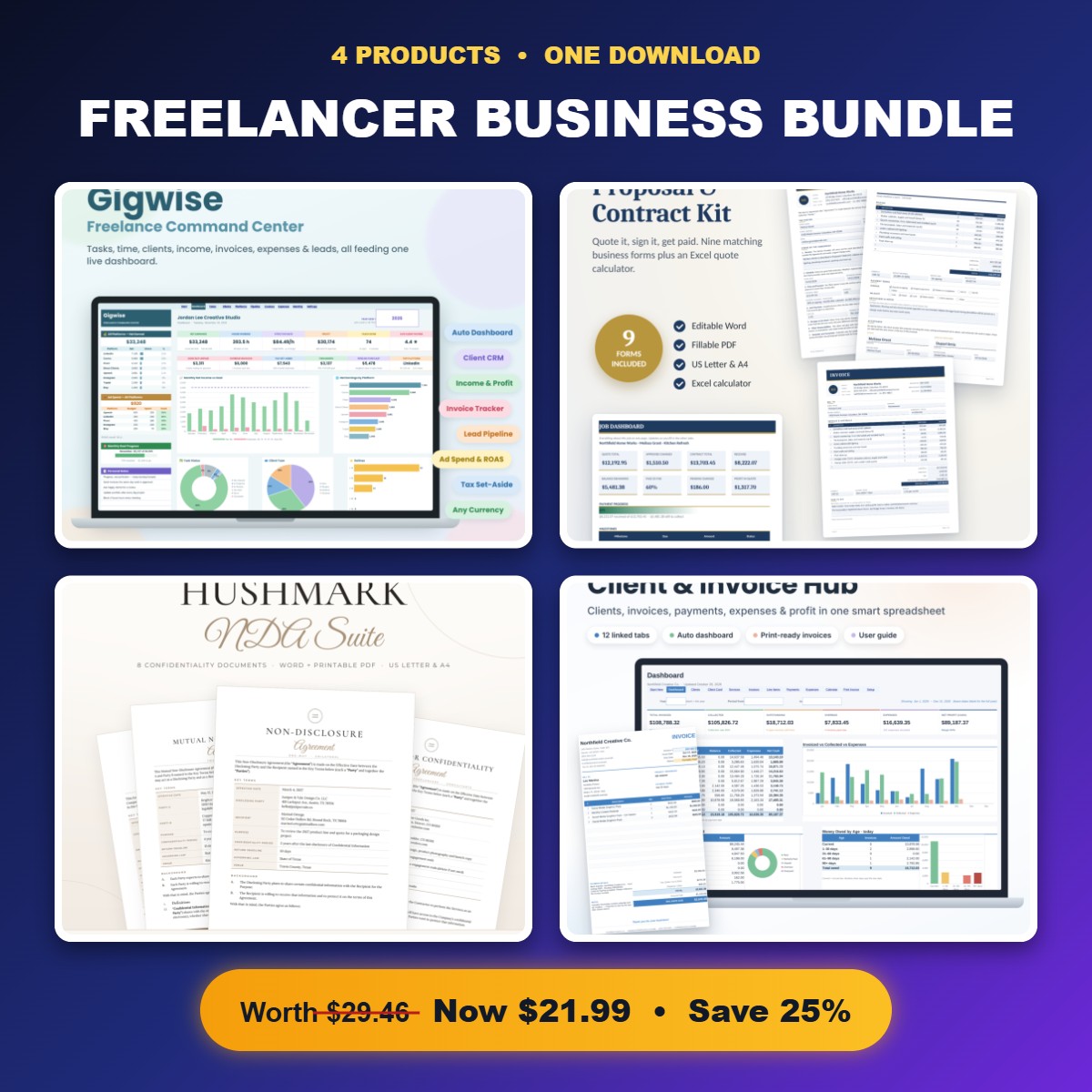 Freelancer Business Bundle | Freelancer Tracker Spreadsheet, Contract & Proposal Templates, NDA Templates & Client Invoice Tracker
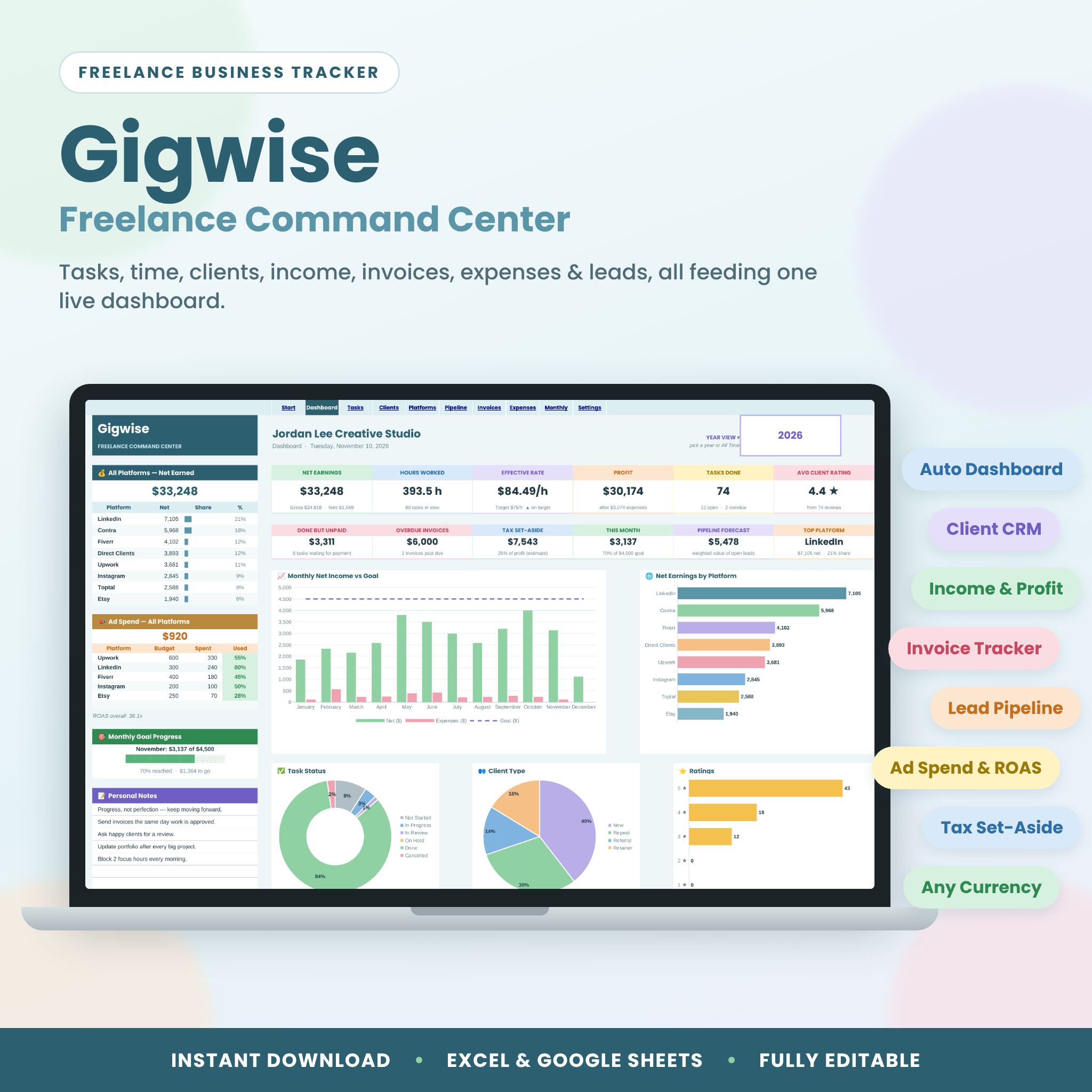
Table of Contents
Toggle
- What should you look for in a freelancer tracker?
- How do the freelancer trackers on this page compare?
- Which freelancer tracker suits which kind of freelancer?
- How do you set up and use a freelancer tracker spreadsheet?
- What mistakes should you avoid when choosing a freelancer tracker?
- What affects the price of a freelancer tracker?
- How do you decide on the best freelancer tracker for you?
- Common questions
What should you look for in a freelancer tracker?
A good freelancer tracker records work once and works out everything else from it. That's the test to apply to every option, and the six factors below are where the products differ in practise.
Net income, not just earnings
A freelancer tracker should show what you keep, not only what you invoiced. If you sell through platforms that take a cut, the gap between gross and net can be large.
Both Gigwise and GigPilot calculate platform fees from your task log. Gigwise also works out your real hourly rate, which is the number that tells you whether a low-paid, quick job beats a well-paid slow one.
A client CRM that fits your client list
A client CRM is the part of the sheet that stores who your clients are and what they're worth to you. Cheque the capacity, because a sheet that fills up is a sheet you'll abandon.
GigPilot states a 150-client CRM. Gigwise includes client lifetime values, which show how much each client has paid you over time and help you decide who deserves your best hours.
Invoice tracking and unpaid invoices
Unpaid invoices are the freelancer's biggest quiet risk. Your tracker should show at a glance what's owed and what's overdue.
Gigwise has an invoice tracker tab. GigPilot goes a step further with one-click invoices, so you can produce an invoice from the work you've already logged.
Tax set-aside
Tax set-aside is the share of each payment you hold back for your tax bill. A tracker that calculates it as you go saves you from an unpleasant surprise at year end.
Both stand-alone trackers calculate it. GigPilot adds a quarterly tax planner. Treat any figure as a planning estimate and cheque your actual obligations with an accountant.
Time and rate tools
If you charge by the hour or want to know whether your fixed fees pay properly, you need hours in the sheet. Gigwise includes a time log. GigPilot includes a rate calculator for setting your prices.
Compatibility and setup
Cheque the file type first. Gigwise and GigPilot both work in Excel and Google Sheets, and both handle any currency. Both come with a user guide: Gigwise has a step-by-step guide and GigPilot has an illustrated DOCX guide.
Gigwise is an instant download, and the listing says there are no formulas to write.
How do the freelancer trackers on this page compare?
The three products overlap on tracking, and differ mainly in scope. The two spreadsheets are close rivals. The bundle is a different kind of purchase, because it adds paperwork alongside the tracker. This table only uses details from the product listings.
| Product | Best for | Tracking features | Extras | Works in |
|---|---|---|---|---|
| Freelancer Business Bundle | Freelancer Tracker Spreadsheet, Contract & Proposal Templates, NDA Templates & Client Invoice Tracker | Freelancers who need tracking and legal paperwork together | Gigwise Freelancer Tracker with client CRM, income dashboard, project tracker, time log, expense tracker and lead pipeline | Contract and proposal templates (service agreement, job quote, change order form, payment schedule), NDA templates, client invoice tracker | Small business templates |
| Freelancer Tracker Spreadsheet | Gigwise Freelance Command Centre with Client CRM, Income Dashboard, Invoice Tracker, Time Log & Lead Pipeline | Excel & Google Sheets | Freelancers who want to see where leads, hours and money stand | 10 connected tabs, 12 KPI cards, 5 charts, client lifetime values, time log, lead pipeline | Step-by-step user guide, no formulas to write | Excel and Google Sheets |
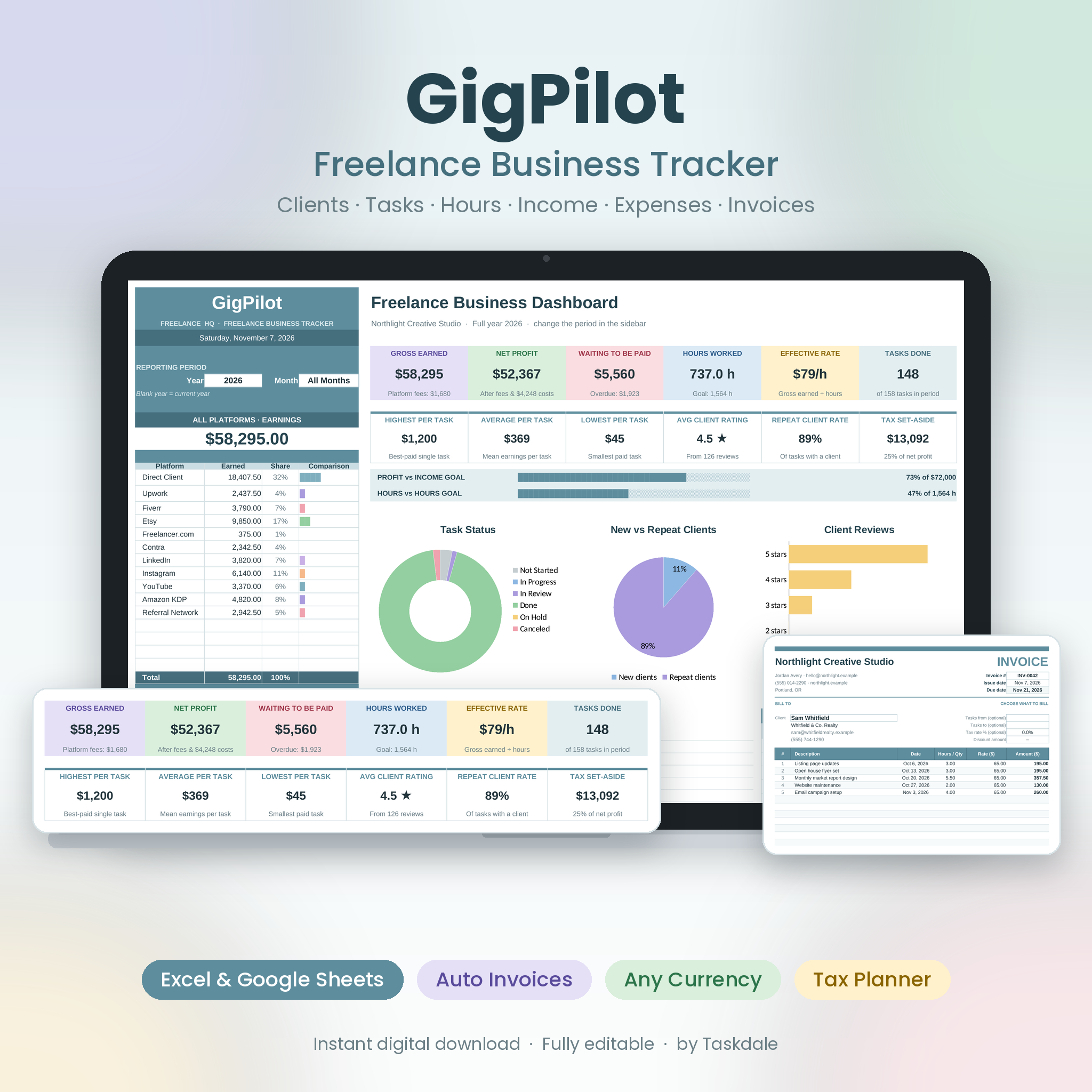 Freelancer Tracker Spreadsheet for Excel & Google Sheets | GigPilot Freelance Business Dashboard with Client CRM, Invoice Generator, Income & Expense Tracker & Rate Calculator | Freelancers who want invoices and pricing built in | 12 KPIs, 5 charts, goals and deadlines, 500-row task log, 150-client CRM, expense tracker | One-click invoices, rate calculator, quarterly tax planner, illustrated DOCX user guide | Excel and Google Sheets |
The listing for GigPilot doesn't mention a time log or a lead pipeline, so if either matters to you, Gigwise is the safer pick. The Gigwise listing doesn't mention a rate calculator or quarterly tax planner by name, so if those matter, look at GigPilot.
Which freelancer tracker suits which kind of freelancer?
Each product suits a different working pattern, and the right one usually becomes obvious once you think about how you find and bill work.
Gigwise Freelance Command Centre suits you if you chase new clients regularly. The lead pipeline shows where each prospect stands, and the time log gives you a real hourly rate. It's a good fit for someone mixing platform work with direct clients.
GigPilot Freelance Business Dashboard suits you if you want to log work and send invoices from the same file. The rate calculator helps if you're unsure whether your prices are right. The goals and deadlines on the dashboard help if you work to targets.
Freelancer Business Bundle suits you if you're still building your professional set-up. If you're sending quotes from an email draught or starting jobs without a signed scope, the contract templates fix that. It includes a service agreement, job quote, change order form and payment schedule, and the title also lists NDA templates.
If you already have contracts you trust, the bundle's extras add little, and a stand-alone tracker is the more direct choice.
How do you set up and use a freelancer tracker spreadsheet?
You set up a freelancer tracker spreadsheet in under an hour, and you keep it useful by logging every task on the day you do it.
- Download the file and open it in Excel or upload it to Google Sheets.
- Read the user guide once before you type anything.
- Enter your currency, your year start and your tax set-aside rate if the sheet asks for one.
- Add your current clients to the CRM.
- Enter the last month or two of tasks and invoices so the dashboard has something to show.
- Log each new task as you finish it. Gigwise's listing says this takes around 20 seconds.
- Once a week, cheque unpaid invoices and chase anything overdue.
- Once a month, review profit, hours and your real hourly rate.
Keep a backup copy. If you use Google Sheets, make one copy for the live file and another you don't touch.
What mistakes should you avoid when choosing a freelancer tracker?
The most common mistake is buying more tool than you'll use. A ten-tab sheet is no help if you stop logging after a fortnight.
- Ignoring the software you already use. If you live in Excel, cheque the file opens properly there. Both stand-alone options cover Excel and Google Sheets.
- Treating the tax figure as advice. Tax set-aside is a planning aid. Your accountant or tax authority decides what you owe.
- Skipping the guide. Both trackers include one, and a quick read saves guesswork about which cells to touch.
- Logging in batches. Entering a month of work in one sitting leads to forgotten tasks and a dashboard you stop trusting.
- Overlooking paperwork. A tracker records what happened. It doesn't protect you if a client disputes scope. That's where the bundle's contract templates matter.
What affects the price of a freelancer tracker?
The price of a freelancer tracker depends mostly on how much it includes. A single spreadsheet costs less than a bundle, because the bundle adds contract, proposal and NDA templates on top of the tracker.
Within the spreadsheets, features such as one-click invoices, a rate calculator or a tax planner add value, and that shapes how each is priced. Both are digital downloads, so there's no postage to consider. Cheque the live product cards for current prices, since they change.
A cheaper option can cost more in the end if you have to buy contract templates separately. Think about what you'd otherwise pay for or build yourself.
How do you decide on the best freelancer tracker for you?
Choose by the gap in your business today. Use this rule:
- If you need to see leads, hours and real hourly rate, choose Gigwise Freelance Command Centre.
- If you want invoices, a rate calculator and a quarterly tax planner in one dashboard, choose GigPilot Freelance Business Dashboard.
- If you also lack contracts, quotes and NDAs, choose the Freelancer Business Bundle.
Browse all 3 options below, open the product cards, and match the feature list to how you work. If two seem equal, pick the one whose file type and guide you'd be happiest opening every day.
Common questions
Is a spreadsheet good enough as a freelancer tracker?
Yes, for most solo freelancers. A well-built spreadsheet records tasks, clients, invoices and expenses without a monthly subscription. You'll outgrow it only if you need automatic bank feeds or a team working in the same system.
Can I use these freelancer trackers in Google Sheets?
Yes. Gigwise Freelance Command Centre and GigPilot Freelance Business Dashboard both state that they work in Excel and Google Sheets. Google Sheets suits you if you want access from several devices without carrying a file around.
Do I need to write formulas to use them?
No. The Gigwise listing says there are no formulas to write. GigPilot says you log tasks once and it calculates hours, earnings, fees and unpaid invoices. You enter data, and the sheet does the sums.
Do these trackers work outside the UK?
Both stand-alone trackers say they work in any currency, and the bundle's tracker is the Gigwise sheet. Tax set-aside is a calculation you control, so cheque the rate you enter against your own country's rules.
What's in the Freelancer Business Bundle that the others lack?
The bundle adds ScopeSigned Contract & Proposal Templates, with a service agreement, job quote, change order form and payment schedule. Its title also lists NDA templates and a client invoice tracker, alongside the Gigwise tracker.