Best Google Sheets Landlord Template for Rent and Tax
The best Google Sheets landlord template is the one that fits your number of units and the reports you need. RentRoost Landlord HQ is built specifically for Google Sheets. Porchfolio has the highest unit limit and printable rent receipts. Keyward Landlord Suite adds investment metrics, and Brick & Ledger has the most tabs and dashboards.
At a glance
- Every template here tracks up to 50 properties, though unit limits differ, from 150 units to 300.
- All four build a rent roll, tenant ledgers and a Schedule E-style tax summary from data you enter once.
- Each one comes with a step-by-step guide, and most include a filled example file so you can see the finished result.
- Brick & Ledger and Porchfolio are described as subscription-free or one-time purchases, so there is no monthly fee to plan around.
- Keyward is an .xlsx file tested in Google Sheets, so you upload it and open it as a Sheet.
Choosing a spreadsheet for your rentals can feel like a bigger decision than it is. You are really deciding how much structure you want, and how much of the bookkeeping you want done for you. Below, we explain what to check, compare the 4 options on this page, and give you a simple rule for picking.
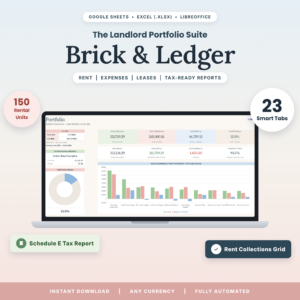 Landlord Spreadsheet for Google Sheets & Excel | Brick & Ledger Rental Property Bookkeeping with Tenant Ledger, Rent Tracker, Schedule E Tax Report & Dashboards
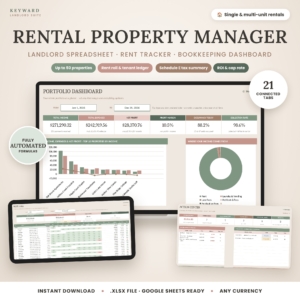 Rental Property Tracker Spreadsheet | Keyward Landlord Suite with Rent Roll, Tenant Ledger, Dashboards, Schedule E Tax Summary & ROI | Google Sheets Landlord Template (.xlsx)
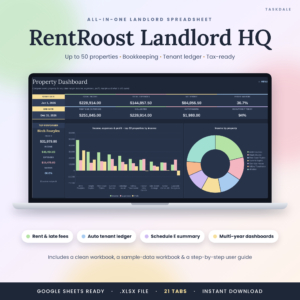
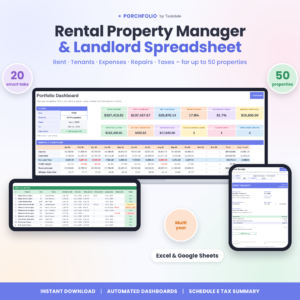
Table of Contents
- What should you look for in a Google Sheets landlord template?
- How do the four templates compare?
- Which landlord template suits which kind of landlord?
- How do you set up a landlord template in Google Sheets?
- What mistakes should you avoid?
- What affects the price of a landlord spreadsheet?
- How to choose the right template for your rentals
- Common questions
What should you look for in a Google Sheets landlord template?
A good Google Sheets landlord template records rent, expenses and leases once, then builds your ledgers, reports and tax figures from that single entry. The factors below decide whether it saves you time or just adds another file to look after.
Capacity for your properties and units
Check the limits before anything else. All four templates cap at 50 properties, but units differ: Brick & Ledger allows 150 units and 200 leases, Keyward 250 units, and Porchfolio 300 units.
One house or a small block sits well within every limit. If you manage several multi-unit buildings, the unit count matters more than the property count.
File format and how it behaves in Google Sheets
Some files are built for Google Sheets, others are Excel files that open in it. RentRoost Landlord HQ is described as a Google Sheets spreadsheet. Brick & Ledger and Porchfolio work in both Google Sheets and Excel. Keyward is an .xlsx file tested in Google Sheets.
If you only ever use Google Sheets, any of them works. If you also open files in Excel, the dual-format options give you more freedom.
Rent tracking and tenant ledgers
A tenant ledger is a running record of what a tenant has been charged and what they have paid. A rent roll is a list of every unit showing who lives there, what they owe and whether they are up to date.
All four build both automatically. Beyond that, they differ. Keyward adds overdue-rent alerts and printable tenant statements. RentRoost adds late fees and lease renewal reminders. Porchfolio produces printable rent receipts. Brick & Ledger includes a 12-month rent collections grid.
Tax reporting
Schedule E is the US IRS form where individuals report rental income and expenses. Each template maps your expenses to Schedule E-style categories, so year-end totals come from your records rather than a pile of receipts.
If you are a UK landlord, you will need to match those categories to your own return, such as the property pages of Self Assessment. The spreadsheet still organises the underlying figures. Brick & Ledger, Keyward and Porchfolio state that they work with any currency.
Dashboards and investment returns
A dashboard is a summary page that shows your figures as totals and charts rather than rows. Brick & Ledger has seven, RentRoost six, and Porchfolio offers 12-KPI dashboards with monthly, 5-year, custom-range and compare views.
For return analysis, Keyward calculates cap rate, cash-on-cash return, NOI and DSCR for every property. Brick & Ledger includes investment returns, RentRoost covers ROI and cash flow, and Porchfolio has a deal analyzer.
Guide and sample data
A filled example file lets you see how the tabs connect before you enter your own data. Brick & Ledger and Keyward include an example file and guide, with Keyward's guide running to 19 pages. RentRoost includes a sample-data workbook and guide. Porchfolio includes a DOCX guide.
How do the four templates compare?
The four templates share the same core of rent roll, tenant ledger and tax summary, and differ in capacity, extra tools and file format. The table sets out what each product states.
Which landlord template suits which kind of landlord?
Each template suits a different landlord, based on portfolio size and how much analysis you want. Here is how we would match them.
RentRoost Landlord HQ suits you if you work only in Google Sheets and want the reminders handled. Late fees and lease renewal alerts help when you have a handful of tenants and little time to chase dates. It also covers deposits, maintenance and mileage.
Keyward Landlord Suite suits you if you think like an investor. If you want to compare properties by cap rate, cash-on-cash return, NOI and DSCR, it is the only one here that lists all four. The Action Centre and overdue-rent alerts also help if you want problems surfaced rather than hunted for.
Porchfolio suits you if you have a larger portfolio, with room for 300 units. Printable rent receipts help if tenants ask for proof of payment. The deal analyzer is useful when you are weighing up a purchase.
Brick & Ledger suits you if you want the broadest set of linked tabs. With 23 tabs, seven dashboards and a 12-month collections grid, it is the most detailed view of rent over a year. It also states that it does not need Microsoft 365 or a subscription.
How do you set up a landlord template in Google Sheets?
Setting up a landlord template takes a single sitting if you gather your lease and expense records first. These steps work for all four products.
- Download the file and upload it to Google Drive. For .xlsx files, open the file and choose to save it as a Google Sheet.
- Open the example file first and click through the tabs, so you can see which cells are meant for entry and which are calculated.
- Make a clean copy for your own data and clear the sample entries.
- Enter your properties, then units, then tenants and leases. Follow the order in the user guide.
- Record rent payments and expenses as they happen, ideally weekly.
- Check the rent roll and dashboards at month end, and keep a dated backup copy.
What mistakes should you avoid?
The most common mistakes are overwriting formulas, entering data in the wrong order and skipping the reconciliation against your bank. All of them are avoidable.
- Typing over calculated cells. Enter data only where the guide says. A pasted number in a formula cell can quietly break a dashboard.
- Buying for today's portfolio only. If you plan to add units, choose a template with spare capacity.
- Ignoring your tax system. Schedule E categories are for US returns. Outside the US, check that the categories map to your own.
- Letting records pile up. A year of receipts entered in one go leads to errors. Little and often works better.
- Skipping the bank check. Compare your ledger totals with your bank statement each month.
- Sharing the master copy. Share a view-only version with your accountant and keep the original editable by you alone.
What affects the price of a landlord spreadsheet?
The price of a landlord spreadsheet depends mainly on how many tabs and reports it includes, the unit capacity, and the extra tools such as a deal analyzer or investment metrics. We do not quote figures here, because the product cards show the current price.
A template with more dashboards and return calculations generally costs more up front than a simple rent tracker. Purchase model matters too. Brick & Ledger states no subscription, and Porchfolio is described as a one-time purchase, so you pay once rather than monthly.
Compare what you would actually use. Paying for investment metrics you never open is poor value, while a missing feature you need later can cost you hours.
How to choose the right template for your rentals
Choose by your biggest need. If you want Google Sheets first and reminders, pick RentRoost Landlord HQ. If you analyse returns, pick Keyward Landlord Suite. If you have many units or need receipts, pick Porchfolio. If you want the widest set of dashboards, pick Brick & Ledger.
Before you buy, check three things: your unit count against the limit, your file format, and whether the tax categories match your return. Then open the example file and enter one month of real rent. If the numbers make sense, you have your template.
Common questions
Can I use a Schedule E template if I am a UK landlord?
Yes, as a way to organise income and expenses, but not as a ready-made return. Schedule E is a US form. You would need to map the expense categories to your own return, so check them against your accountant's guidance.
Do I need Excel or Microsoft 4 to use these templates?
No. All four open in Google Sheets. Brick & Ledger specifically states that it needs no Microsoft 365. Porchfolio and Brick & Ledger also work in Excel, which helps if you switch between the two programs.
Will an .xlsx file work properly in Google Sheets?
Keyward Landlord Suite is an .xlsx file that its listing says was tested in Google Sheets. Upload it to Google Drive and open it as a Sheet. Check the example file first, so you know the calculations carried over.
Is a spreadsheet enough, or do I need landlord software?
For a small portfolio, a spreadsheet is usually enough, and you keep full control of your data. Dedicated software suits larger or more complex portfolios. These templates cover up to 50 properties, which fits most individual landlords.
Can I keep tenant records and rent receipts in the same file?
Yes. Each template stores tenants, leases and payments together. Porchfolio produces printable rent receipts, and Keyward offers printable tenant statements. Keep the file private and share only the pages a tenant or your accountant needs.