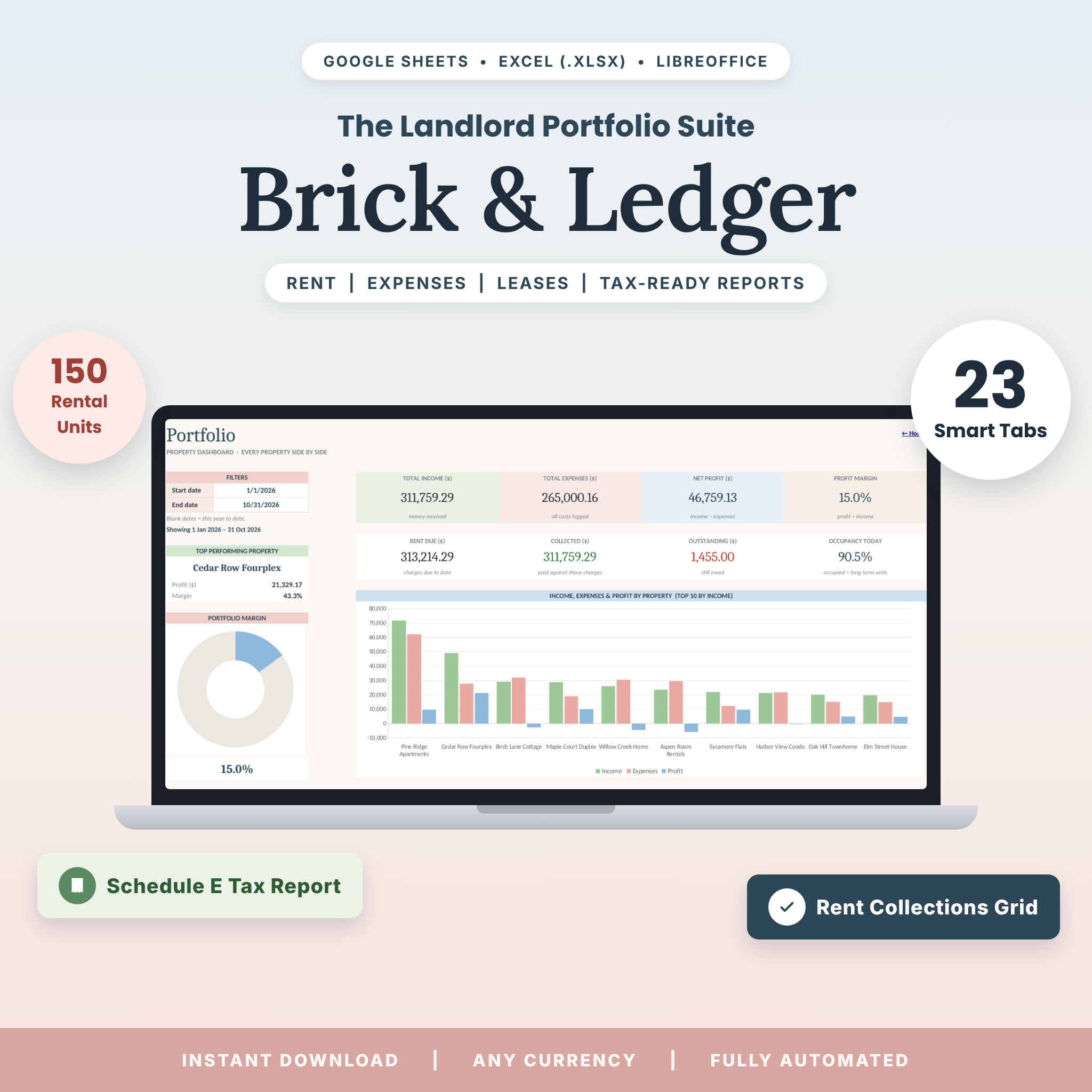
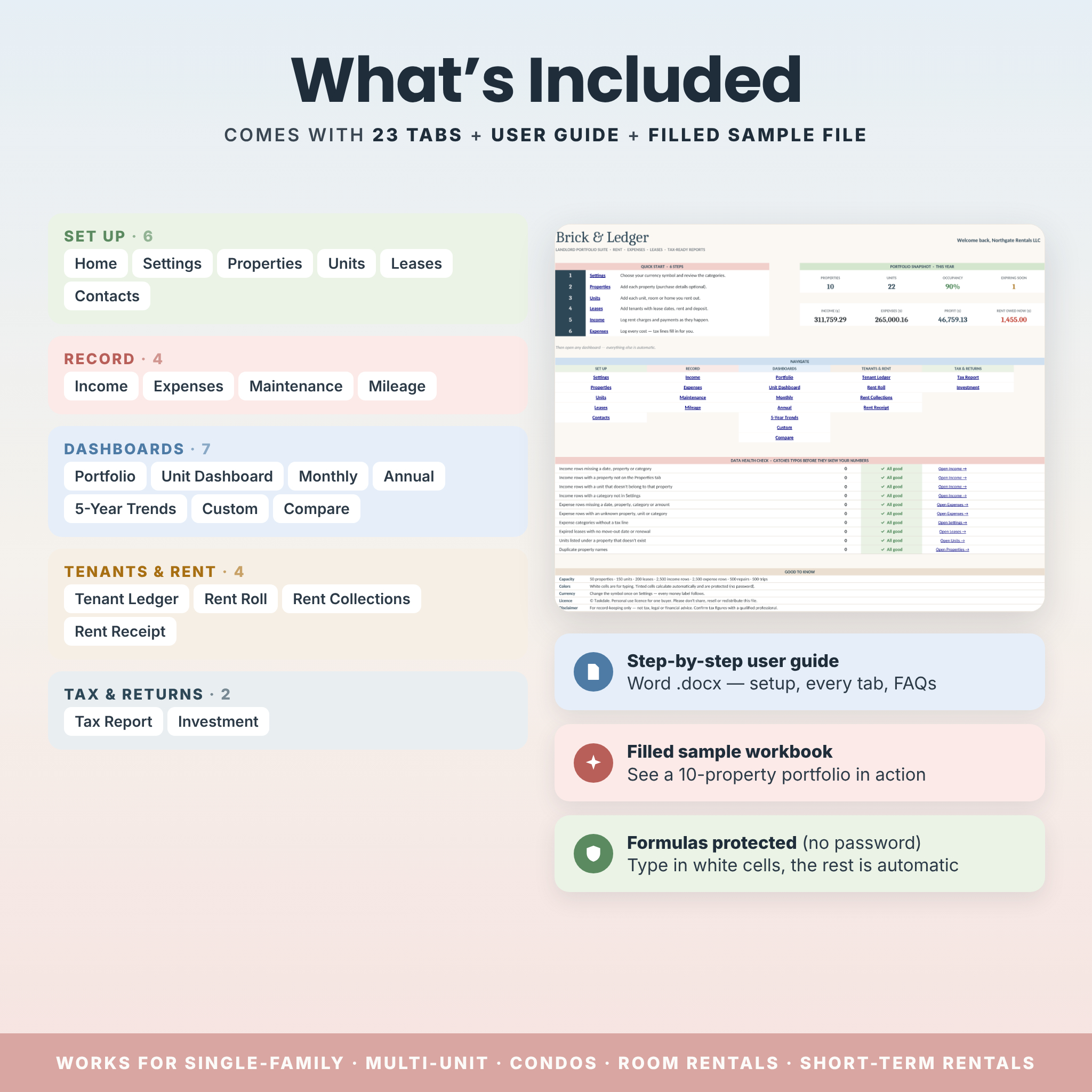

Brick & Ledger is a landlord spreadsheet that turns rental property bookkeeping into a calm, ten-minute habit. Built for Google Sheets and Excel, it brings rent tracking, tenant ledgers, leases, expenses, maintenance, mileage and tax-time reports together in one beautifully designed workbook. You log your data once, and 23 connected tabs do the rest: dashboards, rent roll, a 12-month rent collections grid, a Schedule E–style tax report and investment returns update themselves.
A Complete Landlord Spreadsheet for Rental Property Bookkeeping
Most rental trackers stop at income and expenses. Brick & Ledger goes further, so you can see who has paid, who is late, which property earns the most and what to hand your tax preparer, without building a single formula. It works for one single-family rental or a portfolio of up to 50 properties and 150 units, including duplexes, apartment buildings, condos, room rentals and short-term rentals.
Who It’s For
- Self-managing landlords who want professional records without monthly software fees.
- Multi-unit owners who need profit, occupancy and payments per unit, not just per property.
- Airbnb, Vrbo and room-rental hosts mixing booking income with long-term tenants.
- Real estate investors tracking cash flow, cap rate, cash-on-cash return and equity.
- Anyone dreading tax season who wants every expense sorted into a tax line as it’s entered.
Main Benefits
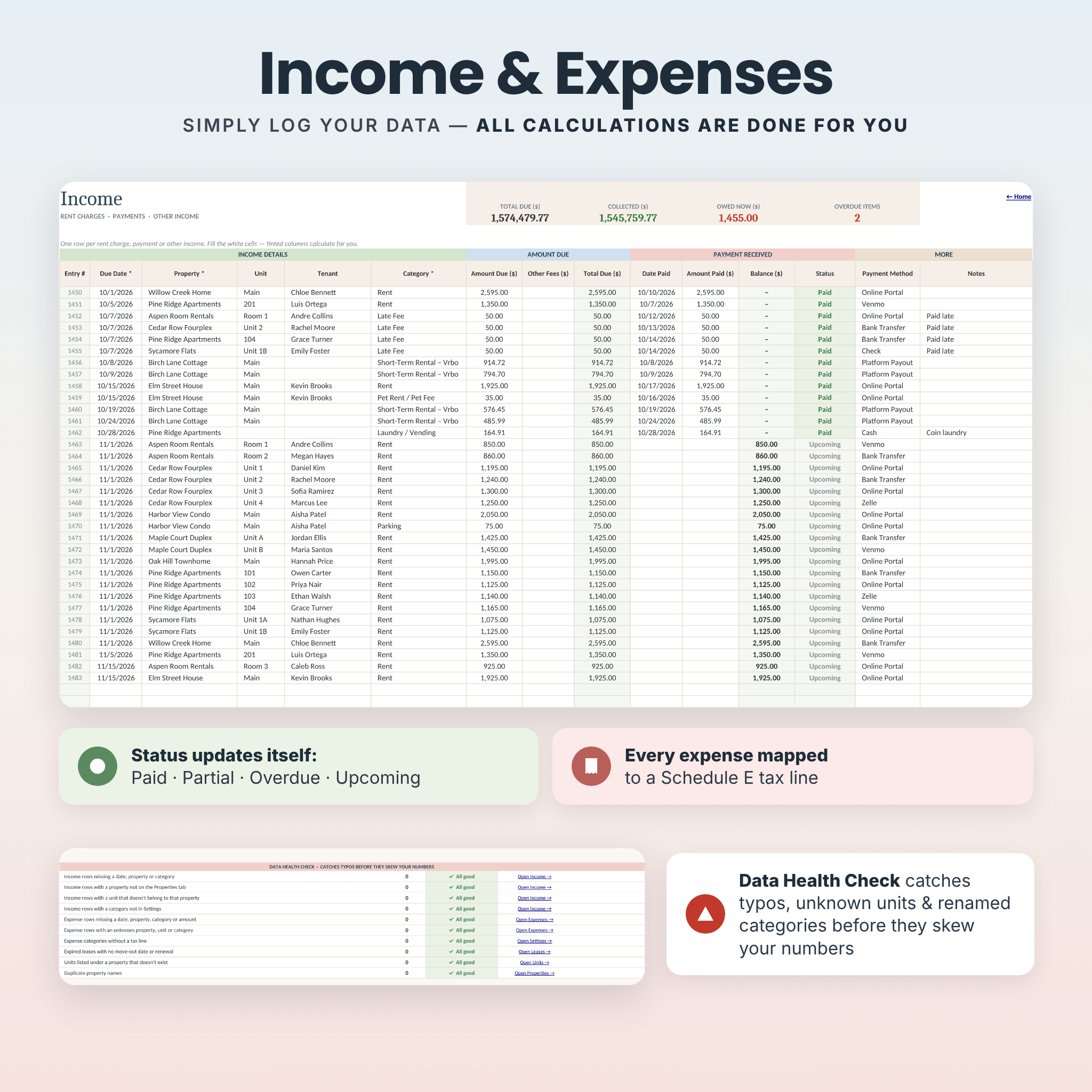
- Know where every dollar stands. Rent status updates itself: Paid, Partial, Overdue, Due or Upcoming.
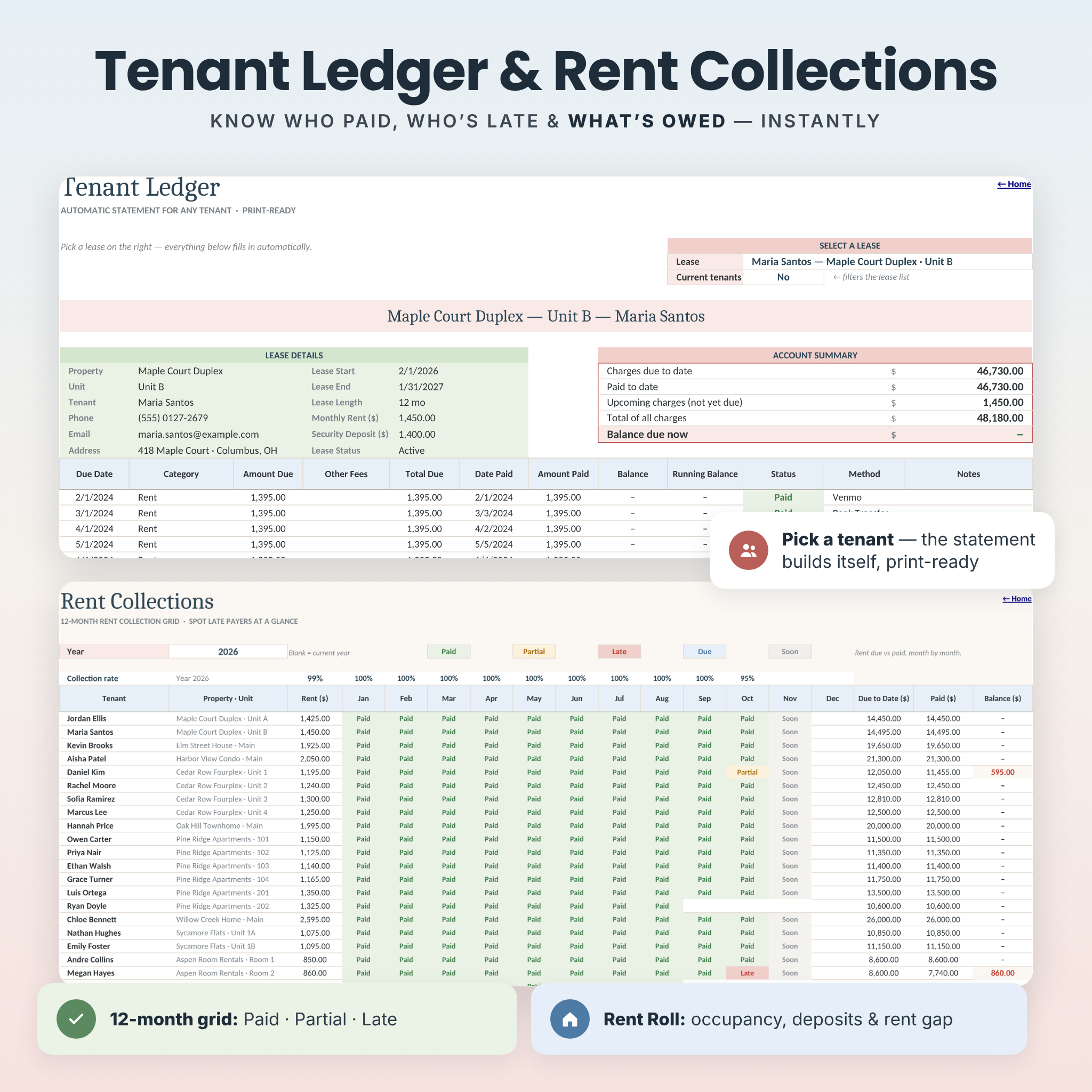
- Chase late rent quickly. The 12-month collections grid shows late and partial payments at a glance.
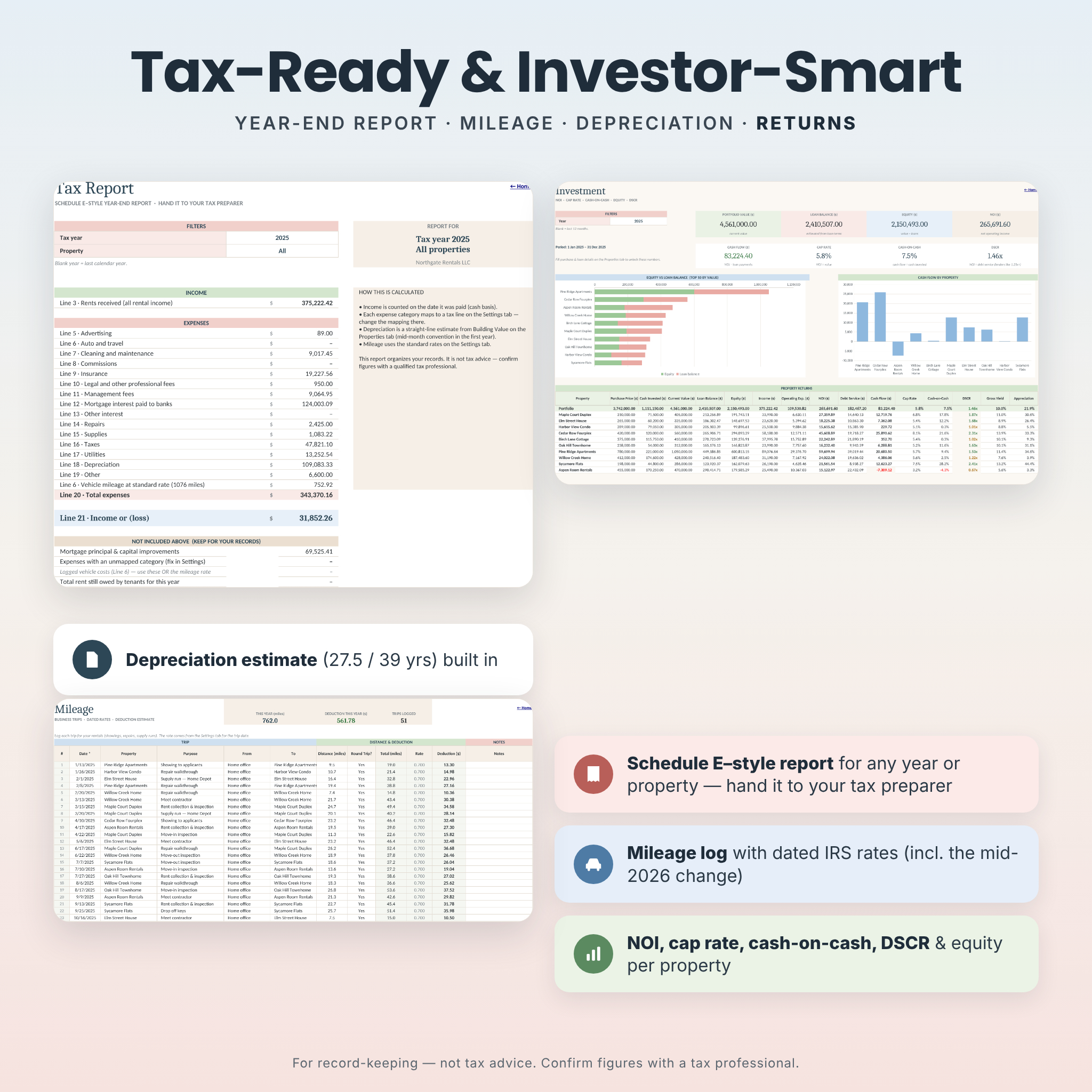
- Tax time in minutes. A Schedule E–style report groups expenses by tax line, adds mileage at standard rates and estimates depreciation.
- Fewer costly mistakes. A built-in Data Health Check flags typos, unknown units and renamed categories before they skew your numbers.
- Any currency. Change one setting and every money label follows.
Features
Set up once
- Home with a portfolio snapshot, one-click navigation and the Data Health Check.
- Settings for currency, rent grace period, lease-expiry alerts, profit goals, dated mileage rates and editable categories with tax-line mapping.
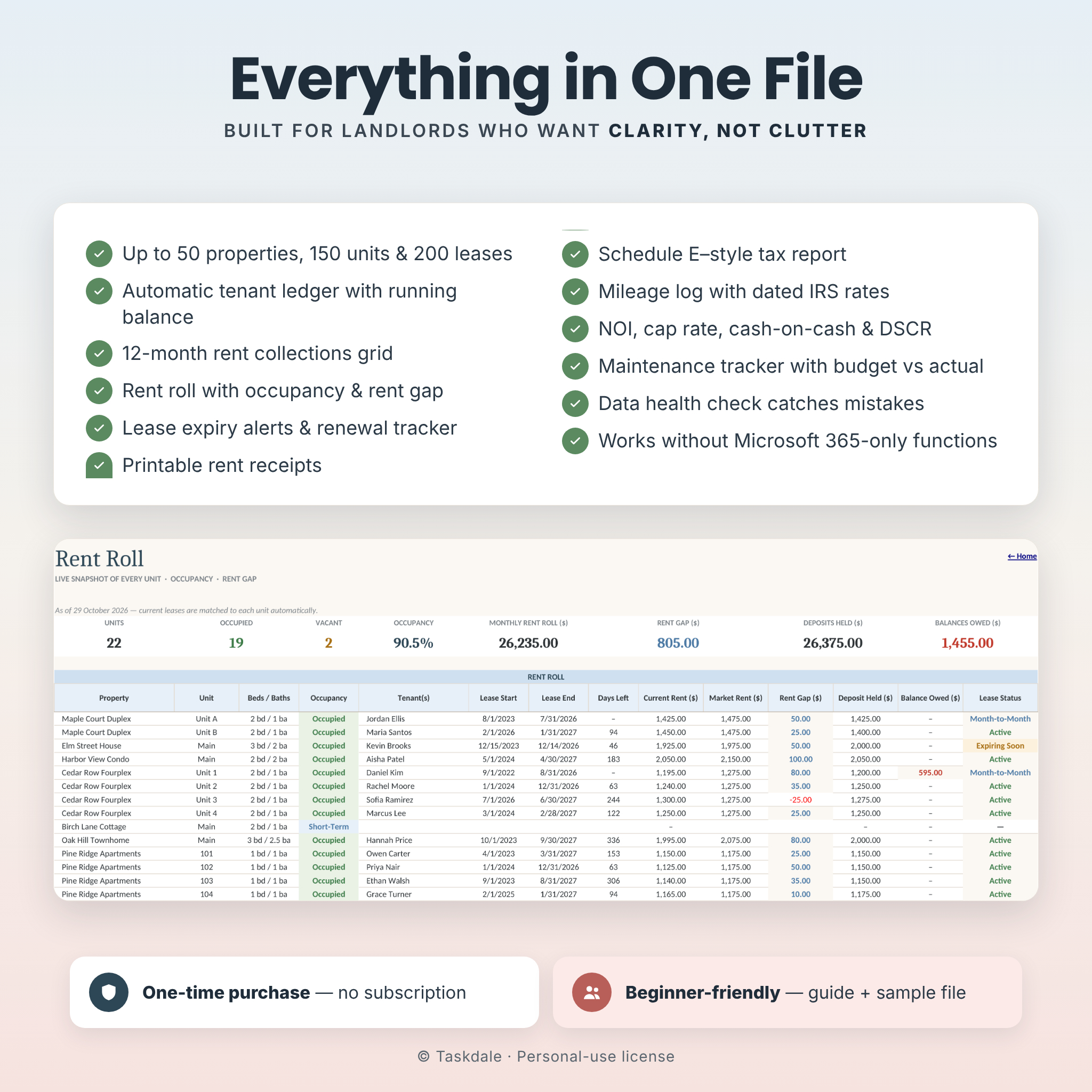
- Properties, Units, Leases and Contacts, with automatic lease status, days left, renewal tracking and occupancy.
Record as you go
- Income log for rent, late fees, parking, laundry and short-term rental bookings, with automatic totals, balances and status.
- Expense log with vendor, receipt check and automatic tax line.
- Maintenance tracker with priority, contractor, budget vs actual cost and days open.
- Mileage log that applies the correct rate for each trip date.
Seven automated dashboards
- Portfolio: income, expenses, profit and payments by property for any date range, top performers and charts.
- Unit Dashboard: profit and payments for every unit, with building-wide costs shared fairly across units.
- Monthly, Annual and 5-Year Trends: category breakdowns, profit goals and growth over time.
- Custom and Compare: any date range, or three periods side by side to spot seasonal patterns.
Tenants and rent
- Tenant Ledger: pick a tenant and a print-ready statement builds itself, with a running balance and balance due now.
- Rent Roll: occupancy, lease dates, deposits held, balances owed and rent gap against market rent.
- Rent Collections: a 12-month Paid / Partial / Late grid with monthly collection rates.
- Rent Receipt: type an entry number and print or save a professional receipt.
Tax and returns
- Tax Report: Schedule E–style lines for any year and property, plus a list of items that aren’t deducted, such as principal and capital improvements.
- Investment: NOI, cash flow, cap rate, cash-on-cash return, DSCR, equity, estimated loan balance, gross yield and appreciation.
What’s Included
- Brick & Ledger workbook (.xlsx): a clean copy with 23 tabs, ready for your data
- Filled sample workbook (.xlsx) with a fictional 10-property portfolio to explore first
- Step-by-step user guide (.docx) covering setup, every tab, customizing, printing, troubleshooting and FAQs
How It Works
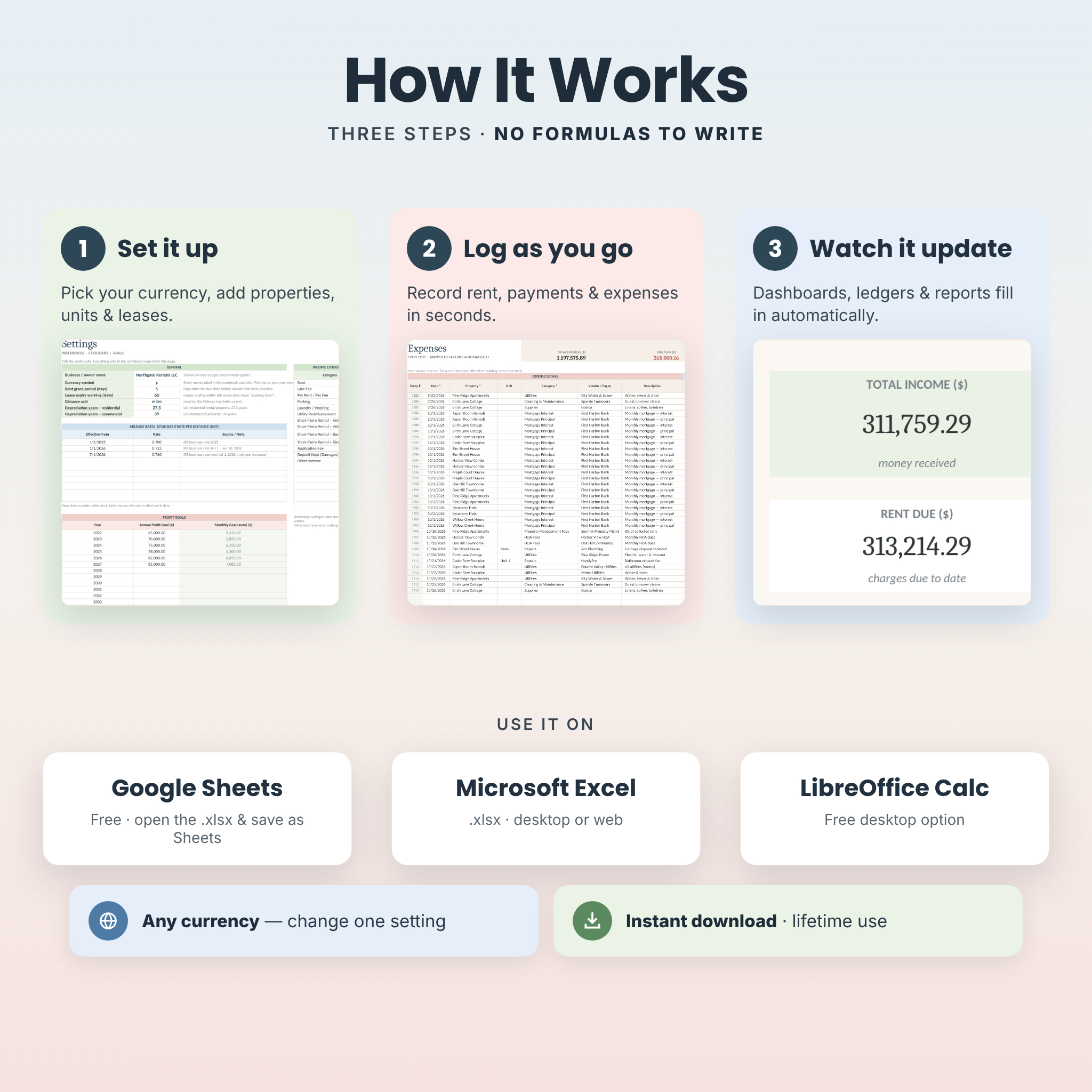
- Download the files right after purchase.
- Open the workbook in Google Sheets (upload it, then choose File › Save as Google Sheets), Microsoft Excel or LibreOffice Calc.
- Fill in Settings, Properties, Units and Leases. It takes about 15 minutes for a small portfolio.
- Log rent and expenses as they happen. Every dashboard and report updates automatically.
File Formats and Software Requirements
- Format: Microsoft Excel workbook (.xlsx) plus Word user guide (.docx).
- Works in Google Sheets (free Google account), Microsoft Excel and LibreOffice Calc. Tested in Google Sheets and LibreOffice.
- Uses standard spreadsheet functions only, so you don’t need a Microsoft 365 subscription.
- Setup is easiest on a computer. The Google Sheets and Excel apps work for entries on the go.
Customization
Change the currency symbol, grace period, lease-expiry warning, profit goals, mileage rates, property types, payment methods and up to 20 income and 30 expense categories, each with its own tax line. Formula cells are protected without a password, so you can unlock a sheet and change colors or layout whenever you like.
Digital Download
This is a digital product. Nothing physical will be shipped. Your files are available to download immediately after payment, and you can use them for as long as you like with no subscription.
Use Cases
- A duplex owner checking each month which unit has paid and printing a receipt for a cash payment.
- A landlord with eight doors sending the Tax Report and mileage total to a CPA in February.
- An Airbnb host comparing summer and winter booking income on the Compare dashboard.
- An investor reviewing cap rate and DSCR before refinancing a property.
- A property owner using the Tenant Ledger as proof of payment history for a reference or dispute.
FAQ
Does this landlord spreadsheet work in Google Sheets?
Yes. Upload the .xlsx to Google Drive, open it, and choose File › Save as Google Sheets. Charts, dropdowns and tab links work in the converted copy.
Do I need Microsoft 365 for Excel?
No. The workbook avoids Microsoft 365-only functions, so you don’t need a 365 subscription to use it in Excel.
How many properties and units can I track?
Up to 50 properties, 150 units, 200 leases and 2,500 income and 2,500 expense entries.
Can I use my own currency?
Yes. Change the symbol once in Settings and every money label updates.
Is it only for US landlords?
No. All tracking works anywhere. The Tax Report follows the US Schedule E layout, and you can edit the tax lines to suit your country.
Does it track short-term rentals?
Yes. It includes Airbnb, Vrbo, Booking.com and direct booking categories, and short-term rental units aren’t counted as vacant.
Is this tax or financial advice?
No. It organizes your records. Please confirm tax figures with a qualified professional.
Can I share the file?
Your purchase includes a personal-use license for one buyer. Please don’t share, resell or redistribute the files.
© Taskdale. Personal-use license. Listing images show the filled sample file; all names and figures in it are fictional.

Reviews
There are no reviews yet.