Best Homework Planner: Printable, Notion, App or Sheet
The best homework planner is the one that matches how you already work. Choose a printable PDF if you like pen and paper, a spreadsheet if you want dates to flow through automatically, Notion if you already live in it, or an offline app if you want no accounts at all. All four here track assignments and grades.
Key facts at a glance
- The Syllabloom printable is the only paper-first option, with 115 hyperlinked, fillable pages in US Letter and A4.
- Semester Studio and Campus Compass both calculate grades and GPA automatically once you enter scores.
- Semester Pilot runs offline from one file, with no account and no subscription.
- Semester Studio works on Notion's free plan, so you don't need a paid Notion tier.
- Browse all 4 options below to compare formats side by side.
 Undated Student Planner Printable PDF | Syllabloom College Academic Planner with Assignment Tracker & GPA Worksheet
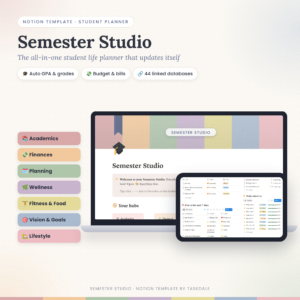 Student Notion Planner | Semester Studio All-in-One Student Life Template with Auto GPA Calculator, Assignment Tracker, Budget & 70+ Linked Pages
Table of Contents
- What should you look for in a homework planner?
- How do the homework planners compare?
- Which homework planner suits which student?
- How do you set up and use a homework planner?
- What mistakes should you avoid?
- What affects the price of a homework planner?
- Which homework planner should you pick?
- Common questions
What should you look for in a homework planner?
A good homework planner does three things: it shows what is due and when, it shows how you are doing in each class, and it is easy enough that you'll open it daily. Everything else is a bonus. Five factors separate these products.
Format: printable, spreadsheet, Notion or app
A homework planner's format decides how you'll use it every day. Paper suits people who remember things better when they write them down. Digital formats suit people who want reminders, searching and automatic sums.
The Syllabloom planner is a printable PDF, though you can also type into it on screen. Campus Compass lives in Excel and Google Sheets. Semester Studio is a Notion template. Semester Pilot is an offline HTML file you open on a computer, tablet or phone.
Assignment tracking and deadline countdowns
An assignment tracker is a list of every piece of work with its due date and status. The better ones also count down the days. Campus Compass shows days-left countdowns and overdue alerts, and you type a due date once so the dashboard and calendar update themselves.
Semester Studio adds assignment and exam countdowns. Semester Pilot offers a board view and a quick-add line, so typing "bio quiz fri 9am" creates the entry. Syllabloom gives you exam planners with a 7-day countdown and a tracker page you fill in by hand.
Grade and GPA tools
A grade tracker records your scores for each class, and a GPA calculator turns those into a semester average. Syllabloom has a grade tracker for every class plus a GPA worksheet you complete yourself.
The other three do the arithmetic for you. Semester Studio updates your course grade, letter grade and semester GPA when you add a score. Campus Compass and Semester Pilot both include a "what do I need?" calculator, which tells you the mark required on a final to reach a target grade.
Offline use and account requirements
Some planners need a login, an app store or a specific service. Semester Pilot needs none of them: no account, no subscription, and your data stays on your device. A printed Syllabloom needs nothing but a printer.
Semester Studio needs Notion, though the free plan is enough. Campus Compass needs Excel or Google Sheets. If your campus Wi-Fi is unreliable, this factor may decide the matter.
Extras you'll actually use
Extras only matter if they replace something you'd otherwise do elsewhere. Syllabloom includes Cornell notes pages and Pomodoro study logs. Semester Pilot has a focus timer, a habit tracker and eight printable reports.
Semester Studio and Campus Compass both include budgeting, and Semester Studio's bills roll forward each month. A student living away from home may find that valuable. A student at home probably won't, and should ignore it.
How do the homework planners compare?
The four homework planners differ mainly in format and in how much they calculate for you. This table sets out what the product details say.
| Planner | Format | Where it runs | Grades and GPA | Notable extras |
|---|---|---|---|---|
| Undated Student Planner Printable PDF | Syllabloom College Academic Planner with Assignment Tracker & GPA Worksheet | Printable PDF, also fillable on screen | Print or type in a PDF reader | Grade tracker per class, GPA worksheet (manual) | 18 weekly planners, 8 course pages, Cornell notes, Pomodoro logs |
| Student Notion Planner | Semester Studio All-in-One Student Life Template with Auto GPA Calculator, Assignment Tracker, Budget & 70+ Linked Pages | Notion template | Notion, free plan | Automatic course grade, letter grade and GPA, plus "what I need" | 44 linked databases, budget, habit tracker |
 Student Academic Planner App | Semester Pilot Assignment Tracker, Calendar, Grade & GPA Calculator with Focus Timer | Offline HTML | Offline HTML file | Computer, tablet, phone | Weighted grade calculator, "what do I need?", GPA planner | Focus timer, 8 printable reports, calendar export |
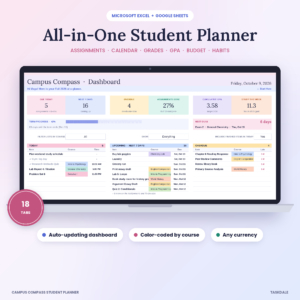 Campus Compass Student Planner Spreadsheet | Assignment Tracker, GPA Calculator, Class Schedule & Budget for Excel and Google Sheets | 18-tab spreadsheet | Excel, Google Sheets | Grades, GPA, "what do I need on the final?" | Colour-coded courses, overdue alerts, budget |
Which homework planner suits which student?
Each homework planner suits a different working style, and matching the style matters more than counting features.
Syllabloom suits students who think best on paper. If you plan with a pen, want a printed page for each week and don't mind working out your own GPA, this is the straightforward choice. It also suits anyone who wants a planner with no logins. Its undated design means you can start at any point in the term.
Semester Studio suits students already using Notion. If you keep lecture notes there, having assignments and grades linked to the same workspace saves switching apps. The automatic GPA and the "what I need" calculator are the main draws, and the pastel hubs keep a busy semester tidy.
Semester Pilot suits students who want privacy and simplicity. Nothing to sign up for, nothing to pay monthly, and one file covers every device. The quick-add line is quicker than filling in a form, and it tells you what to do this week.
Campus Compass suits students who like spreadsheets. If you're comfortable in Excel or Google Sheets, it gives you a dashboard that updates from a single due-date entry. The filled sample copy shows how it should look before you start.
How do you set up and use a homework planner?
A homework planner works once you've loaded your whole term into it and made a short daily check part of your routine. Here is a setup that fits any of the four.
- Gather every syllabus and list each class, its weighting and its key dates.
- Enter all assignments and exams first, before anything else, so the full term is visible.
- Add your timetable and any fixed commitments.
- Pick one daily check, such as ten minutes after your last class, and open the planner then.
- Record each score as soon as work comes back, so the grade tracker stays current.
- Once a week, look ahead for clashes and move study time around them.
Syllabloom and Campus Compass both include a step-by-step user guide, and Semester Studio comes with a DOCX guide. Read it once before you start, because that saves rebuilding later.
What mistakes should you avoid when choosing a homework planner?
The most common mistake is choosing the planner with the most features rather than the one you'll open daily. A tool with 70 linked pages sounds helpful, but if it feels like admin you'll drop it by week three.
Other pitfalls are worth knowing:
- Picking a format that fights your habits. A paper person forced into a spreadsheet tends to stop entering data.
- Ignoring the platform. Semester Studio needs Notion and Campus Compass needs Excel or Google Sheets. Check you can use them before you buy.
- Entering deadlines late. Countdowns and alerts only help when the dates are in. Load them in the first week.
- Skipping grade entry. The "what do I need?" tools only work with real scores, so enter them as they arrive.
- Using everything at once. Start with the tracker and calendar, then add habits or budgeting later if they help.
What affects the price of a homework planner?
The price of a homework planner is mostly shaped by how much it automates and how many pages or tabs it contains. A simple printable costs less than a linked system that calculates your GPA, because the second involves more building and testing.
Format matters too. Printables add a hidden cost in paper and ink, though Syllabloom's Ink Saver version reduces that. Notion and spreadsheet products ask you to own the platform, and Notion's free plan keeps that outlay at nothing. An offline app with no subscription costs more up front but has no recurring charge. Compare the live product cards for current prices.
Which homework planner should you pick? A simple decision rule
Choose by the tool you already open every day. If it's a pen, pick Syllabloom. If it's Notion, pick Semester Studio. If it's Excel or Google Sheets, pick Campus Compass. If you want something private that works offline on any device, pick Semester Pilot.
If you're still torn, choose the one that does the most calculating for you, since entering a score and watching your GPA update is what keeps most students coming back.
Common questions
Is a printable or digital homework planner better?
Neither is better for everyone. Printables help if writing things down makes them stick, while digital planners offer countdowns, alerts and automatic grade sums. Syllabloom can be used both ways, since you can print it or type into the PDF on screen.
Do I need a paid Notion plan for Semester Studio?
No. Semester Studio works on Notion's free plan and includes a DOCX user guide to help you set it up. You only need a free Notion account to use the template.
Can I use a homework planner without an internet connection?
Semester Pilot is built for it: it's an offline HTML file, so your data stays on your device and needs no account. A printed Syllabloom also works anywhere. Check the platform for the other products.
What does a "what do I need on the final?" calculator do?
It works out the mark you need on your last assessment to reach a target overall grade, based on your scores so far and the weighting. Campus Compass and Semester Pilot both include one, and Semester Studio has a "what I need" calculator.
Will the Syllabloom printable fit my paper size?
Yes. The Syllabloom file includes both US Letter and A4 versions, each in Colour and Ink Saver. That covers most home printers in the UK and the US. The pack also includes 18 weekly planners, which is enough for a typical semester.