An invoice template on its own is not a system. It is a nice page you fill in. A system is everything around it: the numbering that never repeats, the client list that fills addresses for you, the log that knows which invoices are paid, and the ten-minute review that tells you where your money is. Excel can hold all of that in one file, with no monthly fee.
This guide is for small business owners who invoice between ten and a few hundred times a month and want a dependable way to do it in Excel. You will get the seven parts of an Excel invoice system, how to set each one up, a worked example from a small wholesale bakery, a weekly and monthly routine, and the Taskdale workbooks that already have most of the pieces wired together.
Quick picks
| Product | Best for | Price | Link |
|---|---|---|---|
| Ledgerline Invoice, Quote and Receipt Kit | Invoices, log, statements and dashboard in one Excel file | Original price was: $3.00.$1.50Current price is: $1.50. | View |
| Tallyhive Small Business Spreadsheet | Makers whose orders feed invoices, stock and bookkeeping | $35.99 | View |
| Sorbet Books Bookkeeping Spreadsheet | Connecting invoices to income, tax and profit and loss | $17.00 | View |
| Petal and Ledger Small Business Hub | Orders, inventory, pricing and invoices in 21 linked tabs | $13.99 | View |
Why Excel works well as an invoice system
Excel is already on many small business laptops. It works offline. The file is yours, so you can back it up, email it to your accountant and open it in five years. And it is very good at the two things invoicing needs most: looking things up and adding things up.
The weak point is discipline. A spreadsheet will not chase you to log a payment. That is why the routine in this guide matters as much as the file. Build the parts once, then spend 15 minutes a week keeping them current, and Excel does the job of a lot of paid software.
One honest limit: if five people need to create invoices at the same time, or clients expect to pay from a link inside the invoice, invoicing software may suit you better. For a one- to three-person business, Excel is usually plenty.
Part 1: A numbering rule that never breaks
Every invoice needs a unique number, in order, with no gaps you cannot explain. Pick a format and stick to it:
- Simple sequence: 1001, 1002, 1003
- Year prefix: 2026-001, 2026-002
- Prefix plus sequence: INV-1001
Let the workbook suggest the next number from the log, so you never type it from memory. If you void an invoice, keep the number in the log marked “void” rather than reusing it. Auditors and accountants like an unbroken run. So will you, the day you need to find invoice 1187 from last spring.
Part 2: A client list that fills itself in
One tab, one row per client: name, contact person, billing address, email, phone, payment terms and any tax number. Then your invoice picks the client from a dropdown and pulls the rest across.
This sounds minor. It is not. Retyping a client’s address 12 times a year is 12 chances to send an invoice to the wrong place. And when a client moves, you change one row and every future invoice is right.
Add a “terms” column for clients who get different deadlines. A café that pays on 14-day terms and a council department on 30-day terms can live in the same list, and each invoice gets the right due date on its own.
Part 3: A price list for products and services
The second lookup list holds what you sell: item code, description, unit, price and whether it is taxable. On the invoice, pick an item and the description and price fill in. Type a quantity and the line total appears.
Keep the list tidy. Fifty well-named items beat 300 near-duplicates. Review prices on a fixed date each year. If you sell physical products and want to know which ones actually make money, our guide to a small business dashboard in Excel shows how to keep an eye on margins alongside sales.
Part 4: The invoice sheet itself
This is the page the client sees. It needs your details and logo, the client block, invoice number and dates, the line items, and a totals block with subtotal, discount, tax, shipping, amount paid and balance due. Formulas sit behind every total. You only type in clearly marked input cells.
Two small touches make a big difference. First, set the print area so the invoice fits one page every time. Second, protect the formula cells so a stray keystroke cannot break them. A good template does both for you, and lets you unlock them if you want to change the layout.
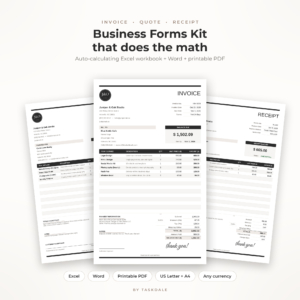
Ledgerline Invoice Kit
Price: Original price was: $3.00.$1.50Current price is: $1.50. | Best for: Small firms wanting a complete Excel setup
An Excel workbook with ten sheets: Start Here, Settings, Invoice, Quote, Receipt, Statement, Invoice Log, Dashboard, Clients and Items. It holds 100 clients and 150 products or services, logs up to 300 invoices with automatic statuses from open to overdue, builds an aged statement for any client and charts what came in and what is owed. Formulas are locked with no password. Matching Word templates and printable PDFs are included. Fill in the Settings sheet, then add your clients and items.
Part 5: The invoice log
The log is the heart of the system. One row per invoice: number, date, client, total, due date, amount paid, balance and status. Statuses should set themselves from the dates and amounts: open, due soon, overdue, partially paid, paid.
Every time you finish an invoice, add it to the log before you send it. That one habit is the difference between a pile of PDFs and an actual system. Sort the log by status and the overdue invoices jump to the top. Filter by client and you have their whole history.
Part 6: Payments and statements
When money arrives, record it against the invoice number with the date and method. The balance drops, the status changes, and the dashboard updates. Part payments work the same way. Three transfers against one invoice are three entries, and the balance shows what is left.
Statements are the next step up. A statement lists every open invoice for one client, with how old each one is. Send one at month end to any client with more than one invoice outstanding. It is often the nudge an accounts department needs to pay everything at once.
Part 7: Linking invoices to your books
An invoice system that never touches your bookkeeping leaves a gap. The money you invoiced has to show up as income, with tax split out, so your profit and loss is right. Some workbooks connect the two directly: log a sale or mark an invoice paid, and the income side of the books updates too.
For makers and sellers of physical products, the connection goes further. Orders become invoices and also reduce stock and feed sales reports. That saves typing the same sale into three places.

Tallyhive Small Business Spreadsheet
Price: $35.99 | Best for: Makers and product sellers
A 30-tab workbook for Excel and Google Sheets where orders feed income, units sold, customer records, invoices and packing slips. Restock purchases raise materials stock, production batches turn materials into finished goods, and bills appear on a monthly calendar. A business dashboard flags open orders, unpaid invoices, low stock and bills due this week. Start by entering your products and current stock, then log this week’s orders.
Worked example: a small wholesale bakery
Rosa runs a bakery that supplies six cafés with bread and pastries. Each café gets a weekly invoice every Monday on 14-day terms. That is about 26 invoices a month, all in Excel.
Her setup:
- Clients tab: six cafés, each with an address, email, contact name and 14-day terms.
- Items tab: 22 products, from sourdough loaves to almond croissants, each with a unit (loaf, dozen, tray) and a wholesale price.
- Invoice sheet: she picks the café, then picks items and types the week’s quantities from her delivery notes.
- Log: each invoice added the moment it is saved as a PDF.
One Monday’s invoice for the Harbor Café looks like this: 18 sourdough loaves at 4.20, 6 dozen croissants at 15.00, and 4 trays of cinnamon buns at 22.00. That is 75.60 plus 90.00 plus 88.00, a total of 253.60, due in 14 days.
On the first of each month, Rosa sorts the log by status. Two invoices are overdue, both from the same café. She sends a statement showing both, plus a short note. Payment arrives within the week. Before the system, she would have noticed in about two months, if at all. Now she notices on the first. That small shift in timing is worth real money to a business that buys flour every week.
A weekly and monthly routine
Every week, 15 minutes
- Create and log all invoices for the week’s work.
- Record every payment received against its invoice.
- Send a polite reminder on anything more than a few days overdue.
Every month, 30 minutes
- Review the dashboard: invoiced, collected, outstanding and overdue.
- Send statements to clients with more than one open invoice.
- Check that paid invoices have landed in your income records.
- Back up the file to a second location.
If you like checklists, add the weekly steps to your regular business routine. Our daily operations checklist for small businesses has a natural slot for them at close of day on Friday.
Keeping invoices and bookkeeping in step
If your invoice workbook and your bookkeeping workbook are separate, settle on one rule: income is recorded when the money arrives, with the invoice number in the reference column. That way you can always trace a bank deposit back to an invoice, and an invoice forward to the books. A bookkeeping file that handles tax in any currency or tax name keeps things tidy for owners outside the US as well.
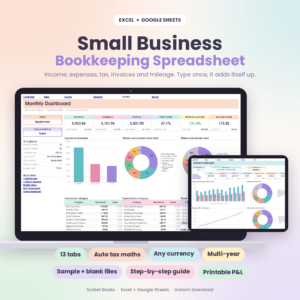
Sorbet Books Bookkeeping Spreadsheet
Price: $17.00 | Best for: Owners linking invoices to their books
A colorful bookkeeping workbook for Excel 2010 or newer and Google Sheets with 13 connected tabs: income and expense logs, budget, invoices, quarterly tax, mileage, account balances, profit and loss and a five-year comparison. It works in any currency, with any tax name such as VAT, GST, Sales Tax or HST, and any start month. A worked sample file and a blank file are included, plus a 23-page guide. Explore the sample first, then set up your own year.
Backups and file safety
A single Excel file holding your whole invoicing history deserves care. Save a dated copy at the end of each month, such as “Invoices 2026-10.xlsx,” in a second location: an external drive or cloud storage. Keep PDFs of every sent invoice in folders by year, so even if the workbook is damaged, your records survive. And keep the formula cells protected. Most spreadsheet disasters start with one overwritten cell nobody noticed.
Common mistakes with Excel invoicing
- Saving each invoice as a new workbook. You end up with 200 files and no log. Keep one workbook and save invoices as PDFs.
- Typing totals by hand. Let formulas do it.
- Skipping the log “just this once.” That is the invoice you will forget to chase.
- Reusing invoice numbers. Void them instead.
- No backups. One corrupted file can cost a year of records.
- Emailing the spreadsheet. Clients get PDFs, never the workbook.
Still deciding whether Excel is right compared with Word or printable forms? Our comparison of invoice templates in Word, Excel and PDF lays it out.
Frequently asked questions
Can Excel be used as an invoicing system?
Yes. With a client list, a price list, an invoice sheet, an invoice log and a place to record payments, Excel covers the core of small business invoicing.
How do I number invoices automatically in Excel?
Keep a log of every invoice and set the next number to the highest number in the log plus one. Many templates show the next free number for you.
Should I keep each invoice in a separate Excel file?
No. Keep one workbook for the system and save each finished invoice as a PDF. Separate workbooks make tracking and reporting very hard.
How do I track paid invoices in Excel?
Record each payment against the invoice number. A formula compares total and amount paid with the due date to set the status to paid, open or overdue.
Is Excel safe for business invoices?
It is as safe as your habits. Protect formula cells, back up monthly, and keep PDFs of every sent invoice.
Will an Excel invoice system work in Google Sheets?
Some workbooks are built for both. Tallyhive, Sorbet Books and Petal and Ledger run in Excel and Google Sheets. Ledgerline is built for Excel.
Your next step
Set aside one evening. List your clients, list your products or services with prices, and decide on a numbering format. Then load all three into one workbook and log every invoice you send from tomorrow onward. The Ledgerline Invoice, Quote and Receipt Kit has the invoice, log, statements and dashboard ready, so you only need to add your details.