The best landlord Excel template is the one that fits your number of units and how you report income. Rooftally suits smaller portfolios that want investment analysis. Lantern Lane Landlord Tracker suits up to 50 properties with a guided setup. Porchfolio suits the largest portfolios, up to 300 units.
Choosing a spreadsheet to run your rentals can feel like a bigger decision than it is. The three templates here all track rent, tenants and expenses in a workbook you own, so the real differences come down to size, reporting and how much help you get setting up. We'll go through each factor so you can pick with confidence.
 Rental Property Spreadsheet for Landlords (Excel): Rent Tracker, Tenant Ledger, ROI & Schedule E | Rooftally
Key facts at a glance
- A landlord Excel template is a pre-built workbook that records rent, tenants, leases, expenses and tax figures in one file you keep on your own computer.
- Rooftally handles up to 25 properties and 150 units, Lantern Lane up to 50 properties and 250 units, and Porchfolio up to 50 properties and 300 units.
- All three include a Schedule E summary, which is the IRS form US landlords use to report rental income and expenses.
- Lantern Lane and Porchfolio work in both Excel and Google Sheets, while Rooftally is built for Excel.
- All three work in any currency.
Table of Contents
- What should you look for in a landlord Excel template?
- How do the three landlord Excel templates compare?
- Which landlord Excel template suits which landlord?
- How do you set up a landlord Excel template?
- What mistakes should you avoid with a rental spreadsheet?
- What affects the price of a landlord Excel template?
- How do you decide on the best landlord Excel template?
- Common questions
What should you look for in a landlord Excel template?
A good landlord Excel template shows you who has paid, what you earned after costs, and what to put on your tax return, without you rebuilding formulas. Judge each option on six factors, in roughly this order of importance.
Rent tracking and arrears
Rent tracking is the core job: a template should show at a glance who has paid, who has paid part, and who is overdue. All three products do this. Rooftally also surfaces late fees, lease endings, vacancies and open repairs. Lantern Lane separates paid, partial and overdue tenants and suggests late fees. Porchfolio uses an automatic Rent Roll plus tenant ledgers.
Capacity: properties and units
A unit is a single lettable space, so one block of flats counts as one property but many units. Cheque your count with room to grow. Rooftally stops at 25 properties and 150 units. Lantern Lane allows 50 properties and 250 units. Porchfolio allows 50 properties and 300 units.
Tax reporting
If you file in the US, you need income and expenses sorted into Schedule E lines. All three include a Schedule E summary. Porchfolio maps expenses to the IRS lines directly, and Lantern Lane adds a printable profit and loss statement. If you are outside the US, these summaries still organise your figures, but cheque your own tax authority's categories.
Dashboards and investment analysis
A dashboard turns your entries into a quick read on performance. Rooftally gives a dashboard with 12 KPIs and 4 charts, and reports cash flow, cap rate, cash-on-cash return and DSCR (debt service coverage ratio) per property. Porchfolio offers 12-KPI dashboards with monthly, 5-year, custom-range and compare views. Lantern Lane provides 9 automated dashboards and shows true profit by property and unit.
Paperwork and documents
Some templates produce documents as well as numbers. Lantern Lane includes printable rent receipts and a move-in and move-out inspection checklist. Porchfolio also prints rent receipts. Rooftally focuses on tracking and analysis rather than listing printable documents.
Setup help and platform
A template is only useful if you can start it quickly. Lantern Lane ships a filled sample file and a step-by-step guide, so you can see how it should look before entering your own data. Porchfolio includes a step-by-step DOCX guide. Lantern Lane and Porchfolio also open in Google Sheets, which helps if you share the file with a bookkeeper or partner.
How do the three landlord Excel templates compare?
The three templates differ mainly in capacity, platform, dashboards and extras. This table shows the differences taken from each product's listing.
| Product | Platform | Capacity | Dashboards | Notable extras |
|---|---|---|---|---|
| Rental Property Spreadsheet for Landlords (Excel): Rent Tracker, Tenant Ledger, ROI & Schedule E | Rooftally | Excel | 25 properties, 150 units | 12 KPIs, 4 charts | Cap rate, cash-on-cash, DSCR, loans, mileage, deal analyzer |
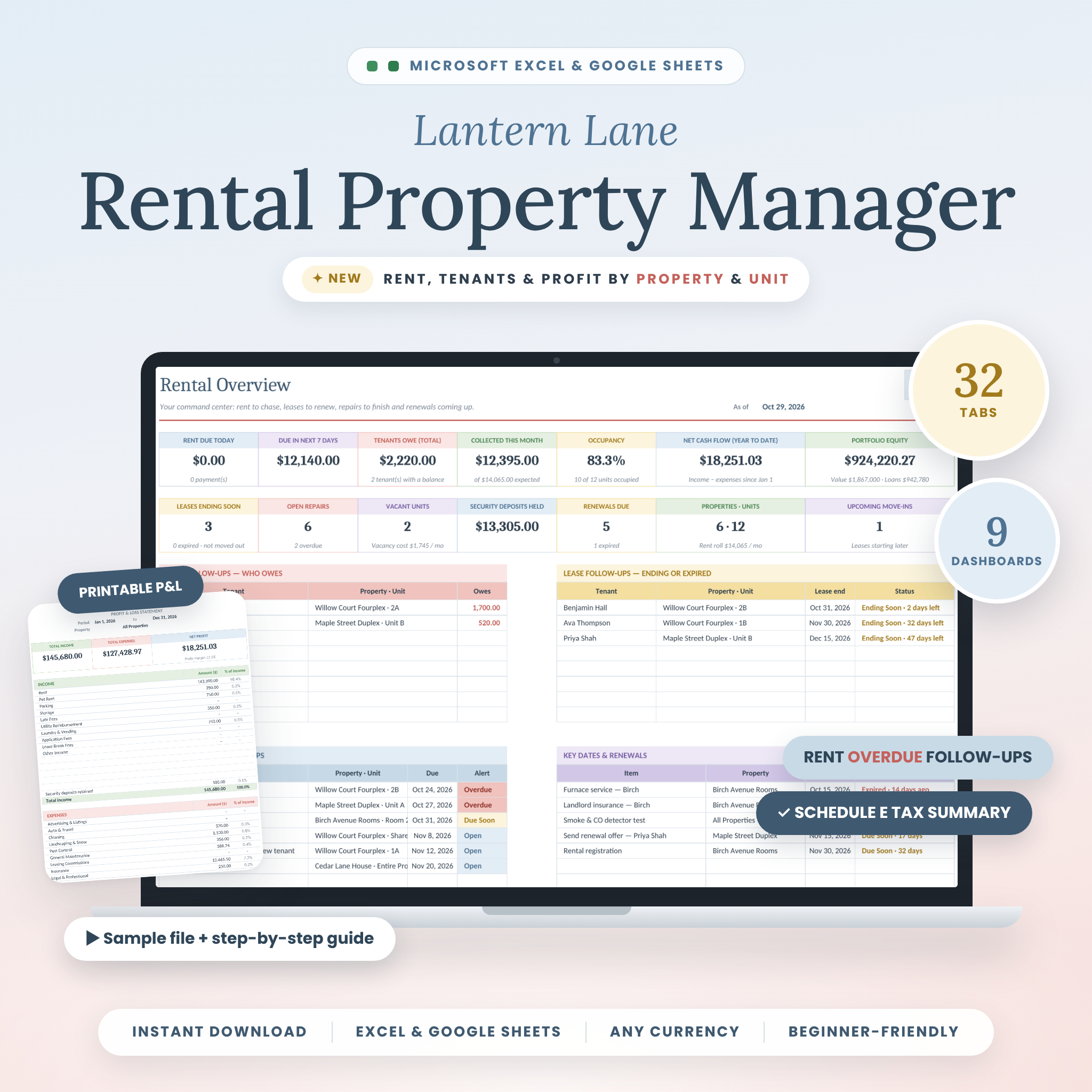 Rental Property Spreadsheet for Excel & Google Sheets | Lantern Lane Landlord Tracker – Rent Collection, Tenant Ledger, Income & Expenses, Schedule E | Excel and Google Sheets | 50 properties, 250 units | 9 automated dashboards | 32 tabs, shared bills split automatically, rent receipts, inspection checklist, sample file |
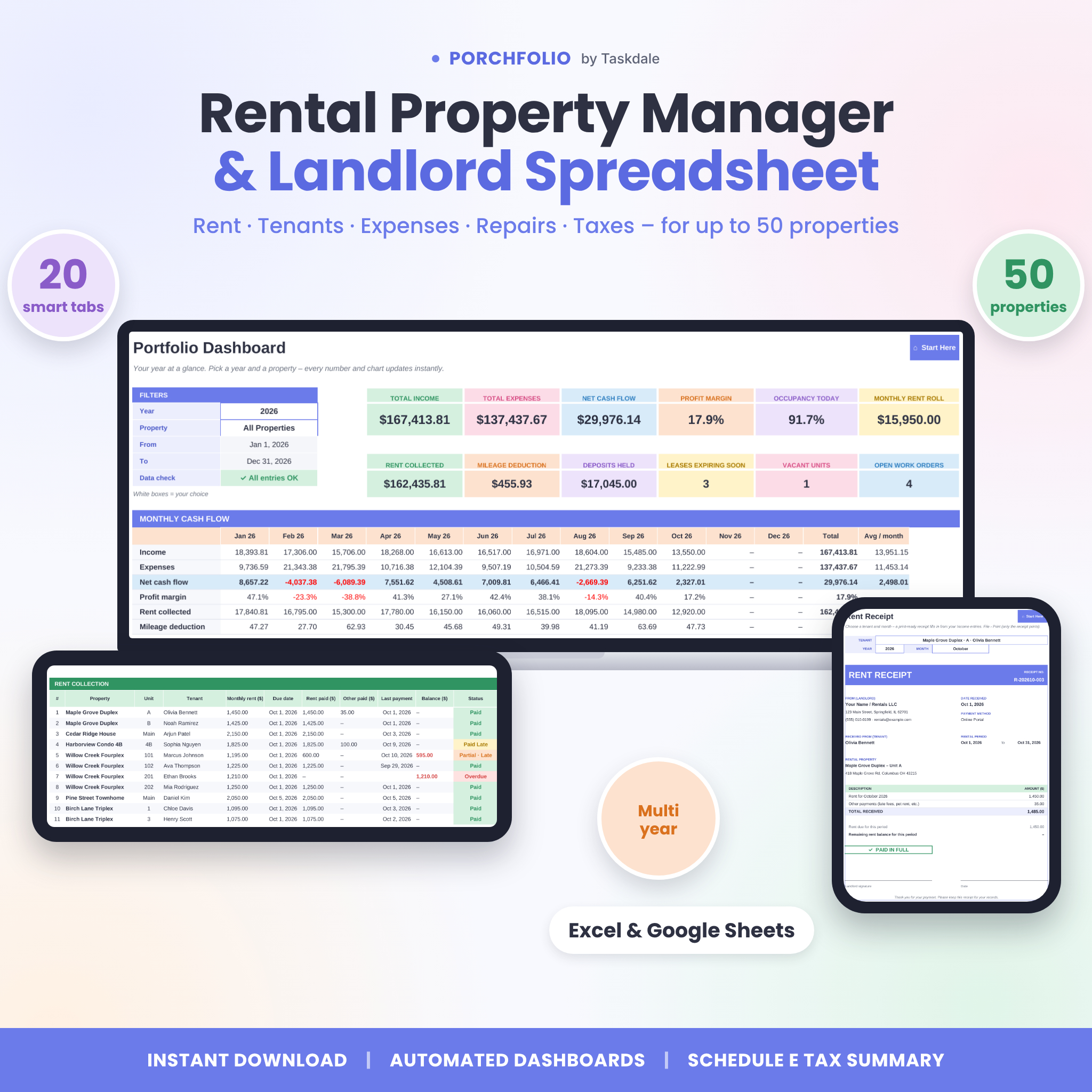 Rental Property Tracker Spreadsheet for Excel & Google Sheets | Porchfolio Landlord Rent Tracker with Rent Roll, Tenant Ledger, Rent Receipts & Schedule E Tax Summary | Excel and Google Sheets | 50 properties, 300 units | 12 KPIs, with monthly, 5-year, custom-range and compare views | Rent Roll, mileage log, deal analyzer, one-time purchase |
Which landlord Excel template suits which landlord?
Each template suits a different type of landlord, and the supplied details point to clear matches.
Rooftally suits the investor-minded landlord with a modest portfolio. If you want to know your cap rate, cash-on-cash return and DSCR for each property, and you track loans alongside rent, this is the most analysis-focused of the three. Its limit of 25 properties and 150 units is generous for most private landlords.
Lantern Lane suits the landlord who wants guidance and paperwork. The filled sample file and step-by-step guide help if this is your first spreadsheet. Splitting shared bills automatically is useful if one electricity or water bill covers several units. The inspection checklist and rent receipts cover the paperwork around tenancies.
Porchfolio suits the larger or fast-growing landlord. It has the highest unit allowance at 300 and the widest range of reporting views, including a 5-year view and a compare view. The mileage log and deal analyzer help if you drive between properties and are weighing new purchases.
How do you set up a landlord Excel template?
Setting up a landlord Excel template takes about an afternoon if you gather your records first. Follow these steps in order.
- Save a copy of the file before you type anything, so you can always return to a clean version.
- Enter your properties and units first, because every other tab builds on them.
- Add tenants and lease dates, including the rent amount and due day.
- Record opening balances for any rent already owed.
- Log the past months' income and expenses so your dashboard has history.
- Set a regular time each week or month to record rent received.
- Back up the file to a second location after every update.
If you use Lantern Lane, open the filled sample file first and compare it with your own entries. If you use Porchfolio, keep the DOCX guide beside you while you work through the tabs.
What mistakes should you avoid with a rental spreadsheet?
The most common rental spreadsheet mistake is entering data inconsistently, which breaks the totals. Watch for these.
- Typing over formulas. Calculated cells should stay untouched. Enter figures only in the input cells.
- Mixing personal and rental spending. Expenses on your own home will distort your profit figures and your tax summary.
- Ignoring partial payments. Record the part-payment as received, so the balance still shows as owed.
- Skipping receipts. A spreadsheet records figures, but it doesn't replace the invoice or receipt behind them.
- Buying for today's size. If you plan to add properties, pick a template with headroom rather than hitting the limit in a year.
- Assuming the tax tabs are advice. A Schedule E summary organises your numbers. Cheque the final return with a qualified tax adviser.
What affects the price of a landlord Excel template?
The price of a landlord Excel template depends mainly on capacity, the number of dashboards and tabs, the included documents, and whether support material comes with it. You can see current prices on the product cards on this page.
Larger unit allowances and more reporting views generally cost more, as do extras such as printable receipts, inspection checklists and a filled sample file. Porchfolio is listed as a one-time purchase, which matters if you want to avoid a recurring fee. A cheaper template that lacks Schedule E mapping may cost you time later, so weigh the saving against the hours you'd spend building those summaries yourself.
How do you decide on the best landlord Excel template?
Choose the template whose limits you won't outgrow and whose reports you will actually read. Use this rule of thumb.
- Pick Rooftally if you want investment ratios such as cap rate and DSCR and own 25 properties or fewer.
- Pick Lantern Lane if you want a sample file, a guide, receipts and an inspection checklist, and may need Google Sheets.
- Pick Porchfolio if you manage the most units, want 5-year and compare views, or log mileage regularly.
Browse all 3 options below and cheque your own property and unit count against the capacity before you buy.
Common questions
Is an Excel template good enough for a landlord, or do I need software?
For a small to medium portfolio, an Excel template is usually enough. It tracks rent, expenses and tax figures in a file you control. If you need automatic bank feeds or tenant portals, dedicated software does more, but a spreadsheet covers the basics.
Can I use these landlord templates outside the US?
Yes. All three work in any currency, so you can record rent in pounds, euros or dollars. The Schedule E summaries follow US IRS categories, so outside the US treat them as a way to group income and expenses and cheque your local rules.
Do I need Google Sheets as well as Excel?
No. Excel alone is enough for all three. Lantern Lane and Porchfolio also open in Google Sheets, which helps if you want to share the file or edit on a phone or tablet. Rooftally is built for Excel only.
How often should I update my rental spreadsheet?
Update it whenever rent arrives, and reconcile with your bank statement once a month. Frequent entries keep late rent visible and stop you forgetting expenses. If weekly is too much, set one fixed monthly date and keep it.
What is DSCR and do I need it?
DSCR, or debt service coverage ratio, compares a property's income with its loan payments. A figure above 1 means income covers the debt. It matters if you have a mortgage and want to compare properties, and Rooftally calculates it for each one.