
Rooftally is a rental property spreadsheet for landlords who want clear numbers without paying for property management software every month. It is one Excel workbook with 20 connected tabs. You enter your properties, units, tenants and loans once. After that you log payments and bills, and the workbook keeps the rent roll, tenant balances, late fees, cash flow, ROI and a Schedule E style tax summary up to date for you.
Built for Microsoft Excel 2010 or newer and tested in LibreOffice Calc. Instant download, no macros, no subscription.
What this landlord spreadsheet does
Most rental trackers stop at income and expenses. Rooftally goes further and answers the questions landlords ask every week.
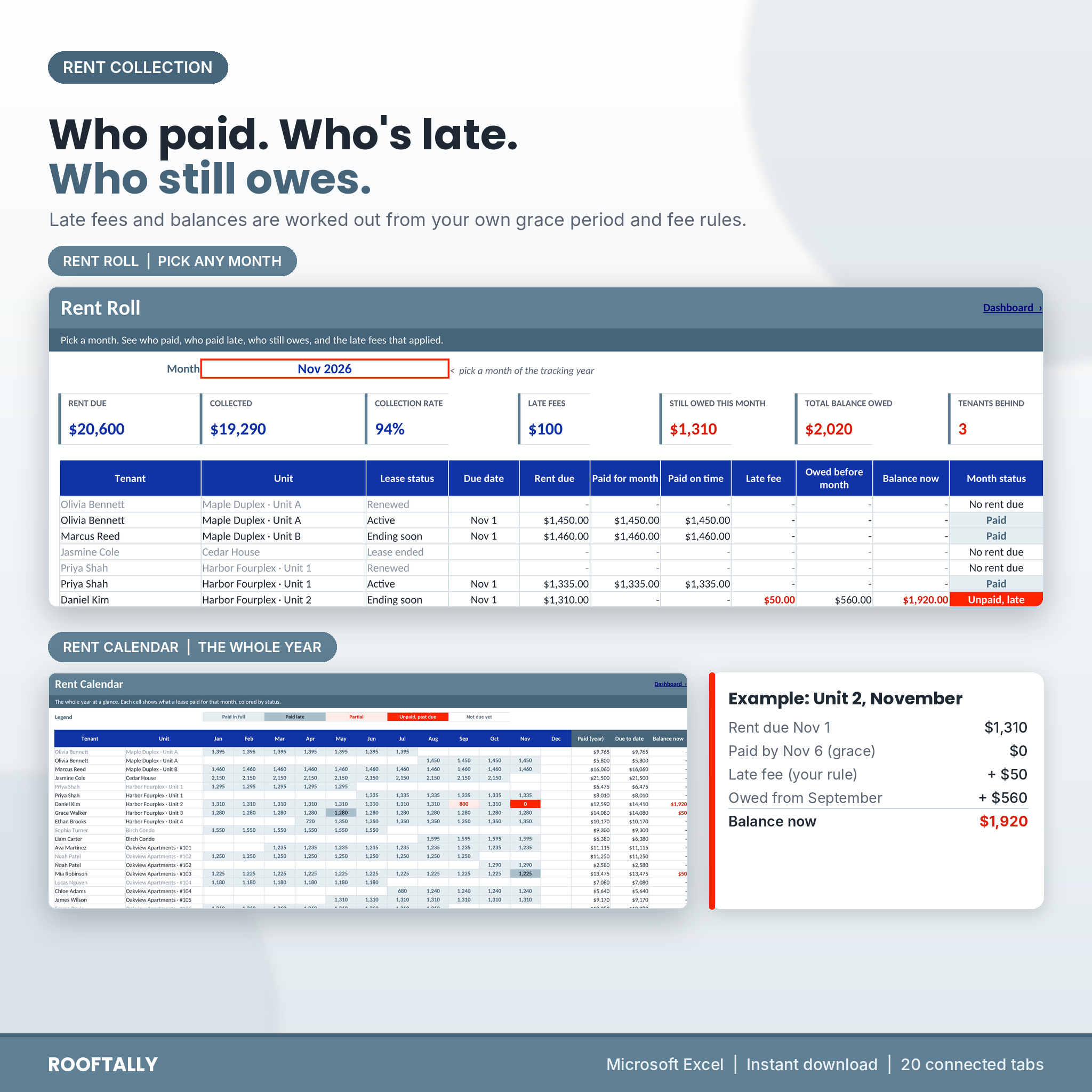
- Who has paid and who is late? The Rent Roll shows every lease for any month: rent due, paid, paid on time, late fee, anything owed from earlier months and the balance now.
- What late fee applies? Set a grace period and a flat or percent fee once. The fee is added only when the rent paid by the end of the grace period falls short.
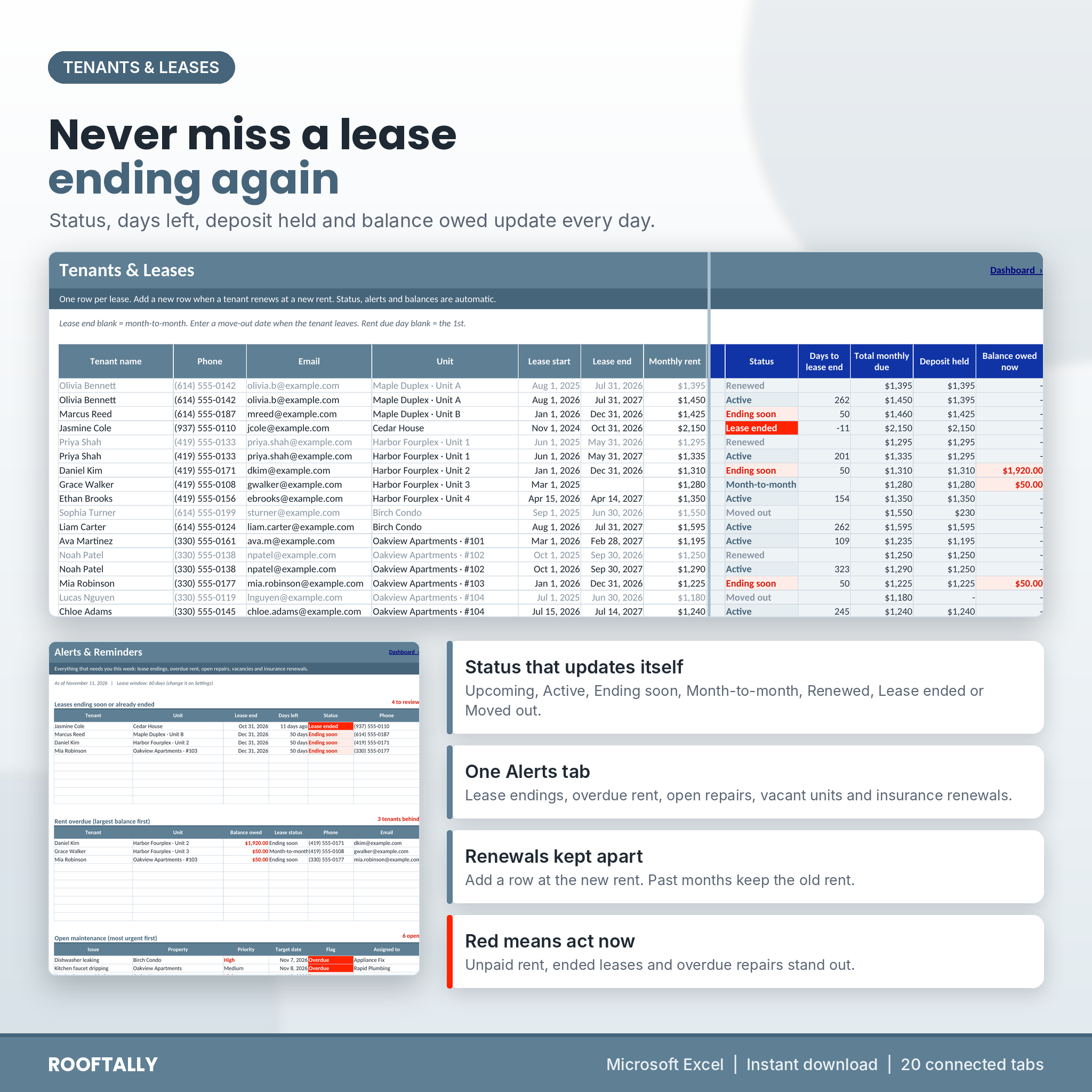
- Which leases end soon? Lease status updates every day: Upcoming, Active, Ending soon, Month-to-month, Renewed, Lease ended or Moved out.
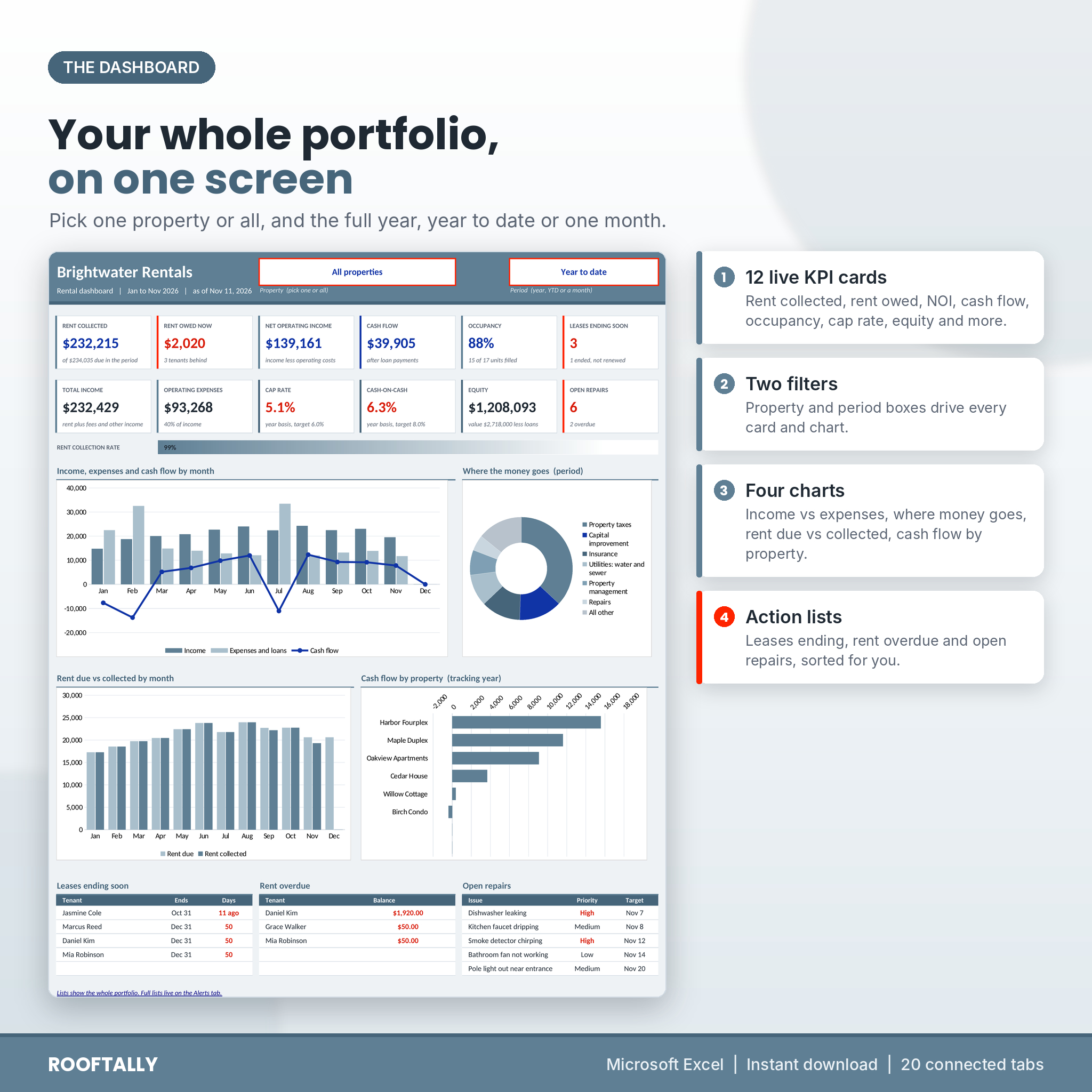
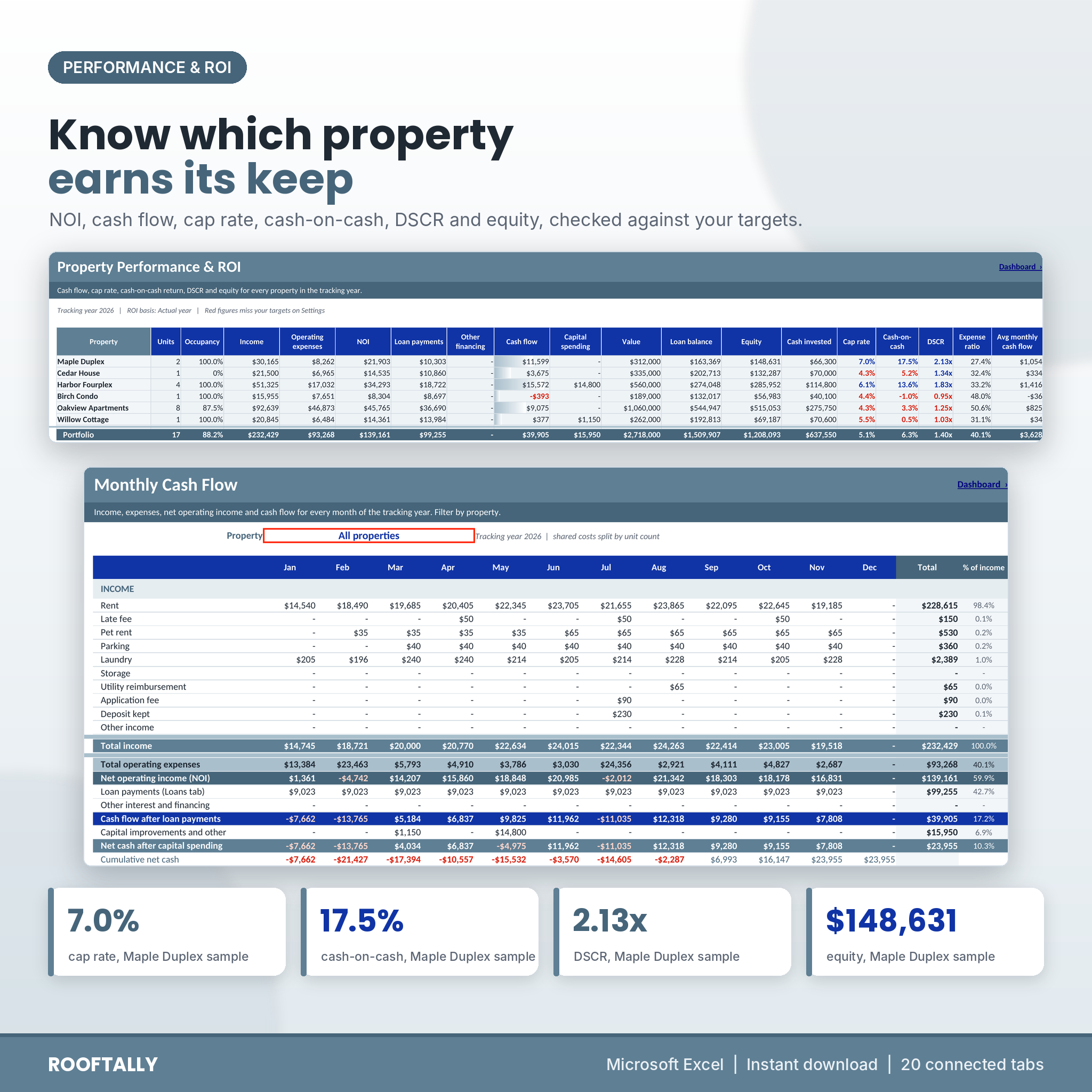
- Is each property worth keeping? Property ROI shows NOI, cash flow, cap rate, cash-on-cash return, DSCR, expense ratio and equity, with figures in red when they miss your targets.
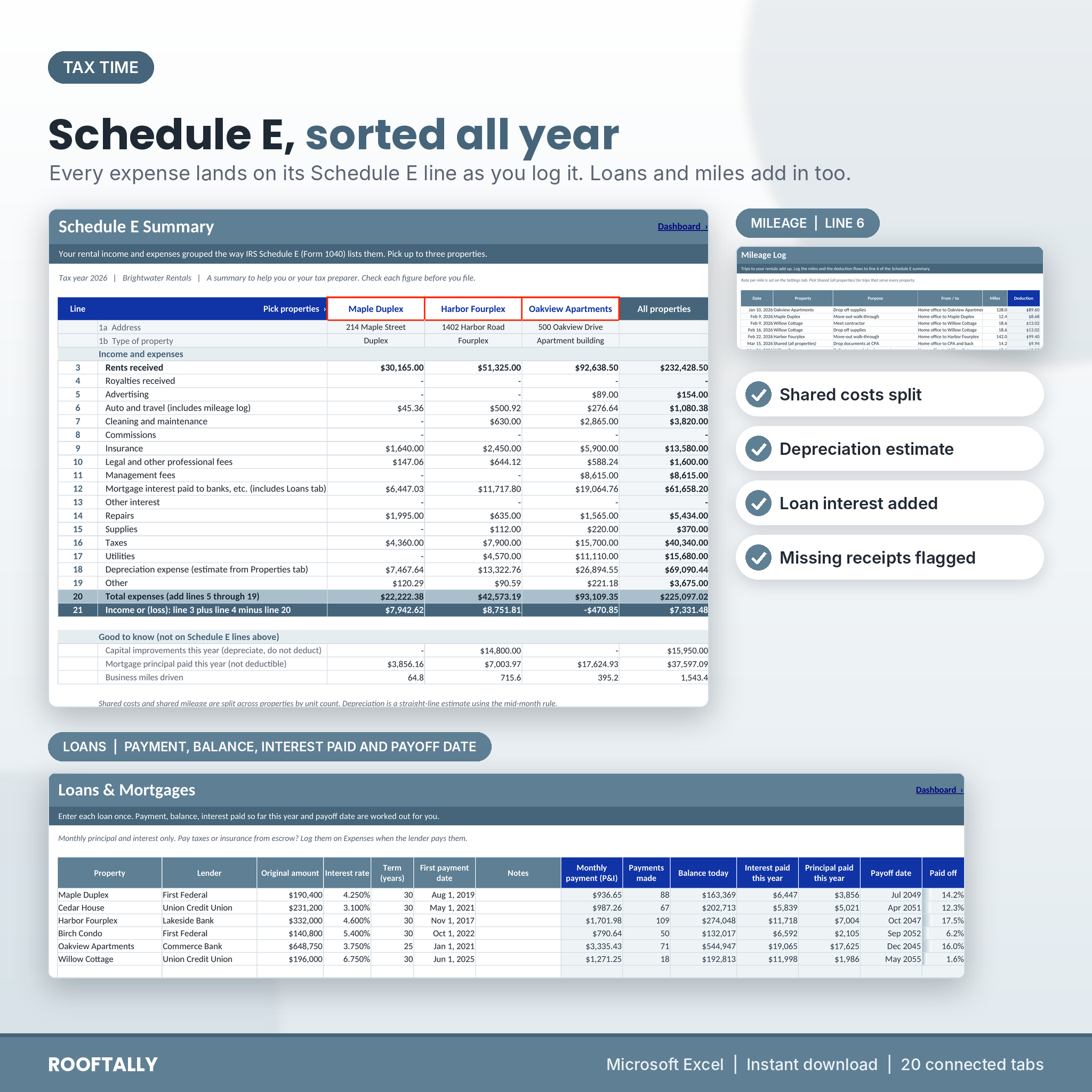
- What goes on my tax return? Every expense category points to a Schedule E line, so the yearly summary is ready when your tax preparer asks.
Who it is for
Self-managing landlords with one rental or a portfolio of up to 25 properties and 150 units. It suits single-family homes, duplexes and fourplexes, small apartment buildings, condos and room rentals. Real estate investors who want to compare properties side by side will like the ROI and deal analyzer tabs.
What is included
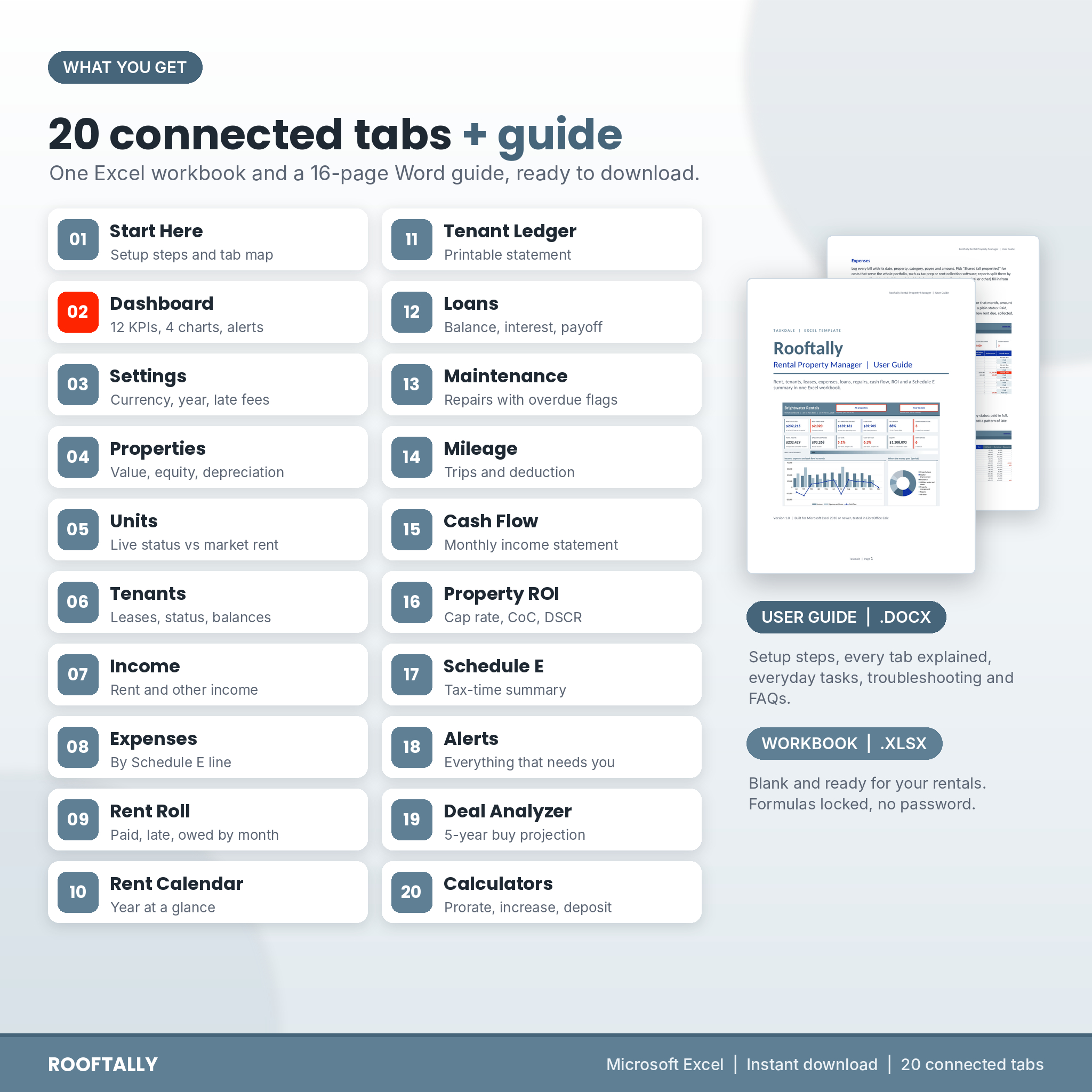
The workbook (.xlsx), 20 tabs
- Start Here: six setup steps with links, color key and tab map.
- Dashboard: 12 KPI cards, a collection rate bar, four charts and lists of leases ending, rent overdue and open repairs. Filter by property and by full year, year to date or one month.
- Settings: currency (20 symbols), tracking year, late fee rules, proration, ROI targets and every drop-down list.
- Properties and Units: purchase details, value, equity, occupancy, depreciation estimate, insurance renewal alerts, unit status and rent compared with market rent.
- Tenants: one row per lease with contacts, dates, rent, other monthly charges, due day, deposit held and balance owed.
- Income and Expenses: 2,500 lines each. Pick a lease from a drop-down and the payment is matched to the right tenant and month. Shared costs are split across properties by unit count.
- Rent Roll, Rent Calendar and Tenant Ledger: one month in detail, the whole year color coded, and a printable statement for any lease.
- Loans: monthly payment, balance today, interest and principal paid this year, payoff date.
- Maintenance and Mileage: repair requests with priority and overdue flags; trips with the mileage deduction.
- Cash Flow: month-by-month income statement down to net cash, for all properties or one.
- Property ROI and Schedule E: performance per property and a tax-time summary for up to three properties plus the whole portfolio.
- Alerts: lease endings, overdue rent, open repairs, vacant units and insurance renewals in one place.
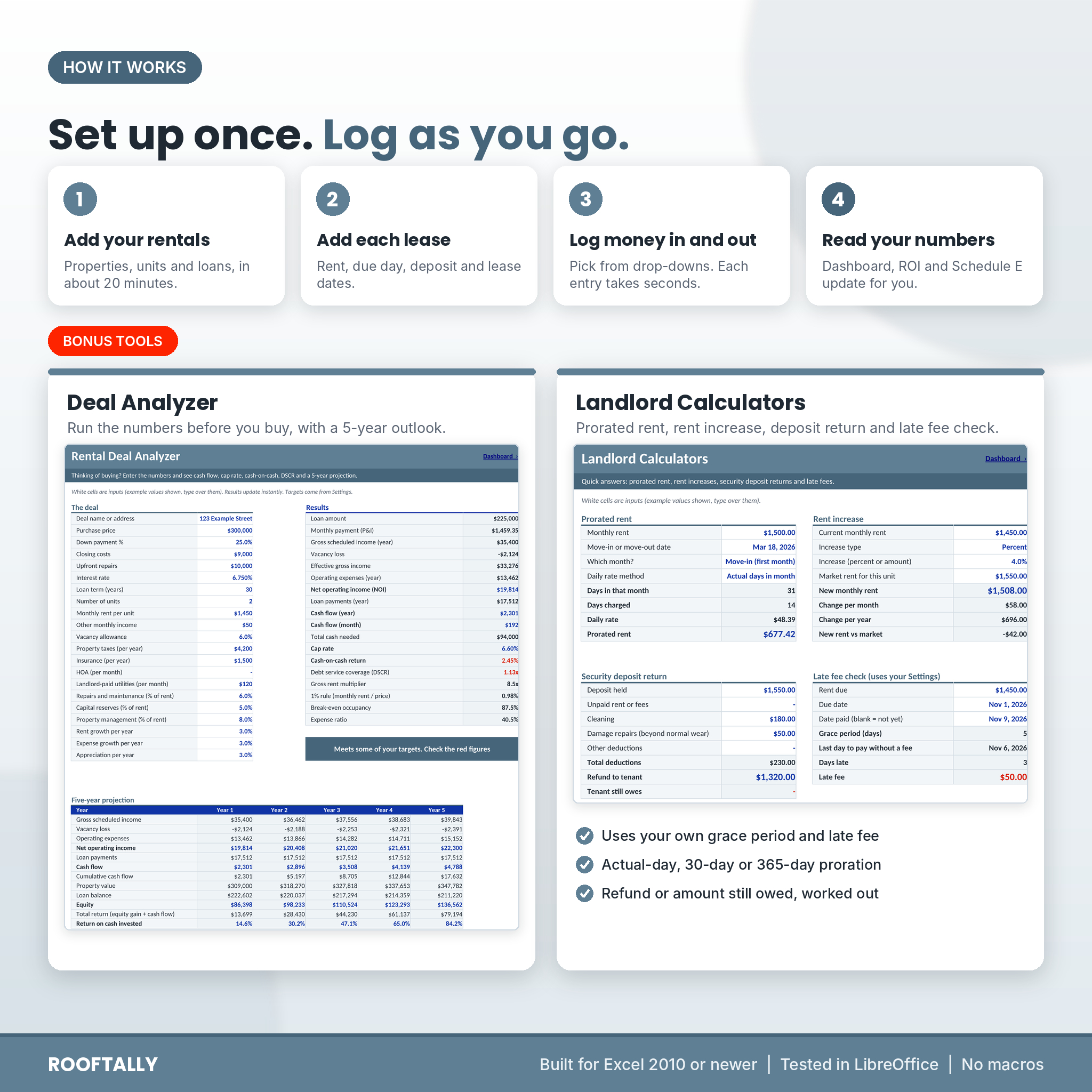
- Deal Analyzer and Calculators: run the numbers on a property before you buy, with a five-year projection, plus prorated rent, rent increase, deposit return and late fee calculators.
The user guide (.docx), 16 pages
Setup steps, every tab explained with screenshots, everyday tasks such as renewals and move-outs, troubleshooting and FAQs.
How it works
- Open Settings. Add your business name, currency and late fee rules.
- List your properties and units, then add each loan.
- Add one row per lease on the Tenants tab.
- Log rent and other income on Income, and bills on Expenses. Most columns are drop-downs.
- Open the Dashboard. Everything else updates on its own.
A typical portfolio takes about 20 minutes to set up. After that, a weekly check-in of five to ten minutes keeps it current.
Why landlords pick Rooftally
- Late fees and balances worked out for you, including partial payments, prepaid rent and balances from last year.
- Prorated rent for move-ins and move-outs in the middle of a month, if you want it.
- Renewals handled properly: add a row at the new rent and past months keep the old rent.
- Locked formulas, open inputs: calculated cells are protected without a password, so nothing breaks by accident.
- Private by design: no macros, add-ins or online links. Your tenant data stays in your file.
File format and requirements
- Microsoft Excel (.xlsx) for Windows or Mac, Excel 2010 or newer. Tested in LibreOffice Calc.
- Not designed for Google Sheets or Apple Numbers.
- Best on a laptop or desktop screen. Print areas are set for every tab.
Customizing your rental property tracker
Rename income types, expense categories, payment methods and property types on Settings. Map any category to a different Schedule E line. Change colors and fonts freely; formatting stays allowed on protected tabs. Need to edit a formula? Unprotect the tab with Review > Unprotect Sheet (there is no password).
Digital download
This is a digital product. You get the Excel workbook and the Word user guide right after checkout. Nothing is shipped.
Real situations it handles
- A tenant pays $800 of $1,310 rent: the Rent Roll shows Partial, the late fee applies after the grace period, and the balance carries forward.
- A tenant pays January rent on December 30: pick January as the rent month and it counts for January.
- Your accountant asks for rental income and expenses per property: open Schedule E and print it.
- You are weighing a new duplex: enter the price, rents and costs on the Deal Analyzer and check cap rate, cash-on-cash and DSCR against your targets.
FAQ
Does it work with Google Sheets?
It is built for Microsoft Excel 2010 or newer and tested in LibreOffice Calc. It is not designed for Google Sheets.
How many properties and tenants can I track?
25 properties, 150 units, 250 leases, 2,500 income lines, 2,500 expense lines, 25 loans, 500 repairs and 500 trips.
Can I use my own currency?
Yes. Pick from 20 currency symbols on Settings and every money cell switches. Dollars are the default.
Does it calculate late fees automatically?
Yes. Set a grace period and a flat amount or a percent of rent. A fee is added for any month where less than the full rent arrived by the end of the grace period.
Will it file my taxes?
No. It groups your income and expenses by Schedule E line and estimates depreciation, which saves hours. Your tax preparer should review it before you file.
Can I use it for short-term rentals?
It is designed for long-term leases with monthly rent. You can log short-term income against a property, but there is no booking calendar.
Can I share the file?
The license covers personal use for your own rentals. Please do not resell, share or upload the workbook or guide.
Reviews
There are no reviews yet.