Best Life Organizer: Four Digital Planners Compared
A life organiser is a single system that holds your tasks, calendar, money, habits and meals so you stop juggling separate apps and notebooks. The best one is the one that matches where you already work. Choose Notion, a spreadsheet or an offline app first, then pick the layout that suits how your head works.
Key facts at a glance
- The four organisers here run in three places: Notion, Excel or Google Sheets, and an offline HTML app on your own device.
- Two of them, Fernhaven and LoadLight, state that there is no subscription, and Fernhaven also needs no account.
- Linden Life Organiser is the largest, with 28 connected tabs, while ADHD Notion Planner is built around one calm Home page.
- LoadLight is the only one with a load-share view for couples.
- All four cover budgeting and habits, so the real difference is layout, platform and how much set-up you want.
Choosing one can feel bigger than it should. There are dozens of templates, each promising to fix your week, and it is easy to buy one that looks lovely and then never open it. This guide gives you a few plain tests to apply, so you can choose with confidence.
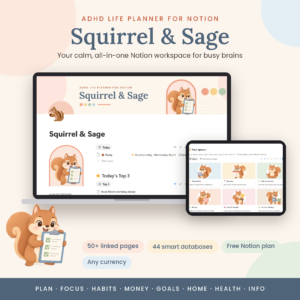 ADHD Notion Planner | Squirrel & Sage Notion Life Planner Template with Dashboard, Task Manager, Habit Tracker, Budget & 50+ Linked Pages
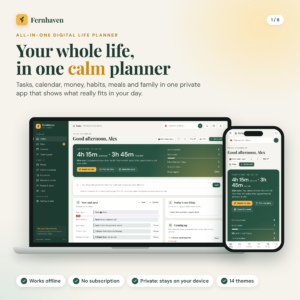 All in One Digital Life Planner | Fernhaven Offline HTML Planner App with Budget, Habit Tracker, Calendar, Meal Planner & Debt Payoff
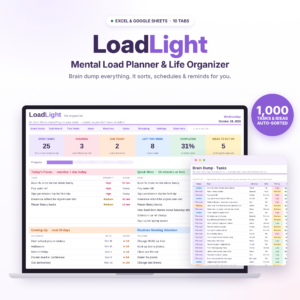
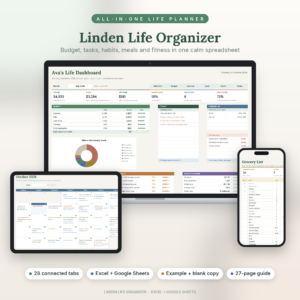
Table of Contents
Toggle
- What should you look for in a life organiser?
- How do these four life organisers compare?
- Who does each life organiser suit?
- How do you set up a digital life organiser?
- What mistakes should you avoid?
- What affects the price of a life organiser?
- Which life organiser should you choose?
- Common questions
What should you look for in a life organiser?
A good life organiser needs to do five things: run on a tool you already use, link your information together, cope with a busy day, handle your money, and come with clear instructions. Test each template against those five before you look at the colours.
Where it runs and what you need to open it
The platform decides whether you will actually use the organiser. ADHD Notion Planner needs Notion, though it works on the free Notion plan. LoadLight and Linden run in Excel and Google Sheets. Fernhaven is a single offline HTML file that needs no account and keeps your data private on your device.
If you already live in Google Sheets, a Notion template means learning a new tool as well as a new routine. That is two hurdles instead of one.
How much the pages connect to each other
A connected organiser means you enter something once and it appears everywhere it matters. Linden is the clearest example: add a bill, a task or a recipe once and it shows up in your budget, calendar, week ahead and dashboard. LoadLight does something similar by filling your weekly planner from one brain dump.
Unconnected pages are just prettier notebooks. You end up copying the same dentist appointment into three places, and that is usually the point where people give up.
How it copes with a day that is already too full
Some organisers only record plans. Better ones help you adjust them. Fernhaven shows the free time you really have each day and fixes an overloaded day in one tap. LoadLight sorts tasks by priority and due date, with a Today's Focus and Quick Wins dashboard.
ADHD Notion Planner takes a different route, with a Top 3, quick wins, energy-based tasks and a brain dump inbox. If a long list makes you freeze, look for this sort of limit on what you see each day.
How it handles money
Every organiser here includes budget tools, but they are not identical. Linden lets you budget by month or by paycheck, and its bills roll forward on their own. Fernhaven includes budget, bills, savings goals and a debt-free date calculator. ADHD Notion Planner has self-updating budget, bills, savings and debt pages with one currency setting.
If you are paid every two weeks or irregularly, a by-paycheck option can match your real life better than a calendar-month view.
Guidance and print options
A user guide is the difference between a template you use and one you abandon. Fernhaven includes a 23-page guide and 13 printable pages in US Letter and A4. Linden comes with a 27-page illustrated guide, plus filled-in example and blank copies. ADHD Notion Planner includes a User Guide as a DOCX, and LoadLight includes an illustrated guide.
The filled-in example in Linden is useful if you learn by seeing it working before you start typing.
How do these four life organisers compare?
The four differ mainly in platform, size and focus. This table sets out what each one offers, using only the details listed on its product page.
| Product | Runs in | Main focus | Standout feature |
|---|---|---|---|
| ADHD Notion Planner | Squirrel & Sage Notion Life Planner Template with Dashboard, Task Manager, Habit Tracker, Budget & 50+ Linked Pages | Notion (free plan works) | Calm daily focus | Home page for today, 8 illustrated spaces, 60-second check-in |
| All in One Digital Life Planner | Fernhaven Offline HTML Planner App with Budget, Habit Tracker, Calendar, Meal Planner & Debt Payoff | Offline HTML app, no account | Privacy and day planning | Shows real free time and fixes an overloaded day in one tap |
| LoadLight Mental Load Planner | Brain Dump Task Organiser & Weekly Planner Spreadsheet for Mums | Excel & Google Sheets Life Organiser | Excel and Google Sheets | Turning a brain dump into a week | Load-share view for couples, 10 tabs |
| Linden Life Organiser | Life Planner Spreadsheet for Excel and Google Sheets | Budget Tracker, Habit Tracker, Smart Calendar, Meal Planner, Workout Tracker | Excel and Google Sheets | Everything connected | 28 connected tabs, automatic grocery list |
Who does each life organiser suit?
Each organiser suits a different kind of person, and the right match depends on how you think and who shares your household. These are the reasons to pick each one.
ADHD Notion Planner suits you if lists overwhelm you and you want a gentle start. The 60-second check-in updates your habit, mood, sleep and water trackers in one go, which keeps daily upkeep small. You will need to be comfortable in Notion, or willing to learn it.
All in One Digital Life Planner (Fernhaven) suits you if you want privacy and a tool with no sign-up. It covers tasks, calendar, budget, bills, habits, meals, chores, birthdays and trips. The printable pages are handy if you like paper alongside the screen.
LoadLight Mental Load Planner suits you if you carry most of the household planning in your head. It is written with mothers in mind, and the load-share view for couples makes the division of tasks visible rather than assumed. It also tracks routines, birthdays, ideas and shopping.
Linden Life Organiser suits you if you want one workbook for money, plans, routines, health and meals. It includes a workout tracker and a meal planner with an automatic grocery list, which the others do not list. The size is a benefit if you will use most of it, and a distraction if you will not.
How do you set up a digital life organiser?
Setting up a digital life organiser takes about one sitting if you add only what you need first. Start small and grow the system once the habit sticks.
- Open the user guide and read the first few pages before touching the template.
- Make your own copy, so the original stays clean for a fresh start later.
- Set the basics: currency, week start day and your main categories.
- Do a brain dump of everything on your mind, and let the template sort it where it can.
- Add your fixed bills and regular appointments.
- Choose one daily habit to track, not ten.
- Pick a fixed time each day to check it, even if it is only a minute.
Back up your file now and then. For spreadsheets, a copy saved to cloud storage is enough. For the offline Fernhaven app, which keeps data on your device, keep a copy of the file somewhere safe.
What mistakes should you avoid when choosing a life organiser?
The most common mistakes are choosing for looks, switching on every feature at once, and picking a tool you do not already use. Each is easy to avoid with a little thought.
- Buying the biggest one by default. A 28-tab workbook is wonderful if you will use it and tiring if you will not. Match size to your appetite.
- Ignoring the platform. If you dislike Notion, a Notion template will gather dust however good it is.
- Tracking everything from day one. Start with tasks and bills, then add habits, meals or workouts later.
- Skipping the guide. The guide often explains the automatic features you would otherwise miss.
- Never doing the check-in. An organiser only works if you open it. Attach it to something you already do, like your morning tea.
What affects the price of a life organiser?
The price of a life organiser depends mainly on how many features it includes, how much guidance comes with it and whether it is a one-off purchase. Live prices appear on the product cards, so this section covers the factors only.
Larger templates with more tabs, example copies and longer guides generally cost more up front than simpler ones. A one-time purchase, as stated for LoadLight, avoids ongoing costs. Fernhaven states no subscription either. With Notion templates, check whether you need a paid Notion plan; ADHD Notion Planner works on the free one.
Think about cost over a year, not just on the day you buy. A cheaper template you abandon costs more than a dearer one you use daily.
Which life organiser should you choose?
Choose by platform first, then by how you feel when you look at a to-do list. Here is a simple rule to follow.
- Already in Notion and easily overwhelmed: ADHD Notion Planner.
- Want privacy, no account and a quick fix for packed days: Fernhaven.
- Carry the household planning and want it shared fairly: LoadLight.
- Want one workbook that does money, meals, health and calendar: Linden Life Organiser.
If two appeal, pick the one that opens in a tool you already use daily. That single test settles most decisions.
Common questions
Is a digital life organiser better than a paper one?
A digital life organiser is better if you want automatic sorting, linked pages and reminders. Paper is better if writing by hand helps you think. Fernhaven includes 13 printable pages, so you can use both and keep the screen as your main record.
Do I need a paid Notion plan for ADHD Notion Planner?
No. The ADHD Notion Planner is listed as working on the free Notion plan. You will still need a Notion account to use it, and the included User Guide in DOCX format explains how to get started with the template.
Can two people share one life organiser?
Yes, with the right tool. LoadLight includes a load-share view for couples, and its spreadsheets run in Google Sheets, which is built for sharing. Agree who updates what first, or the shared view will drift out of date.
What if I do not use Excel or Google Sheets?
Pick a different format. Fernhaven is an offline HTML app that needs neither, and ADHD Notion Planner runs in Notion. Choosing a tool you already feel comfortable with matters more than choosing the most feature-packed template.
How long does it take to get used to a new life organiser?
Plan on a few days to a couple of weeks for the routine to feel natural, depending on how much you track. Start with tasks and bills only, add one habit, and use the user guide. Add the extras once the daily check-in is automatic.