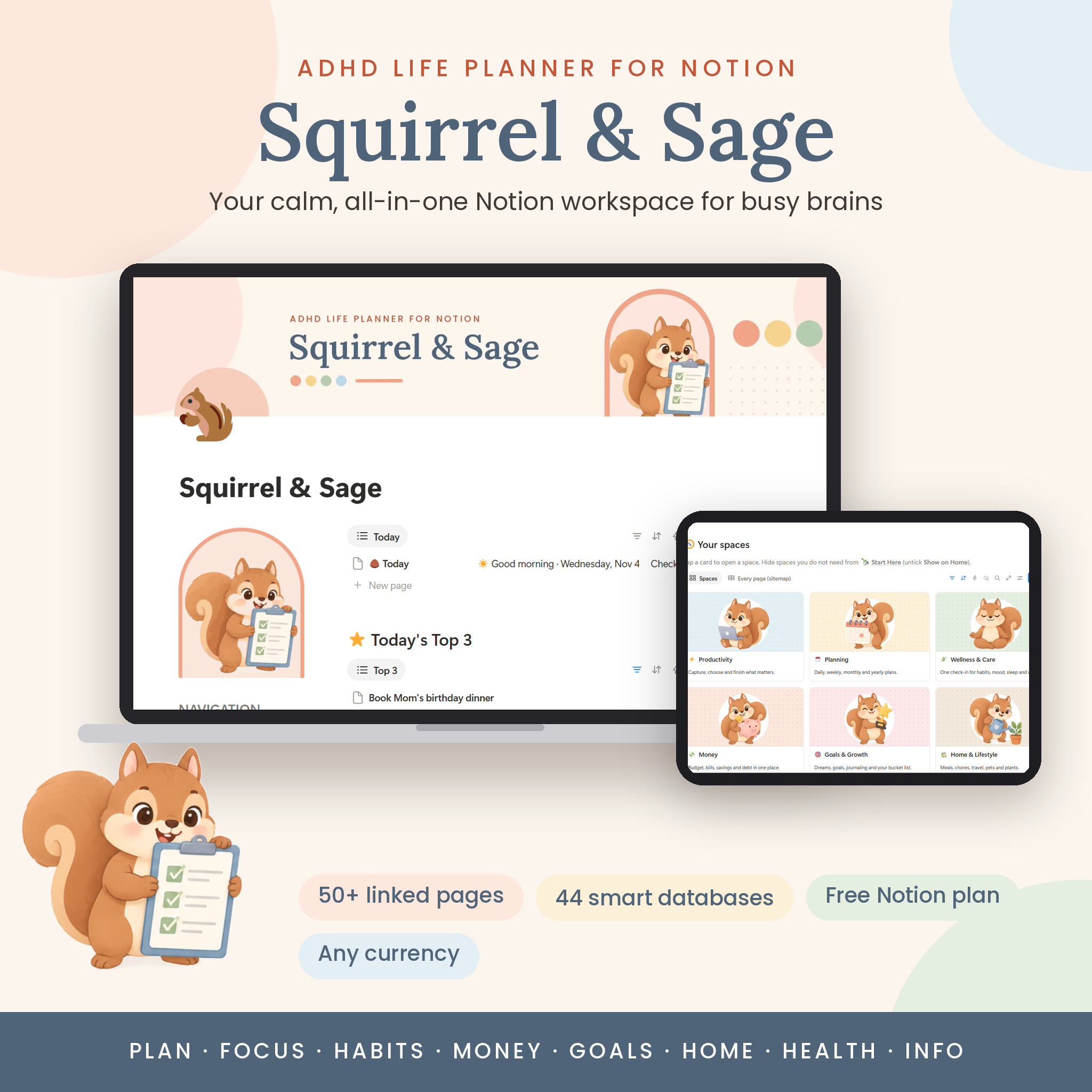



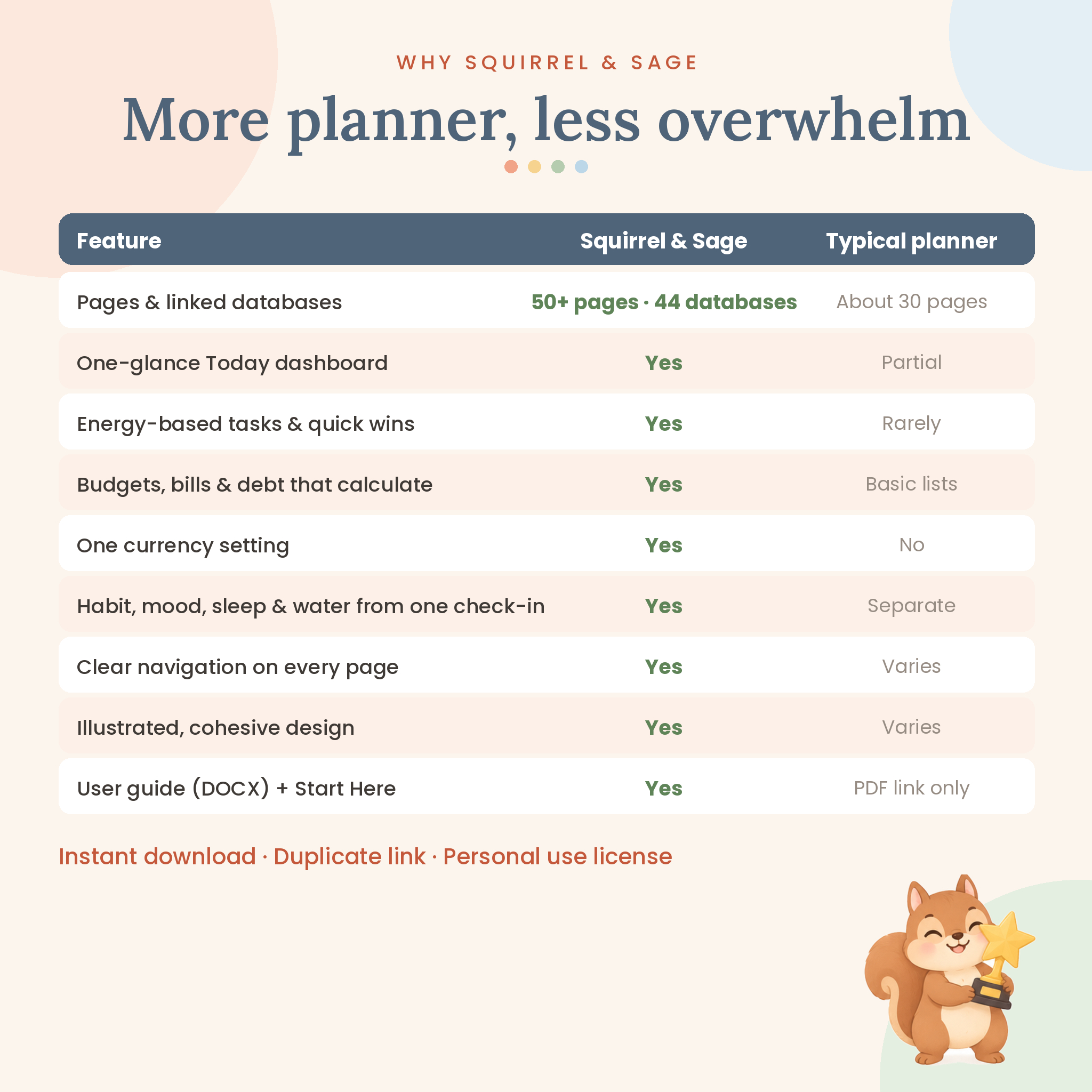
The Squirrel & Sage ADHD Notion planner is an all-in-one life planner built for brains that jump from idea to idea. It gives you one calm home page for today, plus 8 pastel, illustrated spaces for productivity, planning, wellness, money, goals, home, leisure and important information. Everything is linked, so you enter things once and they show up wherever you need them.
Instead of 30 disconnected trackers, you get 50+ pages powered by 44 smart databases that update themselves: due-date countdowns, budget bars, habit percentages, birthday reminders and progress bars all calculate automatically. It works on the free Notion plan, on desktop, web, iPhone, iPad and Android.
What this ADHD Notion template does
Squirrel & Sage turns Notion into a gentle command center. Open the Home page and you see only what matters right now: your Top 3, tasks due today or overdue, quick wins under 15 minutes, your brain dump inbox, today’s check-in, bills due this week, birthdays in the next 30 days, chores due and plants that need water. A short, rotating ADHD tip and a time-of-day greeting keep it friendly.
- Capture every thought in the Brain Dump without sorting.
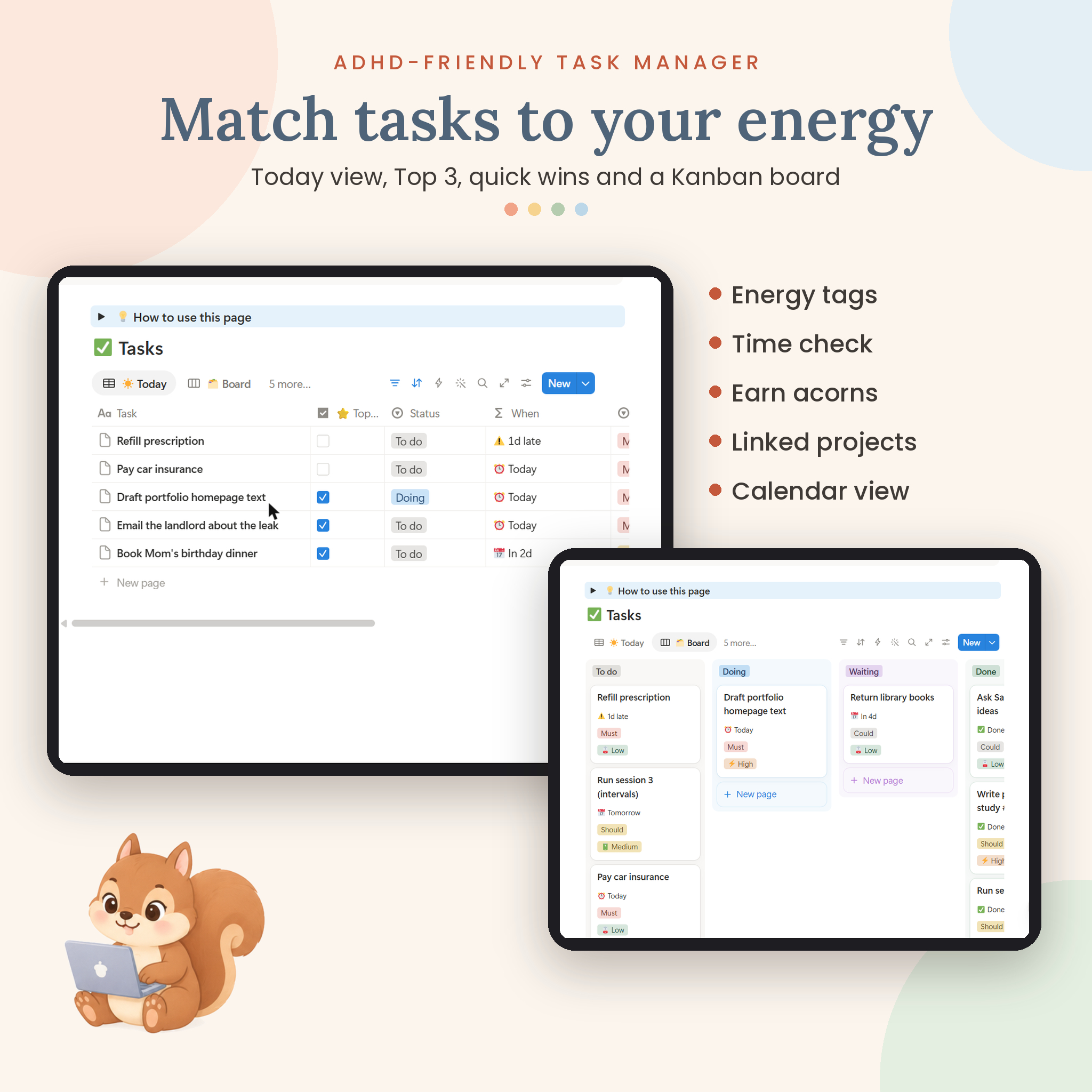
- Choose a Top 3 and match tasks to your energy (Low, Medium or High).
- Do the work with focus sprints, Pomodoro logging and body doubling.
- Reset once a week with a 20-minute checklist.
Who it is for
This planner is for adults with ADHD (diagnosed or self-identified), students, parents and busy professionals who want structure without rigid rules. It is also a great fit if you have abandoned planners before, if you love a cozy aesthetic, or if you want your tasks, habits and budget in one place instead of five apps.
Main benefits
- Less overwhelm: one-glance Home page and filtered views show only what is relevant today.
- Beat time blindness: compare estimated and actual minutes with an automatic Time check.
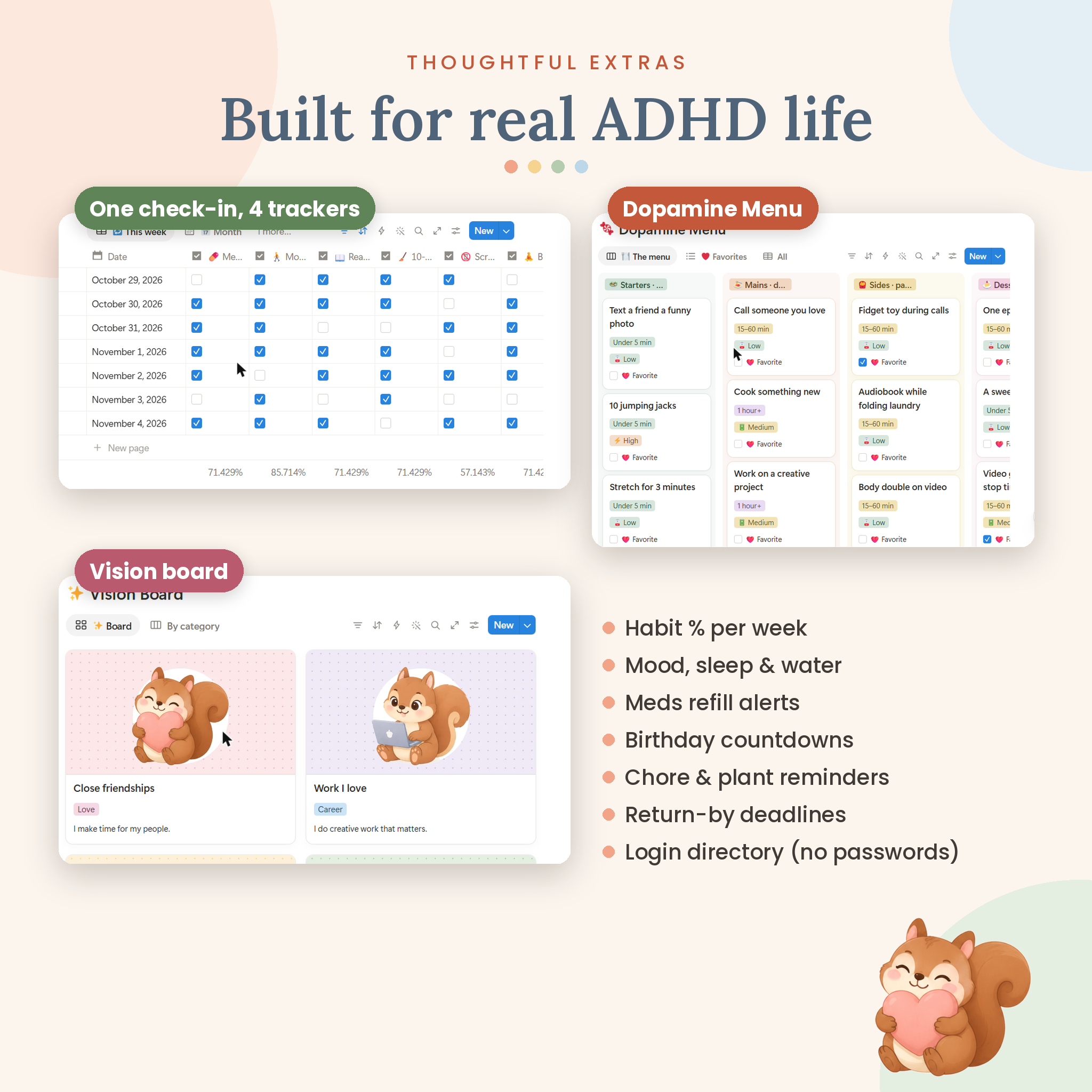
- Healthy dopamine: earn acorns for finished tasks and use the Dopamine Menu when you feel stuck.
- One daily check-in updates your habit tracker, mood log, sleep journal and hydration tracker at once.
- Money on autopilot: budgets reset each month, bills show their true monthly cost and debts show a payoff date.
- Never get lost: every page has quick links and a color-coded navigation sidebar.
Features and what is included
Productivity
Brain Dump inbox, Task Manager (Today, Board, By energy, Quick wins, Calendar, Acorn jar), Project Tracker with automatic progress bars, Focus & Pomodoro log with weekly minutes, Academic Planner with weighted course grades, and a 24-item Dopamine Menu.
Planning
Daily Planner page template (one focus, Top 3, time blocks, reflection), Weekly Reset checklist, Monthly & Yearly Plans with themes and goals, and Morning, Work start, Shutdown and Evening routines.
Wellness & Care
Daily Check-in with six renameable habits, mood, energy, anxiety, triggers, sleep and water. Habit Tracker with weekly percentages, Mood Log, Sleep Journal, Hydration Tracker, Fitness Log, Meds & Symptoms with refill alerts, and Appointments with questions to ask.
Money
Monthly Budget with 11 starter categories, spent and left-to-spend columns and status alerts; Income & Expenses with monthly net; Bills & Subscriptions with due countdowns and true monthly cost; Savings Goals with the amount needed per month; Debt Payoff with months to debt-free; and an Accounts list.
Goals & Growth, Home & Lifestyle, Leisure, Important Info
Goal Tracker linked to projects, Vision Board, Bucket List and Reflection & Gratitude journal with 20 prompts. Meal & Grocery Planner, Cleaning Schedule with 18 starter chores that calculate their next due date, Travel Planner with packing list, Pet Care Log, Plant Care and a Digital Declutter checklist. Reading Tracker, Watchlist and Hobby Hub. Contacts & Birthdays, Account & Login Directory (hints only, never passwords), Orders & Deliveries with return deadlines, Documents & Files with expiry warnings, and Emergency Info.
How it works
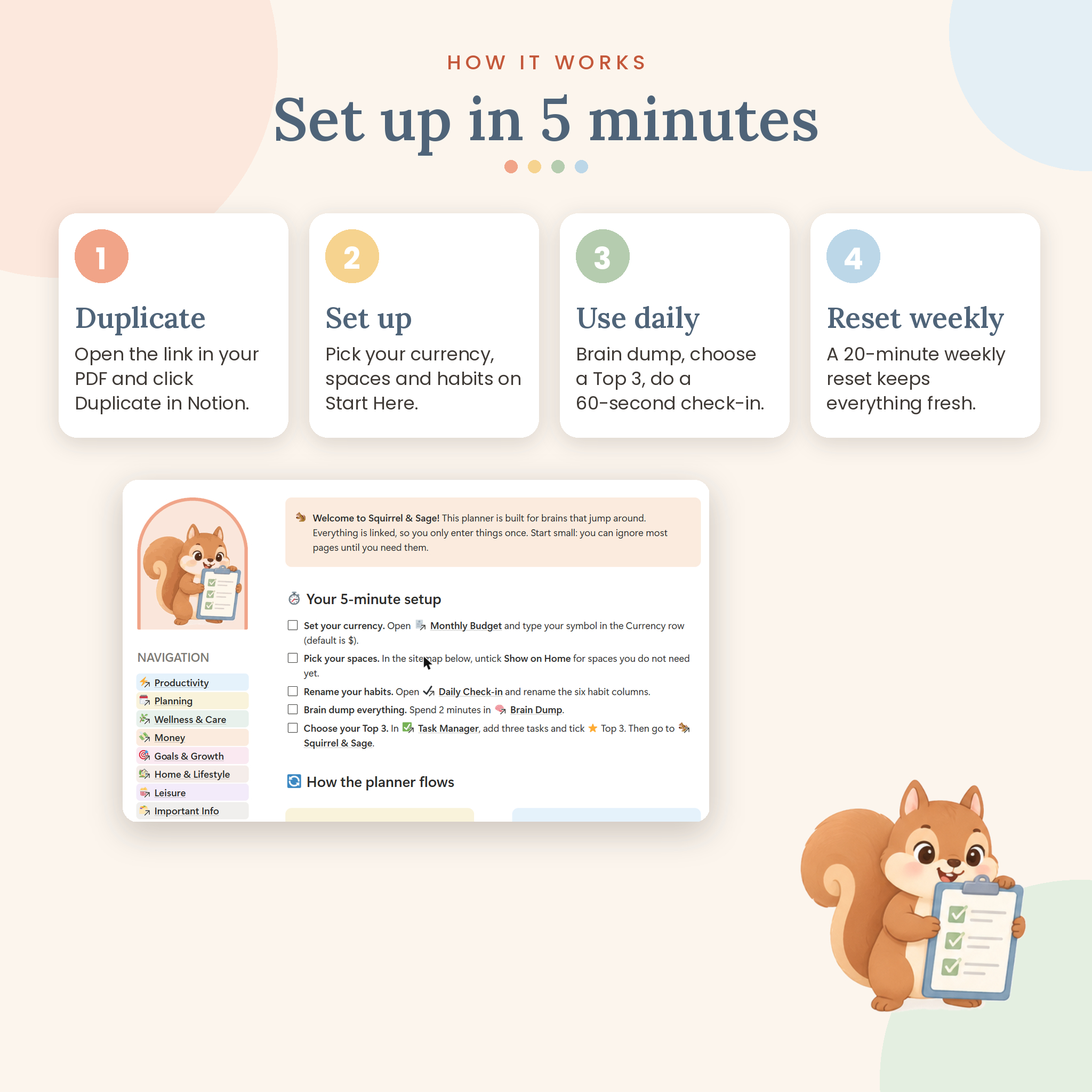
- Download your files and open the Access PDF.
- Click the template link and press Duplicate to copy it into your free Notion workspace.
- Follow the 5-minute setup on the Start Here page: choose your currency, pick your spaces, rename habits.
- Use Home every day and do a short weekly reset.
File formats and software requirements
- Notion template (duplicate link) delivered in an Access PDF, in US Letter and A4.
- User Guide in DOCX format (opens in Word, Google Docs, Pages or LibreOffice).
- Requires a free Notion account. No paid Notion plan or add-ons needed.
- Works on Mac, Windows, web browsers, iPhone, iPad and Android through Notion.
Customization
Use any currency: type your symbol once (for example $, €, £, R or ₹) and choose whether it appears before or after the amount; every money column updates. Rename habits, tags and budget categories, change covers and icons, hide spaces you do not need from Home, and edit any page template. Notion’s light and dark modes are both supported.
Digital download
This is a digital product. No physical item will be shipped. Your files are available to download right after purchase. The template is licensed for personal use only: you may duplicate and edit it for yourself, but please do not share, resell or redistribute it.
Use cases
- A student juggling classes, assignments, a part-time job and a budget.
- A parent tracking meals, chores, appointments and family birthdays in one place.
- A freelancer who needs projects, focus sessions and income in one dashboard.
- Anyone starting ADHD treatment who wants to track meds, mood, sleep and symptoms to share with a doctor.
- Someone rebuilding routines after burnout who needs small, flexible steps.
FAQ
Do I need a paid Notion plan?
No. Squirrel & Sage works on Notion’s free plan.
Is this a printable planner?
No. It is a digital Notion template. You use it in the Notion app or browser.
Can I use it on my phone or iPad?
Yes. Use the free Notion app on iPhone, iPad or Android. Columns stack neatly on small screens.
Can I change the currency?
Yes. Set your symbol once in the Monthly Budget page and every money field follows it.
Is it beginner friendly?
Yes. A Start Here page, a “How to use this page” note on every page and a full User Guide walk you through everything.
Does it include sample data?
Your copy starts clean so you can make it your own. It includes helpful starter lists such as budget categories, chores, habits, a Dopamine Menu and a digital declutter checklist.
Is this medical advice?
No. The wellness pages are personal tracking tools. Please talk to a healthcare professional about your care.
Can I get a refund?
Because this is a digital product, please contact us if you have any trouble and we will help you get set up.
Reviews
There are no reviews yet.