Best to Do List: Four Digital Planners Compared
A good to do list is one you will open every day, and on this page that means a digital planner with a task list built in. Fernhaven suits people who want privacy and a realistic day. Monthly Scheduler suits diaries full of appointments. Daybloom and Linden suit people who want tasks linked to money, meals and routines.
A long list of jobs can feel heavier than the jobs themselves. We'll keep this simple: what to check, how the options differ, and how to pick one that fits how you already live.
Key facts at a glance
- Fernhaven is a single offline HTML app with no account and no subscription, and your data stays on your device.
- Monthly Scheduler Spreadsheet works in Excel and Google Sheets and puts every event on 12 colour-coded monthly calendars, a week view and a year view.
- Daybloom Life Planner Spreadsheet has 27 linked tabs and a 35-page illustrated guide.
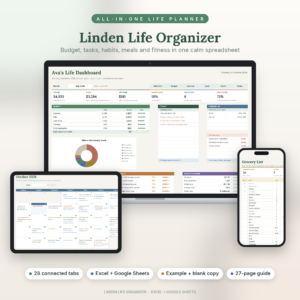
- Linden Life Organiser has 28 connected tabs, a 27-page illustrated guide and a meal planner that builds a grocery list automatically.
- All four are digital templates or apps, so you choose between a standalone app and a spreadsheet before you choose between products.
Table of Contents Toggle
- What should you look for in the best to do list?
- How do the four to do lists compare?
- Which to do list suits which person?
- How do you use a digital to do list so it sticks?
- What mistakes should you avoid with a to do list?
- What affects the price of a to do list planner?
- Which to do list should you choose?
- Common questions
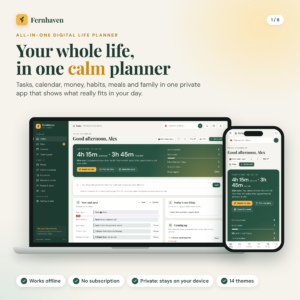 All in One Digital Life Planner | Fernhaven Offline HTML Planner App with Budget, Habit Tracker, Calendar, Meal Planner & Debt Payoff
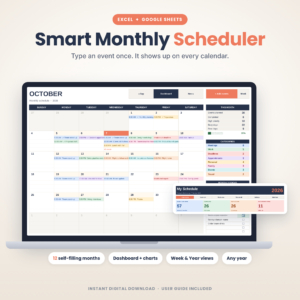 Monthly Scheduler Spreadsheet | Smart Monthly Scheduler Digital Calendar Planner for Excel & Google Sheets | Event, Meeting & Appointment Tracker
What should you look for in the best to do list?
The best to do list matches your habits on five points: where it lives, whether it respects your time, whether it connects to the rest of your life, whether you can print it, and how well it explains itself. Check these before you compare anything else.
Where does the list live?
A to do list lives either in an app or in a spreadsheet, and the choice shapes how you use it. Fernhaven is one offline HTML app, so there is nothing to sign up for and nothing stored on someone else's server. The other three are spreadsheet templates for Excel and Google Sheets, which suit you if you already open spreadsheets and like to see how things are built.
Does it show your real time, not only your tasks?
A task list without a sense of time is how people end up with fifteen jobs on a day that has three free hours. Fernhaven shows the free time you actually have each day and can fix an overloaded day in one tap. Monthly Scheduler approaches the same problem from the calendar side, showing events across week, month and year views so you can see a crowded week before you add to it.
Do tasks connect to the rest of your life?
Linked tabs mean you type something once and it appears wherever it belongs. Daybloom and Linden both work this way. Add a bill, a task or a recipe and it updates the budget, calendar and dashboard without copying. If your to do list is half bills and half errands, this saves real effort. If it is only errands, it is more than you need.
Can you print it?
Some people think better on paper, and a printable page is a useful fallback when a screen is not to hand. Fernhaven includes 13 printable pages in US Letter and A4, so UK printers are covered. The product descriptions for the three spreadsheets do not mention printable pages, so check before you buy if paper matters to you.
How much guidance comes with it?
A user guide is the difference between a tool you use and one you abandon in week two. Fernhaven includes a 23-page guide. Daybloom has a 35-page illustrated guide, Linden a 27-page illustrated guide, and Monthly Scheduler a step-by-step guide. Daybloom and Linden also give you a filled-in example beside a blank copy, which helps you see how the finished thing should look.
How do the four to do lists compare?
The four to do lists differ mainly in size and format. Fernhaven is an offline app, Monthly Scheduler is a focused calendar with to-do lists, and Daybloom and Linden are large life planners with many linked tabs. The table sets out what each product's description says.
| Product | Format | Main strength | Includes |
|---|---|---|---|
| All in One Digital Life Planner | Fernhaven Offline HTML Planner App with Budget, Habit Tracker, Calendar, Meal Planner & Debt Payoff | Offline HTML app | Shows free time each day, no account or subscription | 23-page guide, 13 printable pages |
| Monthly Scheduler Spreadsheet | Smart Monthly Scheduler Digital Calendar Planner for Excel & Google Sheets | Event, Meeting & Appointment Tracker | Excel and Google Sheets | Type an event once, see it on 12 monthly calendars, week and year views | To-do lists, 8 custom categories, step-by-step guide |
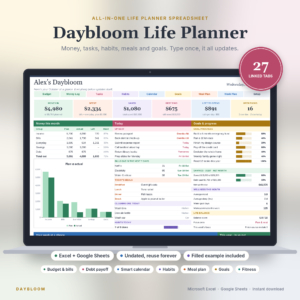 Daybloom Life Planner Spreadsheet | Excel & Google Sheets | Budget, Bills, Debt, Habit Tracker, Meal Planner, Goals & Digital Calendar | Excel and Google Sheets | 27 linked tabs, undated | Blank planner, filled example, 35-page guide |
| Linden Life Organiser | Life Planner Spreadsheet for Excel and Google Sheets | Budget Tracker, Habit Tracker, Smart Calendar, Meal Planner, Workout Tracker | Excel and Google Sheets | 28 connected tabs, bills roll forward, automatic grocery list | Blank copy, filled example, 27-page guide |
Which to do list suits which person?
Each of these four suits a different kind of week. Match the product to the thing that most often derails your plans, whether that is overcommitting, appointments, bills or household routines.
Fernhaven suits you if you want one tidy place for tasks, calendar, budget, bills, habits, meals, chores, birthdays and trips, and you would rather not create an account or pay a subscription. It also covers savings goals and has a debt-free date calculator. The offline design is a real point in its favour if you prefer your personal finances to stay on your own device.
Monthly Scheduler Spreadsheet suits you if your to do list is really a diary: meetings, appointments, family events, clubs. It works for any year, starts the week on Sunday or Monday, and gives you 8 custom categories to colour-code. It is the narrowest of the four, and that is its appeal if you find bigger planners overwhelming.
Daybloom Life Planner Spreadsheet suits you if you want tasks alongside wellness, cleaning, goals and workouts as well as money. It is undated, so you can start on any day without wasting a page. With 27 tabs, expect to spend an evening learning it.
Linden Life Organiser suits you if meals and money drive your week. You can budget by month or by paycheck, bills roll forward on their own, and the meal planner builds a grocery list for you. It has one more tab than Daybloom, and the difference is in emphasis rather than scale.
How do you use a digital to do list so it sticks?
A digital to do list sticks when you set it up once, keep it small, and check it at the same time each day. Follow these steps with any of the four products.
- Open the filled-in example first, if one is included, and read the start of the user guide before you change anything.
- Enter only what is fixed: bills, appointments, regular chores and birthdays.
- Add this week's tasks, and give each one a category or a day.
- Pick no more than three jobs that must be done today and mark them clearly.
- Review the list at a regular time, such as after breakfast or with your evening cup of tea.
- At the end of the week, clear finished items and move anything unfinished on deliberately, not by default.
Back up spreadsheet files by saving a copy before big changes. With Fernhaven, which keeps data on your device, keep your own copy of anything you cannot afford to lose.
What mistakes should you avoid with a to do list?
The most common mistake with a to do list is writing down everything, so the list becomes a source of worry rather than a plan. A few others are just as easy to make and just as easy to avoid.
- Choosing the biggest planner by default. A 28-tab planner is wasted if you only need appointments. Monthly Scheduler may serve you better.
- Skipping the guide. Linked tabs only save time once you know where to type. Read the guide for an hour and you will save many more later.
- Ignoring time. A list of ten jobs for a day with two free hours will fail whatever tool you use.
- Typing the same item in several places. In the linked planners, enter it once and let the other tabs update.
- Leaving finished items to pile up. A list you cannot read at a glance stops being used.
What affects the price of a to do list planner?
The price of a to do list planner depends mainly on how much it does, what format it comes in and what extras are included. A single-purpose scheduler generally costs less than a large life planner with dozens of linked tabs, though you should check the live product cards for current figures.
Four things move the price. Scope matters first: a calendar and task tool covers less than one that also handles budgets, debt, meals and workouts. Format matters next, since an offline app and a spreadsheet template are built differently. Then come the extras, such as a filled example copy, printable pages and a long illustrated guide. Last is whether you pay once or pay repeatedly. Fernhaven is described as having no subscription, which is worth weighing if you dislike ongoing charges.
Which to do list should you choose?
Choose by the main job you want the list to do. If you want privacy and a realistic daily plan, choose Fernhaven. If your week is mostly appointments, choose Monthly Scheduler Spreadsheet. If you want tasks tied to money, wellness and routines, choose Daybloom Life Planner Spreadsheet. If meals and bills drive your week, choose Linden Life Organiser.
Still unsure? Start with the smallest one that covers your biggest headache. You can always move up to a larger planner later, and the 4 options on this page are there to compare side by side.
Common questions
Is a digital to do list better than a paper one?
It depends on how you work. Digital lists are easier to reorder and link to calendars and budgets, while paper is quicker to jot on. Fernhaven includes 13 printable pages, so you can use both and keep a paper copy for days away from a screen.
Do I need Excel to use the spreadsheet planners?
No. Monthly Scheduler Spreadsheet, Daybloom Life Planner Spreadsheet and Linden Life Organiser are all described as working in both Excel and Google Sheets. You only need one of the two, so pick whichever you are already comfortable with.
What does an undated planner mean?
An undated planner has no fixed year or start date, so you begin whenever you like and reuse it later. Daybloom is described as undated. Monthly Scheduler also works for any year, so neither locks you into January.
Can one planner handle both tasks and bills?
Yes. Fernhaven, Daybloom and Linden all combine tasks with budgets and bills. Linden's bills roll forward automatically, and Fernhaven adds savings goals and a debt-free date calculator. Monthly Scheduler focuses on events and to-do lists instead.
Will I be able to learn these without help?
Each one includes a guide. Fernhaven has 23 pages, Linden 27 and Daybloom 35, all illustrated or step by step as described, and Monthly Scheduler comes with a step-by-step guide. Start with the example copy, where included, and add your own details slowly.