Best No Subscription Budget App: Four Offline Options
The best no subscription budget app is one you buy once and run in your browser, with no monthly fee and no bank login. On this page that means four offline planners: Moonpenny, Tidewise, Spendlight and Peony. Choose by the question you ask most, whether that is "what can I spend today?" or "what will my balance be next month?"
Budgeting tools can feel like a maze of free trials, tiers and renewal dates. The apps below avoid that. They work offline, ask for no account, and leave you with a plan rather than another recurring payment to track. Browse all 4 options below, then use this guide to narrow them down.
Key facts at a glance
- All four apps are listed as working offline with no subscription and no bank login.
- Moonpenny, Spendlight and Peony centre on one "safe to spend" or "free to spend" figure until your next payday.
- Tidewise is the only one of the four built around a forecast that runs up to three years ahead.
- Moonpenny and Spendlight come with a user guide, at 24 and 23 pages respectively.
- Peony is a single HTML file and is the simplest of the four.
 ADHD Budget Planner App | Moonpenny Paycheck Budget with Safe to Spend, Bills & Subscription Tracker, Envelopes, Savings Goals & Debt Payoff | Works Offline
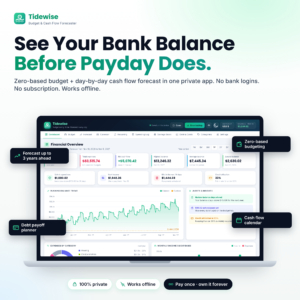 Budget Planner App | Tidewise Zero-Based Budget & Cash Flow Forecaster with Running Balance Forecast, Bill Calendar, Debt Payoff Planner & Savings Goals | Works Offline
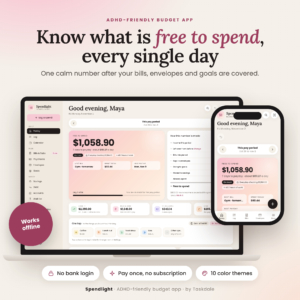
Table of Contents
- What is a no subscription budget app?
- What should you look for in a no subscription budget app?
- How do the four apps compare?
- Which app suits which person?
- How do you get started with an offline budget app?
- What mistakes should you avoid?
- What affects the price of a no subscription budget app?
- Which no subscription budget app should you choose?
- Common questions
What is a no subscription budget app?
A no subscription budget app is a budgeting tool you pay for once, with no monthly or yearly renewal. The ones here are HTML apps that open in a browser and work offline, so there is no account to create and no bank connection to approve.
That matters if you have ever signed up to a budgeting service, forgotten to cancel, and ended up paying to track your own spending. It also matters for privacy. With no bank login, the app only knows what you type in.
The trade-off is manual entry. You log spending yourself, and the apps are designed to make that quick, with one-tap logging in Moonpenny and Spendlight.
What should you look for in a no subscription budget app?
Look for five things: offline privacy, a clear spendable figure, a fit with how you are paid, bill and debt tools, and a written guide. Each one changes how likely you are to keep using the app after the first fortnight.
Offline use and privacy
Offline means the app runs without an internet connection and keeps your figures on your own device. Moonpenny and Peony both state that they work offline in Chrome or Edge, so check your browser before you commit. Spendlight and Tidewise are described as offline and private, with no account or bank login.
A single number you can trust
A "safe to spend" figure is what remains after bills, savings and debt payments are covered. It is the number that stops a Friday takeaway from clashing with Monday's direct debit.
Moonpenny calls it safe to spend, Spendlight calls it free to spend, and Peony shows what is safe to spend after every bill, savings transfer and debt payment still due this month. Tidewise includes safe-to-spend on its dashboard, alongside your lowest upcoming balance.
Fit with your pay pattern
Your budget should follow your paycheck, not the calendar month. Spendlight supports weekly, biweekly, twice-monthly and monthly pay. Moonpenny plans six paydays ahead, which helps if your income is regular but your bills fall at awkward times. Peony plans each paycheck and shows what is left to live on.
Bills, debt and savings tools
Bill tracking is the baseline, and debt and savings goals come next. Peony lets you tick bills off on a calendar and logs them for you. Spendlight offers debt snowball or avalanche payoff, and Tidewise and Moonpenny both include a debt payoff planner or section.
Snowball clears the smallest debt first. Avalanche clears the highest interest rate first. Spendlight is the one listed with both methods.
Written guidance
A guide matters more than it sounds, because these apps are new to you and you have no support chat to fall back on. Moonpenny includes a 24-page user guide. Spendlight includes a 23-page guide and a quick-start PDF. For Tidewise and Peony, no guide is mentioned in the product details, so expect to learn by exploring.
How do the four apps compare?
The four apps differ mainly in how far ahead they look and how much support they give you. The table uses only the details supplied for each product.
Which app suits which person?
Each app suits a different kind of budgeter, and the right one depends on whether you want simplicity, support or foresight.
Moonpenny suits you if your money gets tight between paydays. It holds money back when a paycheck cannot cover its bills, which shows a shortfall before it happens. Its envelopes and subscription tracker also help if small recurring charges tend to creep up on you.
Tidewise suits you if you like to see the whole picture. It is a true zero-based budget, which means every pound is given a job until nothing is left unassigned. Its running balance forecast shows your bank balance after each paycheck, bill and transfer, so it works well for irregular bills, planned big purchases or avoiding overdrafts.
Spendlight suits you if you want gentle structure. Its 48-hour wait list holds back impulse buys, "Can I afford it?" answers the question in the moment, and Focus mode, routines and streaks build the habit. The setup guide and quick-start PDF make the first evening easier.
Peony suits you if you want the least to learn. It is one HTML file, you plan each paycheck, tick bills off on a calendar and see what is left. If feature-heavy apps put you off, this is the calmest starting point.
How do you get started with an offline budget app?
You can get a working budget in about an hour by following the same short sequence in any of these apps.
- Open the app in Chrome or Edge (the browsers named for Moonpenny and Peony) and read any quick-start guide first.
- Enter your paycheck amount and how often you are paid.
- Add every bill and subscription with its due date, including the small ones.
- Add any debt payments and a first savings goal, even a modest one.
- Check the safe-to-spend or free-to-spend figure, then log your next purchase.
- Review once a week and adjust your plan for the paydays ahead.
Because the apps are offline and need no account, no company server holds a copy of your figures for you. Look in the user guide for how your data is saved, and keep a copy of the file somewhere safe.
What mistakes should you avoid?
The most common mistakes are leaving out small bills, not logging spending, and choosing a tool that is more complicated than your finances.
- Missing subscriptions. Streaming, apps and memberships add up. Moonpenny and Spendlight both have a bills and subscriptions section, so use it.
- Skipping the log. With no bank feed, the figure is only as good as your entries. One-tap logging exists so this takes seconds.
- Choosing a forecaster you will not read. Tidewise is powerful, but a three-year forecast is wasted if you only want a number for the week.
- Ignoring the browser requirement. Moonpenny and Peony are described for Chrome or Edge. Check that you can use one of them.
- Treating the app as a rule. The budget is a plan you adjust. If a bill changes, update the app that day.
What affects the price of a no subscription budget app?
The price of a no subscription budget app is a single up-front cost, and it varies with how much the tool does and how much support comes with it. The live product cards show current prices, so check them there.
Broadly, three things push the cost up: forecasting depth, the number of built-in tools, and included learning material. Tidewise's long-range forecasting and Moonpenny's 15 pages of tools are a bigger build than a single-file planner. Guides and quick-start PDFs add to what you receive.
Set that against what you are replacing. A subscription app costs you every month for as long as you use it. A one-off purchase costs the same on day one as on day one thousand, so the longer you keep budgeting, the better the comparison gets.
Which no subscription budget app should you choose?
Choose the app that answers your most frequent money question. If it is "what can I spend today?", take Spendlight or Moonpenny. If it is "will I be overdrawn in March?", take Tidewise. If you simply want a clean paycheck plan, take Peony.
A quick decision rule: pick Spendlight if you want habit support, Moonpenny if you want guidance and envelopes, Tidewise if you want forecasting, and Peony if you want the lightest option.
Common questions
Do these budget apps need an internet connection?
No. All four are listed as working offline. Moonpenny and Peony are described for use in Chrome or Edge, so make sure you have one of those browsers. Nothing needs to connect to your bank, because you enter your own figures.
Can a no subscription budget app help with debt?
Yes. Moonpenny, Tidewise, Spendlight and Peony all include debt payoff tools. Spendlight specifically supports both the snowball method, which clears the smallest balance first, and the avalanche method, which targets the highest interest rate first.
What does zero-based budgeting mean?
Zero-based budgeting means giving every pound of income a purpose, whether bills, savings, debt or spending, until nothing is left unassigned. Tidewise is built on this approach and adds a forecast so you can see how each choice affects your balance.
Are these apps only for people with ADHD?
No. Moonpenny, Spendlight and Peony are designed to be ADHD-friendly, with one clear number and quick logging, but the same features help anyone who finds budgeting tedious. Tidewise is a general budget planner.
Is a one-off budget app better than a subscription one?
It depends on how long you will use it. A subscription charges repeatedly, while a one-off app costs the same however long you keep it. The trade-off is that you manage your own entries and file, rather than relying on a bank-linked service.