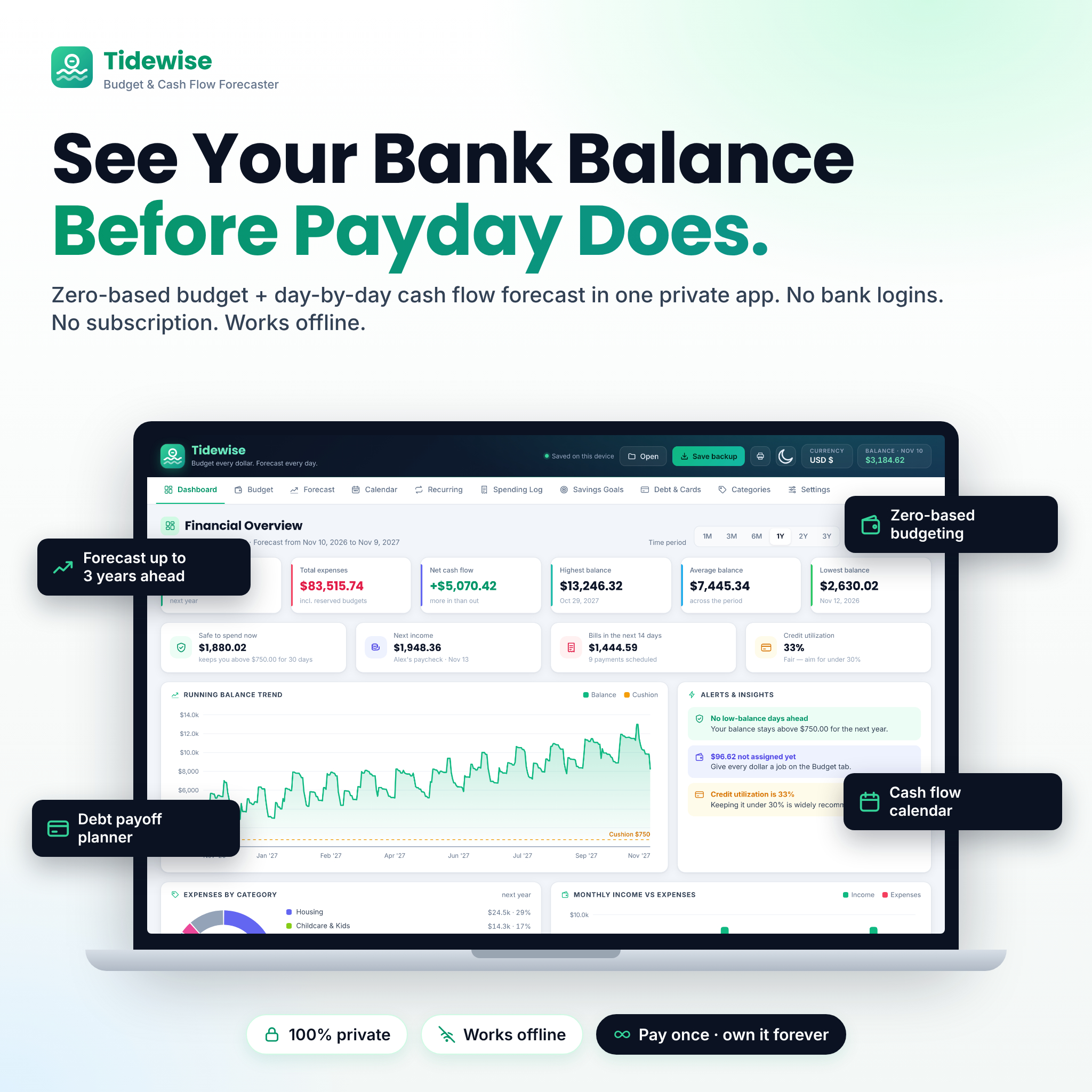


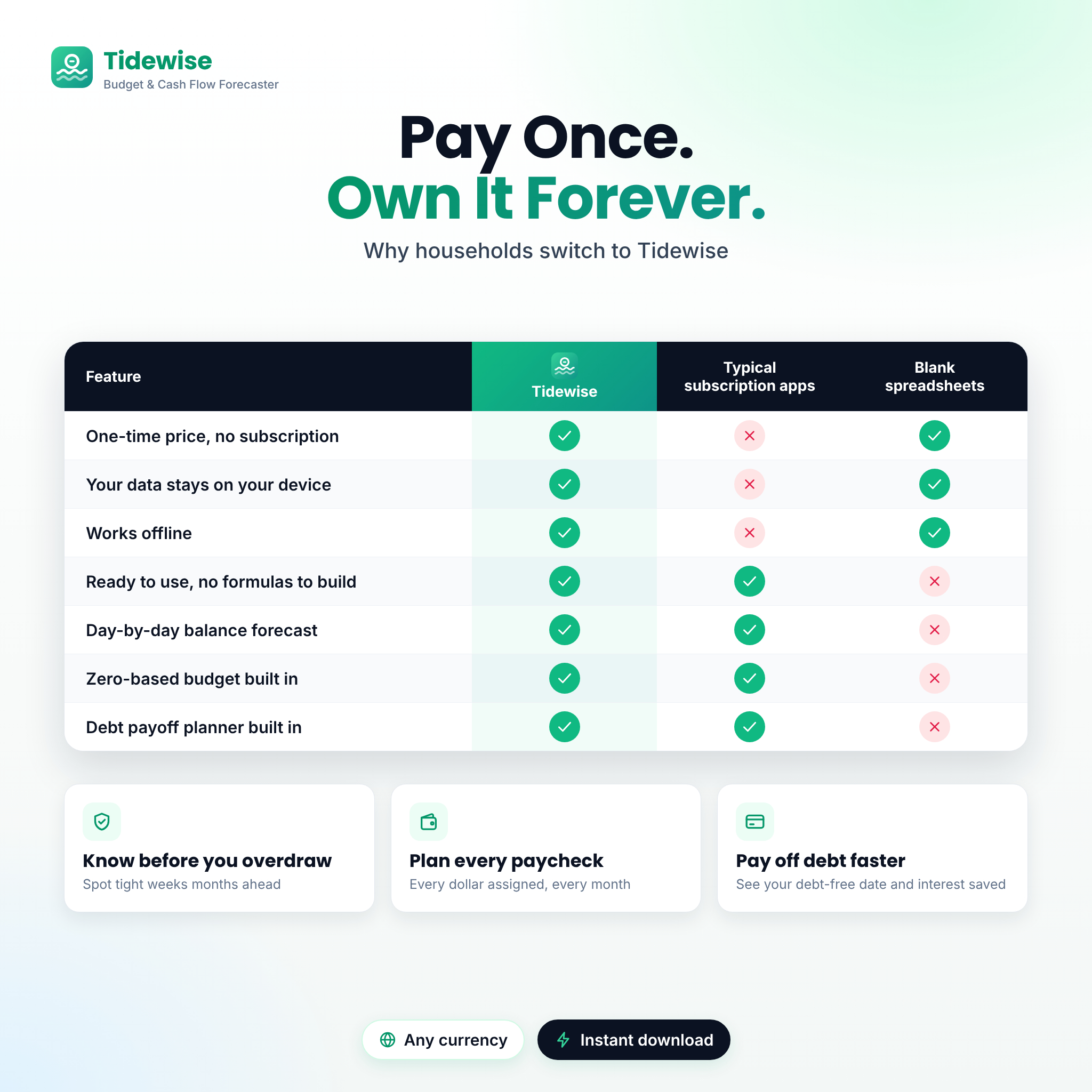
Tidewise is a budget planner app that shows your bank balance before it happens. It combines a true zero-based budget with a day-by-day cash flow forecast, so you can see every paycheck, bill and savings transfer in date order, with your running balance after each one, up to three years ahead. It is one private file that opens in your web browser. There are no bank logins, no subscription and no internet connection needed.
A zero-based budget planner and cash flow forecast in one app
Most budget templates tell you what you spent last month. Tidewise also tells you what your checking account will look like next Tuesday, at the end of the month and next spring. Enter today’s balance, add your paychecks and recurring bills, and the forecast builds itself. If a week is going to get tight, you will know weeks in advance.
Who it is for
- Households living paycheck to paycheck who want to stop guessing before payday
- Zero-based budgeters who want “left to assign” to reach zero every month
- Anyone paying down credit cards or loans who wants a debt-free date
- People who prefer privacy and a one-time purchase over budgeting app subscriptions
Features
Dashboard
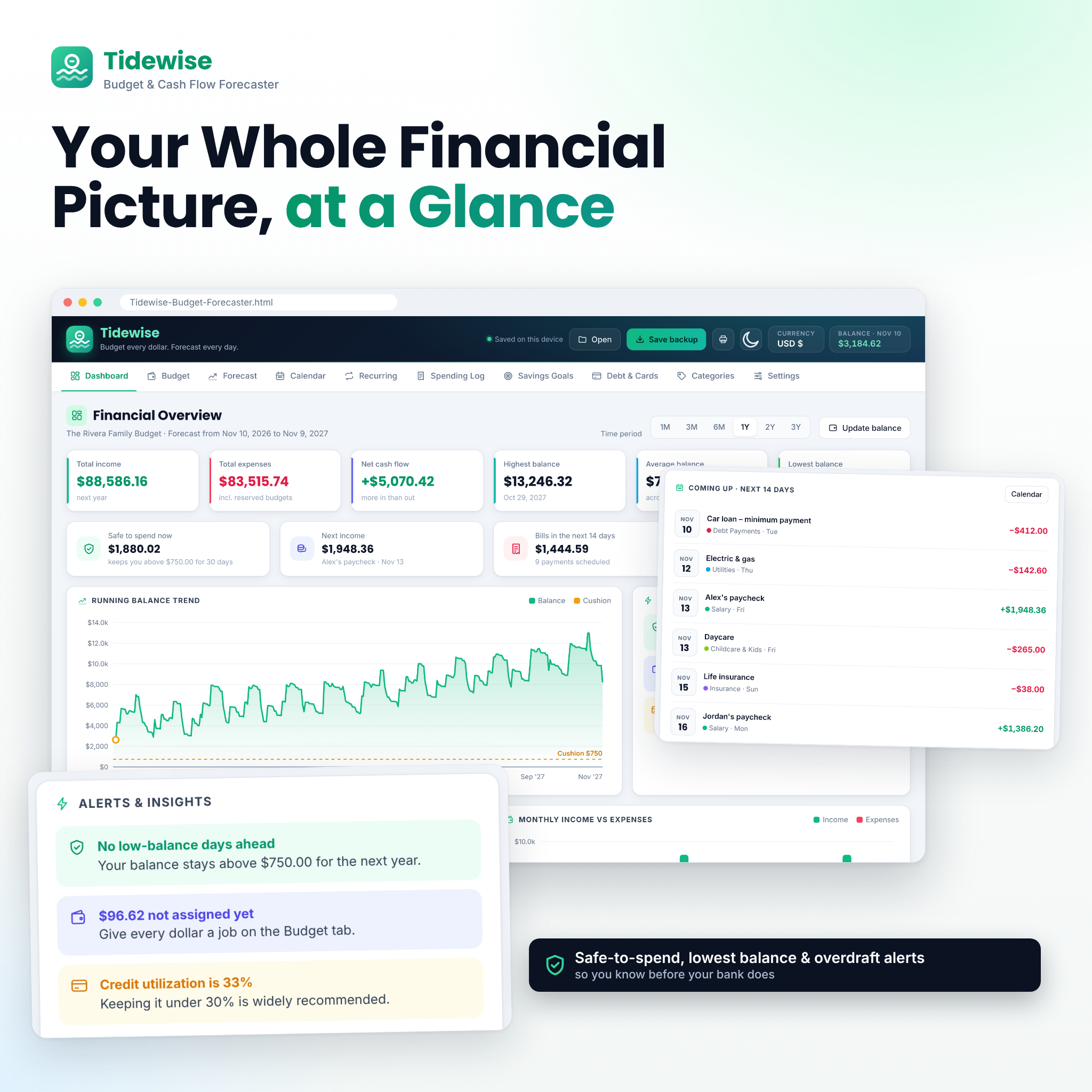
- Total income, total expenses and net cash flow for 1 month up to 3 years
- Highest, average and lowest projected balance, each with its date
- Safe to spend now: what you can spend today and still stay above your cushion for 30 days
- Running balance chart with a low-balance cushion line and overdraft warnings
- Expenses by category, monthly income vs expenses, budget progress and the next 14 days of bills
- Alerts for overdraft risk, over-budget categories, unassigned money and high credit utilization
Zero-based budget
- Monthly budgets for flexible categories; fixed bills fill in automatically from your recurring list
- A “left to assign” meter, plus one-click Assign the rest to send leftovers to savings
- Reserves (placeholders) hold the unspent part of a budget in your forecast at month end, so grocery money is never counted as spare cash
Forecast and cash flow calendar
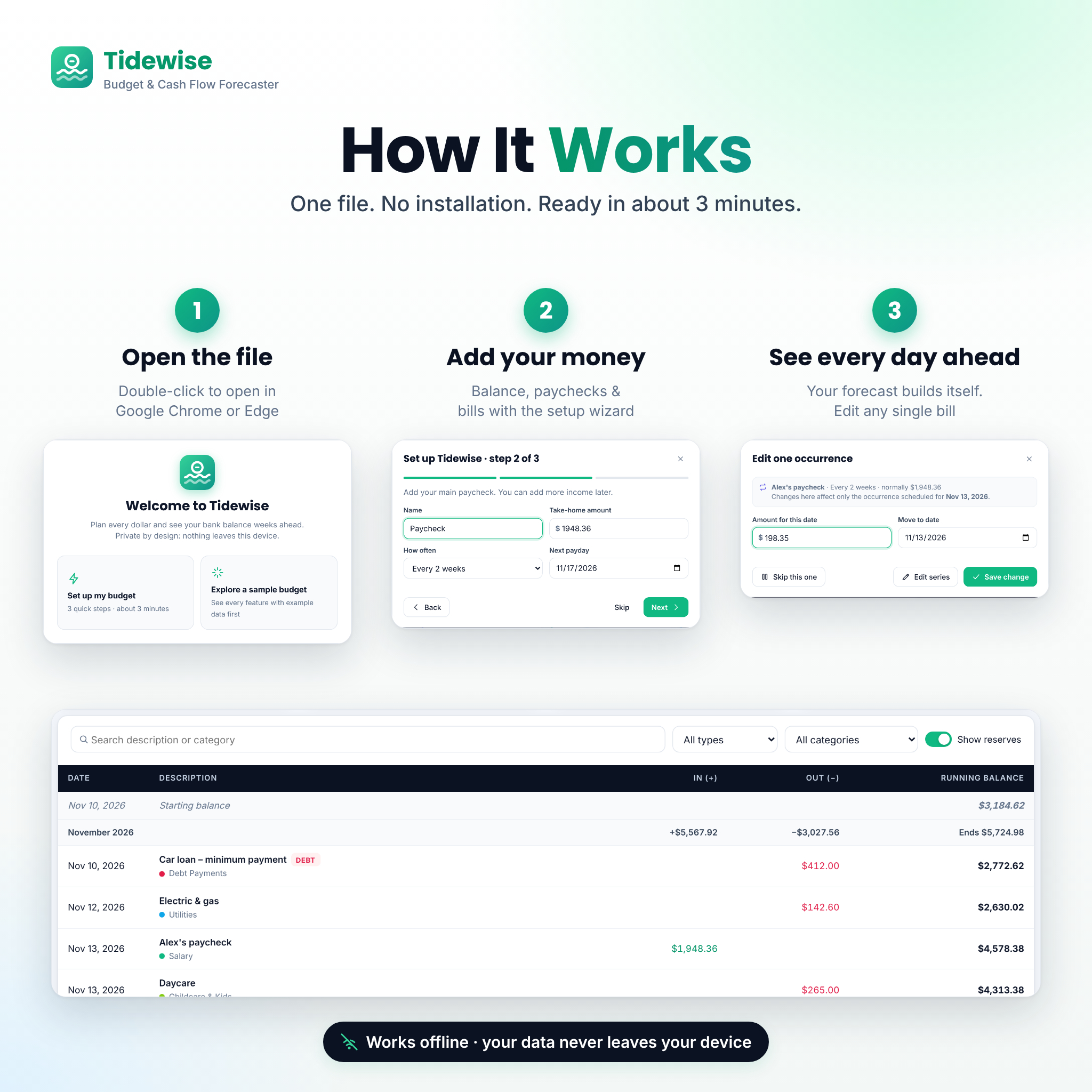
- A full running balance ledger with month totals, search and filters
- Change one occurrence of a bill (amount or date), skip it once, or edit the whole series
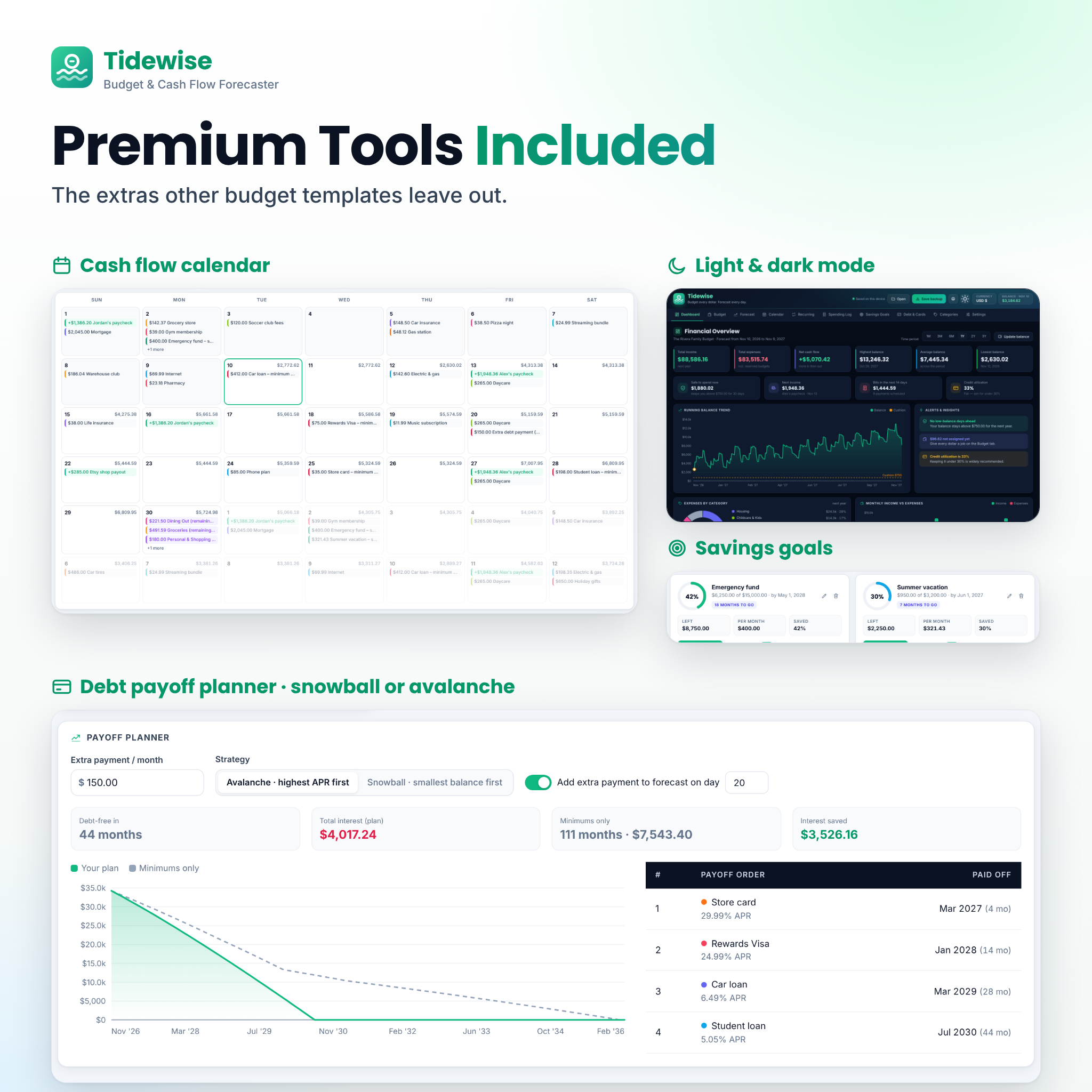
- A month calendar showing every deposit and payment, with your end-of-day balance on each date
Recurring income and bills
- Daily, weekly, every 2 weeks, twice a month, monthly, every 2 months, quarterly, every 6 months, yearly or custom (every N days, weeks, months or years)
- Optional end dates, pause and resume, duplicate, and a monthly-equivalent cost for every item
Spending log, savings goals and debt payoff
- Quick-add spending log for purchases and one-time costs, with bank CSV import and duplicate detection
- Savings goals with progress rings, the monthly amount needed to finish on time, and optional automatic transfers in the forecast
- Credit card utilization per card and overall, payment history, and a warning when a minimum payment doesn’t cover interest
- Debt payoff planner with snowball or avalanche, debt-free date, total interest and interest saved compared with minimum payments
Make it yours
- Rename, recolor, add or delete categories
- One currency setting for every amount: 25 currencies or your own symbol, before or after the number, with 0 or 2 decimals
- Light and dark mode, three date formats and Sunday or Monday week start
- Print or save a PDF report (US Letter or A4), and export your forecast, spending and recurring items to CSV
What is included
- Tidewise-Budget-Forecaster-v1.0.html: the app. It opens empty and ready for your numbers, with a built-in sample budget you can explore first
- Tidewise-User-Guide-v1.0.docx: an illustrated guide covering setup, every feature, tips, troubleshooting and FAQ
- Tidewise-CSV-Import-Template.csv: the column layout for importing purchases from your bank or a spreadsheet
How it works
- Open the file in Google Chrome or Microsoft Edge. Nothing to install.
- Run the 3-step setup: your currency and bank balance, your paycheck and your regular bills. It takes about three minutes.
- See every day ahead. Set monthly budgets, log spending as you go and update your balance once or twice a week.
Your budget saves automatically in your browser on that computer. Click Save backup to download a small backup file you can keep safe or open on another computer.
File format and requirements
- Format: a single HTML file that runs offline in your web browser (plus a DOCX guide and CSV template)
- Tested in Google Chrome and Microsoft Edge on a desktop or laptop computer (Windows or Mac)
- No Excel, Google Sheets or account needed. No internet connection needed once downloaded
- The layout adapts to smaller screens, but Tidewise is designed for desktop and laptop use
Real-life ways to use it
- Check whether the rent will clear before a biweekly paycheck lands
- Plan for a month with three paychecks, a yearly insurance bill or holiday gifts
- Decide whether you can afford new tires this month or should wait until after payday
- Find an extra $150 a month for debt and see exactly how many months it saves
- Build an emergency fund with a clear monthly target
Frequently asked questions
Does Tidewise connect to my bank?
No. You enter amounts yourself or import a CSV file from your bank. Your data never leaves your device.
Is there a monthly fee?
No. You pay once and keep the file.
Do I need Excel or Google Sheets?
No. Tidewise runs in Google Chrome or Microsoft Edge, which are both free.
Can I use my own currency?
Yes. Choose from 25 currencies or type your own symbol. Dollars are the default.
What is zero-based budgeting?
You give every dollar of income a job (bills, spending, savings or debt) until “left to assign” is zero. Tidewise does the math and fills in your bills for you.
Can I try it before entering my own numbers?
Yes. Load the built-in sample budget, explore every tab, then erase it and start fresh.
What happens if I clear my browser data?
Browser storage can be erased, so save a backup file regularly. Open it any time to restore everything.
License and digital download
This is an instant digital download; nothing is shipped. Licensed for personal, non-commercial use by the purchaser and their household. Please do not share, resell or redistribute the files. Tidewise is an organizing tool and does not provide financial advice.
Reviews
There are no reviews yet.